Agentic Dashboard
 MD Fizul ahasun67 downloads
A crystal-glass daily dashboard: video hero, quick capture, today's tasks, calendar, stats, meetings, recents and inbox — with obsidian:// agent actions. No Dataview required.
- Overview
- Scorecard
- Updates21
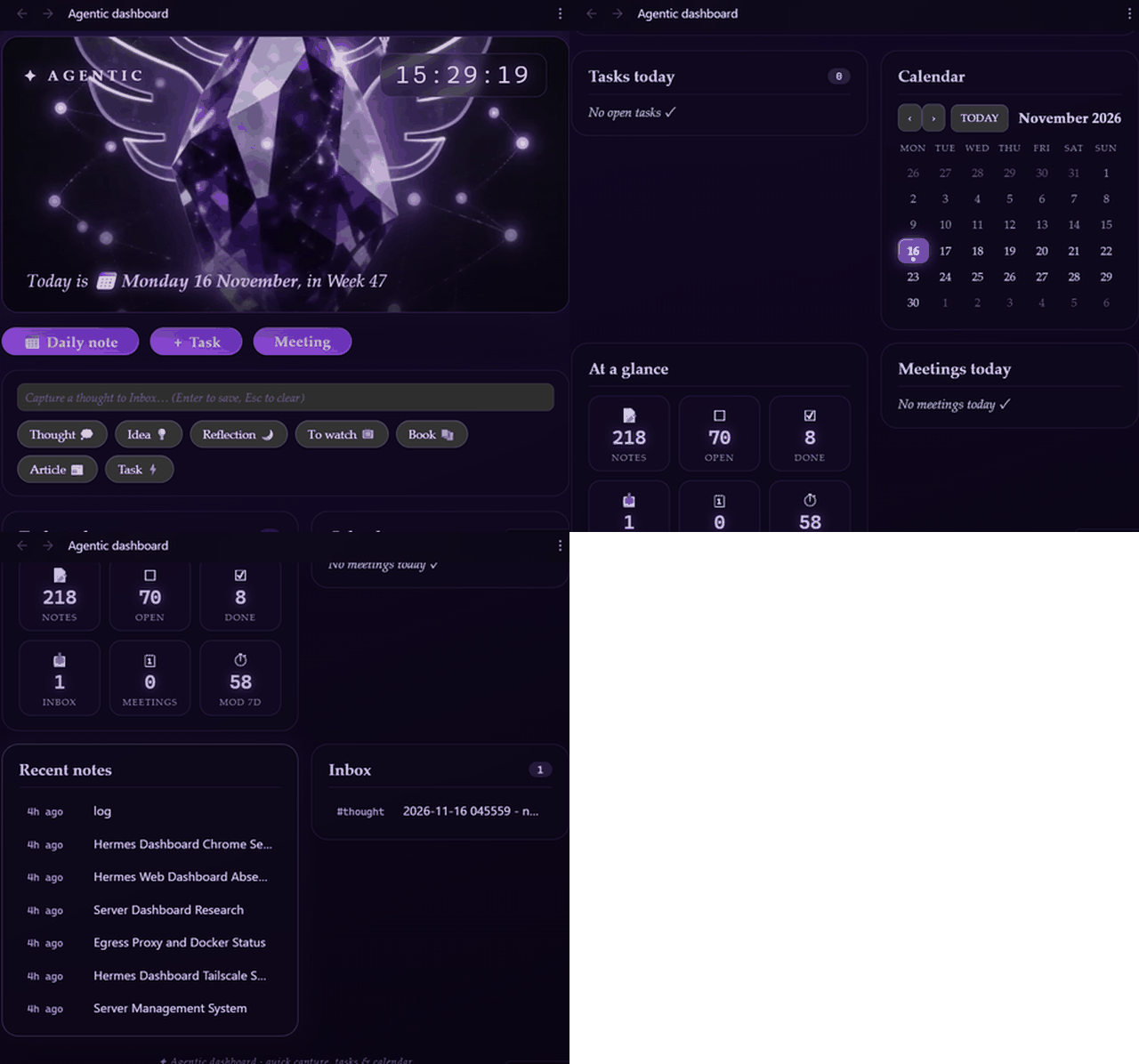
A crystal-glass daily dashboard for Obsidian: a video hero with a live clock, quick capture to your Inbox, today's tasks, a monthly calendar, vault stats, meetings, recent notes and your Inbox — all in one custom view.
No Dataview, no Templater, no other plugins required. Works on desktop and mobile. Agent-agnostic: point its folder settings at any vault layout — it doesn't care which agent or workflow feeds your notes.
Features
- ✦ Hero banner — animated video (or poster image) with your live clock and today's date / ISO week, plus an optional live weather chip (city you choose, refreshed with the dashboard)
- 🌤️ Weather — optional chip beside the clock: pick any city, temperature in °C or °F, updated on the plugin's auto-refresh (Open-Meteo, no API key, off by default); shows a cached/offline indicator if the network is unavailable
- + Quick capture — one-Enter captures for thoughts, ideas and articles; chips are standalone: tap one and it stays selected (also across saves), tap another to switch — no silent reset; the reflection, to-watch and book chips open a fuller form (context + takeaway, link, author + reading status) and build a structured inbox note with frontmatter (
author,status,source) and body sections - + Two ways to add tasks — the
Task ⚡chip is quick capture: type one line, hit Enter, it lands in today's daily note; the + Task button opens the proper form (name, date, priority, repeat) for scheduling ahead - Tasks today — open tasks from today's daily note plus every task across the vault that is due today or overdue (📅 / ⏳ / 🛫 emoji dates), click to toggle done
- Task features from the Tasks ecosystem — the + Task button opens a rich form (name, date, priority, repeat) so tasks for future days can be scheduled today; completing a task stamps it with a done date ✅; adding one stamps a created date ➕; recurring tasks (🔁 every week, every 3 days, every weekday,
when done, …) generate their next occurrence automatically on completion; priorities (⏫ 🔼 🔽) are preserved and sort overdue lists; cancelled tasks (- [-]) are excluded;*and numbered checkboxes are supported - Agent editing, per entity —
toggle-taskandupdate-taskfor tasks;update-meetingfor meetings;update-thought,update-idea,update-reflection,update-to-watch,update-bookandupdate-articlefor Inbox captures. Each action edits the note in that entity's own format (frontmatter, sections, action-item tasks) instead of rewriting free text, with ambiguous-match guards and realx-errorcodes - Calendar — Monday-start month view, dots on days with a daily note, click any day to open/create that daily note
- Meetings today — notes in the meetings folder whose frontmatter
dateis today; the Meeting button opens a full form (name, date, time, agenda, notes, decisions, action items) that builds the complete meeting note - At a glance reveals — every stat tile is clickable: open and completed tasks, inbox notes, today's meetings and recently modified files each open a clickable list; the notes stat opens the file explorer
- Recent notes — 7 most recently modified notes
- Inbox — 10 newest captures with their type tag
- Auto-refresh — the dashboard updates when your vault changes
- Linked notes (optional) — with Link notes together on, the daily note gains a
## Meetingsand a## Capturessection linking to that day's notes, and meeting notes link back to their day — so the graph and backlinks come alive; off by default - Open at startup — automatically opens when Obsidian starts (toggle in settings)
- Agent & automation actions — official Obsidian CLI commands (
obsidian agentic-dashboard:add-task text="...") plusobsidian://agentic-dashboardURI actions; agents and scripts can drive the vault with no extra plugin or server
Install
- Open Settings → Community plugins and make sure Restricted mode is off
- Browse, search for Agentic Dashboard, install and enable
- Click the ✦ sparkles ribbon icon or run "Open Agentic Dashboard" from the command palette
Manual install
Download manifest.json, main.js and styles.css from the latest release into
<vault>/.obsidian/plugins/agentic-dashboard/, then enable the plugin in settings.
Configuration (Settings → Agentic Dashboard)
| Setting | Default | What it does |
|---|---|---|
| Open dashboard at startup | on | Auto-opens the dashboard when Obsidian starts |
| --- | --- | --- |
| Journal folder | Journal |
Where YYYY-MM-DD.md daily notes live |
| Inbox folder | Inbox |
Where quick captures are stored |
| Meetings folder | Meetings |
Where new meetings are created |
| Dashboard note | (empty) | Name of your dashboard note — new daily notes link to it (empty = no link) |
| Hero video path | (empty) | Video behind the hero (empty → gradient) |
| Poster (desktop / mobile) | (empty) | Fallback image when there is no video |
| Link notes together | off | Connect daily notes, meetings and captures with links (respects your Files and links format preference) |
| Max tasks shown | 18 |
Cap for the Tasks today card |
| Auto refresh | 60 s |
Background refresh interval for the dashboard and weather (0 = off) |
| Show weather | off | Live weather chip beside the clock (Open-Meteo, no API key) |
| Weather city | (empty) | City name to fetch weather for |
| Weather units | Celsius |
Celsius (°C) or Fahrenheit (°F) |
Point the three folder settings at any folders in your vault and the dashboard adapts to your layout. Daily notes, meetings and captures are created with sensible frontmatter (type, date, time, tag) so they stay Dataview-friendly.
Dashboard note template
Daily notes can link back to a central dashboard note (like the Agentic Dashboard note in a journaling setup). Copy Dashboard.md from this repo anywhere into your vault, set Dashboard note in the plugin settings to that note's name, and every daily note the plugin creates will carry a link to it. Leave the setting empty and daily notes have no link at all.
Hero video (optional)
The hero banner shows a calm gradient out of the box — no extra files needed. To enable the animated crystal video hero:
- Download
hermes_obsidian_animated_profile_with_long_crystal_tone.mp4(~1 MB) from the latest release - one copy in the repo, no longer shipped as a release asset - Put it anywhere in your vault (e.g. an
assets/folder) - Set Hero video path in the plugin settings to that vault-relative path (e.g.
assets/hermes_obsidian_animated_profile_with_long_crystal_tone.mp4)
Optional poster images (shown instead of the video when a device can't play it) work the same way: add them to the vault and point Poster (desktop) / Poster (mobile) at them. Skip all of this and you simply get the gradient.
Agent & automation actions
Any agent, script or shortcut can drive the vault — no extra plugin or server needed. Two native channels are built in:
Obsidian CLI (desktop, Obsidian 1.12.7+)
Requires the Obsidian CLI to be enabled (Settings → General → Command line interface). Commands return text output, so agents get feedback directly:
| Command | What it does |
|---|---|
obsidian agentic-dashboard |
Opens the dashboard |
obsidian agentic-dashboard:add-task text="Call plumber" |
Adds - [ ] Call plumber ➕ … 📅 … to today's daily note (created date and due-date stamps included, note created if missing) |
obsidian agentic-dashboard:add-task text="Call plumber" date=2026-11-14 |
Adds to that day's daily note (future days created if missing) |
obsidian agentic-dashboard:add-task text="Call plumber" date=2026-11-20 priority=high recurrence="every month" |
Task with priority and repeat rule |
obsidian agentic-dashboard:capture text="Read X" type=idea |
Creates an Inbox note (type: thought/idea/reflection/to-watch/book/article) |
obsidian agentic-dashboard:meeting title="Design review" date=2026-11-20 time=14:30 |
Creates a meeting note (date/time/agenda/notes/decisions/actions all optional) |
obsidian agentic-dashboard:new-daily date=2026-11-14 |
Creates (if missing) and opens that daily note |
obsidian agentic-dashboard:open-note path="folder/note.md" |
Opens that exact vault path |
obsidian agentic-dashboard:find-note query=dashboard |
Best-match search over note names, opens the winner |
obsidian agentic-dashboard:toggle-task text="Call plumber" |
Ticks/unticks the matching task (add path= or date= to narrow it, index= when duplicates match) |
obsidian agentic-dashboard:update-task text="Call plumber" due=2026-11-25 priority=high |
Edits an existing task: new-text=, status=open|done|cancelled, due= / scheduled= / start= (none clears), priority=, recurrence=, append= |
obsidian agentic-dashboard:update-meeting query="Design review" time=11:00 agenda="Point" |
Edits a meeting in its own format: new-title=, date=, time=, agenda=, notes=, decisions=, actions= (mode=replace rewrites a section) |
obsidian agentic-dashboard:update-book query="Atomic Habits" status=finished |
Edits a capture in its own format — update-thought, -idea, -reflection, -to-watch, -book, -article; text=, date=, time=, source=, author=, status=, context=, takeaway=, body= (none clears a field) |
Add vault="<name>" before the command to target a specific vault. Example:
obsidian vault="Ai diary" agentic-dashboard:add-task text="Water the plants"
obsidian:// URI (desktop & mobile)
The plugin registers obsidian://agentic-dashboard?op=... — useful for links inside notes, iPhone/iPad Shortcuts, and environments without a terminal:
| Action | URL | What it does |
|---|---|---|
| Add task | ...op=add-task&text=Call plumber |
Appends to today's daily note |
| Add task on a date | ...op=add-task&text=Call plumber&date=2026-11-14&priority=high&recurrence=every week |
Task with date, priority and repeat |
| Capture to inbox | ...op=capture&text=Read X&type=idea |
Creates an Inbox note |
| New meeting | ...op=meeting&title=Design review&date=2026-11-20&time=14:30 |
Creates a meeting note |
| Daily note | ...op=new-daily (&date= optional) |
Creates if missing and opens it |
| Open a note | ...op=open-note&path=Journal/2026-11-13.md |
Opens that exact vault path |
| Find a note | ...op=find-note&query=dashboard |
Best-match search, opens the winner |
| Toggle a task | ...op=toggle-task&text=Call plumber |
Ticks/unticks the task (path= / date= / index= to narrow) |
| Update a task | ...op=update-task&text=Call plumber&due=2026-11-25&priority=high |
Changes text, status, dates, priority or repeat of an existing task |
| Update a meeting | ...op=update-meeting&query=Design review&time=11:00 |
Edits date, time, title, agenda, notes, decisions or action items of an existing meeting |
| Update a capture | ...op=update-book&query=Atomic Habits&status=finished |
Typed ops update-thought, update-idea, update-reflection, update-to-watch, update-book, update-article (or update-capture&type=book) edit the capture's own fields and sections |
| Open dashboard | ...op=open-dashboard |
Focuses the dashboard |
Base: obsidian://agentic-dashboard?op=<action>&.... Spaces in parameters should be URL-encoded (%20). URI actions confirm with an in-app notice.
Use op=, not action=. Obsidian overwrites the action parameter with the protocol handler id (agentic-dashboard) before the plugin sees it, so action=meeting never reaches the handler. Older links that still say action=meeting keep working through parameter inference, but op= is the reliable form.
Agents can also just write notes directly (plain file edits) — the dashboard listens to vault events and refreshes itself.
x-callback-url replies
Add x-success and/or x-error and the plugin opens that URL back when the action finishes, so a Shortcut or on-device agent gets a real confirmation instead of guessing from a notice:
obsidian://agentic-dashboard?op=meeting&title=Design%20review&time=14%3A30
  &x-success=shortcuts%3A%2F%2Frun-shortcut%3Fname%3DAfterMeeting
  &x-error=shortcuts%3A%2F%2Frun-shortcut%3Fname%3DOnFailure
Success replies carry action, name, file, path, url (an obsidian://open link), plus title for meetings, date for tasks and daily notes, type for captures, and task / line for task edits. Error replies carry action, errorCode and errorMessage; errorCode is unknown_action, missing_parameter, note_not_found, task_not_found, ambiguous_match, match_not_found, no_change, type_mismatch or action_failed. Your callback's own existing query string is preserved.
Editing is deliberately conservative: toggle-task and update-task refuse an ambiguous text match unless you pass path=/date=/index=; update-meeting only looks in the meetings folder and update-<type> only in the Inbox with a matching tag:, and both require a query= or path= and refuse an ambiguous match. Edits stay inside the entity's own format — frontmatter fields, ## Agenda / ## Notes / ## Decisions / ## Action items sections and the capture's ## Context / ## Takeaway / ## Notes sections — and mode=replace rewrites a section instead of appending. Renaming a note keeps its links intact. update-task can clear a date or priority with due=none / priority=none, and a completed recurring task still generates its next occurrence.
iPhone & Apple Shortcuts (how it actually runs)
Every action above works on iPhone and iPad — same links, same plugin, no separate mobile build. The part worth knowing is how iOS runs a URI:
- A Shortcut (or a link, or another app) opens
obsidian://agentic-dashboard?op=.... - iOS launches Obsidian, or switches to it if it is already running. The action runs inside Obsidian, never in the background — a Shortcut cannot edit the vault silently.
- When the action finishes, Obsidian opens your
x-success/x-errorURL. That is how control comes back to the Shortcut (or to whatever app made the call). Without a callback URL you simply stay in Obsidian, with the result shown as a notice.
A minimal "quick capture" Shortcut is three steps:
| Step | Setting |
|---|---|
| Ask for Input | Text |
| URL | obsidian://agentic-dashboard?op=capture&type=thought&text=[Provided Input] |
| Open URLs | — |
Add &x-success=shortcuts%3A%2F%2Frun-shortcut%3Fname%3DAfterCapture to return to Shortcuts when it is done.
Before blaming the URL, check these three things on the phone:
- Same plugin version. Open Settings → Community plugins → Agentic Dashboard. If the phone shows an older version than your desktop, update or re-copy the plugin folder — plugin folders are not always included in vault sync.
- Plugin enabled in that vault on that device.
- Parameters URL-encoded. Spaces must be
%20,&inside a value must be%26, and a colon in a time is%3A(time=14%3A30).
Callbacks like shortcuts://run-shortcut?name=... work from Obsidian on iOS the same way they do on desktop; x-success/x-error also accept http://127.0.0.1:port/... on desktop for local test listeners.
iPhone vault mount note: It is recommended to mount the vault folder as read-only when using shell agents on iPhone. This prevents direct file writes from agent scripts, keeping the vault safe from accidental modifications.
Compatibility
Requires Obsidian 1.4.0+. Works on desktop and mobile. Themes (like Hermes Crystal) style it automatically; without a theme it uses its own built-in crystal-glass dark look.
Release policy
Every command and every option is tested on the installed build before a release — CLI and URI, success and error paths. Results are shared with the maintainer and discussed until approved; release artifacts are prepared only after that approval, and publishing to GitHub requires a separate, explicit go-ahead.
Companion theme: Hermes Crystal
The theme this dashboard was designed around is also a community theme: Hermes Crystal — amethyst crystal-glass styling with a nebula background, matching the dashboard's look. It's optional: the dashboard ships with its own built-in crystal-glass dark look and works with any theme.
License
MIT © 2026 MD Fizul Ahasun