Agentfiles
 railly7k downloads
Discover, organize, and edit AI agent skills, commands, and agents across Claude Code, Cursor, Codex, Windsurf, and more.
- Overview
- Scorecard
- Updates21
AI skills manager for Obsidian. Browse, create, and manage skills across Claude Code, Cursor, Codex, Windsurf, and 17 coding agents.
Open in Obsidian → · View on Obsidian Community · Website · Latest release
Install
From Obsidian (one-click)
Open the deep link in your browser:
obsidian://show-plugin?id=agentfiles
Or open the community page first to see the scorecard and screenshots: community.obsidian.md/plugins/agentfiles.
You can also search Agentfiles in Settings → Community plugins inside Obsidian.
Manual
- Download
main.js,manifest.json, andstyles.cssfrom the latest release - Create
<vault>/.obsidian/plugins/agentfiles/ - Copy the three files into that folder
- Enable in Settings → Community plugins
Optional: skillkit analytics
bunx @crafter/skillkit@latest scan
npx -y @crafter/skillkit@latest scan also works when Bun is installed and available on PATH. Skillkit uses the Bun runtime, so npx does not remove that requirement.
What it does
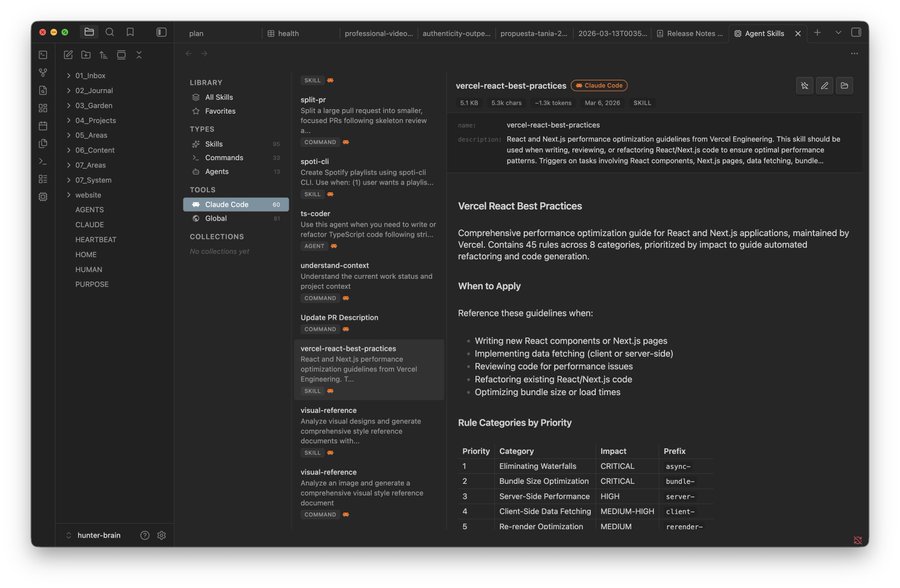
- Browse skills, commands, and agents from 17 tools in one place
- Search by name or file content with deep search toggle
- Create new skills with a stepped wizard (pick tool, type, name)
- Edit skills inline with markdown preview and Cmd+S save
- Marketplace — install skills from skills.sh
- Conversations — browse Claude Code session history, search, tag, and export to vault
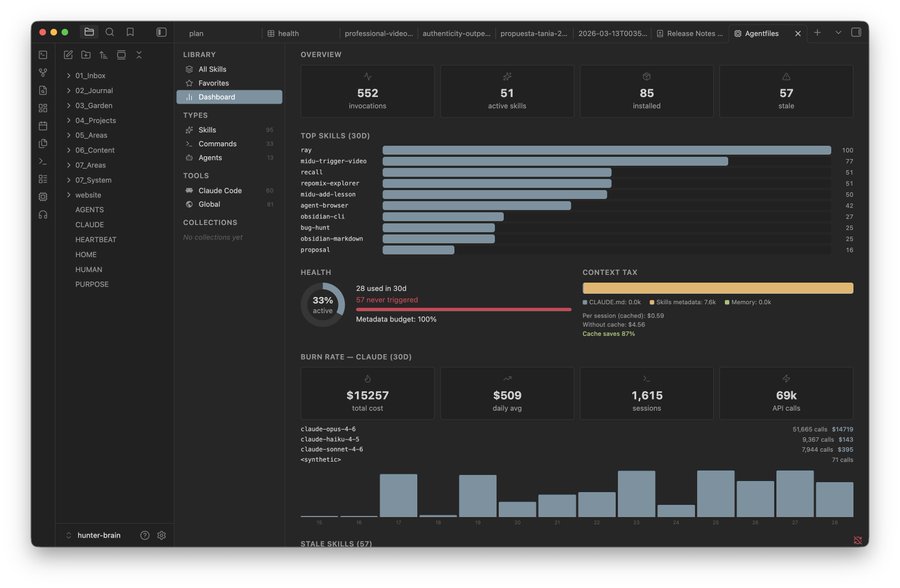
- Dashboard — usage analytics, burn rate, context tax, health metrics (requires skillkit)
Supported tools
| Tool | Skills | Commands | Rules / Memories | Agents |
|---|---|---|---|---|
| Claude Code | ~/.claude/skills/ |
~/.claude/commands/ |
~/.claude/agents/ |
|
| Cursor | ~/.cursor/skills/ |
~/.cursor/rules/ |
~/.cursor/agents/ |
|
| Windsurf | ~/.codeium/windsurf/skills/ |
~/.codeium/windsurf/memories/, ~/.windsurf/rules/ |
||
| Codex | ~/.codex/skills/ |
~/.codex/prompts/ |
~/.codex/memories/ |
~/.codex/agents/ |
| Copilot | ~/.copilot/skills/ |
|||
| Amp | $XDG_CONFIG/amp/skills/ |
|||
| OpenCode | $XDG_CONFIG/opencode/skills/ |
|||
| Cline | detection only | |||
| Roo Code | ~/.roo/skills/ |
|||
| Kilo Code | ~/.kilocode/skills/ |
|||
| Continue | ~/.continue/skills/ |
|||
| OpenHands | ~/.openhands/skills/ |
|||
| Goose | $XDG_CONFIG/goose/skills/ |
|||
| Pi | ~/.pi/agent/skills/ |
|||
| Antigravity | ~/.gemini/antigravity/skills/ |
|||
| Global | ~/.agents/skills/ |
|||
| Claude Desktop | detection only | |||
| Aider | detection only |
Desktop only (macOS, Windows, Linux) — reads files outside your vault.
FAQ
What is Agentfiles?
An AI skills manager for Obsidian. Browse, create, and manage skills, commands, and agents across 17 coding agents, all from your vault. Full docs: agentfiles.crafter.run/docs.
What can I do with Agentfiles?
See What it does above. Full feature list and screenshots: agentfiles.crafter.run/docs.
What tools are supported?
See Supported tools above: 17 tools including Claude Code, Cursor, Codex, Windsurf, Copilot, Amp, OpenCode, Cline, Roo Code, Kilo Code, Continue, OpenHands, Goose, Pi, Antigravity, Claude Desktop, Aider, and a global ~/.agents/skills/ directory.
How do I install Agentfiles?
See Install above.
What is skillkit analytics?
Optional local analytics for the Dashboard's usage metrics, burn rate, context tax, and health. Agentfiles imports Skillkit's portable API and reads a versioned snapshot. It never executes the Skillkit CLI.
bunx @crafter/skillkit@latest scan
# npx alternative, with Bun installed:
npx -y @crafter/skillkit@latest scan
Security and permissions
Agentfiles is desktop-only because its core purpose requires direct access to skill files outside the current vault.
- Filesystem: reads supported agent directories and user-configured project paths. Writes happen only for explicit create, edit, install, update, or remove actions.
- Marketplace: searches
skills.sh, resolves the selected source through the GitHub API, pins downloads to a commit SHA, rejects path traversal, and limits each install to 200 files and 10 MB. - Shell: Agentfiles does not spawn processes or execute shell commands. Optional Skillkit actions are shown or copied for the user to run separately.
- Analytics: Agentfiles reads
~/.skillkit/agentfiles-snapshot.jsonthrough Skillkit's versioned programmatic API. The snapshot remains local. - Network and telemetry: Marketplace search, preview, and install use
skills.shand GitHub. Agentfiles sends no analytics or telemetry. - Clipboard: commands are copied only after an explicit button click.
The Obsidian scorecard can still identify direct filesystem access as a risk capability. That capability is required for Agentfiles to manage skills across desktop coding agents. It is disclosed here so users can review the exact scope.
Is Agentfiles free and open source?
Yes, MIT licensed. See LICENSE.
Where can I get help?
License
MIT