
- Overview
- Scorecard
- Updates33
Turn your vault into an AI command center. Build and run autonomous AI agents on Claude Code, OpenAI Codex, or the multi-provider Pi harness — schedule tasks, chat in real time, connect Slack, Telegram, and Discord, and hook into any MCP service. Every agent is markdown you own.
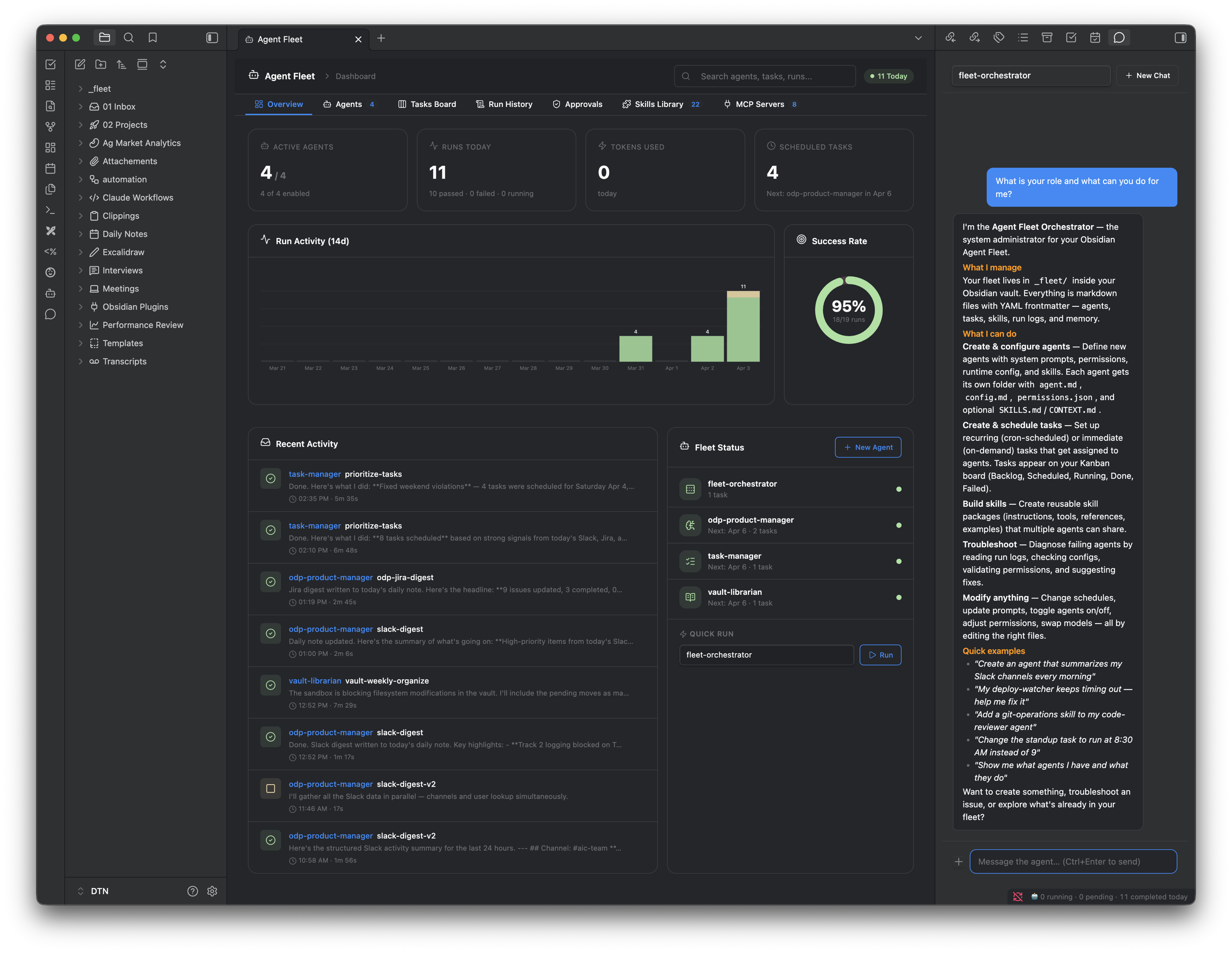
What is Agent Fleet?
Agent Fleet is an Obsidian plugin that lets you build, configure, and run AI agents directly from your vault. Agents run on the CLI backend of your choice — Claude Code (Claude Max/Pro subscription or Anthropic API key), OpenAI Codex, or Pi (multi-provider: Anthropic + OpenAI models through one harness) — selectable per agent. Every agent, skill, task, and run log is a markdown file. If the plugin disappears, your knowledge stays.
Core Capabilities
🤖 AI Agents — Create specialized agents with system prompts, skills, permissions, heartbeat schedules, and memory. Each agent is a folder of markdown files you fully own and control.
🔀 Three CLI backends — Run each agent on Claude Code, OpenAI Codex, or Pi, set per agent. Models, chat, tasks, heartbeat, channels, and permission rules all work the same on every backend — pick the engine, keep the workflow. Pi agents get a live dual-vendor model picker: every Anthropic and OpenAI model your connected providers expose.
📚 Wiki Keeper — Turn any folder in your vault into a self-maintaining wiki in the spirit of Karpathy's "LLM wiki" pattern. Drop sources into an inbox, point at existing note folders as passive watched sources, and a scoped keeper agent ingests them into an interlinked _topics/ tree with cross-references, citations, and a log. Each topic page carries a refreshable ## Summary block synthesized from its claims history, so query-time reads stay cheap as the wiki grows. Substantive Q&A answers compound back into the wiki — both as filed synthesis pages and as dated bullets on every cited topic. Weekly lint surfaces orphans, contradictions, dedup candidates, and stale summaries; the dashboard's Wiki Keepers tab renders the review queue. Scales from one whole-vault keeper to many project-scoped instances; any other agent (e.g. a PM agent) can reference a keeper's scope and query or contribute. See the Wiki Keeper Guide.
💬 Interactive Chat — Dock a chat panel anywhere in Obsidian. Switch between agents. Attach documents and images. Send follow-up messages while the agent works. Inline threads under any assistant reply let you tangent without polluting the main thread — each thread has its own backend session, its own context, its own stats.
📊 Live chat stats — Compact terminal-style strip under the composer shows the model and a context-usage bar so you always know where you stand on context.
📡 Slack, Telegram & Discord — Chat with your agents from Slack, Telegram, or Discord. Multi-agent routing via @agent-name prefix or interactive buttons, native typing indicators, image attachments, and session persistence across restarts. Any task or heartbeat can also post its full output to a specific channel.
💓 Heartbeat — Autonomous periodic agent runs. Define what an agent does when no one is asking — monitoring, reports, health checks — with results posted to a Slack, Telegram, or Discord channel (broadcast, DM, or a specific channel/chat by id).
📋 Task Board — Kanban view with scheduling, priority, real-time progress tracking, and abort. Tasks run on cron schedules or on-demand. Per-task model override lets you route a simple nightly summary to Haiku while keeping the agent on Opus, and per-task channel delivery posts the result straight to Slack/Telegram/Discord.
🎛️ Model picker — Choose between Claude aliases (opus / sonnet / haiku / fable), current Codex GPT-5.6 tiers, pinned IDs, or Bedrock/Vertex/Foundry formats. One place to configure: settings default, per-agent, or per-task override. Runs log both the requested alias and the concrete resolved model.
🔌 MCP Integration — Register an MCP server once and it's available to any agent on either adapter (Claude Code or Codex). Servers live in a fleet-owned registry (_fleet/mcp/) and are projected into each run; your native ~/.claude.json and ~/.codex/config.toml are never modified. One-click OAuth 2.1 (or a static bearer token), stored in your OS keychain and projected to both backends.
🧠 Agent Memory — A two-tier, self-curating memory (curated working set + append-only ground truth) that agents write via a remember tool or [REMEMBER] tags, on both Claude and Codex. An optional nightly reflection consolidates it and can propose new skills from recurring patterns (approval-gated) — and now runs visibly, showing live in the dashboard and writing a run log with its full output.
📊 Dashboard — Overview with run charts, success rates, token/cost tracking, activity timeline, fleet status, streaming output from active agents, and focused run-detail panels that lead with the final result and hide the full reasoning transcript behind a toggle. Token and cost totals span every run — tasks, heartbeats, chat, and channel turns — via a unified usage ledger.
Quick Start
Install
Via Obsidian (recommended):
- Settings → Community plugins → Browse → search "Agent Fleet" — or open the plugin directory page
- Install, then enable Agent Fleet
Via npm:
npm install -g obsidian-agent-fleet
The installer automatically finds your Obsidian vaults and copies the plugin files.
Via BRAT:
- Install the BRAT plugin
- Add beta plugin:
denberek/obsidian-agent-fleet - Enable Agent Fleet in Settings → Community Plugins
Manual:
- Download
main.js,manifest.json,styles.cssfrom the latest release - Create
<vault>/.obsidian/plugins/agent-fleet/ - Copy the 3 files into that folder
- Restart Obsidian → Enable Agent Fleet
Requirements
Agent Fleet runs on the subscriptions you already pay for — no separate API bill required.
Obsidian 1.11.4+ (desktop — macOS, Windows, Linux)
At least one CLI backend — install whichever engine(s) your agents will use:
- Claude Code CLI (default):
Works with a Claude Max or Pro subscription or an Anthropic API key — no separate API costs if you already subscribe. Use 2.1.219 or newer. Earlier builds truncate streamed output when the reader is slow, which is exactly how this plugin consumes run output — 2.1.216 and 2.1.219 fixed that, along withnpm install -g @anthropic-ai/claude-code claude # authenticate on first runclaude -pdropping the answer on a mid-stream API error. - OpenAI Codex CLI (optional, for
codexagents):npm install -g @openai/codex codex login # authenticate on first run - Pi coding agent (optional, for
piagents):
⚠️ Anthropic bills third-party harness usage per token ("extra usage"), not against Claude plan limits — unlike the first-party Claude Code backend. Check claude.ai/settings/usage before scheduling Pi agents on Anthropic models. OpenAI officially endorses ChatGPT-subscription use in Pi. For MCP servers on Pi agents, also install the community MCP client:npm install -g --ignore-scripts @earendil-works/pi-coding-agent pi # then /login to connect Claude Pro/Max, ChatGPT, or add API keyspi install npm:pi-mcp-adapter. Works with a ChatGPT Plus/Pro plan or an OpenAI API key. Use 0.146.0 or newer — this release is validated against that JSONL/resume behavior and includes the current MCP reconnect fixes.
You only need the backend(s) your agents are configured to use — Claude-only users never pay the Codex probe, and vice versa.
Both CLIs ship frequently and Agent Fleet tracks their current behavior rather than pinning a version. If a run starts failing in a way that looks like output-format drift, update the CLI first — the run log records the concrete model and the raw CLI event that failed to parse.
Agent Fleet detects both CLI versions at startup (Codex only when a Codex agent exists), caches them in plugin settings, and shows a dismissible notice when a detected version is below the recommendation. Version-sensitive flags fail with an actionable message instead of silently degrading a configured safety or output contract.
- Claude Code CLI (default):
First Launch
On first launch, Agent Fleet creates a _fleet/ folder in your vault:
_fleet/
├── agents/
│   └── fleet-orchestrator/    ← default agent (manages the fleet)
├── skills/                    ← 22 built-in skills
├── tasks/
├── channels/
├── mcp/                        ← registered MCP servers (one file each)
├── runs/
└── memory/
The Fleet Orchestrator agent is ready — click Chat to ask it to create new agents, tasks, skills, or channels.
Update
npm update -g obsidian-agent-fleet
Or via BRAT: settings → check for updates.
Features
Agents
Agents are AI assistants with specific personalities, capabilities, and permissions. Each agent is a folder in _fleet/agents/ containing markdown files:
agents/my-agent/
├── agent.md       ← Identity: name, description, system prompt
├── config.md      ← Runtime: model, timeout, permissions
├── SKILLS.md      ← Agent-specific skills
├── CONTEXT.md     ← Project context
└── HEARTBEAT.md   ← Autonomous periodic run instruction (optional)
What you can configure:
| Setting | Description |
|---|---|
| Name & Description | Identity shown in the dashboard |
| Avatar | Lucide icon picker (1,400+ icons) or emoji |
| System Prompt | Core instructions that define the agent's behavior |
| Model | Backend-aware picker — Claude aliases (opus/sonnet/haiku/fable), pinned IDs, Bedrock/Vertex/Foundry, or Codex slugs; free-text for anything else |
| Adapter | Claude Code, OpenAI Codex, or Pi — set per agent |
| Effort | Low / Medium / High / Extra High / Max / Ultracode. Codex maps unsupported levels safely and reports the fallback once |
| Working Directory | Where the agent operates (defaults to vault root) |
| Timeout | Max execution time in seconds |
| Permission Mode | bypassPermissions, dontAsk, acceptEdits, auto, or plan |
| Spend / Turn Limits | Optional per-run guard overriding fleet defaults; blank inherits and 0 explicitly opts out |
| Subagent Output | Opt-in Claude subagent transcript forwarding, reconstructed and depth/size bounded in run logs |
| Allow/Deny Lists | Fine-grained tool control (e.g., allow Bash(curl *), deny Bash(rm -rf *)). Enforced on both backends — Claude Code natively, Codex via execpolicy command rules (see Backends) |
| Skills | Shared skills from the skill library |
| MCP Servers | Which MCP servers the agent can access |
| Memory | Two-tier self-curating memory: remember tool / [REMEMBER] tags → working set + raw archive, with optional nightly reflection |
| Heartbeat | Autonomous periodic run with schedule and instruction |
Permission Modes:
| Mode | Behavior |
|---|---|
bypassPermissions |
Auto-runs everything except deny list |
dontAsk |
Only allow-listed commands run |
acceptEdits |
File edits auto-approved, bash blocked unless allowed |
auto |
Claude classifies commands and asks only when risky; maps to Codex workspace-write |
plan |
Read-only — no writes, no commands |
Backends
Each agent runs on one of three CLI backends, selected by the Adapter field in the agent editor:
| Claude Code (default) | OpenAI Codex | |
|---|---|---|
| Engine | @anthropic-ai/claude-code |
@openai/codex (codex exec) |
| Auth | Claude Max/Pro subscription or Anthropic API key | ChatGPT Plus/Pro plan or OpenAI API key |
| Models | opus / sonnet / haiku / fable aliases, pinned IDs, Bedrock/Vertex/Foundry |
GPT-5.6 tiers (e.g. gpt-5.6-terra) + free-text |
| Permission rules | Native — .claude/settings.local.json |
execpolicy command rules via per-agent CODEX_HOME overlay |
| File/network sandbox | Permission Mode | Permission Mode (workspace-write / read-only); codex exec forces approval policy never |
| MCP servers | Fleet registry (_fleet/mcp/), projected via --mcp-config |
Fleet registry (_fleet/mcp/), projected via -c mcp_servers.* |
| Spend / turn limits | Enforced by --max-budget-usd / --max-turns |
Recorded for audit only; Codex exposes neither limit |
| Structured task output | Inline --json-schema; validated JSON read from structured_output |
Temporary --output-schema file; final JSON parsed from the agent message |
Everything else — chat, tasks, heartbeat, Slack/Telegram channels, memory, run logs, model picker — works identically on every backend. The picker switches its alias list based on the selected adapter; free-text remains the escape hatch for any model ID.
The third backend: Pi. Pi is an open-source multi-provider harness — one engine that can run both Anthropic and OpenAI models (plus more via API keys). Selecting pi as an agent's adapter changes the model picker into a live dual-vendor list discovered from pi --list-models: the listing is credential-gated, so it shows exactly the models your connected providers expose. How Pi maps onto the fleet contract:
- Chat runs over Pi's RPC protocol with one persistent process per session — messages sent mid-turn steer the current run instead of waiting, a capability neither other backend has.
- Permission rules: Pi ships no permission system, so your
Bash(...)deny rules are compiled into a generated gate extension loaded per run (same rule shapes — and the same dropped patterns — as the Codex execpolicy translation). The gate matches the command string (quote-stripped, any position), not the argv of spawned processes like execpolicy does — it catchessudo rm -rfandtrue && rm -rfbut determined quoting tricks can slip through, so treat deny rules on Pi as guardrails, not a security boundary. Permission Mode maps to tool sets: Read Only restricts the agent to read-only tools; everything else runs with full tools plus the gate. - Structured output uses a generated terminating-tool extension carrying the task's JSON schema (fail-closed: a schema run with no structured result fails rather than returning prose).
- MCP requires the community
pi-mcp-adapterpackage (pi install npm:pi-mcp-adapter); the fleet registry is projected via a per-run config overlay, tokens delivered by env, never on disk. - Costs are Pi's catalog-priced estimates (close, but not provider-billed figures). Spend/turn limits are recorded for audit only, like Codex.
Billing note: with a Claude Pro/Max subscription connected to Pi, Anthropic bills usage per token from your extra usage balance — it does not draw from plan limits the way the first-party Claude Code backend does. OpenAI's ChatGPT-subscription path is officially endorsed for Pi. Prefer the
claude-codeadapter for Anthropic-on-subscription agents; use Pi to reach OpenAI models, API-key providers, or both vendors from one agent roster.
How Codex permission rules work. Your Bash(...) allow/deny rules are translated into Codex execpolicy rules and injected through a per-agent CODEX_HOME overlay (the agent's ~/.codex with auth/config/sessions symlinked through, but its own rules directory). This enforcement is lossy by design and degrades safely:
- Only command-prefix patterns translate —
Bash(git push *)→ denygit push …. Tool-name rules (Read/Write/Edit) and mid-pattern wildcards (Bash(* --force)) are dropped; file/network access is governed by the Permission Mode sandbox instead. - There's no closed allow-list — Codex
allowrules are additive, so "only the allow-list runs" (Claude'sdontAsk) is not reproducible; the sandbox is the real boundary. - Requires a Codex build with execpolicy support. If it's missing (or
~/.codexisn't set up, or symlinks are unavailable), the agent falls back to sandbox-only enforcement with a one-time console warning — the run never breaks.
Codex reports no per-run dollar cost and exposes no spend/turn cap, so
cost_usdis blank and configured limits are audit-only on Codex runs. Compact/rate-limit telemetry is Claude-only.
Claude checks
--max-budget-usdbetween API turns. A response already in flight can take the final cost above the configured threshold; the setting is a stop guard, not a prepaid hard ceiling. Agent Fleet records that terminal event as stopped, not failed.
Heartbeat
A heartbeat gives an agent autonomous behavior — what it does when no one is asking. Think periodic monitoring, daily reports, health checks, or trend analysis.
Setup: Create a HEARTBEAT.md file in the agent's folder, or configure it in the dashboard's agent edit page:
---
enabled: true
schedule: "0 */6 * * *"     # every 6 hours
notify: true                 # Obsidian notice on completion
channel: my-slack            # post results to a channel (optional)
channel_target: C0123456789  # a specific Slack/Discord channel id or Telegram chat id (optional)
---

Check all monitored endpoints for availability and response time.
Compare with previous checks using your memory. Report anomalies.
If everything is healthy, respond with a one-line "all clear".
Key behaviors:
- The "Run Now" button on any agent with a heartbeat uses the heartbeat instruction (no more generic fallback)
- Agent memory integration — heartbeats can use
[REMEMBER]tags to track trends across runs - Channel delivery — results automatically posted to a configured Slack, Telegram, or Discord channel; set
channel_targetto route to one specific channel/chat rather than the channel's default - Dashboard — heartbeat status shown on the agent's Overview tab with enable/disable toggle, schedule, and next run time
Slack Channels
Chat with your agents from Slack — every message flows through the same chat-session pipeline as the in-app panel (Claude Code or Codex), with full tool use, session persistence, and agent memory.
📖 Step-by-step Slack setup guide → — complete walkthrough from creating the Slack app to sending your first message.
Quick overview:
- Create a Slack app at api.slack.com with Socket Mode + Agents & AI Apps enabled
- Add credentials in Settings → Agent Fleet → Channel Credentials
- Create a channel via the dashboard or as
_fleet/channels/my-slack.md - DM the bot from Slack
---
name: my-slack
type: slack
default_agent: fleet-orchestrator
allowed_agents:
  - fleet-orchestrator
  - site-monitor
  - code-reviewer
enabled: true
credential_ref: my-slack-creds
allowed_users:
  - U0AQW6P37N1
per_user_sessions: true
channel_context: |
  You are being contacted via Slack. Keep replies concise.
---
Features:
- Socket Mode — outbound WebSocket, works behind NAT/firewalls, no public URL needed
- Slack Assistants API — native "is thinking..." indicator, threaded conversations, thread titles
- Multi-agent routing — type
@agent-name: messageto switch agents mid-thread. Each agent gets its own isolated session./agentsslash command lists available agents. - Session persistence — conversations survive Obsidian restarts via the backend's resume (Claude
--resume/ Codexexec resume) - Idle hibernation — subprocess eviction after configurable idle time, transparent resume on next message
- Allowlist — only approved Slack users (by user ID) can reach the bot
- Rate limiting — per-conversation sliding window to prevent budget burn
- Markdown → mrkdwn — automatic formatting conversion with fence-aware chunking for long replies
Important: Obsidian must be running for channels to work. When Obsidian is closed, the bot goes offline.
Telegram
Chat with your agents from Telegram — simpler setup than Slack, no @mention required in DMs.
Setup:
- Create a bot via @BotFather —
/newbot, pick a name and username, copy the token - Add the token in Settings → Agent Fleet → Channel Credentials (type: Telegram)
- Create a channel via the dashboard or as
_fleet/channels/my-telegram.md - Message the bot in Telegram
Features:
- Zero dependencies — long-poll via HTTPS, no WebSocket, no SDK
- Typing indicator —
typing...dots while the agent works (auto-refreshed every 4.5s) - Inline keyboard agent picker —
/agentscommand shows interactive buttons to switch agents - Slash command autocomplete — commands registered automatically via
setMyCommands - Agent name prefix — replies show
[agent-name]when multiple agents are configured - Group chat support — add the bot to groups (disable privacy mode via BotFather for full access)
- Forum topics — enable Threaded Mode in BotFather for topic-based conversations
- Session persistence — conversations survive Obsidian restarts via the backend's resume (Claude
--resume/ Codexexec resume) - 4096-char message splitting — long replies automatically chunked at paragraph boundaries
Discord
Chat with your agents from Discord — in servers, channels, threads, or DMs.
📖 Step-by-step Discord setup guide → — complete walkthrough from creating the Discord app to sending your first message.
Setup:
- Create an application at discord.com/developers, add a bot, and copy its token
- Enable the Message Content privileged intent (required to read messages)
- Invite the bot with the
bot+applications.commandsscopes - Add the token in Settings → Agent Fleet → Channel Credentials (type: Discord)
- Create a channel via the dashboard or as
_fleet/channels/my-discord.md - Mention or DM the bot in Discord
Features:
- Gateway over WebSocket — outbound connection, works behind NAT/firewalls, no public URL; hand-rolled over
ws, nodiscord.jsdependency - Servers, threads & DMs — every channel or thread is an isolated conversation with its own agent binding
- Typing indicator — native typing dots while the agent works (auto-refreshed)
- Button agent picker — the
/agentsslash command shows interactive buttons to switch agents;@agent-nameprefix routing also works - Image attachments — images are downloaded into your vault and passed to the agent
- Session persistence — conversations survive Obsidian restarts via the backend's resume (Claude
--resume/ Codexexec resume) - Allowlist — only approved Discord users (by numeric ID) can reach the bot
- 2000-char message splitting — long replies automatically chunked at paragraph boundaries
- Auto-reconnect & resume — Gateway RESUME on transient drops with exponential backoff
Interactive Chat
The chat panel is a first-class Obsidian view — dock it in the sidebar, center, or any split.
Features:
- Agent Switcher — dropdown to switch between agents instantly. Each agent has its own conversation.
- Session Persistence — conversations survive Obsidian restarts via the backend's resume (Claude
--resume/ Codexexec resume) - Enter to send — Enter sends your message, Shift+Enter inserts a newline (IME-safe, so composing in other languages won't fire early).
- Bidirectional Streaming — send follow-up messages while the agent is working. Steer it mid-task.
- Document Attachment — click + to attach the active document. Agent gets the full content; you see a compact pill.
- Image Paste & Drop — paste from clipboard or drag images into chat. Saved to vault, passed to the agent.
- Stop Button — + button becomes ■ while agent works. Click to abort.
- Streaming Markdown — responses render in real-time with syntax highlighting
- Code Block Copy — hover any code block for a copy button
- Tool Activity — see which tools the agent is using in real-time
Task Board
A kanban view for managing agent tasks with five columns:
| Column | Description |
|---|---|
| Backlog | Tasks with no schedule, waiting to be run manually |
| Scheduled | Tasks with a cron schedule, enabled and waiting |
| Running | Currently executing — shows real-time progress bar tied to timeout |
| Done | Completed today |
| Failed | Failed, timed out, or cancelled today |
Task features:
- Priority — low / medium / high / critical (color-coded left border)
- Real-time Progress — progress bar shows elapsed time vs timeout, updates every second
- Stop Button — red ■ on running cards to abort (shows as "Cancelled", not "Failed")
- Cron Scheduling — human-friendly picker (daily, weekdays, weekly, monthly, custom)
- Catch Up If Missed — auto-run overdue tasks when Obsidian opens
- Run Now — execute any task immediately regardless of schedule
- Channel delivery — post a task's full output to a channel via
channel:(broadcast or DM) and optionallychannel_target:(a specific Slack/Discord channel id or Telegram chat id); works on every transport - Spend and turn limits — override the agent/fleet guard per task; blank inherits and
0explicitly opts out - Structured output — provide
output_schemaas JSON Schema; validated JSON is stored understructured_outputin the run note frontmatter for file-based workflows - Drag & Drop — move tasks between backlog and scheduled columns
MCP Servers
Register an MCP server once and it works for any agent on either adapter (Claude Code or Codex). Servers are a fleet-owned registry — one markdown file per server under _fleet/mcp/<name>.md — and are projected into each run at spawn time (Claude via --mcp-config, Codex via -c mcp_servers.*). Your native ~/.claude.json and ~/.codex/config.toml are read-only; Agent Fleet never modifies them.
One-time import. On first load, your existing Claude and Codex MCP servers are imported into the registry (a server configured in both becomes one entry, marked imported), and any bearer tokens found are moved into your OS keychain. Idempotent.
Add Server UI:
- Click "Add Server" on the MCP page to open the form
- stdio — command, arguments, environment variables
- HTTP / SSE — URL, custom headers, and authentication: none, a static bearer token (stored in the keychain), or OAuth (authenticate after saving)
- Servers are written to
_fleet/mcp/; secrets never touch the vault
Server Management:
- Enable/disable toggle per server (writes the registry file's frontmatter)
- Per-server "Probe tools" action — stdio servers are spawned and probed via JSON-RPC; HTTP/SSE servers are probed with the stored token
- Detail slideover with transport, auth state, and the discovered tool list
- Remove Server trashes the registry file and clears any stored token
- Grant servers to specific agents in the agent editor — leave an agent's list empty to grant every enabled server
OAuth 2.1 Authentication:
One-click browser-based auth, projected to both backends:
- Click "Authenticate" on any HTTP/SSE server card
- Plugin discovers OAuth endpoints automatically and registers via Dynamic Client Registration (PKCE flow)
- Opens browser for approval
- Tokens stored securely in the OS keychain (macOS Keychain, Windows Credential Manager, Linux Secret Service)
- The token is projected into each run — to Claude as an
Authorizationheader, to Codex viabearer_token_env_var(passed through the spawn environment, never written to argv or any config file) - Background token refresh — expiring tokens are refreshed automatically, and the next run picks up the fresh token
Skills
Reusable instruction sets that agents share. Each skill is a folder:
skills/my-skill/
├── skill.md          ← Core instructions
├── tools.md          ← CLI/API tool documentation
├── references.md     ← Background docs
└── examples.md       ← Few-shot examples
22 Built-in Skills:
| Skill | Description |
|---|---|
agent-fleet-system |
Full knowledge of the Agent Fleet plugin |
algorithmic-art |
Generative art with p5.js |
canvas-design |
Visual art, posters, static designs as PNG/PDF |
claude-api |
Build apps with the Claude API and Anthropic SDKs |
doc-coauthoring |
Structured co-authoring workflow for documentation |
docx |
Create, read, edit Word (.docx) files |
frontend-design |
Production-grade web UIs and components |
internal-comms |
Status reports, newsletters, incident reports |
mcp-builder |
Build MCP servers for LLM-to-service integration |
pdf |
Read, create, merge, split, OCR PDF files |
pptx |
Create, read, edit PowerPoint (.pptx) files |
skill-creator |
Create, evaluate, and optimize skills |
slack-gif-creator |
Animated GIFs optimized for Slack |
taste-skill |
Senior UI/UX engineering for frontend design |
theme-factory |
Apply visual themes (colors, fonts) to slides, docs, HTML |
web-artifacts-builder |
Multi-component HTML artifacts with React, Tailwind, shadcn/ui |
webapp-testing |
Test local web apps with Playwright — UI checks, screenshots |
xlsx |
Create, read, edit spreadsheets (.xlsx, .csv, .tsv) |
wiki-ingest |
Ingest sources into a scoped Wiki Keeper wiki |
wiki-query |
Answer a question strictly from wiki content |
wiki-refresh |
Regenerate topic-page ## Summary blocks from claim history |
wiki-lint |
Weekly Wiki Keeper health check (orphans, stale pages, missing links) |
Dashboard
The main overview with:
- Stat Cards — active agents, runs today, tokens used (with cost), scheduled tasks
- Run Activity Chart — 14-day bar chart with green (success), yellow (cancelled), red (failure)
- Success Rate Donut — overall success percentage
- Active Agent Cards — fixed-height streaming output from running agents with agent→task title
- Activity Timeline — recent runs with status, duration, tokens
- Fleet Status — agent list with quick-run capability
Sidebar navigation:
- Dashboard / Agents / Tasks Board / Run History / Approvals / Skills / MCP Servers / Channels
Agent detail page tabs:
- Overview (stats, heartbeat status, skills, permissions, recent runs)
- Config (all settings, system prompt, heartbeat instruction)
- Runs (full history for this agent)
- Memory (learned context)
Agent Memory
A two-tier, self-curating memory that works on task, heartbeat, and chat runs and on both Claude Code and Codex backends. Per agent, under _fleet/memory/<agent>/:
working.md— curated, token-budgeted memory (memory_token_budget, default 1500) injected into every run, organized into Preferences (pinned) / Procedures / Observations / Recent.raw/<date>.md— append-only ground-truth log of everything captured (never injected), so summaries can always be re-derived.
How an agent records something (two channels, same sink):
- The
remembertool —remember(fact, pin?, section?), auto-enabled for memory agents (preferred, structured). - The
[REMEMBER] … [/REMEMBER]text tag as a fallback ([REMEMBER:pin]for standing preferences).
Captures land in working.md immediately, so the next run/turn sees them. Memory is agent-scoped (shared across all conversations, including channels).
Reflection ("dreaming") — enable reflection_enabled and a nightly run (reflection_schedule, default 0 3 * * *) consolidates memory from the raw log: dedups, resolves contradictions, summarizes from ground truth to fit the budget, and keeps pinned preferences. With reflection_propose_skills, recurring friction becomes an approval-gated skill proposal in the Inbox. A failed reflection never wipes memory. Trigger manually with Reflect now on the agent. Reflection runs visibly — it shows live in the dashboard's Active Agents card and writes a run log to Recent Activity with its full output, so you can see exactly what it consolidated.
Legacy single-file memory (
_fleet/memory/<agent>.md) is migrated automatically.memory_max_entriesis superseded bymemory_token_budget.
Run History
Every execution is logged in _fleet/runs/YYYY-MM-DD/:
---
run_id: abc123
agent: fleet-orchestrator
task: daily-report
status: success
started: 2026-04-03T09:00:00
completed: 2026-04-03T09:02:30
duration_seconds: 150
tokens_used: 4500
cost_usd: 0.07
model: claude-opus-4-8
tags: [heartbeat]
---

## Prompt
...

## Output
...

## Tools Used
...
Click any run in the dashboard to see full details in a slideover panel.
Configuration
Plugin Settings
| Setting | Default | Description |
|---|---|---|
| Fleet Folder | _fleet |
Root folder for all fleet data |
| Claude CLI Path | claude |
Path to the Claude Code CLI |
| Codex CLI Path | codex |
Path to the OpenAI Codex CLI (used by codex agents) |
| Default Model | default |
Default model for new agents. Pick Default / Alias (opus/sonnet/haiku/fable) / Custom (manual ID for Bedrock/Vertex/etc.) |
| AWS Region | us-east-1 |
For AWS Bedrock model support |
| Max Concurrent Runs | 2 |
Parallel task execution limit |
| Spend Limit per Run | 0 |
Fleet-wide Claude dollar stop threshold; checked between API turns, so cost can overshoot. 0 disables it |
| Turn Limit per Run | 0 |
Fleet-wide Claude agentic-turn cap; 0 disables it. Agents/tasks can override |
| Strict Claude Network Allowlist | false |
Project sandbox.network.strictAllowlist into Claude run settings |
| Disable Claude Filesystem Sandbox | false |
Project sandbox.filesystem.disabled into Claude run settings |
| Run Log Retention | 30 days |
Auto-cleanup old logs |
| Catch Up Missed Tasks | true |
Run overdue tasks on startup |
| Notification Level | all |
all, failures-only, none |
| Status Bar | true |
Show the fleet status indicator in Obsidian's status bar |
| Chat Watchdog Timeout | 10 min |
Kill a chat turn after this much silence from the CLI |
Security
All secrets — MCP OAuth/bearer tokens and channel credentials (Slack/Telegram) — are stored in your OS keychain via Obsidian's SecretStorage API, never in the vault or in your native ~/.claude.json / ~/.codex/config.toml. Existing plaintext credentials are migrated from data.json to the keychain automatically on first load and the plaintext copies are cleared.
Keychain storage uses Obsidian's SecretStorage API (Obsidian 1.11.4+, the minimum supported version).
Channel Settings
| Setting | Default | Description |
|---|---|---|
| Max Concurrent Sessions | 5 |
Live agent chat sessions across all channels |
| Idle Timeout | 15 min |
Hibernate sessions after inactivity |
| Rate Limit | 20 msgs / 5 min |
Per-conversation sliding window |
File Structure
All data lives in _fleet/ as plain markdown:
_fleet/
├── agents/           Agent folders (agent.md, config.md, HEARTBEAT.md, etc.)
├── skills/           Shared skill folders (skill.md, tools.md, etc.)
├── tasks/            Task files with frontmatter
├── channels/         Channel bindings (Slack, Telegram, Discord)
├── mcp/              Registered MCP servers (one markdown file each)
├── runs/             Execution logs by date
│   └── YYYY-MM-DD/
├── memory/           Per-agent memory (working.md + raw/ archive)
└── chat-images/      Images pasted into chat
Everything is searchable, version-controllable, and fully yours.
FAQ
Q: Do I need an API key? Not necessarily. Agent Fleet works with your Claude Max or Pro subscription via Claude Code CLI. No separate API key or billing. If you prefer, you can also use an Anthropic API key directly.
Q: Can I use OpenAI Codex instead of Claude?
Yes. Set an agent's Adapter to OpenAI Codex and it runs on the @openai/codex CLI (ChatGPT plan or OpenAI API key) instead of Claude Code. You can mix freely — some agents on Claude, others on Codex — in the same fleet. Chat, tasks, heartbeat, channels, and memory all work the same. See Backends for the per-backend differences (notably how command permission rules are enforced and that Codex runs report no dollar cost).
Q: Does it work without internet? No — agents need their CLI backend (Claude Code or OpenAI Codex) to reach its API. But all your data (agents, tasks, skills, memory) is local markdown.
Q: Can I use different models per agent or per task?
Yes. Each agent has its own model setting, and you can override it per task (e.g. keep the agent on Opus but run a simple nightly summary task on Haiku to cut cost). Supports Anthropic direct, AWS Bedrock, Google Vertex, Foundry, and Mantle. Claude aliases opus / sonnet / haiku / fable cover the Claude backend; Codex agents use Codex slugs (a Claude-shaped default is ignored on Codex and vice-versa). Resolution order: task → agent → settings → the backend's own CLI default.
Q: What happens if I delete the plugin?
Your _fleet/ folder stays. All agents, tasks, skills, run logs, and memory are plain markdown files in your vault.
Q: Can multiple agents run at the same time?
Yes, up to maxConcurrentRuns (default 2). Additional tasks queue until a slot opens.
Q: Does the chat remember previous conversations?
Yes. Each agent has persistent chat sessions that survive Obsidian restarts via the backend's session resume (Claude --resume / Codex exec resume).
Q: Does the Slack bot work when Obsidian is closed? No. The bot runs inside Obsidian via Socket Mode — when Obsidian is closed, the bot goes offline. Slack buffers messages briefly during short disconnects.
Q: Can I use multiple agents in Slack, Telegram, or Discord?
Yes. Type @agent-name: message to switch agents, or use /agents to get interactive buttons. Each agent maintains its own session. Works in all three transports.
Q: Which is easier to set up — Slack or Telegram? Telegram. Create a bot via @BotFather (30 seconds), paste the token, create a channel. Slack requires creating an app with Socket Mode, scopes, events, and reinstalls after scope changes.
Q: What is a heartbeat?
An autonomous periodic run — what an agent does on a schedule without user input. Configured via HEARTBEAT.md in the agent's folder. Results can be posted to Slack, Telegram, or Discord automatically — to the channel default or a specific channel/chat via channel_target.
Links
- Website
- Obsidian Plugin Directory
- Slack Setup Guide
- Discord Setup Guide
- Releases
- npm package
- Report Issues
MIT License — © 2026 Denis Berekchiyan