Agent Deck
 matsurimw7 downloads
Track Claude Code, Codex, WorkBuddy and DeepSeek Harness from Obsidian; delegate with a command; keep agent status in the macOS menu bar.
- Overview
- Scorecard
- Updates12
Track every agent. Delegate from the line you are already looking at.
Agent Deck is an Obsidian plugin that reads the local session logs of Claude Code, Codex, WorkBuddy and DeepSeek Harness, shows what each agent is doing now, and tracks delegated tasks from the editor. Delegation itself stays command-driven: Agent Deck does not put a trigger on every list item. Once a line is bound to a session, the line-end pill becomes the progress surface: the fill moves with the session, the label changes to Delegating, and a cancel control appears next to it.
It is the AI/agent tracking half of Nautilus Spiral, extracted into a standalone plugin and extended with a second primary agent, DeepSeek Harness, model/effort/mode selection, and a layered model picker.
Recommended: use it with Nautilus Spiral
The two plugins are two halves of one setup:
| Plugin | Owns |
|---|---|
| Nautilus Spiral | The daily note and the plan: spiral scheduling, timing, capacity, reviews — and the agent tracking display (inner rings, status bar, progress rows, 🔗 bindings) |
| Agent Deck | The AI write half: automatic journal logging, status write-back, 💬, desktop child / side chat / subagent blocks, archive → DONE, and delegation from a task line |
To hand over: open Settings → 追踪 → 停用螺旋日程里的 AI 写入 in Agent Deck, then reload Nautilus Spiral. Nautilus stops writing but keeps its schedule and tracking display; Agent Deck owns the note writes. Agent Deck also works on its own — you just lose Nautilus's planner and display.
What it does
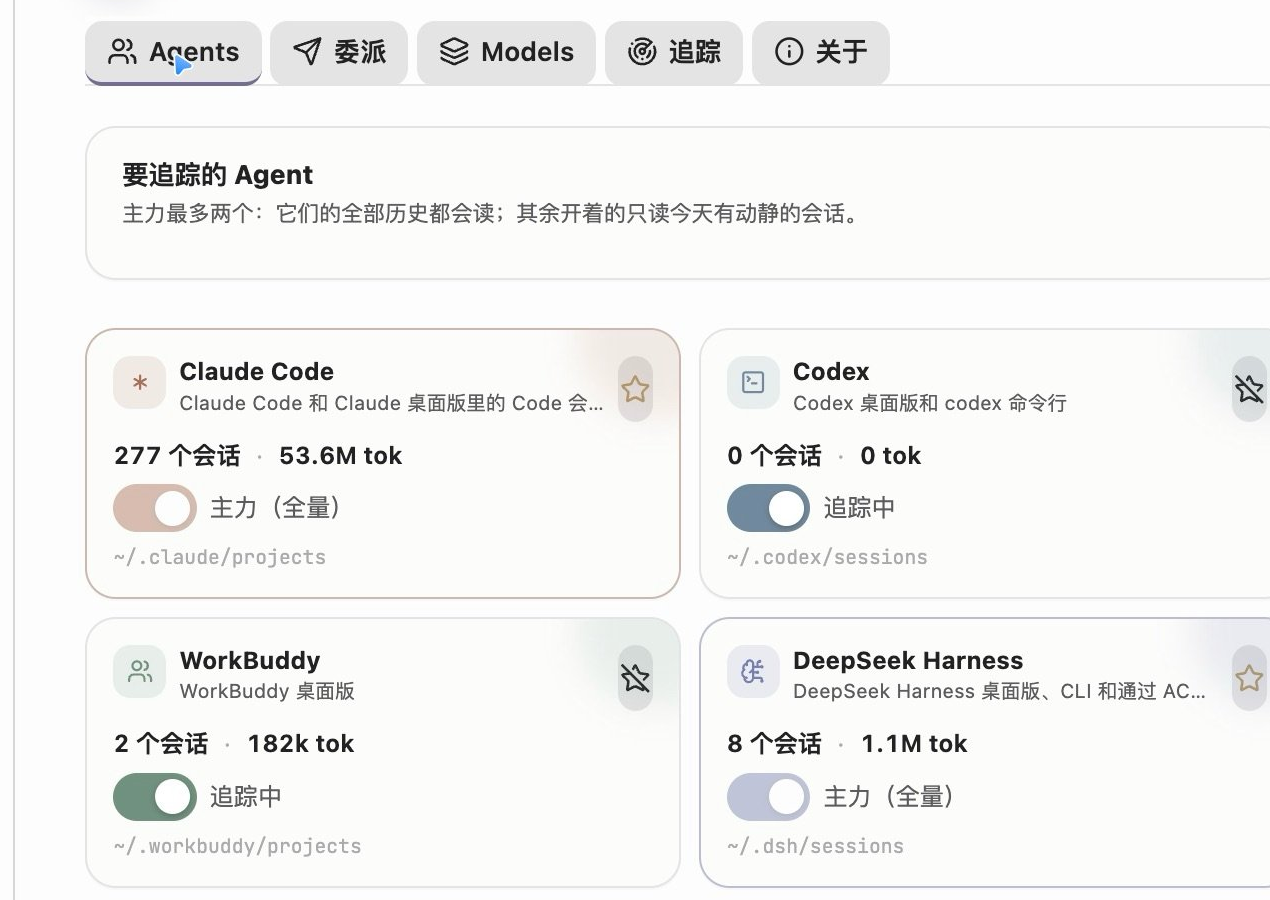
- A dashboard for the agents on this Mac. Running, waiting and quiet sessions for Claude Code, Codex, WorkBuddy and DeepSeek Harness, with project, last step, elapsed time and tokens. Click a row to open that session in its client.
- Claude desktop side chats. In the Claude desktop app a session can spawn another session that looks like a sibling in the sidebar. Agent Deck reads
spawnedFromfromclaude-code-sessions/**/local_*.json, indents the child under its parent, and labels the relationship; a session with an open side chat gets a badge, and the menu bar addsside chat ×N. Sessions archived in the desktop app drop out of the live lists. - Human–AI journal, moved in. The AI half of Nautilus Spiral's journal flow now lives here: sessions are recorded into today's note (a local
claude -pnames them and matches existing task lines), status and elapsed time are written back,💬carries the last reply, child sessions / side chats / Claude Code subagents become nested blocks, and archiving a session marks its lineDONE. Nautilus keeps the tracking display. - Write-back on bound lines. A bound
🔗session gets💬, its keyword follows the session (DOING/TOREVIEW/NEEDOK/ERRORED/HITLIMIT), and archiving writesDONE+⏱and retires the🔗line. While Nautilus's own AI tracking is still enabled Agent Deck stays out of the note, so the two never fight over the same lines. - Two primary agents, full history. Pick up to two agents as primaries. They are read in full (all history, cross-day catch-up); every other enabled agent is only read for sessions that moved today.
- Command-driven delegation. Use
Agent Deck: 委派光标所在块…or your existing 块去向 → 委派给 Claude shortcut. Agent Deck does not put a Delegate button on every list item. The options sheet is still available fromAgent Deck: 委派选项…when you want model, effort, permission mode or a working directory that differs from the defaults. - Progress only on bound lines. A line with a
🔗session or a running delegation gets a line-end pill. While the job runs the pill fills and shows the elapsed clock; the×cancels it. When the agent answers, the pill becomes Done and the result is written under the task as one💬line. Lines with no session stay clean. - Note-native records. Delegation writes a
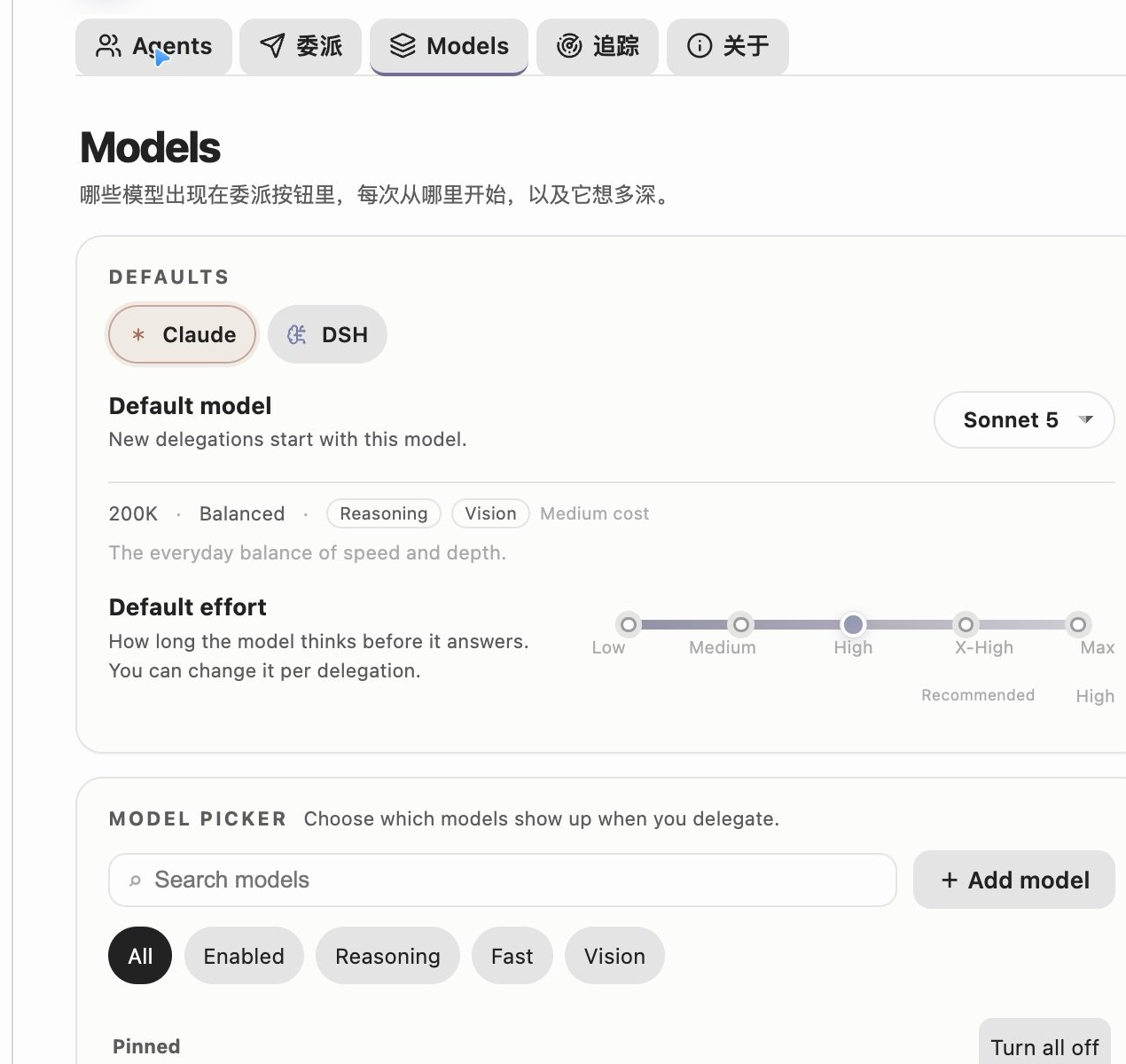
🔗line under the task and changes the status toDELEGATED; the line is the source of truth. Delete the🔗line to unbind. - Layered model settings. A global default model, a default effort slider, capability tags, search/filter, enable switches, pinned order, per-row menu, and task models. Changes sit in an Unsaved changes bar until you save them.
- Local only. Everything is read from
~/.claude,~/.codex,~/.workbuddy,~/.dshand the Claude desktop session list under~/Library/Application Support/Claude/claude-code-sessions. Nothing is uploaded. The plugin stores its own aggregate inusage.jsonnext to the plugin, so history survives log rotation. - Official app icons. Claude, Codex, WorkBuddy and DeepSeek Harness use the icons of their own apps in the dashboard, session rows, pills, settings and menu bar; status, tool and window icons stay Lucide, and running states use a CSS spinner.
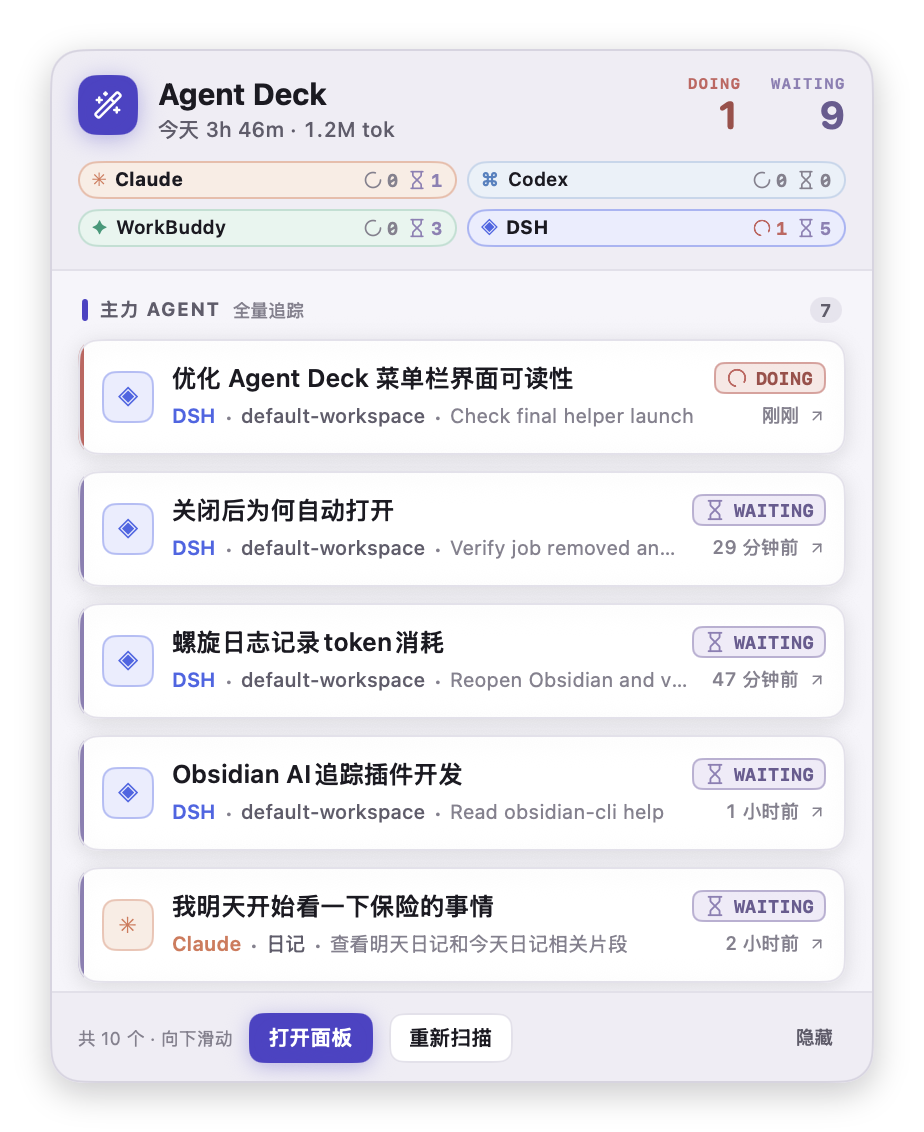
- The agent summary lives in the macOS menu bar. Obsidian's bottom-right status bar no longer carries the agent session summary. A small status item shows an icon plus something like
2 跑 · 1 等; click it for a solid, opaque panel of task cards you can jump from.
macOS menu bar
The menu bar item is a tiny SwiftUI helper app compiled on first use. It is not a second copy of the dashboard: it is the quick "what is running / what needs me" surface.
- Solid, not glassy. The panel is a borderless window with opaque surfaces. There is no
NSPopover, no vibrancy and no frosted material, so text keeps its contrast on macOS 26. The light background is a near-white tint of the current Obsidian theme, and dark mode has its own solid palette. - Rows speak TODOseq. Each card is tagged with a TODOseq keyword —
DOING,WAITING,NEEDOK?,HITLIMIT!,PAUSED,ERRORED,DONE,LATER,TODO— with the same SVG icon and task-state colour TODOseq uses.DOINGkeeps its loader-circle spinning while the panel is open. The header countsDOING/WAITING, and anyNEEDOK?session gets an orange reminder. - Cards are card-like. White surface, 1px border, a soft shadow, a state-coloured rail, the agent's glyph badge, the project and the current step. Hovering lifts the card.
- Five at a time. The first five sessions are visible; the rest are a scroll away. The footer tells you how many sessions are in the list.
- Right side, plus a shortcut. The status item stays in the right side of the menu bar. If macOS hides it because the bar is full, press ⌃⌥⌘D (Control + Option + Command + D) to open or focus the panel from any app. Pressing the shortcut again leaves it open; Escape or a click outside closes it. The shortcut can be changed in Settings → 追踪 → 菜单栏快捷键; no Accessibility permission is needed.
- Primary agents (up to two) contribute more rows: all live sessions plus recent sessions from the last six hours, up to six per primary by default.
- Other agents contribute only sessions that are currently running, up to three per agent by default. WorkBuddy is the exception: its waiting sessions are listed too, because they are part of the daily loop.
- The header shows all enabled agents as chips, with running and waiting counts, including agents that have no row at the moment.
- Clicking a row opens the same deeplink as the dashboard. DeepSeek Harness focuses the client and copies the session id; Codex copies
codex resume <id>. - 打开面板 opens the Obsidian dashboard via
obsidian://agent-deck; 重新扫描 triggers a scan; 隐藏 disables the menu bar from inside the panel.
The dashboard itself keeps the calmer 1.0.2 palette; only the menu bar uses the vivid task-state colours.
The first start needs swiftc (Xcode Command Line Tools). The plugin compiles ~/.agent-deck/AgentDeckMenuBar.app, then launches it. It exits when Obsidian exits. The source is included in the plugin bundle, so no separate download is needed. If the menu bar does not appear, open 追踪 → 重启菜单栏 or install the command line tools with xcode-select --install.
If the menu bar is full (or a menu-bar manager such as Ice has the item in its hidden section), press ⌃⌥⌘D to open or focus the panel (a second press leaves it open; Escape or a click outside closes it). You can also run Agent Deck: 打开 macOS 菜单栏面板 from the command palette.
Human–AI journal
Your task lines are the plan; the agent session logs are the record of what actually happened. With Auto-log into today's note enabled, Agent Deck periodically reads today's sessions and writes the record back:
- Active → the matching line becomes
DOING; if there is no line it writes- DOING 00:45 🤖 …. A localclaude -pnames the session and picks an existing task line when one fits. - Idle for a while (40 minutes by default) →
PAUSED, with- ⏱ 00:45–01:20 · 共 52m · Claudeunderneath. - Archived in the desktop app / Codex →
DONE 19:20 …, including lines still open from previous days. - It never guesses DONE. The machine only moves between
DOINGandPAUSED; finishing is you marking it done or archiving the session. - Bound lines get
💬when the session answers, their keyword follows the session, and archiving writesDONE+⏱. - Nested blocks: desktop child sessions (from
spawnedFrom), open side chats, and Claude Code subagents (<session>/subagents/agent-*.jsonl) become indented blocks with their own status.
Writes are line-level, stay out of undo history, skip while an IME composition is active, and abort if the note changed in the meantime. These writes used to live in Nautilus Spiral; now Agent Deck owns them, and Nautilus keeps the tracking display. While Nautilus's write flags are still on, Agent Deck stays out of the note — use 停用螺旋日程里的 AI 写入 and reload Nautilus to complete the handoff.
Delegate targets
Claude Code
Agent Deck starts a headless Claude Code session with:
--model(Opus 5, Sonnet 5, Haiku 5.5, Fable, or a custom alias)--effort(low, medium, high, xhigh, max)--permission-mode(plan,auto,acceptEdits,manual)-nfor the session name,--add-dirfor the vault
The first turn runs in the background. The session can then be reopened in the Claude desktop app with claude://resume?session=<id>.
If Claude Code has never trusted the vault, the plugin reads ~/.claude.json and starts in a directory that Claude already trusts, adding the vault with --add-dir. This behaviour can be turned off in 委派 → 库没被信任时自动换个目录.
DeepSeek Harness
Agent Deck speaks ACP (Agent Client Protocol) to dsh acp. It creates a real Harness session, selects the model and reasoning_effort, sends the prompt, and follows the session/update stream. The session is persisted in ~/.dsh/sessions, so it also appears in the dashboard afterwards.
ACP does not expose Claude-style plan/auto permission modes. Instead the plugin can auto-approve one-shot tool permissions, or reject them and notify you.
Codex and WorkBuddy
Codex and WorkBuddy are tracked read-only. Codex has no session URL, so the dashboard copies codex resume <id>. WorkBuddy opens with workbuddy://chat/<id>.
Deep links
| Agent | Link | State |
|---|---|---|
| Claude Code | claude://resume?session=<id> |
Works |
| WorkBuddy | workbuddy://chat/<id> |
Works |
| DeepSeek Harness | dsh://open |
Opens the client; the desktop build does not expose a per-session URL yet. Agent Deck copies the session id to the clipboard so you can find it in the sidebar. |
| Codex | none | Copies codex resume <id> |
The status pill
The pill is a CodeMirror widget. It only lives on lines that already have a session or delegation, not on every list item, and it has four states:
- Starting, while the session is being created.
- Delegating, with a liquid fill, elapsed time and
×. - Waiting / needs approval, with a slow glow.
- Done or Error, with an open/retry control.
The options sheet is opened from the command palette (委派选项…) or from the chevron on a status pill:
Installation
This plugin is not in the community store yet. Install it manually:
- Download or clone this repository.
- Copy
main.js,manifest.jsonandstyles.cssinto<vault>/.obsidian/plugins/agent-deck/. - Enable Agent Deck in Settings → Community plugins.
To build from source:
git clone https://github.com/MatsuriMW/obsidian-agent-deck.git
cd obsidian-agent-deck
npm install
npm run build
npm run build writes main.js with esbuild. The only runtime dependency is fzstd, used to read DeepSeek Harness's zstd-compressed session logs.
Settings
- Agents: enable each agent, pick up to two primaries, scan now, import Nautilus Spiral history.
- 委派: default target, models, effort, permission mode, working directory, prompt prefix/suffix, write-back rules, trust fallback.
- Models: the layered picker shown above.
- 追踪: day cutoff, polling interval, idle threshold, history depth, Claude desktop side chats, automatic journal logging and write-back toggles, macOS menu bar toggle and row limits, UI switches, rebuild, import, and a one-click pause Nautilus Spiral's AI writes action.
- 关于: version, license and debug info.
Compatibility with Nautilus Spiral
Agent Deck understands the same 🔗 line as Nautilus Spiral. If both plugins are on, Nautilus will also see the Claude sessions and may rewrite DELEGATED to TOREVIEW.
Agent Deck hides Nautilus's 🤖 agent status item automatically (the planner's own status bar and timer stay). The AI writes of the journal flow (automatic logging, status keywords, 💬, child blocks) now live in Agent Deck; while Nautilus's write flags are still on, Agent Deck keeps its hands off the note. Use 追踪 → 停用螺旋日程里的 AI 写入 to turn off only those writes — Nautilus keeps its tracking display. Its settings are backed up first. After using it, reload Nautilus Spiral from Obsidian's plugin settings (or restart Obsidian); Agent Deck never disables or enables another plugin.
If you use done-to-top and journal-tidy, update to done-to-top 1.17.3+ and journal-tidy 1.9.1+. Those versions keep a DELEGATED block that mentions 明天 / 后天 / 大后天 in today's DOING area instead of moving it to the next day, and do not fold DOING/TODO blocks before the first separator.
Privacy
- Session logs are read locally with Node's
fs. - No network requests are made by the tracking code.
- Delegation starts local CLI processes (
claude,dsh) owned by the user. usage.jsonstores only aggregate per-day numbers and session summaries, not full conversations.- The menu bar helper reads
~/.agent-deck/menubar.jsonand makes no network requests.
Release provenance
Releases are built by GitHub Actions from the tagged commit. main.js, manifest.json and styles.css carry build provenance attestations:
gh attestation verify main.js --repo MatsuriMW/obsidian-agent-deck
Credits
- Extracted from Nautilus Spiral, which remains the planner.
- The progress-in-trigger-button interaction is inspired by @ZZ.X's note “AI 任务进度,长在触发按钮里”.
- The layered model settings page is inspired by @ZZ.X's note “AI 产品模型设置”.
License
MIT. See LICENSE.