Search...Search plugins and themes...
⌘K
Sign in
  • Get started
  • Download
  • Pricing
  • Enterprise
  • Account
  • Obsidian
  • Overview
  • Sync
  • Publish
  • Canvas
  • Mobile
  • Web Clipper
  • CLI
  • Learn
  • Help
  • Developers
  • Changelog
  • About
  • Roadmap
  • Blog
  • Resources
  • System status
  • License overview
  • Terms of service
  • Privacy policy
  • Security
  • Community
  • Plugins
  • Themes
  • Discord
  • Forum / 中文论坛
  • Merch store
  • Brand guidelines
Follow us
DiscordTwitterBlueskyThreadsMastodonYouTubeGitHub
© 2026 Obsidian

Accent and Theme Customizer

Miłosz LamańskiMiłosz Lamański273 downloads

Assign different accent colors and themes to different folders

Add to Obsidian
Accent and Theme Customizer screenshot
  • Overview
  • Scorecard
  • Updates5

An Obsidian plugin that allows you to assign different accent colors and themes to different folders!

Context menu

You can customize this plugin directly from the file explorer. Just right-click on a folder you want to customize and you're done.
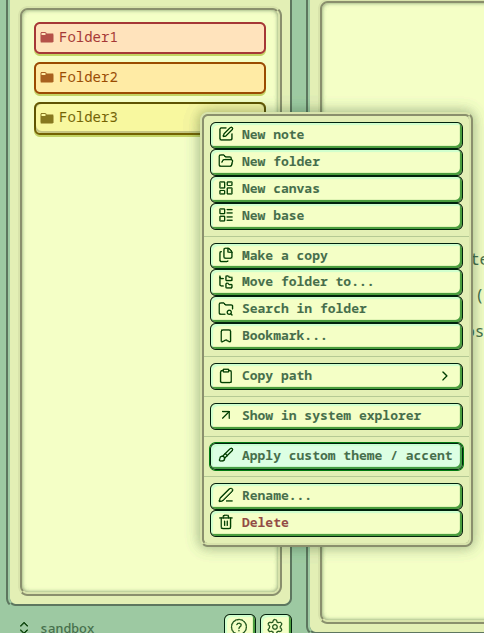
context-menu-1

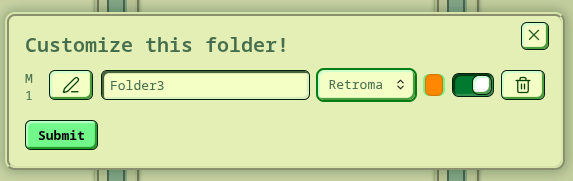
You will be presented with this simple settings tab:
context-menu-customization

Here you can pick what to customize. Accent color and theme don't both have to be customized - you can leave either one as is.

Settings

When you open the plugin settings you can quickly preview your mappings and make changes there as well.
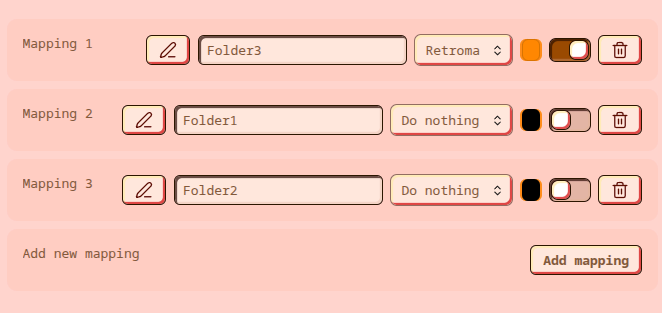
settings

HealthExcellent
ReviewPassed
About
Assign different accent colors and themes to individual folders to give each section a distinct look. Customize folder appearance directly from the file explorer context menu and preview or edit mappings in the plugin settings.
ThemingAppearanceFolders
Details
Current version
1.0.6
Last updated
3 weeks ago
Created
3 weeks ago
Updates
5 releases
Downloads
273
Compatible with
Obsidian 1.5.7+
Platforms
Desktop, Mobile
License
MIT
Report bugRequest featureReport plugin
Author
Miłosz LamańskiMiłosz Lamańskispajciuch
GitHubspajciuch
  1. Community
  2. Plugins
  3. Theming
  4. Accent and Theme Customizer

Related plugins

Hider

Hide interface elements such as tooltips, status bar, titlebar, and more.

Style Settings

Adjust theme, plugin, and snippet CSS variables.

Colorful Folders

Automatically adds color-code folders, tags, and your Graph View with premium palettes, and auto-assign smart icons to visualize your structures instantly

Share Note

Instantly share/publish a note, with the full theme and content exactly like you see in Obsidian. Data is shared encrypted by default, and only you and the person you send it to have the key.

Quick Explorer

Perform file explorer operations (and see your current file path) from the title bar, using the mouse or keyboard.

Supercharged Links

Add attributes to internal links with the values of target note's frontmatter attributes.

Flexplorer

Enhance the file explorer with custom sorting, pinning, and hiding.

Note Toolbar

Add customizable toolbars to your notes.

Folder notes

Create notes within folders that can be accessed without collapsing the folder, similar to the functionality offered in Notion.

Minimal Theme Settings

Control the colors and fonts in Minimal Theme.