Refwright
 Sang-Min Park212 downloads
AI-native citation manager: PubMed search, LLM summaries, MeSH tags, CSL citations, and optional Claude Code/Codex MCP access to the live vault.
- Overview
- Scorecard
- Updates44
Refwright
Formerly “Academic Paper Citation Manager” — same plugin, same id, same settings.
Your markdown notes are the reference library.
Search PubMed, get AI summaries, cite in any journal style — a Zotero / EndNote replacement inside Obsidian.
Install · User guide · Features · Claude Code / Codex · manuwright · Changelog
English · 한국어 · 中文 · 日本語 · Español · Deutsch · Français · Português
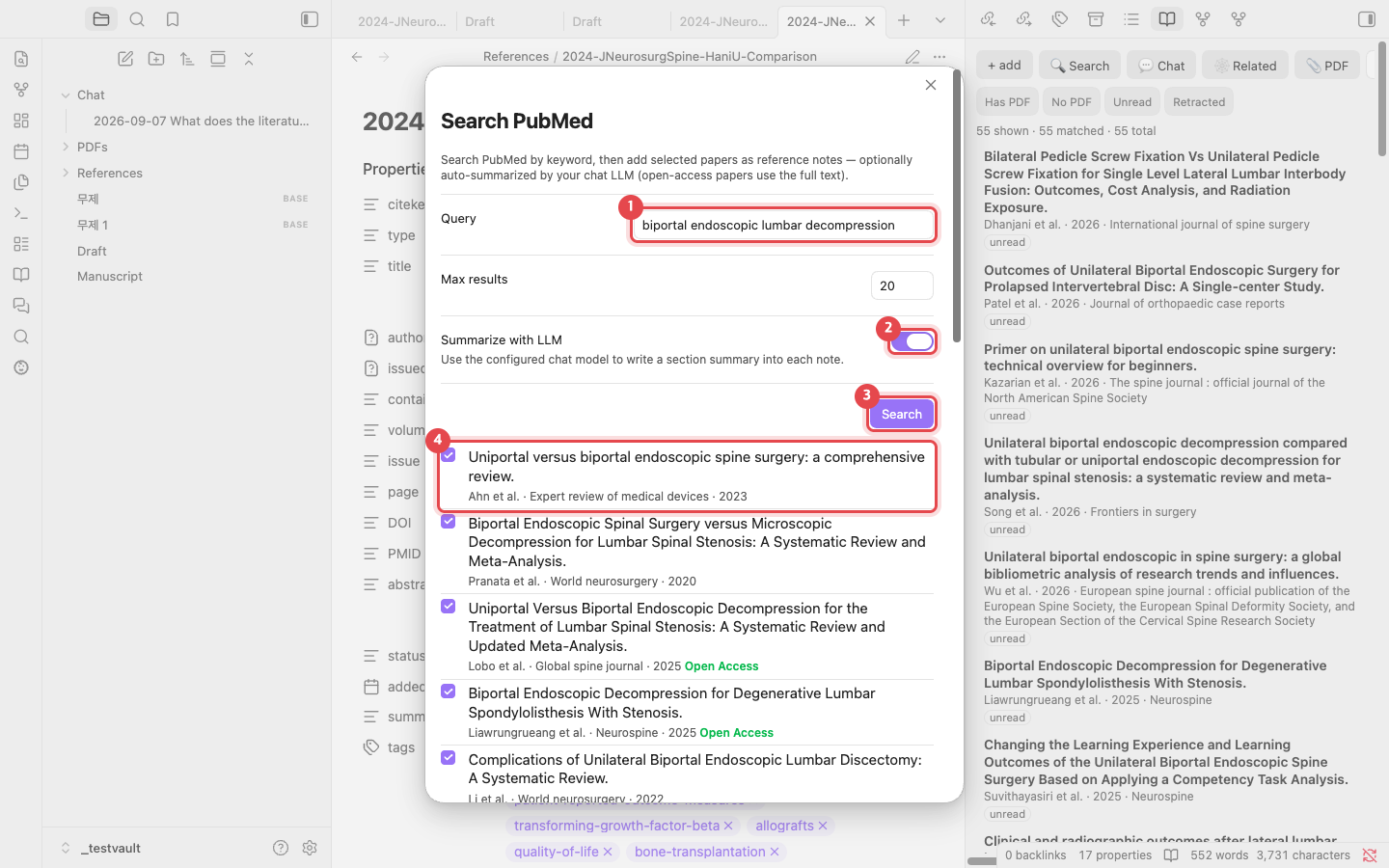 Add papers from PubMed |
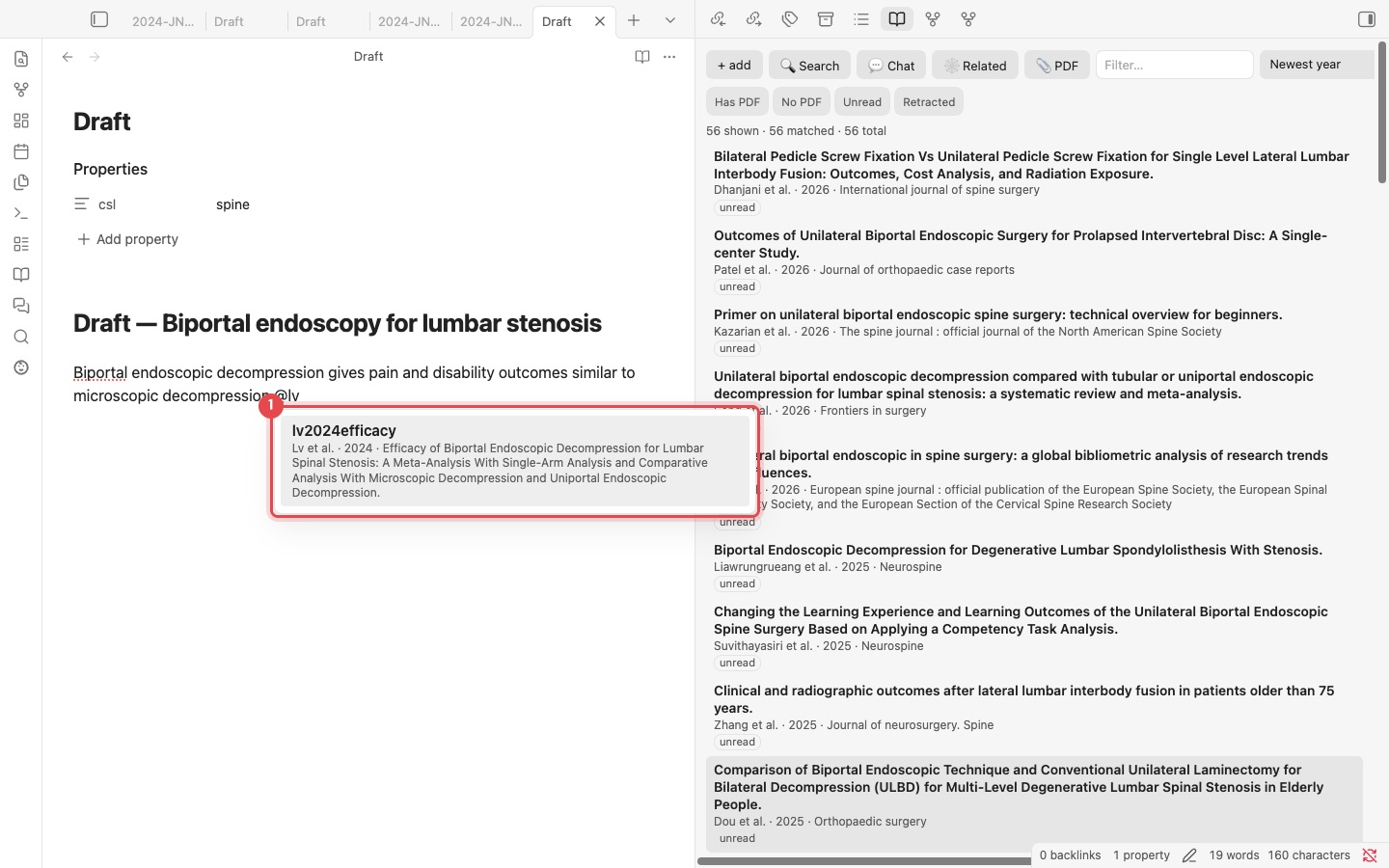 Cite with @ |
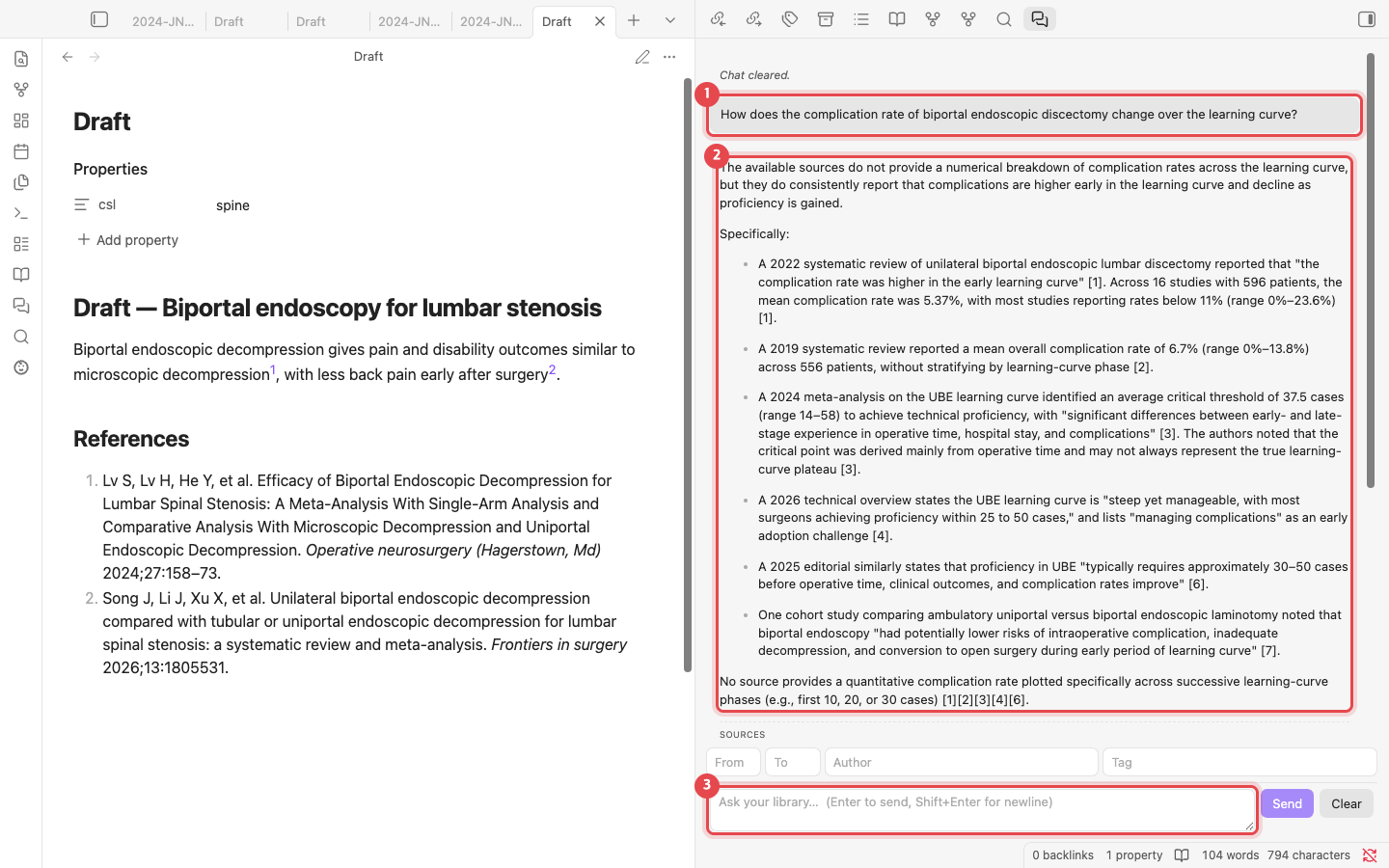 Chat with your library |
 Citation map |
Every reference is a plain .md note with CSL-JSON
frontmatter, so your library stays portable, future-proof, and yours. No external app,
no account, no backend — just your vault.
📖 User guide
A step-by-step guide with screenshots, from adding papers to exporting a Word manuscript: English · 한국어 · 中文 · 日本語 · Español · Deutsch · Français · Português
✨ Features
📥 Collect
- Search PubMed by keyword inside Obsidian → pick papers → notes.
- Add by DOI / PMID / arXiv, or by paper title (auto-lookup).
- Import an existing library — BibTeX · RIS · PubMed
.nbib· CSL-JSON, or straight from a running Zotero 7 (whole library or one collection).
🧠 Summarize (AI)
- An LLM writes a section-by-section summary (Background / Methods / Results / Conclusions) into each note. Summary language (Settings → Chat) picks English, Korean, both (default, English + a concise Korean summary), or any other language by name.
- Uses the full text for open-access papers (PubMed Central), the abstract otherwise.
🏷️ Organize
- Auto-tags every note with MeSH topic terms → Obsidian's graph view clusters your papers by subject.
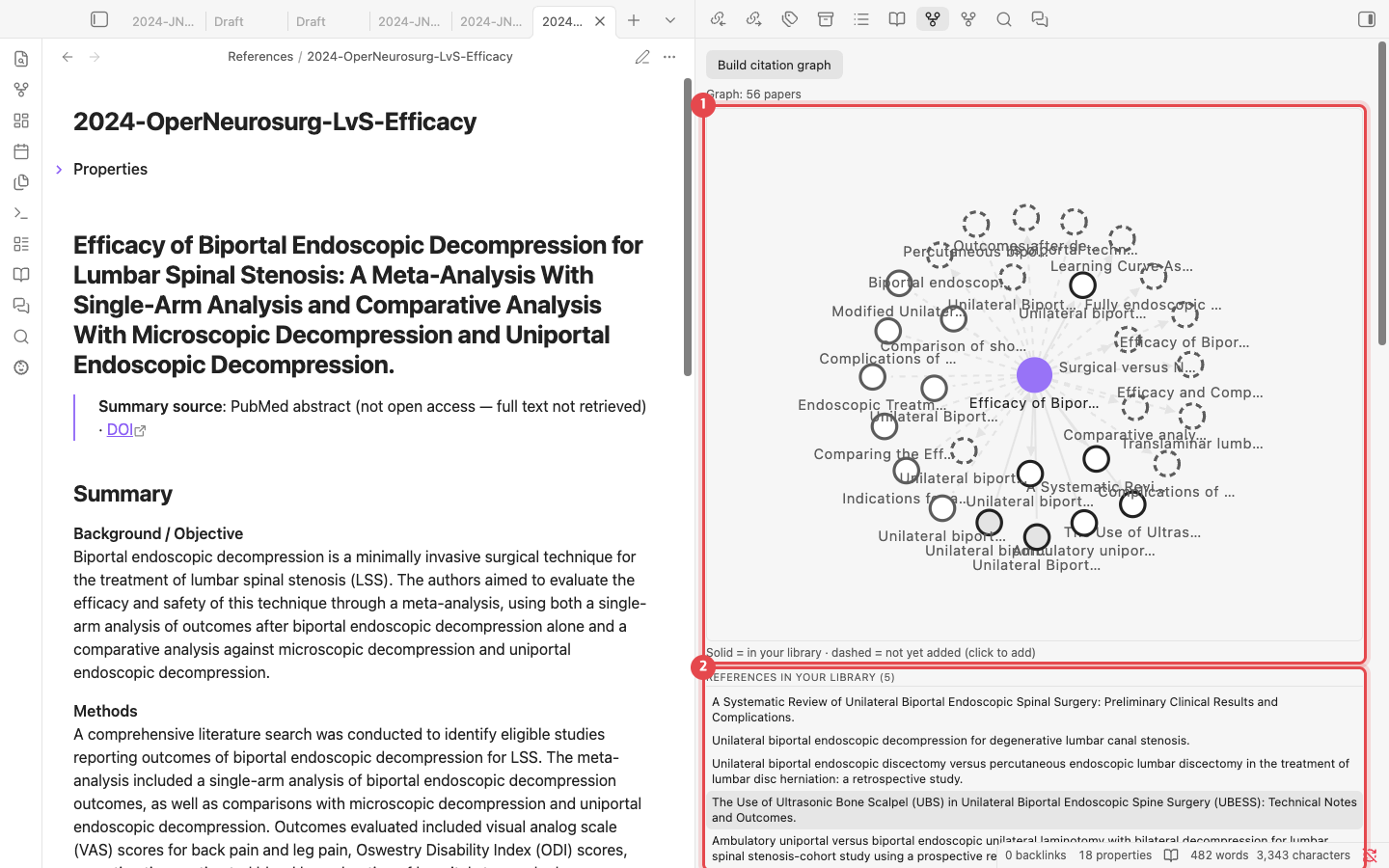
- Citation graph (OpenAlex): references / cited-by in your library, and "frequently cited but missing" recommendations — drawn as a map in the Related pane (solid nodes are notes you have, dashed ones are papers you don't; click a dashed node to add it). Build it once from the pane's button; references added later join it on their own.
- Reading status, dashboard, citation counts. The Library pane sorts by year, title, author, citations or date added, with quick filters (has PDF / no PDF / unread / retracted).
- Duplicates: find them, then merge them — one note kept, gaps filled from the others,
[@old]citations rewritten across the vault. - Retraction check for one note or the whole library (OpenAlex), with a report note.
- Systematic review: a screening pane (include / exclude / maybe, key questions, evidence level, design, exclusion reasons, keyboard shortcuts) and a PRISMA 2020 flow diagram for all references or a tag.
- PDFs: download open-access copies for every reference without one (Unpaywall), or link a folder of PDFs you already have — matched by file name, DOI, PMID or title.
✍️ Cite & write
- Type
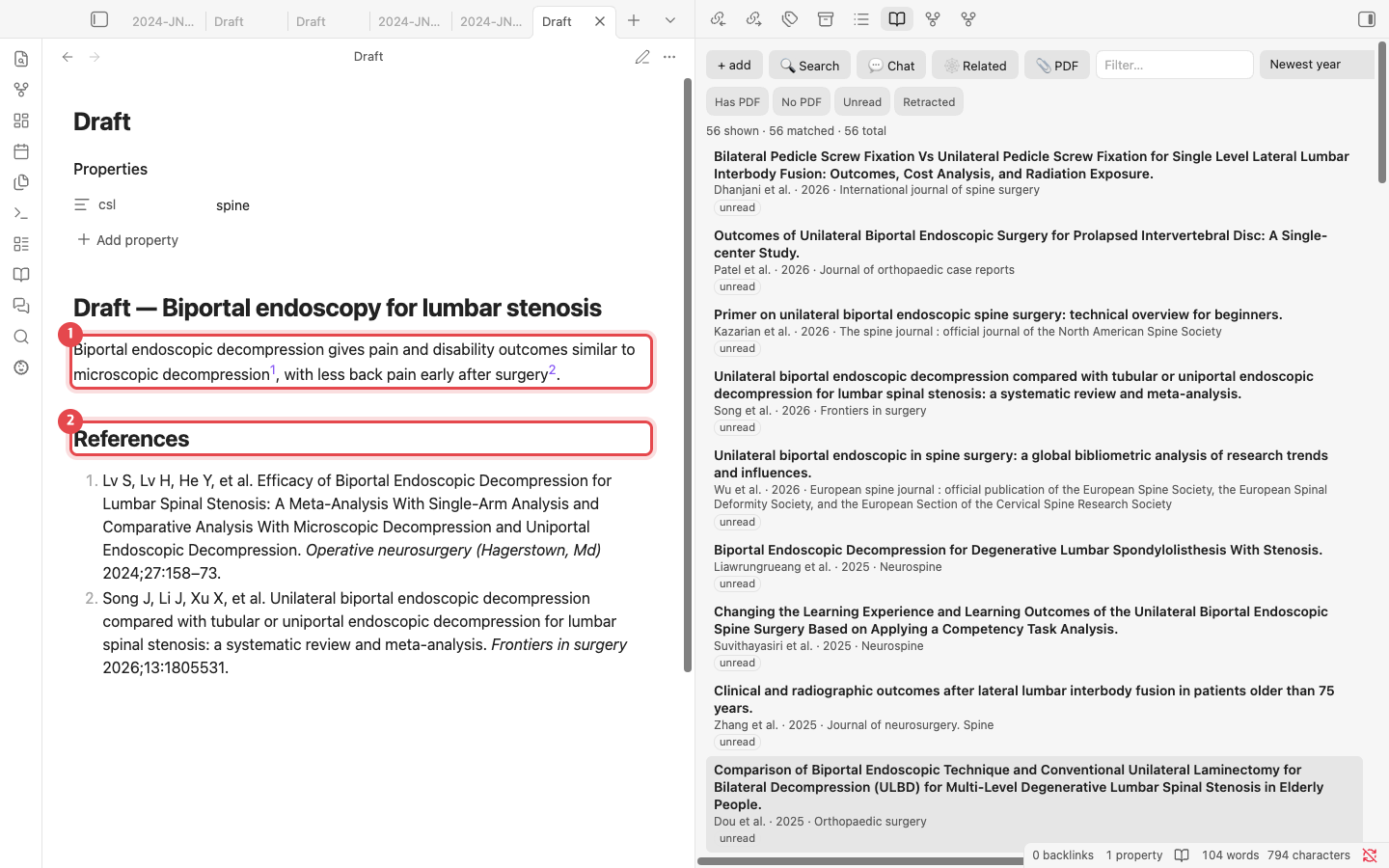
@→ autocomplete inserts[@citekey]. - "Update bibliography" builds a
## Referenceslist in a real journal style (citeproc-js / CSL); in-text marks render to match ([1], superscript, or author–date). - Per-manuscript style via a note's
csl:frontmatter — or Choose citation style… and search about 10,000 journal styles by journal name. - Citations render as you type in Live Preview; hover one to see the paper.
- Check references in this manuscript before submission: missing from the library, retracted, no DOI, or incomplete metadata.
- Compile manuscript → a clean copy with citations resolved → export to
.docx.
🔎 Search & chat
- Hybrid semantic search (BM25 + vector) and citation-grounded chat that answers
only from your library, with
[n]sources. - Measured retrieval (0.8.1): a hosted cross-encoder reranker (about $0.0002 a search), query expansion (your own search vocabulary + MeSH entry terms), and automatic translation of Korean (or any non-English) questions. On a 96-question clinical benchmark over 16,578 papers, nDCG@10 rose from 0.53 to 0.81 for English questions and from 0.18 to 0.83 for Korean ones.
- Finding-level search for Claude Code / Codex (MCP
search_findings): individual results — effect size, CI, p and the verbatim quote — from a note's## Evidence (extracted)section. - Filters in the search and chat panes — narrow by publication year range, by author (family name), and by tag: type in the tag box (it autocompletes from the tags already in your library) and press Enter to add a chip; add several and a paper must carry them all. The filters belong to the pane rather than to settings; in the chat pane they scope which papers an answer may draw on, and the answer's source list says what it was narrowed to.
- Claude Code / Codex via MCP (desktop): let an external AI search the live library, find, add, and summarize papers, safely create/edit/move/trash Markdown notes, and compile a cited manuscript. Summary prose comes from Claude/Codex; the MCP path never calls this plugin's chat, summary, or reranking LLM. Setup buttons for Claude Code, Codex, OpenCode and Antigravity; the seven note-editing tools can be switched off.
- No API key needed for the LLM (desktop): chat and summaries can run through your logged-in Codex CLI or OpenCode CLI. Search embeddings still need OpenRouter/OpenAI or a local Ollama.
📦 Installation
Published in the Obsidian Community directory: community.obsidian.md/plugins/academic-paper-citation-manager. Version 0.6.0 changed the plugin id; anyone still on 0.5.x follows the migration guide once.
Option A — Community plugins (recommended)
- Obsidian → Settings → Community plugins → turn off Restricted mode if it is on.
- Browse → search Refwright → Install → Enable.
Obsidian updates it like any other plugin (Settings → Community plugins → Check for updates). Desktop only (Obsidian 1.11.4+).
Installed earlier through BRAT? The plugin id and folder are the same, so your settings and index stay: remove the plugin from BRAT's list and keep updating through Community plugins.
Option B — Download a release (manual)
From the latest release, download
main.js, manifest.json and styles.css into
<your vault>/.obsidian/plugins/academic-paper-citation-manager/
(create the folder if it does not exist), then reload Obsidian and enable the plugin under Settings → Community plugins. Updating means downloading the three files again.
Option C — Build it yourself
Requires Node.js 18+ and git.
git clone https://github.com/grotyx/rag-obsidian.git
cd rag-obsidian
npm install

cp .env.example .env        # Windows: copy .env.example .env
# edit .env → set VAULT_PLUGIN_DIR to <your vault>/.obsidian/plugins/academic-paper-citation-manager

npm run deploy              # builds + copies the plugin into your vault
Then in Obsidian: Settings → Community plugins → enable the plugin → reload (Ctrl/Cmd-R).
Option D — Cloud-synced vault (no build on the 2nd machine)
If your vault is in OneDrive / iCloud / Dropbox / Obsidian Sync, the built plugin travels
inside the vault (<vault>/.obsidian/plugins/academic-paper-citation-manager/). On another machine just
open the synced vault and enable the plugin — no Node, no build.
🚀 Quick start (5 minutes)
- Reload Obsidian (
Ctrl/Cmd-R) and confirm the plugin is enabled. - Set your AI provider — Settings → the plugin's tab → see Providers below.
- Add a paper — ribbon 🔍 Search PubMed, type a topic, select results → Add.
Each becomes a note in
References/with an AI summary + topic tags. - Write & cite — in any note, type
@and pick a reference →[@citekey]. - Bibliography —
Ctrl/Cmd-P→ Update bibliography → a## Referenceslist in your chosen journal style.
The citation workflow needs no embeddings. Semantic search & chat are optional and require a one-off Rebuild search index.
Connect Claude Code or Codex
On Obsidian Desktop, open Settings → Refwright → External AI (MCP), enable access, then copy the generated Claude Code command or Codex configuration. Keep this vault open while using the tools. See the complete MCP guide for the tool list, safe editing workflow, example prompts, security model, and troubleshooting.
MCP delegates reasoning and prose to Claude Code or Codex. It does not call Chat with library, paper summarization, or the LLM reranker; only library search/index rebuild may use the configured embedding provider.
For a complete import, ask the client to add and summarize the paper. It will follow
add_reference → get_reference_source → save_reference_summary: PMC full text is preferred,
an abstract is the fallback, and a current note hash prevents overwriting concurrent edits.
🖋️ Write the paper with manuwright
manuwright is a companion project by the same author: a medical-manuscript workflow for AI agents (Claude Code, Codex, Antigravity, opencode, Muse). It makes the agent plan before it writes, cite only registered sources, take every number from your results files, and pass verification gates before submission. It uses this plugin's MCP server as its reference library:
- The library is shared with every agent.
manuwright obsidian connectregisters this plugin's MCP server (rag-obsidian) with each installed agent, so any of them can search your papers while it drafts.manuwright obsidian installcan also install the plugin into a vault and turn on MCP access for you. - Obsidian finds papers; manuwright decides what can be cited.
manuwright evidence import-obsidian <citekey>copies a reference note into the paper'sknowledge/evidence.md: the CSL fields become the citation, the plugin's AI summary fills the summary fields, and the citekey becomes the[EVID:citekey]id. Imported entries start as abstract-only until you have read the full text.
uv tool install git+https://github.com/grotyx/Academic_writing_c_claudecode
manuwright obsidian status          # vaults with this plugin, and which agents are connected
manuwright obsidian connect         # add the rag-obsidian MCP server to your agents
manuwright evidence import-obsidian lv2024efficacy
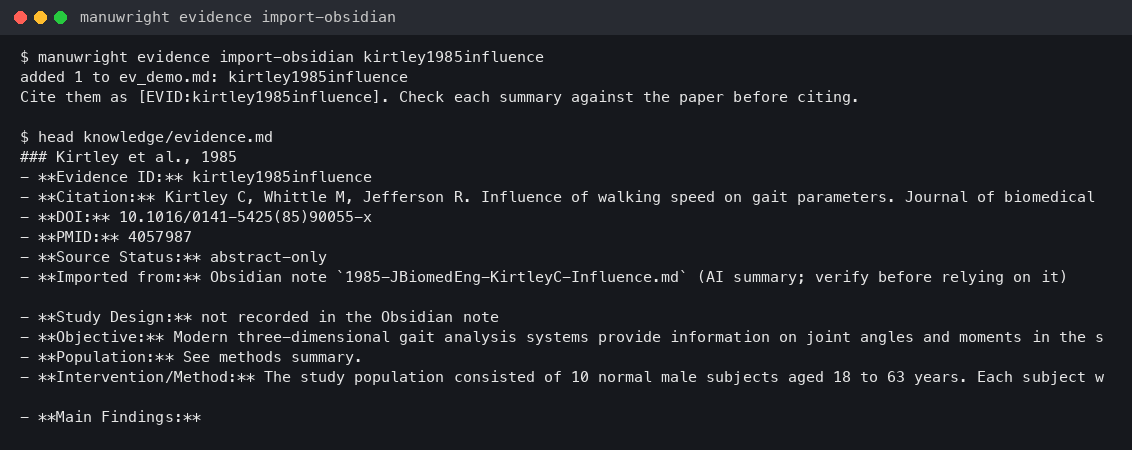
manuwright is optional: the plugin works on its own, and manuwright works without Obsidian. Keep Obsidian open with MCP access enabled while agents use the library. See the manuwright manual.
⚙️ Providers
Pluggable, all through Obsidian's requestUrl on Obsidian Desktop:
Out of the box both are set to the OpenAI-compatible provider pointed at OpenRouter, so a single key covers chat, paper summaries and embeddings and nothing has to be installed locally. Paste the key and you are done; everything else is optional.
- LLM (chat + summaries): OpenAI / compatible (default) · Anthropic · Ollama (local) · Codex CLI · OpenCode CLI. Chat model is optional and overrides the default model for Chat with library only — worth a stronger model there, since summaries and PDF metadata extraction stay on the cheaper default.
- Embeddings (search + chat): OpenAI / compatible (default) · Ollama (local).
- No API key: Codex CLI / OpenCode CLI (desktop). If you already use Codex (ChatGPT login)
or OpenCode, pick it as the LLM provider: every chat, summary and rerank call runs through
that CLI with your own login, and the plugin stores no key. Leave Default model empty for
the CLI's own default, or name one (
gpt-5.1-codex; for OpenCodeprovider/model). The CLI is found in the usual install folders, or set CLI executable; Test checks it. Calls run from an empty temporary folder with the CLI's user config skipped (its MCP servers and hooks would otherwise start on every call), about 4–7 s each, three at a time in batches. Embeddings still need OpenRouter/OpenAI or Ollama. - Index location: Keep the search index outside the vault (desktop) stores it in the computer's app-data folder, so a synced vault doesn't re-upload it after every change; each device then builds its own.
- Retrieval: Results (top-k) is how many passages an answer is built from (default 20; at most three per reference, so one long paper can't take every slot). Rerank chat results with the LLM is off by default — with it on, chat retrieves twice as many passages and has the model order them by relevance first, at one extra request per question.
OpenRouter model ids carry a vendor prefix (
openai/…,deepseek/…). Pointing the base URL athttps://api.openai.com/v1instead works too — drop the prefix from the model ids.
Using OpenRouter? Pick the OpenAI provider for both chat and embeddings — one key, one base URL, hundreds of models:
| Setting | Value |
|---|---|
| Chat / Embedding provider | OpenAI |
| OpenAI base URL (shared) | https://openrouter.ai/api/v1 |
| Chat model | any OpenRouter id, e.g. deepseek/deepseek-v4-flash |
| Embedding model | openai/text-embedding-3-small |
| OpenAI API key | your OpenRouter key (openrouter.ai/keys) |
Using Google Gemini? Pick the OpenAI provider and point it at Google's endpoint:
| Setting | Value |
|---|---|
| Chat provider | OpenAI |
| Chat model | gemini-3.5-flash |
| Embedding provider | OpenAI |
| Embedding model | gemini-embedding-001 |
| OpenAI base URL (shared) | https://generativelanguage.googleapis.com/v1beta/openai |
| OpenAI API key | your Gemini key (Google AI Studio) |
✍️ Writing a paper (without Zotero / Word plugins)
Obsidian:  write Manuscript.md  →  type @ to cite  →  set the journal: csl: springer-basic-brackets
           Ctrl/Cmd-P → "Compile manuscript"        →  Manuscript (compiled).md
           Ctrl/Cmd-P → "Export manuscript to Word (.docx)"  →  Manuscript.docx (needs Pandoc)
- Compile manuscript resolves every
[@citekey]to its styled in-text mark and appends the## Referenceslist — ready for Pandoc / submission. - Export manuscript to Word (.docx) compiles the same way and runs Pandoc with the bundled
academic template: Times New Roman 12 pt, double-spaced, black. Pandoc is found in the usual
install folders; set its path under Settings → Writing if it lives elsewhere.
(
scripts/to-docx.cjsstill does the same from a terminal.)
🎨 Citation styles
Bibliographies and in-text marks use citeproc-js over your CSL-JSON — the same engine Zotero uses.
- Globally: Settings → Bibliography style (CSL). Bundled offline: Spine · The Spine
Journal · European Spine Journal · AMA · APA. Or type any style id (e.g.
nature,the-lancet) — it's fetched from the CSL repo and cached. - Per manuscript: add
csl:to the note's frontmatter — it overrides the global style.
---
csl: springer-basic-brackets
---
| Journal | csl: value |
|---|---|
| Spine | spine |
| The Spine Journal | elsevier-vancouver |
| European Spine Journal | springer-basic-brackets |
| Global Spine Journal | american-medical-association |
| anything else | any id from the CSL styles repo |
🧰 Commands
| Group | Commands |
|---|---|
| Add | Search PubMed · Add by DOI / PMID / arXiv / title · Import (BibTeX / RIS / nbib / CSL-JSON / Zotero) · Import PDF |
| Read | Mark unread / reading / read · Reading queue · Find open-access PDF · Download open-access PDF · Download open-access PDF files for references without one · Link PDF files in a folder to references · Extract PDF highlights · Index linked PDF files · Index this note's PDF · Open reference online |
| Organize | Summarize and tag references (fill gaps) · Summarize and tag this reference · Summarize and tag references in a folder or tag… · Re-summarize this reference · Re-summarize references made by an older model · Open screening pane · Create PRISMA flow diagram · Library dashboard · Find duplicates · Merge duplicates… · Backfill citation counts · Check retraction (this note / all) · Rename tag · Enrich metadata · Suggest related papers · Export citation network |
| Write | @ autocomplete · Suggest citations for selection · Find unsupported claims · Update bibliography · Choose citation style… · Check references in this manuscript · Compile manuscript · Export manuscript to Word (.docx) · Copy citation · Export annotated bibliography · Save latest chat answer as note |
| Search | Search library (semantic) · Chat with library · Show related papers · Build citation graph · Rebuild search index |
| Export | Library → BibTeX / RIS / CSL-JSON |
🛠️ For developers
npm run dev        # esbuild watch → main.js
npm run deploy     # build + copy into the vault (VAULT_PLUGIN_DIR in .env)
npm run build      # tsc + esbuild production
npm test           # live integration suite + MCP contract/security checks
Helper script (terminal, no Obsidian needed) — path from .env:
node scripts/to-docx.cjs "Manuscript (compiled).md" # compiled md → styled .docx
See docs/MCP.md for external-AI setup,
docs/MIGRATION-0.6.md for the 0.5.x migration, and
CLAUDE.md for the module map.
⚠️ Notes & limitations
- The Community-compatible plugin id is
academic-paper-citation-manager. The MCP connection name remainsrag-obsidian; these identifiers are independent. - Filenames are readable (
2022-SpineJ-ParkSM-Biportal.md); the shortcitekey:in frontmatter is the[@cite]handle. .docxexport needs Pandoc; PDF highlight extraction needs a PDF with annotations.- This release is desktop-only because the optional live MCP bridge uses Node APIs. Keep Obsidian Desktop and the target vault open while using MCP.
- Obsidian's Properties panel may warn on nested CSL frontmatter — the data is valid.
- Set Contact e-mail in settings: OpenAlex, Unpaywall and PubMed all use it, and open-access PDF lookup does not work without one.
- API keys live in the OS keychain (Obsidian's secretStorage) and are blanked in
data.json; on a synced vault, enter the key once per device. - Source builds/deployments include CSL styles under
styles/(CC BY-SA 3.0; seestyles/README.md). Community installs fetch and cache a selected CSL style/locale if it is not present in the three release files. Plugin code is MIT. - Mobile installation is not supported as of 0.6.0; see docs/MOBILE.md.
🔒 Network and privacy
- Reference lookup/search sends identifiers or queries to Crossref, NCBI PubMed/PMC, OpenAlex, Unpaywall, and arXiv as needed. CSL styles/locales may be downloaded from the official CSL GitHub repository. PDF.js is bundled with the plugin; no executable code is loaded from a CDN. Network requests are subject to the contacted services' privacy policies.
- AI features send the selected source text and prompt to the provider you configure: an
OpenAI-compatible endpoint (including OpenRouter or Gemini), Anthropic, or Ollama. API keys are
stored in Obsidian SecretStorage when available; older Obsidian versions fall back to plugin
data.json. The plugin has no telemetry, advertising, account service, or hosted backend. - With Rerank results with a cross-encoder on (default), the search query and the retrieved passages are sent to OpenRouter's rerank endpoint. With Translate non-English searches on (default), a non-English query is sent to your chat model for translation. Build MeSH synonym list for search sends your library's common subject tags to NCBI E-utilities.
- MCP listens only on authenticated
127.0.0.1. It writes a generated bridge beside the plugin and a short-lived discovery file in the operating-system temporary directory (outside the vault); both contain connection data, never note contents or provider API keys. MCP tools can read and change vault Markdown only when you enable MCP access. See the MCP security model. - Local programs (desktop, opt-in). Two features run a program already installed on your computer, and only when you use them: the Codex CLI / OpenCode CLI LLM providers (the prompt and source text go to that CLI, which sends them to its own provider under your login; the plugin stores no key and skips the CLI's user config) and Export manuscript to Word (Pandoc, run locally on the compiled manuscript). The plugin never downloads or installs either program.
- Files outside the vault (desktop, opt-in). With "Keep the search index outside the vault"
on, the index is written to the operating system's app-data folder
(
~/Library/Application Support,%LOCALAPPDATA%or~/.local/share, underacademic-paper-citation-manager/; through 0.8.1 it was the cache folder, which cleaners empty). CLI and Pandoc calls use a temporary folder that is deleted after each call.
👤 Author
Professor Sang-Min Park, M.D., Ph.D. Department of Orthopaedic Surgery, Seoul National University Bundang Hospital, Seoul National University College of Medicine 🌐 sangmin.me
📄 License
MIT (plugin code). Bundled PDF.js retains its full Apache-2.0 license and modification notice in main.js; CSL
styles/locales retain their CC BY-SA 3.0 license (see THIRD_PARTY_NOTICES.md).