Typewriter
 crashmoney463k downloads
Typewriter is an Obsidian theme designed for a focused writing experience.
- Overview
- Scorecard
- Updates40
Typewriter is an Obsidian October-winning theme with 403k+ downloads designed for a focused writing experience.
If you enjoy the theme, consider buying me a Ko-Fi! It helps keep the project going :)
Accessibility issues and bug fixes will be prioritised over new features at this current time. That said, please keep filing feature requests under the 'Issues' tab! I still take note of what's there for active development.
Features
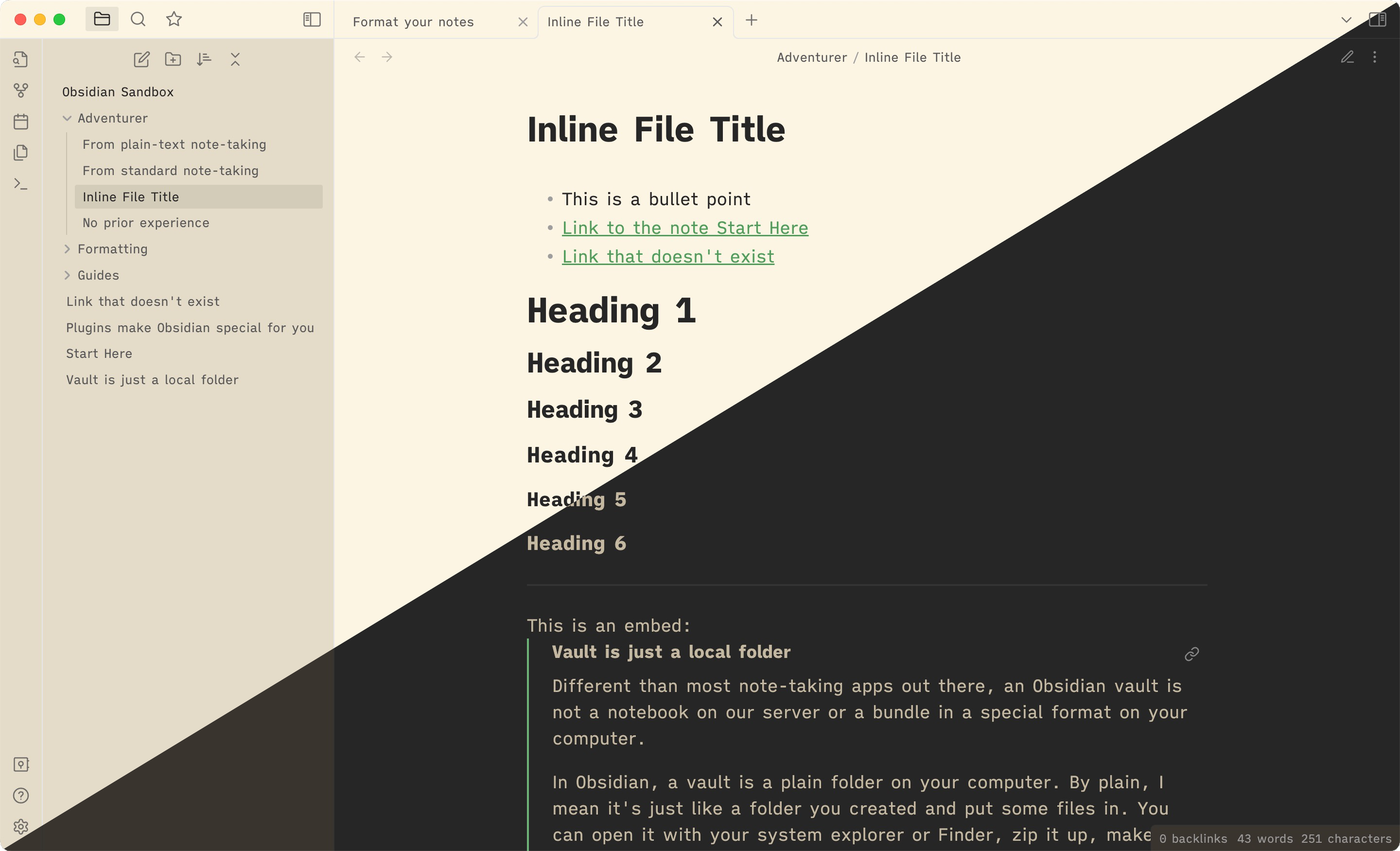
- Careful choice in fonts; monospace in the editor and semi-proportional in preview and UI
- Fonts have been base64 encoded, meaning you don't need to install them to use Typewriter
- This means that the fonts used here are available on mobile
- Markdown formatting symbols are faded and shrunk, letting you focus on words instead
- Vim cursor support
- Long titles in the file explorer will soft-wrap
- Useful for mobile and small displays
- Seamless embeds, without file titles
- Cool dark mode and warm light mode
- Compatibility with community plugins (see Plugin Compatibility)
- Compatibility with Obsidian Hub
- Highlight on the active line for focus
- Currently unavailable in v2.0.0 (Obsidian version 0.16.0 onwards)
Recommended Plugins
- Typewriter Scroll by @death_au for the full typewriter experience
- This plugin comes also with a focus mode, which dims every line except the active one
- Click Clack by @Acylation (still in beta) for typewriter sounds
- Style Settings by @mgmeyers for easy customization
Plugin Compatibility
This list is non-exhaustive; other plugins I haven't tested yet may work. The plugins on this list are plugins I've tested or added specific support for.
- Calendar by @liamcain
- Kanban by @mgmeyers
- Sliding Panes (Andy's Mode) by @death_au
- Tag Wrangler by @pjeby
- Typewriter Scroll by @death_au
- Better Word Count by @lukeleppan
- Day Planner by @lynchjames
- Workbench by @ryanjamurphy
- Citations by @hans
- Journey by @akaalias
- Banners by @noatpad
- Dataview by @blacksmithgu
- Style Settings by @mgmeyers
- Obsidian TODO by @larslockefeer
- Obsidian Image Export by @zhouhua
Development
This theme is currently under development. Issues and pull requests are welcome.
Please see Releases for changes between updates.
Installation
Recommended (Obsidian Theme Manager)
- Open Settings
- Navigate to Appearance
- Press the 'Manage' button
- Search for Typewriter and press 'Install'
Manual
You can also manually install this theme.
For Obsidian version 0.16.0/1.0.0 and above:
- Download
theme.cssandmanifest.json - In your vault's hidden theme directory (
.obsidian/themes/), create aTypewriter/directory - Move
theme.cssandmanifest.jsoninto the.obsidian/themes/Typewriterfolder
For Obsidian version 0.15.9 and below:
- Download
obsidian.css- Please note that
obsidian.csshas been deprecated. Development will focus more ontheme.css.
- Please note that
- Rename the file to
Typewriter.css - Move the file to your vault's theme directory
- Navigate to your vault's hidden
.obsidian/themesfolder - Place
Typewriter.cssinside that folder
- Navigate to your vault's hidden
Credits
Inspiration and/or some code were taken from the following:
- Minimal by @kepano
- Yin and Yang by @chetachiezikeuzor
- Deep Work by @nikbrunner
- the Scrivener theme A Midsummer Night for the colors behind Typewriter's dark mode
- Solarized Light for the colors behind Typewriter's light mode
Fonts
This theme uses the fonts iA Writer Mono V, iA Writer Quattro S and JetBrains Mono. These fonts have been base64 encoded into the theme CSS, meaning that you don't have to install them and that they are available on mobile. If you want to, however, the links are below: