Search...Search plugins and themes...
⌘K
Sign in
  • Get started
  • Download
  • Pricing
  • Enterprise
  • Account
  • Obsidian
  • Overview
  • Sync
  • Publish
  • Canvas
  • Mobile
  • Web Clipper
  • CLI
  • Learn
  • Help
  • Developers
  • Changelog
  • About
  • Roadmap
  • Blog
  • Resources
  • System status
  • License overview
  • Terms of service
  • Privacy policy
  • Security
  • Community
  • Plugins
  • Themes
  • Discord
  • Forum / 中文论坛
  • Merch store
  • Brand guidelines
Follow us
DiscordTwitterBlueskyThreadsMastodonYouTubeGitHub
© 2026 Obsidian

Plagx Writer

Plagiarism Checker XPlagiarism Checker X126 downloads

Calm light and dark Obsidian theme for long-form writing: serif text, warm headings, WCAG AA contrast. By Plagiarism Checker X.

Add to Obsidian
Plagx Writer screenshot
  • Overview
  • Scorecard
  • Updates1

Calm light and dark themes for long-form writing in Obsidian. Plagx Writer is made for essays, theses, research notes and journals: a readable serif text font, warm headings, quiet links and dimmed Markdown syntax.

By Plagiarism Checker X. For full plagiarism checks and AI-generated text detection, visit Text Similarity Detector. This free theme only changes how Obsidian looks; it does not detect plagiarism or AI-generated text.
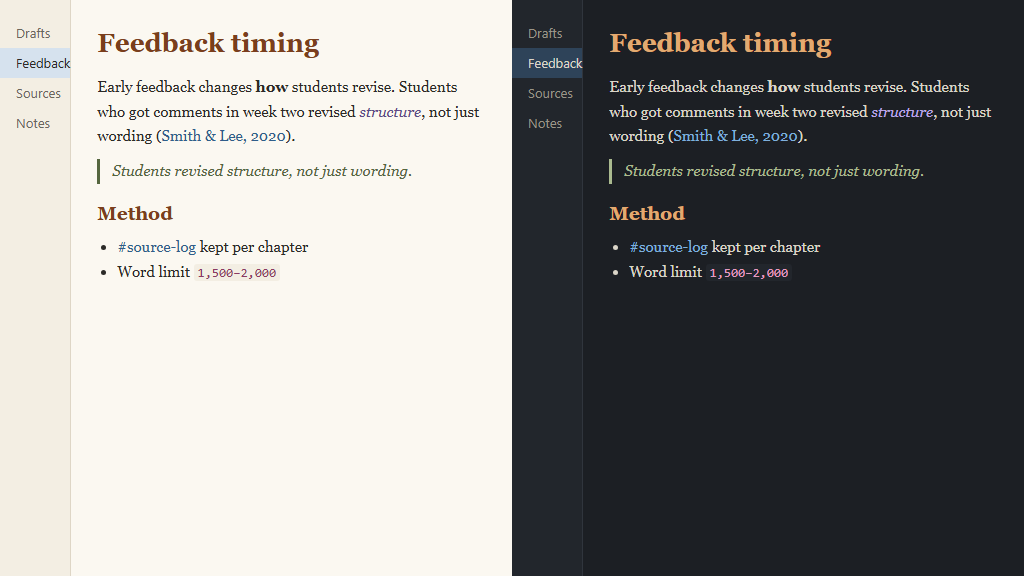
Plagx Writer: light and dark

Features

  • Plagx Paper (light) and Plagx Ink (dark), following Obsidian's light/dark setting
  • Serif reading font (Charter, Georgia) with a comfortable line height and line width
  • Warm headings, italic quotes, and links that underline only on hover
  • Dimmed Markdown syntax (#, *, >) in Live Preview and Source mode
  • All text colours meet WCAG AA contrast (4.5:1 or more)
  • Your own font size and font choices still apply

Install

From Obsidian: Settings → Appearance → Themes → Manage → search for Plagx Writer → Install and use.

Manually: copy theme.css and manifest.json into <your vault>/.obsidian/themes/Plagx Writer/, then choose Plagx Writer in Settings → Appearance → Themes.

Switch between light and dark in Settings → Appearance → Base color scheme.

Matching themes

The same colours are available for VS Code: Plagx Writer Theme.

Building from source

theme.css is generated from tokens/colors.json, which is shared with the other Plagx Writer themes:

node build.mjs

License

MIT © 2026 Plagiarism Checker X

HealthExcellent
ReviewPassed
About
Write long-form documents with calm light and dark themes tuned for essays, theses, research notes, and journals. Use a readable serif font, warm headings, quiet links that underline on hover, and dimmed Markdown syntax; all text colors meet WCAG AA contrast.
Details
Current version
0.1.0
Last updated
2 weeks ago
Created
2 weeks ago
Updates
1 release
Downloads
126
License
MIT
Report bugRequest featureReport theme
Author
Plagiarism Checker XPlagiarism Checker Xplagiarismcheckerx
plagiarismcheckerx.com
GitHubplagiarismcheckerx
plagcheckerx
facebook.com
plagiarismcheckerx
XPlagiarismX
  1. Community
  2. Themes
  3. Plagx Writer

Related themes

Minimal screenshot

Minimal

Wasp screenshot

Wasp

Border screenshot

Border

Things screenshot

Things

GitHub Theme screenshot

GitHub Theme

Catppuccin screenshot

Catppuccin

LYT Mode screenshot

LYT Mode

Cupertino screenshot

Cupertino

Blue Topaz screenshot

Blue Topaz

Shimmering Focus screenshot

Shimmering Focus