Foreglow
 William281 downloads
Foreglow Theme (includes Foreglow, Afterglow, Alpenglow, and Airglow)
- Overview
- Scorecard
- Updates1
Foreglow Theme for Obsidian
Previews
🌃 Foreglow
🌇 Afterglow
🌉 Alpenglow
🌌 Airglow
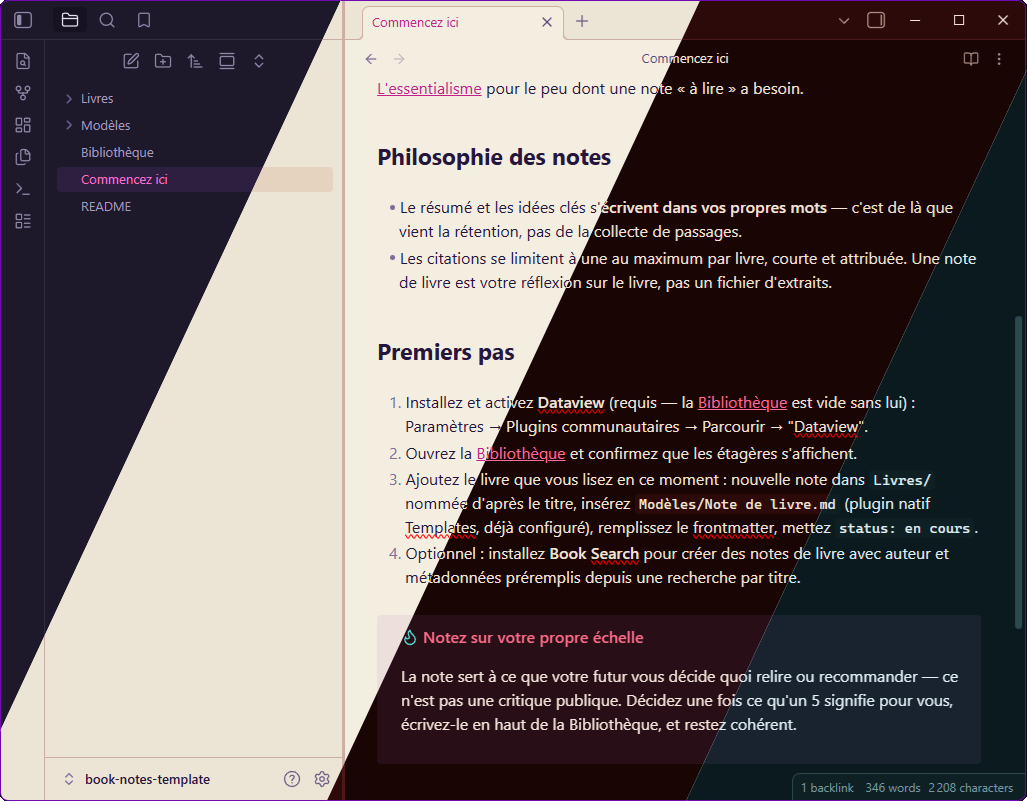
A twilight-inspired theme for Obsidian, with four variants: Foreglow (dark-dawn), Afterglow (light-dusk), Alpenglow (rubescent), and Airglow (auroral).
Structure
Contains a single Obsidian theme (one manifest.json + theme.css at the
repo root) that handles all four color variants in one package:
- Foreglow (dark) and Afterglow (light) follow Obsidian's own Appearance → Base color scheme toggle automatically — no extra setup.
- Alpenglow and Airglow are alternate dark flavors, selectable via the Style Settings community plugin (installed separately). Once installed, go to Settings → Style Settings → Foreglow → "Alternate dark flavor" to switch.
This one-theme approach is also what makes the theme eligible for
Obsidian's official Community Themes directory in the first place —
submissions there are one GitHub repo per theme, with manifest.json and
theme.css at the repo root (see Publishing below); there's
no way to register four separately-named themes from one repo.
Repository Layout
.
├── manifest.json
├── theme.css
└── foreglow-pack-obsidian-alt.png   # marketplace screenshot
Installation
Manual
- Open Obsidian Settings → Appearance → Themes → click "Manage" (or the
folder icon) to open your vault's theme folder — this is
<vault>/.obsidian/themes/ - Create a folder there named
Foreglowand copymanifest.jsonandtheme.cssfrom this repo into it - Restart Obsidian or reload it (
Ctrl/Cmd+R) - Back in Settings → Appearance → Themes, select Foreglow
From the Community Themes directory
Search for Foreglow in Settings → Appearance → Themes → "Manage" → browse.
Reaching Alpenglow and Airglow
Install the Style Settings community plugin, then go to Settings → Style Settings → Foreglow → "Alternate dark flavor" and pick Alpenglow or Airglow. Leave it unset to use the default Foreglow/Afterglow pair.
Color Palette
Foreglow (Dark)
| Token | Hex | Usage |
|---|---|---|
| Background | #161221 |
Main background |
| Current Line | #281F3D |
Line highlight |
| Selection | #3D2556 |
Text selection |
| Foreground | #E8E3F2 |
Default text |
| Comment | #736699 |
Comments |
| Keyword | #CB81E4 |
Keywords |
| String | #ED9F82 |
Strings |
| Function | #EC93BF |
Functions |
| Number | #EFBF6C |
Numbers |
| Type | #75C6D7 |
Classes, types |
| Variable | #C7BCE6 |
Variables |
| Accent | #F471C8 |
Cursor, accent |
Afterglow (Light)
| Token | Hex | Usage |
|---|---|---|
| Background | #F4EEE1 |
Main background |
| Current Line | #E6D6C1 |
Line highlight |
| Selection | #DFC2AA |
Text selection |
| Foreground | #24163B |
Default text |
| Comment | #7A6F9B |
Comments |
| Keyword | #8930A6 |
Keywords |
| String | #B64820 |
Strings |
| Function | #AE296B |
Functions |
| Number | #955F0F |
Numbers |
| Type | #1D7187 |
Classes, types |
| Variable | #4D3781 |
Variables |
| Accent | #C3228E |
Cursor, accent |
Alpenglow (Rubescent)
| Token | Hex | Usage |
|---|---|---|
| Background | #1A0505 |
Main background |
| Current Line | #3D1212 |
Line highlight |
| Selection | #5A1E1E |
Text selection |
| Foreground | #F5E6DC |
Default text |
| Comment | #8B6B6B |
Comments |
| Keyword | #FF6B8A |
Keywords |
| String | #FF9F6C |
Strings |
| Function | #FFB3C6 |
Functions |
| Number | #FF7E67 |
Numbers |
| Type | #E85D75 |
Classes, types |
| Variable | #FFA07A |
Variables |
| Accent | #FF6B9D |
Cursor, accent |
Airglow (Auroral)
| Token | Hex | Usage |
|---|---|---|
| Background | #0A1A1F |
Main background |
| Current Line | #0F2024 |
Line highlight |
| Selection | #162E34 |
Text selection |
| Foreground | #E0F0F5 |
Default text |
| Comment | #5A8A90 |
Comments |
| Keyword | #2EE8C8 |
Keywords |
| String | #7DD8A8 |
Strings |
| Function | #C8A0E8 |
Functions |
| Number | #D4B870 |
Numbers |
| Type | #4AA8D0 |
Classes, types |
| Variable | #8BC4D4 |
Variables |
| Accent | #2EE8C8 |
Cursor, accent |
License
MIT © Foreglow