
- Overview
- Scorecard
- Updates3
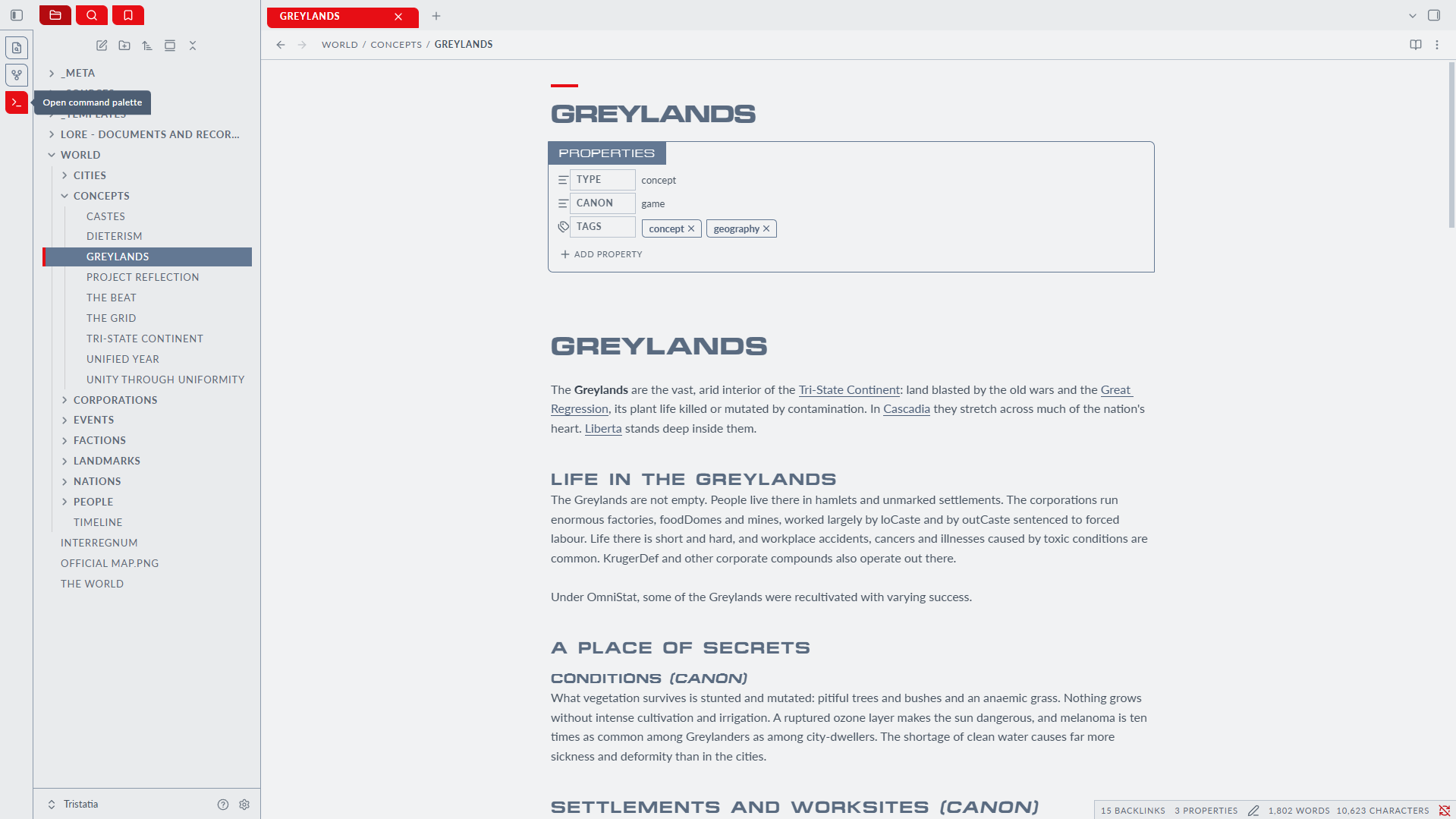
An Obsidian theme inspired by the interface of Mirror's Edge Catalyst: concrete greys, slate panels, and the solid red chips of the in-game menus.
Cascadian is a fan-made theme. It is not affiliated with, endorsed by, or connected to Electronic Arts or DICE. Mirror's Edge is a trademark of Electronic Arts Inc.
Features
- Light and dark modes. Light mode follows the in-game Intel and Upgrade screens; dark mode follows the game's charcoal data screens.
- Game-style shapes. Panels, tabs, buttons and chips are square, with the top-right and bottom-left corners rounded.
- Red chip tabs. The active tab is solid red with white text, like the top menu in-game. Sidebar tabs are solid red chips.
- Panel callouts. Every callout has a slate outline and a solid header strip, like the COMBAT and MOVEMENT panels. A folded callout shows only the outline.
- Lore callouts for worldbuilding vaults:
> [!infobox]— a stat box titled AT A GLANCE. Use> [!infobox|title] Your Titleto keep your own title.> [!intel](red),> [!runner](cyan)- Corporate callouts in their in-game colours:
> [!kruger](KrugerSec blue),> [!elysium](Elysium green),> [!callaghan](Callaghan yellow)
- Solid highlights. Highlights, selected text and search matches are solid red with white text. No pastels. Second colours come from the game's corporations (KrugerSec blue, which is cyan in dark mode, Elysium green and Callaghan yellow) and are used only where a second colour is needed.
- Game-style settings. Settings rows are outlined panels, toggles are square boxes that fill when on, and sliders are a thin line with a solid bar.
- Missing links read like
[ NOT FOUND ]. Links to notes that don't exist yet show in faint brackets. - Uppercase interface in Lato, extended display headings, red list markers, and a red marker above every note title.
- Every part styled: editor, reading view, properties, tables, code, checkboxes, embeds, hover previews, menus, command palette, settings, graph view, canvas, Bases, PDF viewer, mobile and print.
- Smooth text on Windows. Greyscale smoothing removes ClearType's coloured fringes on the wide display fonts. You can switch it off.
Options
Install the Style Settings plugin, then open Settings › Style Settings › Cascadian to change:
- Accent red and slate colours (light and dark separately)
- Corner rounding
- Heading weight (bold, or the thinner in-game weight)
- Smaller headings in Regular or Bold extended
- H1 font
- Normal-case interface (turns off ALL CAPS)
- Property value size
- Text smoothing (notes only, or the whole interface)
- Title marker, H1 rule,
[ NOT FOUND ]brackets, ribbon chips, infobox title
Fonts
| Use | Font | Notes |
|---|---|---|
| Headings | MicroExtendFLF (Casady & Greene) | embedded |
| Interface and body | Lato (Łukasz Dziedzic) | embedded, SIL Open Font License 1.1 |
| H1 and note titles | Microgramma D Extended Bold (URW) | embedded |
Installation
From Obsidian: Settings › Appearance › Themes › Manage, search for Cascadian, then Install and use.
Manually:
- Download
manifest.jsonandtheme.cssfrom the latest release. - Put both in
<your vault>/.obsidian/themes/Cascadian/. The folder name must be exactlyCascadian. - Restart Obsidian, then pick Cascadian under Settings › Appearance › Themes.
Licence
The theme's CSS is released under the MIT licence (see LICENSE). The embedded fonts keep their own terms, listed in FONT-LICENSES.md.
HealthExcellent
ReviewCaution
About
Apply a Mirror's Edge Catalyst–inspired interface with concrete greys, slate panels and solid red chip tabs in light and dark modes. Use square panels with top-right and bottom-left rounded corners, game-style callouts and solid red highlights with corporate accent colors. Style every UI area from editor and reading view to graph, canvas and mobile for a cohesive, menu-like appearance.Details
Current version
1.0.2
Last updated
6 hours ago
Created
7 hours ago
Updates
3 releases
License
MIT