
- Overview
- Scorecard
- Updates3
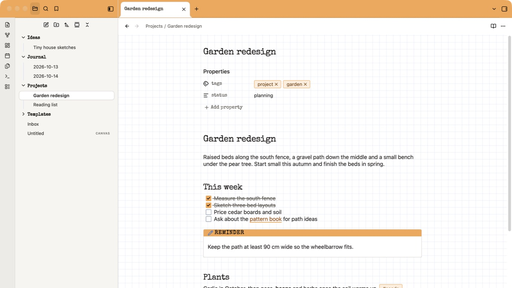
A light Obsidian theme modeled on the classic orange-covered French graph pad: an orange binding across the top with a tear-off perforation, extra-white paper, and a pale blue grid your text sits on.
Features
- Graph paper that lines up with your text. In editing view the ruling is anchored to your first line of text, so every line sits on the paper like handwriting.
- Four papers. Grid by default, plus lined, dots and blank, chosen per note.
- Orange binding. The top bar is the pad's cover color, with bold black labels and a dotted tear line.
- Typewriter headings. Special Elite for titles, headings, callout labels and property names; your system font for everything else. The whole theme is under 100 KB.
- Notebook details. Callouts as white cards with a colored label strip, tags like small stamps, orange checkboxes, and the active note lifted off the stack like a sheet.
- Light only. Dark mode shows the same paper.
Install
From Obsidian: Settings → Appearance → Themes → Manage, search for Bloc, then select Install and use.
Manually: download theme.css and manifest.json from the latest release and put them in a folder named Bloc inside your vault's .obsidian/themes folder. Then pick Bloc under Settings → Appearance → Themes.
Requires Obsidian 1.14 or later.
Change the paper for one note
Every note is graph paper. To change a single note, add a cssclasses property:
---
cssclasses: lined
---
| Value | Paper |
|---|---|
lined |
Ruled lines |
dots |
Dot grid |
blank |
Plain paper |
roomy |
Text on every second square (combine it, e.g. [lined, roomy]) |
Tip: make one tiny template per paper (a note containing only that property) and use Templates: Insert template from the command palette. Give each template a hotkey and you can switch paper with one keystroke.
Options
Install the Style Settings plugin to change Bloc's defaults under Settings → Style Settings → Bloc.
| Option | Choices |
|---|---|
| Square size | 12 to 28px (19 to 20px is close to 5 mm) |
| Roomier text | Text on every second square, for all notes |
| Ruling color and strength | Any color, 10 to 100% |
| Cover color | Any color. Keep it light, since it sits behind black text. |
| Top band height | 40 to 72px |
| Tear line | On or off |
Known limits
- Text after a callout, embed or image can sit slightly off the lines, because those blocks have their own heights.
- Reading view shows the grid as page texture without exact line alignment.
- Bloc is a light theme: dark mode uses the same paper.
License
Bloc is released under the MIT License. The bundled Special Elite font by Astigmatic is licensed under the Apache License 2.0. See FONT-LICENSE.txt.
Bloc is an independent project and is not affiliated with any notebook or stationery brand.