
- Overview
- Scorecard
- Updates1
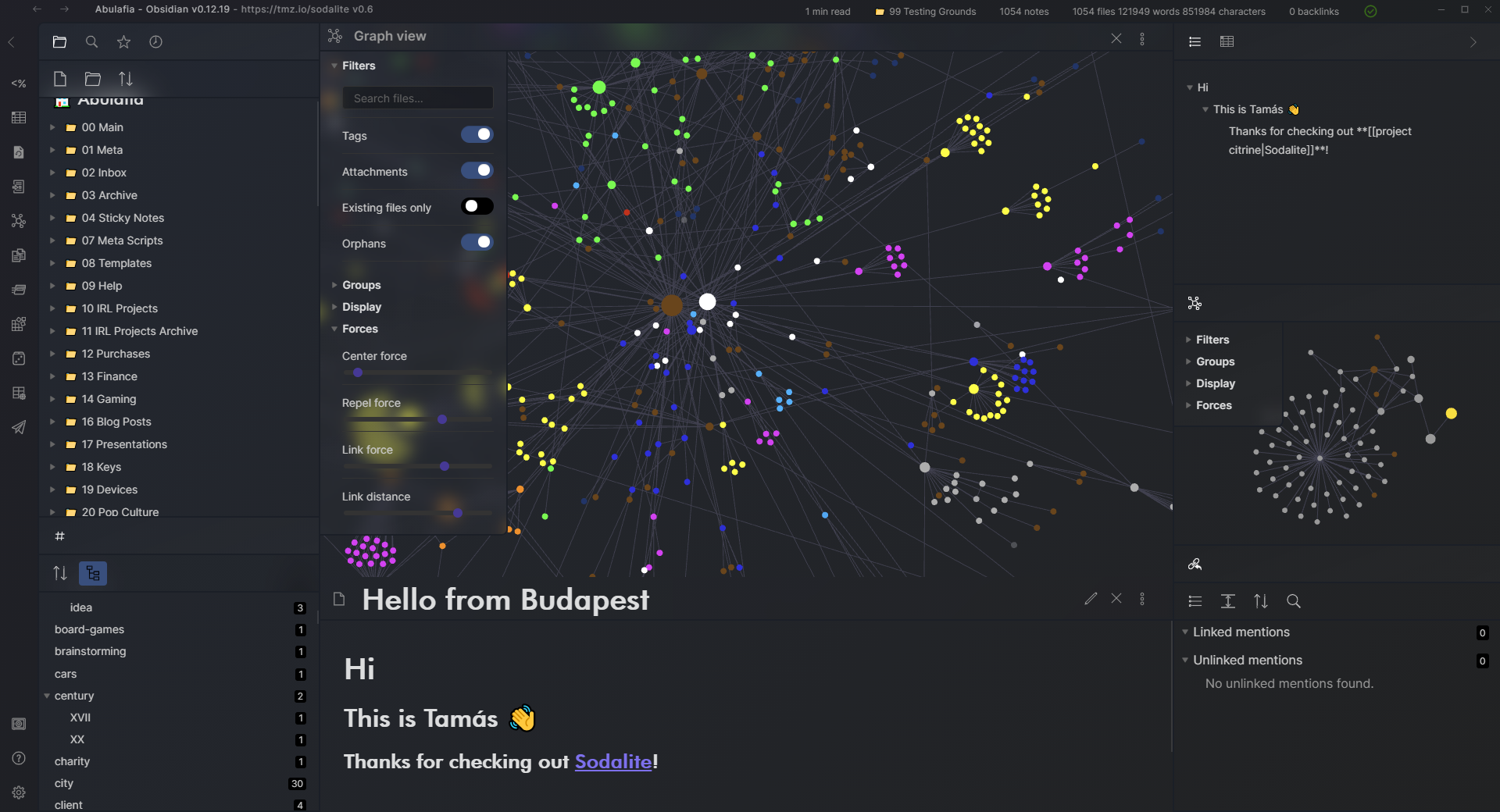
This is the relatively opinionated Sodalite theme for Obsidian. Inspired by in part some Windows 10 and 11 design ideas (Fluent, Mica). The theme only supports dark mode, as of v0.1.
Tested with Obsidian v1.14.5.
I've made several other useful snippets and tidbits, these are available at my obsidian-toolkit repo: https://github.com/tomzorz/obsidian-toolkit
Relatively Opinionated?
Unusual title formatting
As Obsidian prominently features the note title in a separate title-bar outside of the document itself, this theme scales that title up to H1 size.
Unusual status bar placement
To save on the typically limited vertical screen space, the theme moves the status bar into the right side of the title bar.
Installation
In Obsidian, navigate to Settings > Appearance > Themes - you should be able to find it in the list there.
Alternatively, download theme.css and manifest.json into your vault's .obsidian/themes/Sodalite folder and select it under Settings > Appearance.
Recommended Settings
Sodalite is optimized for the following appearance settings:
- appearance > advanced > show inline title OFF
- appearance > advanced > native menus OFF
- appearance > advanced > show tab title bar ON
- appearance > advanced > window frame style Hidden
Snippets
Sodalite offers CSS snippets to alter certain smaller aspects of the theme.
| File name | Description |
|---|---|
| content-max-width-1100.css | Limits maximum width of content to 1100 px and center aligns it. |
| content-max-width-900.css | Limits maximum width of content to 900 px and center aligns it. |
| content-max-width-700.css | Limits maximum width of content to 700 px and center aligns it. |
These can be found in the snippets folder of the repository.
Changelog
0.10.0
- fixed the theme for Obsidian 1.14: title bar text, pane gradients, sidebar and tab backgrounds, the rounded corner with a collapsed sidebar, and the settings window
- the theme now sets Obsidian's own CSS variables instead of overriding its selectors, and uses no
!important - removed styles for UI that Obsidian no longer has (CodeMirror 5, the old frontmatter box, the Sliding Panes plugin, pre-1.0 tabs)
- note content has the same top margin in editing and reading view, and properties sit closer to the header and the text below them
- the frosted floating header covers notes, bases and the graph view; other views such as canvas and PDF get a plain header
- the note title header has no bottom border, so it no longer ends at a different line than the sidebar toolbars, and the title sits level with the header buttons
- sidebar toolbar buttons are vertically centered, and the toolbar grows with its search filter instead of overlapping the list
- the backlinks toolbar floats as frosted glass like the other sidebar toolbars
- sidebar panes have the same inset on top as on the sides
- icons are a notch larger than Obsidian's defaults
- the vault switcher at the bottom of the left sidebar blends in with the panes
- the modal close button stays inside the modal
- the title strip is no longer added on mobile
- the window title and theme link show only in the main window; the settings window keeps a plain title bar
- note tabs have full-height separators, and a hovered tab tints as a whole instead of showing a rounded inner box and an outline
- requires Obsidian 1.14.5 or newer
0.9.0
- added support for bases
- reworked theme to use css variables consistently
0.8.4
- fixed file explorer header blur missing while there's an active file highlight #24
- fixed left and right sidebar buttons on mac os
0.8.3
- fixed "All Properties" and "Outline" blur-behind effects #25
- fixed active file highlight effect missing #26
- minor tweaks to file explorer styles
0.8.2
- fixed the previous patch by forcing it to apply
0.8.1
- fixed titlebar drag issue #8
0.8.0
- remove workaround from earlier to re-fix search area #12
- added theming for callouts #9
- file tree highlighted item no longer flips between regular/bold font-weight on hover #14
- improved styling of "special" files in the file tree, e.g. canvas, images #15
- made tooltips more legible #18
- fixed weird padding on right sidebar collapse button when collapsed #17
- graph view settings are small now when closed #16
- added recommended appearance settings to readme #19
- fixed scroll-below on new bookmarks plugin #20
0.7.1
- fixed missing scrollbars in settings #5
- fixed broken search field button #6
0.7.0
- Updated theme for Obsidian v1.0 and above
0.6.5
- Fixed foldable headings gutter background
0.6.4
- Fixed scroll under styling for the new editor / live preview
v0.6.3
- 2nd attempt at Mac title bar fixes
v0.6.2
- Attempted to fix the title bar on Mac
- Added a fade in animation to the sync-working indicator animation, so it only shows up if the sync is taking longer than 0.5s
- Fixed a dark background column in edit mode when collapsing headers was turned on
v0.6.1
- Moved modal close button to the right
v0.6.0
- Updated screenshot
- Added sync working title bar animation
- Adjusted sync icon size
- Fixed a bug with multiple vertically split middle views
v0.5.2
- Added a bit of extra padding on the bottom of the frontmatter
v0.5.1
- Adjusted suggestion container styling to match other popups
- Fixed selected text styling to be more visible
- Matched edit mode tag colors to preview mode tag colors
v0.5.0
- Added styling for button hover state
- Added stying for tooltips
- Added styling for notices
- Consolidated the active style for vertical-tabs with the file listing
- Fixed some mobile issues (middle area button paddings, graph controls positioning)
v0.4.0
- Added styling for the prompt
- Added styling for buttons
- Fixed graph line colors
v0.3.0
- Added styling for modals
- Fixed various issues on mobiles
v0.2.0
- Added support for the Sliding Panes plugin
v0.1.3
- Fixed the graph controls first option being hidden if the graph was open in the middle
v0.1.2
- Styled right-click menu.
- Fixed status-bar covering up the back-fwd buttons
- Status bar automatically disappears when window is less than 1200px wide
v0.1.1
- Fixed css filename for the community listing.
v0.1
- Initial release.