
- Overview
- Scorecard
- Updates51
以墨与纸为语言的 Obsidian 主题 — 白纸为心,黛青为框。
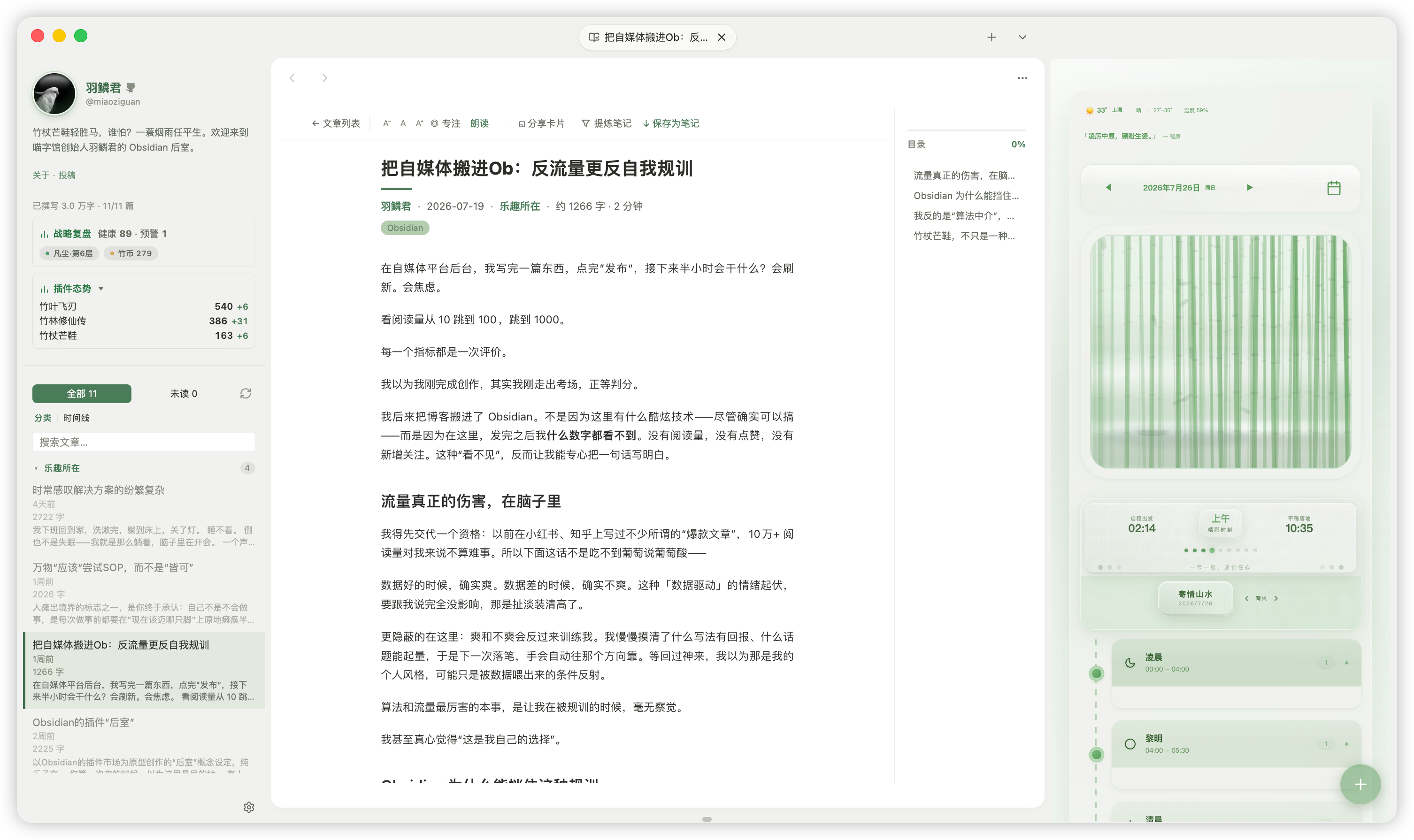
设计理念
- 墨与纸:动效取法「卷轴舒展」—— 轻微的过冲、从容的节奏,绝不仓促(品牌曲线
cubic-bezier(0.34, 1.56, 0.64, 1))。 - 白纸为心、黛青为框:编辑区始终纯净如纸,侧栏与面板承载意境色调。
- 字体优先 CJK 可读:
SF Pro→PingFang SC/Hiragino Sans GB/Microsoft YaHei,在中文与拉丁文之间取得平衡。 - 适度圆角与密度:利落而不冰冷。
核心特性
- 10 套东方意境配色:通过 Style Settings 一键切换,明/暗双基底通用;配色由单一数据源生成,跨平台外观完全一致。
- 默认「宣纸竹青」调色板:明亮清爽的浅色基底,配以竹青点缀;深色模式作为可选基底,而非主题性格本身。
- 平台细节自适应:在 macOS 呈现 Cupertino 细节 —— 红绿灯窗口控件、标签头装饰、无框布局;其他平台回退为中性跨平台外观。形状有细微的 mac ↔ 非 mac 之分,颜色 100% 由意境驱动、与平台无关。
- Style Settings 深度可调:意境配色、侧栏与面板展开、标签页样式、状态栏、图片缩放、链接样式、动画速度、字号与图标大小等 22 项开关与滑块。
- 无障碍:默认调色板与每一套意境配色均通过 WCAG 对比度校验;统一的
:focus-visible焦点环;尊重prefers-reduced-motion与prefers-contrast。 - 多脚本友好:中文、英文、日文、韩文及其他书写系统同样适用。
意境配色一览
| Class | 名称 | 基调 |
|---|---|---|
none |
竹影 · 宣纸竹青 | 竹青强调 · 宣纸白画布 — 克制的原点 |
cn-yanzhi |
胭脂 · 米色朱砂 | 朱砂红强调 · 米色侧栏 — 温润古典 |
cn-qinglu |
青绿 · 千里江山 | 石青绿强调 · 青灰侧栏 — 清新生机 |
cn-liujin |
鎏金 · 秋棠金辉 | 金辉强调 · 秋棠侧栏 — 温暖厚重 |
cn-tianqing |
天青 · 雨过天青 | 天青强调 · 天灰侧栏 — 清透宁静 |
cn-daizi |
黛紫 · 紫烟幽兰 | 紫罗兰强调 · 紫灰侧栏 — 优雅静谧 |
cn-haitang |
海棠 · 粉颊红晕 | 海棠粉强调 · 粉灰侧栏 — 温柔少女 |
cn-bohe |
薄荷 · 清凉薄荷 | 薄荷绿强调 · 浅绿侧栏 — 清爽宜人 |
cn-hupo |
琥珀 · 蜜珀流光 | 琥珀橙强调 · 暖褐侧栏 — 醇厚温暖 |
cn-dianlan |
靛蓝 · 群青深蓝 | 靛蓝强调 · 蓝灰侧栏 — 沉稳专业 |
cn-songhua |
松花 · 橄榄新绿 | 橄榄绿强调 · 绿灰侧栏 — 自然朴实 |
安装
主题已提交至 Obsidian 官方社区主题列表。在 Obsidian 中:
- 设置 → 外观 → 主题 → 管理 → 社区主题浏览
- 搜索 Bamboo China
- 点击「使用」,并在 Style Settings 插件中按需微调
自定义
大部分视觉调整都可通过 Style Settings(需安装社区插件 Style Settings)完成,无需改代码:
- 意境配色:切换 10 套东方意境主题
- 侧栏 / 面板:悬停功能区、侧边栏标签、状态栏
- 标签页与链接:左对齐标签页、简约标签、链接样式
- 字体与密度:界面字号、标准字号、图标大小、行间距
- 无障碍:减少动画、标准字号、高亮链接颜色
仓库结构
src/                  主题源码(Sass)
  app/                全局 token 与基础组件样式
  elements/           Bamboo China 表层细化
  color-schemes/     默认调色板 + 10 套意境配色(生成)
  layouts/            布局 token
  features/          可选特性模块
scripts/             构建与护栏脚本(mood 生成、对比度校验、体积校验)
theme.css            编译产物
manifest.json        主题清单
versions.json        版本映射
构建:npm run build(生成 mood token → 编译压缩 CSS → 校验 mood 一致性)。
基于 / 鸣谢
本主题派生自 Cupertino 主题(作者 aaaaalexis,基于 MIT 许可证)。原主题的版权声明随附于 LICENSE。
许可
MIT © 2025 aaaaalexis, © 2026 羽鳞君
English
Design Philosophy
- Ink & Paper: Motion follows the rhythm of a scroll unfurling — gentle overshoot, unhurried cadence (signature curve
cubic-bezier(0.34, 1.56, 0.64, 1)). - Rice-Paper Heart, Indigo Frame: The editor canvas stays clean as paper; sidebars and panels carry the mood-tinted accent.
- CJK-First Typography:
SF Pro→PingFang SC/Hiragino Sans GB/Microsoft YaHei, balanced for both Chinese and Latin scripts. - Thoughtful Radius & Density: Crisp without feeling cold.
Core Features
- 10 Eastern Mood Palettes: Switch via Style Settings; shared light/dark skeleton, generated from a single data source for cross-platform consistency.
- Default "Rice-Paper Bamboo-Green" Palette: Bright, clean light base with bamboo-green accents. Dark mode is an optional base, not the theme's identity.
- Platform-Adaptive Details: macOS gets Cupertino touches — traffic-light window controls, tab-bar ornament, frameless layout. Other platforms fall back to a neutral cross-platform look. Subtle mac ↔ non-mac shape differences; colors are 100% mood-driven and platform-agnostic.
- Rich Style Settings: 13 class toggles + 9 sliders covering mood palettes, sidebar/panel expansion, tab style, image zoom, link styling, animation speed, font size, and icon size.
- Accessibility First: Every palette passes WCAG contrast validation; unified
:focus-visiblefocus ring; respectsprefers-reduced-motionandprefers-contrast. - Multi-Script Friendly: Works for Chinese, English, Japanese, Korean, and other writing systems.
Installation
Available on the Obsidian Community Theme Store:
- Settings → Appearance → Themes → Manage → Browse Community Themes
- Search Bamboo China
- Click "Use" and fine-tune via the Style Settings plugin
Customization via Style Settings
- Mood Palette: 10 Eastern mood themes
- Sidebar & Panels: Hover ribbon, sidebar tabs, status bar
- Tabs & Links: Left-aligned tabs, unstyled tags, link styles
- Typography & Density: UI font size, standard font size, icon size, line height
- Accessibility: Reduce motion, standard font size, highlight link colors
Credits
Derived from Cupertino by aaaaalexis (MIT). Original copyright notice included in LICENSE.
License
MIT © 2025 aaaaalexis, © 2026 羽鳞君
HealthExcellent
ReviewSatisfactory
About
Apply a restrained paper-and-ink look with a pure "xuan zhi" editor canvas and ink-toned frames for sidebars and panels. Switch among 16 named East-Asian color moods on light or dark bases and adopt CJK-first typography with platform-aware details. Ensure WCAG-checked contrast and respect for reduced motion for accessible viewing.Details
Current version
3.2.69
Last updated
6 hours ago
Created
2 weeks ago
Updates
51 releases
License
MIT