AbsoluteGruv
 kkyrusobad12k downloads
Obsidian theme as it exists in my `.obsidian` folder.
- Overview
- Scorecard
- Updates4
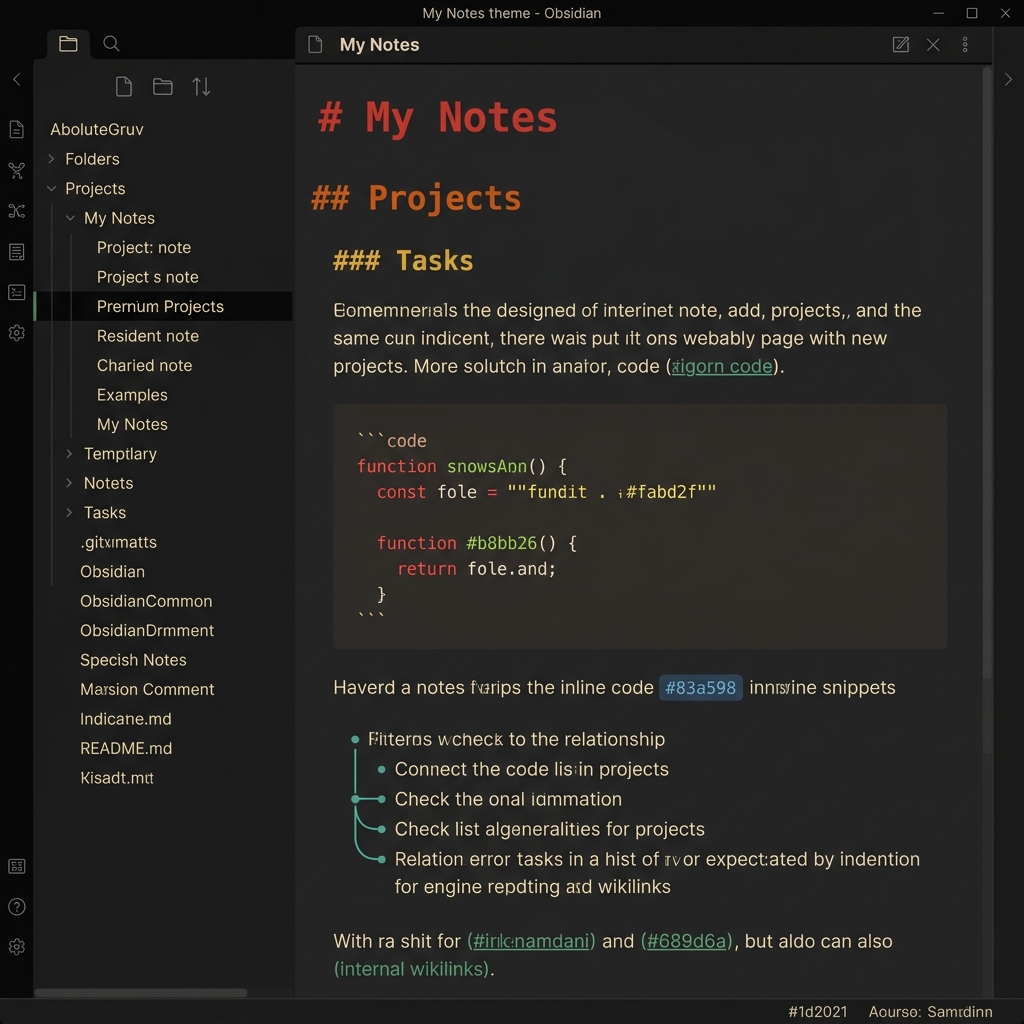
An Obsidian theme with 3 Gruvbox palette variants — warm, retro-groove colours that are easy on the eyes.
Palette credit: morhetz/gruvbox and sainnhe/gruvbox-material
Screenshot
Features
- 3 palette variants — switch via Style Settings (Original / Hybrid / Strict Material)
- Rainbow headings: H1→red, H2→orange, H3→yellow, H4→green, H5→aqua, H6→purple
- Full syntax highlighting for code blocks (keywords, strings, functions, operators…)
- Sidebar tabs always visible by default (auto-hide optional via Style Settings)
- Bullet relationship lines
- Clean, borderless UI
- Compatible with Style Settings plugin
Installation
Via Community Themes (recommended)
Settings → Appearance → Themes → Browse → search AbsoluteGruv
Manual
- Download
obsidian.cssandmanifest.json - Create folder
<vault>/.obsidian/themes/AbsoluteGruv/ - Place both files inside
- Settings → Appearance → Themes → select AbsoluteGruv
Style Settings options
Install the Style Settings plugin to customise:
| Option | Default | Description |
|---|---|---|
| Palette Variant | Original Gruvbox | Switch between Original, Hybrid (soft bg), or Strict Material |
| Auto-hide Sidebar Tabs | off | Collapse tabs to thin strip, appear on hover |
| Re-enable Title Bar | off | Show window title bar |
| Re-enable Scrollbars | off | Show scrollbars |
| Re-enable collapsed pane borders | off | Show borders on collapsed panes |
| Re-enable status bar border | off | Show status bar top border |
| Left-align images and embeds | off | Left-align instead of centre |
Colour Palette
Dark
| Role | Original | Hybrid | Strict Material |
|---|---|---|---|
| Background (base) | #1d2021 |
#32302f |
#32302f |
| Background (main) | #282828 |
#32302f |
#32302f |
| Surface | #3c3836 |
#3c3836 |
#3c3836 |
| Foreground | #ebdbb2 |
#ebdbb2 |
#d4be98 |
| Red | #fb4934 |
#fb4934 |
#ea6962 |
| Orange | #fe8019 |
#fe8019 |
#e78a4e |
| Yellow | #fabd2f |
#fabd2f |
#d8a657 |
| Green | #b8bb26 |
#b8bb26 |
#a9b665 |
| Aqua | #8ec07c |
#8ec07c |
#89b482 |
| Blue | #83a598 |
#83a598 |
#7daea3 |
| Purple | #d3869b |
#d3869b |
#d3869b |
Light
| Role | Original / Hybrid | Strict Material |
|---|---|---|
| Background | #fdf6e3 |
#fbf1c7 |
| Foreground | #5c6a72 |
#654735 |
| Red | #f85552 |
#c14a4a |
| Orange | #f57d26 |
#c35e0a |
| Yellow | #bf983d |
#b47109 |
| Green | #899c40 |
#6c782e |
| Aqua | #569d79 |
#4c7a5d |
| Blue | #5a93a2 |
#45707a |
| Purple | #b87b9d |
#945e80 |
License
MIT
HealthExcellent
ReviewSatisfactory
About
Apply a warm, dark color palette to Obsidian for comfortable writing and clear syntax highlighting. Keep UI elements distinct with balanced contrast and muted tones to reduce eye strain.Details
Current version
2.0.3
Last updated
4 weeks ago
Created
4 years ago
Updates
4 releases
Downloads
12k
License
MIT
Author