- Overview
- Scorecard
- Updates60
This plugin provides 2 customViews for navigating a zettelkasten using Luhmann-style IDs and key word indexes.
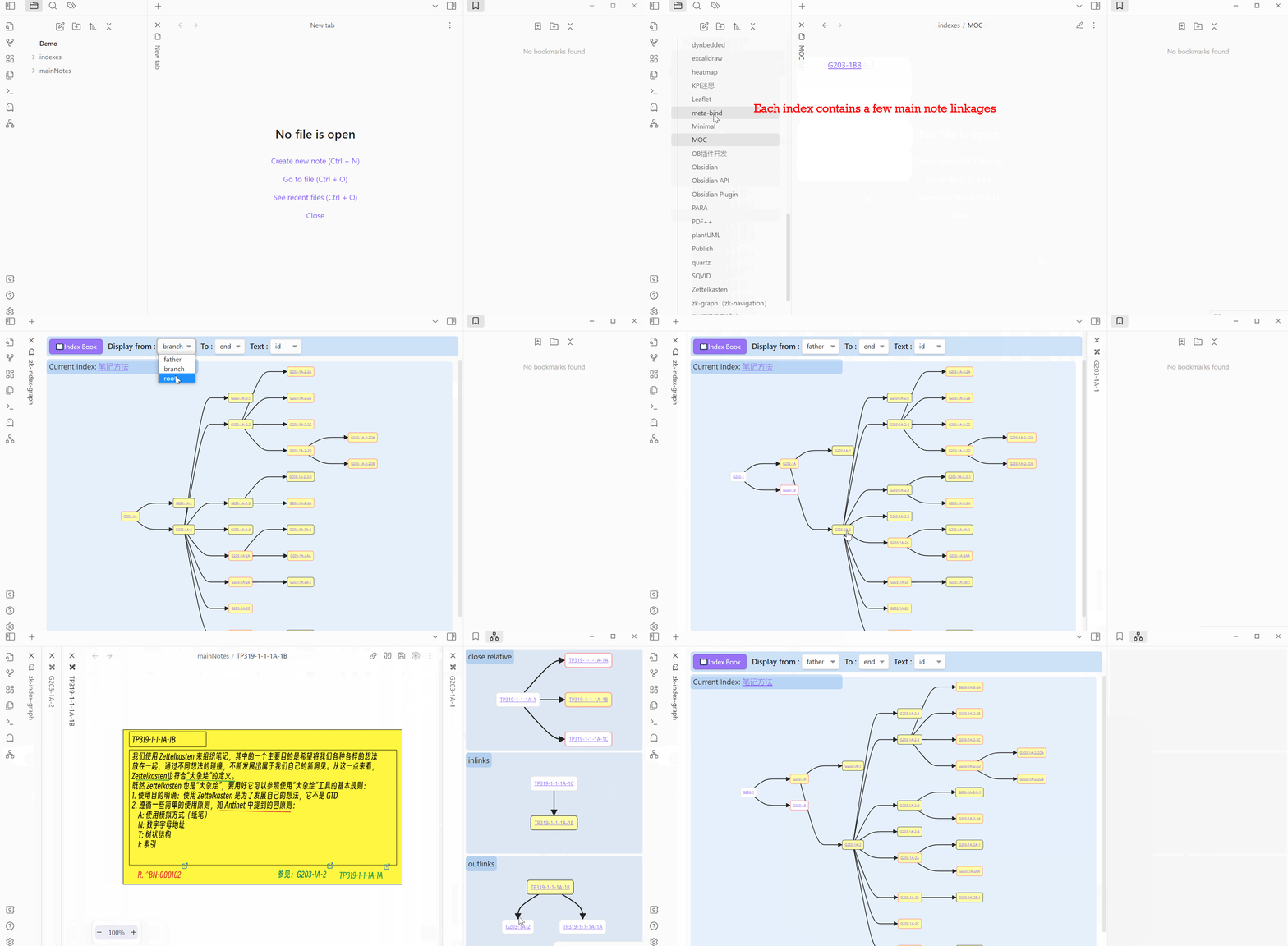
Main functionalities
- zk-index-graph-view
- zk-local-graph-view
Why I created this plugin?
[!important] What kind of graph view can be generated basing on Luhmann-style IDs and his keyword index
Many note-taking apps like Obsidian provide the graph view functionality to visualize the relation of notes. But this kind of graph view only bases on linkages/references between notes. It is hard to recognize a specific long COT(chain of thoughts)——the starting point, the path and the end. Different COTs crossing in the graph view makes it more chaotic.
Luhmann's zettelkasten is a
"combination of disorder and order, of clustering and unpredictable combinations emerging from ad hoc selection."
Johannes F.K. Schmidt, Niklas Luhmann’s Card Index: The Fabrication of Serendipity
The graph view, basing on linkages/references between notes, in some ways can represent the aspect of disorder of a zettelkasten. But what is the aspect of order?
"The absence of a fixed system of order and, in consequence, a table of contents turned the index into the key tool for using the file – how else should one be able to find certain notes again and thus gain access to the system of references? Not wanting to rely on pure chance requires being able to identify at least one point from which the respective web of references can be accessed. This is the purpose of the keyword index."
Johannes F.K. Schmidt, Niklas Luhmann’s Card Index: The Fabrication of Serendipity
Base on my understanding, the aspect of order in Luhmann's zettelkasten is composed of his note IDs(folgezettel) and keyword index(register).
As so far, I don't find any note-taking apps or plugins provide the graph view functionality basing on Luhmann-style IDs and his keyword index——And this is the reason why I created this plugin.
This plugin provides a different graph view to visualize and navigate a zettelkasten with Luhmann-style IDs and his keyword index. I think this is the real Luhmann way to retrive thoughts and navigate notes in a digital zettelkasten.
Why Mermaid?
Because Obsidian supports Mermaid.js natively.
This plugin uses Obsidian API: loadMermaid() to generate graphs and uses svg-pan-zoom for panning and zooming mermaid graphs.
Prerequisites
Luhmann-style IDs. below style IDs are supported by this plugin:
- 100% Luhmann IDs: such as 21/3a1p5c4aA11 , 12.5.1. (more detials please refer to Niklas Luhmann-Archiv)
- Folgezettel: such as 13.8c1c1b3. (more detials please refer to How to Use Folgezettel in Your Zettelkasten)
- Antinet: such as 3306/2A/12. (more detials please refer to Introducing the Antinet Zettelkasten)
- (As '/' is not allowed in file name on computer, it must be changed to '-', '.' or ',' if the file name is the note ID of your main notes.)
Luhmann-style key word indexes.
- Each key word index contains a few notes (branch entrance). (more detials plase refer to Niklas Luhmann-Archiv)
- In this plugin, a valid key word index is a single file contains a few linkages of main notes.
ID field options
Below ID field options are supported by this plugin. You have to choose 1 option in the plugin settingTab.
- option 1: filename as note ID
- option 2: metadata as note ID
- option 3: prefix of filename as note ID
Plugin Settings
- Specify a folder location or/and a tag for main note files (mandatory)
- Specify a folder location for keyword index files(mandatory)
- Choose 1 option for your note's ID field.
- others settings(optional)
Installation
Settings > Community plugins > Community Plugins > Browse and search for Zettelkasten Navigation.
Support
如果您觉得这个插件有用,并希望支持其开发,您可以通过以下方式赞助我:微信,支付宝。感谢您的任何支持!
If you find this plugin useful and wish to support its development, you can do so through the following methods: WeChat, Alipay. Any amount of support is appreciated. Thank you!