Yunseul
 zaemyung623 downloads
Yunseul - sparkling ripples of clarity across your Obsidian vault. Chat with your notes using LM Studio or Claude Code.
- Overview
- Scorecard
- Updates6

Yunseul (윤슬)
Yunseul (윤슬) — Korean for sparkling ripples on the water. Where your notes catch the light: brilliant insights amidst a chaotic web of notes.
Chat with your Obsidian vault using a local OpenAI-compatible LLM server (LM Studio, Ollama, llama.cpp server, vLLM, LocalAI) or the Claude Code CLI.
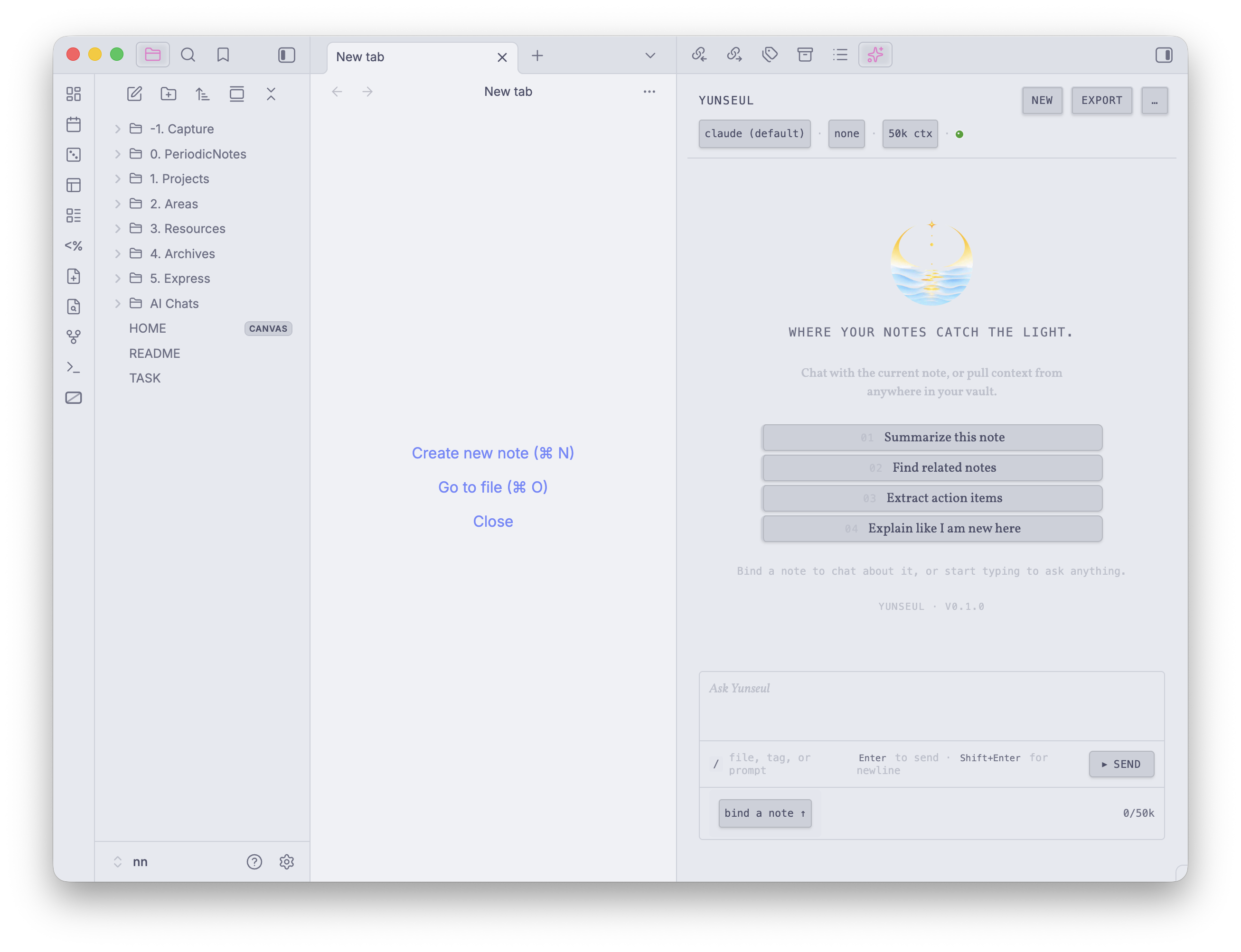
Status: Pre-1.0 — actively developed; expect breaking changes between versions.
What it does
- Two backends, your choice. Connect to a local LLM server (LM Studio, Ollama, llama.cpp, vLLM, LocalAI) for fully-offline chat, or ride your existing Claude Code subscription via the
claudeCLI subprocess. - Vault-aware retrieval. Optional on-device BM25 search pulls the most relevant notes for every question. A "Top retrieved sources" block under each reply shows what the model saw, with clickable wikilinks back to the originals.
- Tied to your current note. Each session binds to the active file, so Append always lands where you started — even if you switch notes mid-conversation.
- Streaming everything. Tokens appear as they're generated; Stop anytime; multi-turn conversations persist locally per session.
- Provider-aware diagnostics. "Test connection" and the offline banner tell you exactly what went wrong (no model loaded, CORS off,
claudenot on PATH, etc.) and how to fix it. - Safe by default. Sanitized streaming render, sanitized writes to disk, injection-guarded vault excerpts, secret-redacted debug output. External images and unsafe URL schemes in assistant output never silently fetch.
- Operator's Console aesthetic. Bubble-less, typographically driven, theme-aware. Plays well with Catppuccin, Things, Minimal, and stock Obsidian.
Providers
Yunseul ships two backends. The active one is selected under Settings → Yunseul → Provider.
LM Studio (and other OpenAI-compatible local servers)
Talks to any server that implements the OpenAI /chat/completions SSE protocol — LM Studio, Ollama, llama.cpp server, vLLM, LocalAI. Configure the base URL, API key (if your server requires one), and the model id in Settings → Yunseul. Everything runs on your machine: prompts, vault excerpts, and retrieved chunks never leave the host.
Claude Code subprocess
Spawns the local claude CLI binary. Yunseul does NOT manage an API key for this provider; it rides on your existing Claude Code authentication (Pro/Max OAuth, Anthropic Console, Bedrock, Vertex, etc.) as configured in your Claude Code install. Configure the binary path (optional — defaults to claude on PATH) and model in Settings → Yunseul → Provider: Claude Code subprocess. Writes (Edit/Write tools) are off by default; toggle "Allow writes" to let the assistant modify vault files.
Privacy & data flow
- LM Studio path: prompts, vault excerpts, and retrieved chunks stay on your machine. No network calls leave the host beyond the local server URL you configured.
- Claude Code path: prompts, vault excerpts, and retrieved chunks are sent to Anthropic via your authenticated
claudeCLI. See Anthropic's privacy policy: https://www.anthropic.com/legal/privacy - BM25 index stays in your vault at
<vault>/.yunseul/bm25-index.json. It is never uploaded by Yunseul itself; any sync service watching the vault will see it (see "Sync services" below). - Sessions persist locally at
<vault>/.obsidian/plugins/yunseul/sessions/<id>.json. - Environment variables are allowlist-filtered, not collected. The Claude Code subprocess inherits only a minimal allowlist (
PATH, locale, proxy vars, andCLAUDE_*/ANTHROPIC_*/AWS_*/GOOGLE_*/VERTEX_*auth vars the CLI needs); everything else — including allELECTRON_*internals — is stripped. Yunseul never reads hostname, username, or hardware identifiers, and no environment data leaves your machine. - Clipboard is write-only and user-initiated. The Copy buttons write chat text to the clipboard; Yunseul never reads from it.
- API keys for the LM Studio provider are stored in plain text in
<vault>/.obsidian/plugins/yunseul/data.json(Obsidian's standard plugin data location). - No telemetry, no analytics, no automatic network calls without an explicit user action (sending a message, clicking Test Connection, or building the vault index).
- Persisted assistant output is sanitized. When Append or Download writes assistant text to a vault note, external images,
data:URIs, Obsidian![[embed]]syntax, and unsafe link schemes are rewritten as bracketed placeholder text (e.g.,[blocked external image: host],[blocked data image],[embed stripped: target]). This applies to both Append-to-note and Download-as-Markdown paths, is independent of the in-chat "Allow external images" toggle, and cannot currently be disabled.
Installation
Community plugin store (recommended, when published)
- Open Settings → Community plugins in Obsidian.
- Turn Restricted mode off.
- Click Browse, search for "Yunseul", and install.
- Enable Yunseul.
Manual install
- Download
main.js,manifest.json, andstyles.cssfrom the latest release. - Create a folder at
<vault>/.obsidian/plugins/yunseul/and drop the three files into it. - In Obsidian: Settings → Community plugins → Restricted mode OFF → Yunseul.
Vault search & the on-disk index
When the "Enable vault search" toggle is on, Yunseul builds a BM25 inverted index over every markdown file in your vault. The index lives at:
<vault>/.yunseul/bm25-index.json
Notes on this file:
- It is stored as a single JSON document under the vault root (NOT inside
.obsidian/) so it survives plugin reinstall. - Size scales roughly with the total token count of the indexed bodies. A vault of 5,000 notes typically produces a 30-150 MB index; a vault of 50,000 notes can produce a multi-hundred-MB index.
- The file is rewritten atomically (
*.tmpsibling + rename) whenever an indexed note changes. The debounce window is 1.5 seconds.
Sync services
The index file lives under the vault root, so anything that watches the vault will see and potentially sync it. To exclude it:
- Obsidian Sync: Obsidian Sync ignores hidden files (paths starting with
.) by default, which covers.yunseul/. Verify in your sync settings. - iCloud (macOS): Append
.nosyncto the directory to opt out: rename.yunseulto.yunseul.nosync. Note this requires updating the path in the plugin code. - Syncthing: Add
.yunseul/to the folder's.stignorefile. - Dropbox / OneDrive / Google Drive: Most desktop clients do not provide per-folder ignore lists; consider moving your vault out of the synced folder if you don't want a multi-hundred-MB index uploaded.
- git: Add
.yunseul/to your vault's.gitignore.
Resetting the index
To remove the on-disk index, either:
- Open Settings → Yunseul → Vault search → Reset index, or
- Run the command "Reset vault index" from the command palette.
Both routes show a confirmation modal before deleting the file.
Contributing & building from source
See CONTRIBUTING.md for dev setup, code conventions, architecture overview, and how to add a provider or setting.
Support the work
Yunseul is built with care, in spare hours, by one person — alongside other small things that try to make a few minutes of someone's day a little brighter. If it's been useful to you, a coffee keeps the next small bright thing alive.

More small things at zaemyung.github.io.
License
MIT. See LICENSE.