Wisp
A small intelligence that follows you everywhere, for managing your Obsidian vault.
- Overview
- Scorecard
- Updates4

A small intelligence that follows you everywhere.
Wisp is a cross-platform, mobile-first AI assistant for Obsidian. It brings provider-backed chat, vault actions, voice input, and optional web search into an Obsidian workspace view.
The project is an early MVP. It is designed to run on Obsidian Mobile first and on Obsidian Desktop as a browser-safe compatibility target. Wisp does not provide model or search credits: you bring your own provider keys.
Core features
- Mobile-first AI chat inside Obsidian, with streaming Claude Messages API and OpenAI-compatible providers.
- Vault-aware assistance for listing, reading, searching, opening, and understanding notes, folders, metadata, links, recent notes, and the active note.
- Approved note editing: create, append, update, and exact-match edit operations always ask for confirmation before changing the vault.
- Image attachments from the composer: choose up to three images from the device album, save them to the configured attachment folder, and let an agent insert them into a note. Vision-capable providers can inspect the images; text-only providers can still use their Vault paths.
- Voice input through browser
MediaRecorder, with transcript review, using OpenAI-compatible, Deepgram, or Alibaba DashScope speech-to-text providers; plus real-time voice input with voice-activity detection and pause-to-submit. - Persistent chat sessions with browser-style tabs, drag reordering, rename, delete, and clear-history actions.
- Optional read-only web search through Tavily or Brave Search, Markdown answers with links, code blocks, and Obsidian-rendered math.
- Mobile side-pane or fullscreen layouts, English and Simplified Chinese UI, and redacted copyable debug diagnostics.
Screenshots and demo
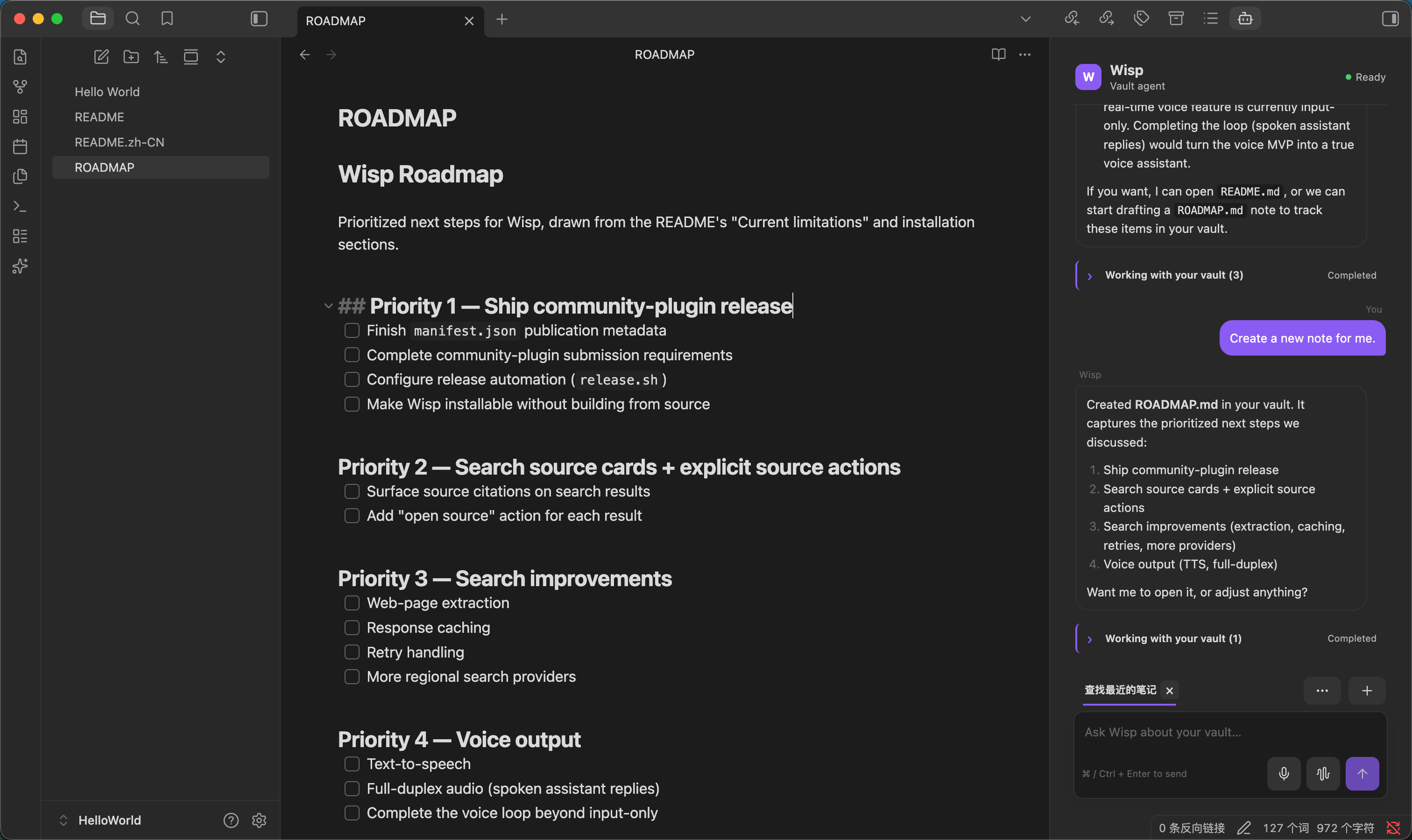
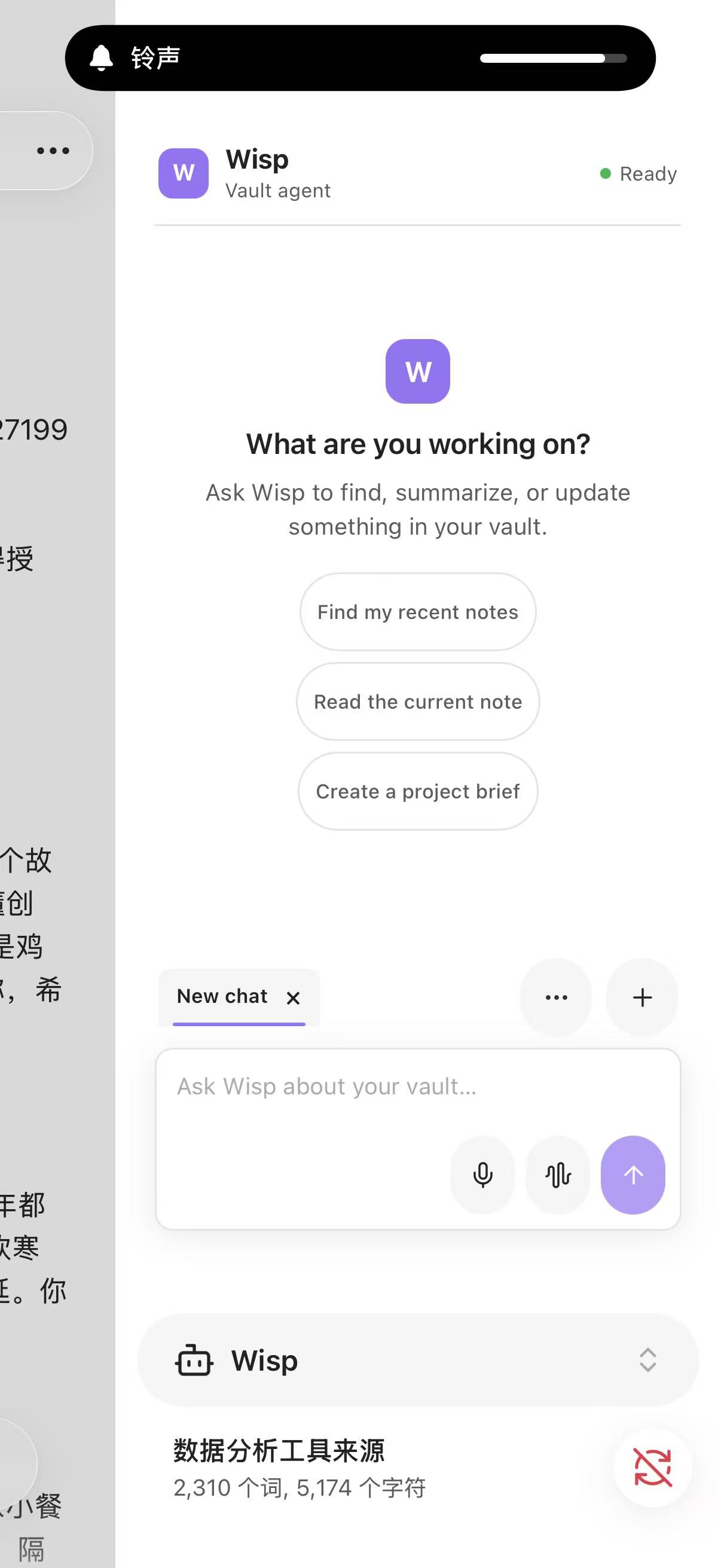
Wisp is designed for a focused workspace experience on both desktop and mobile.
Desktop
Mobile
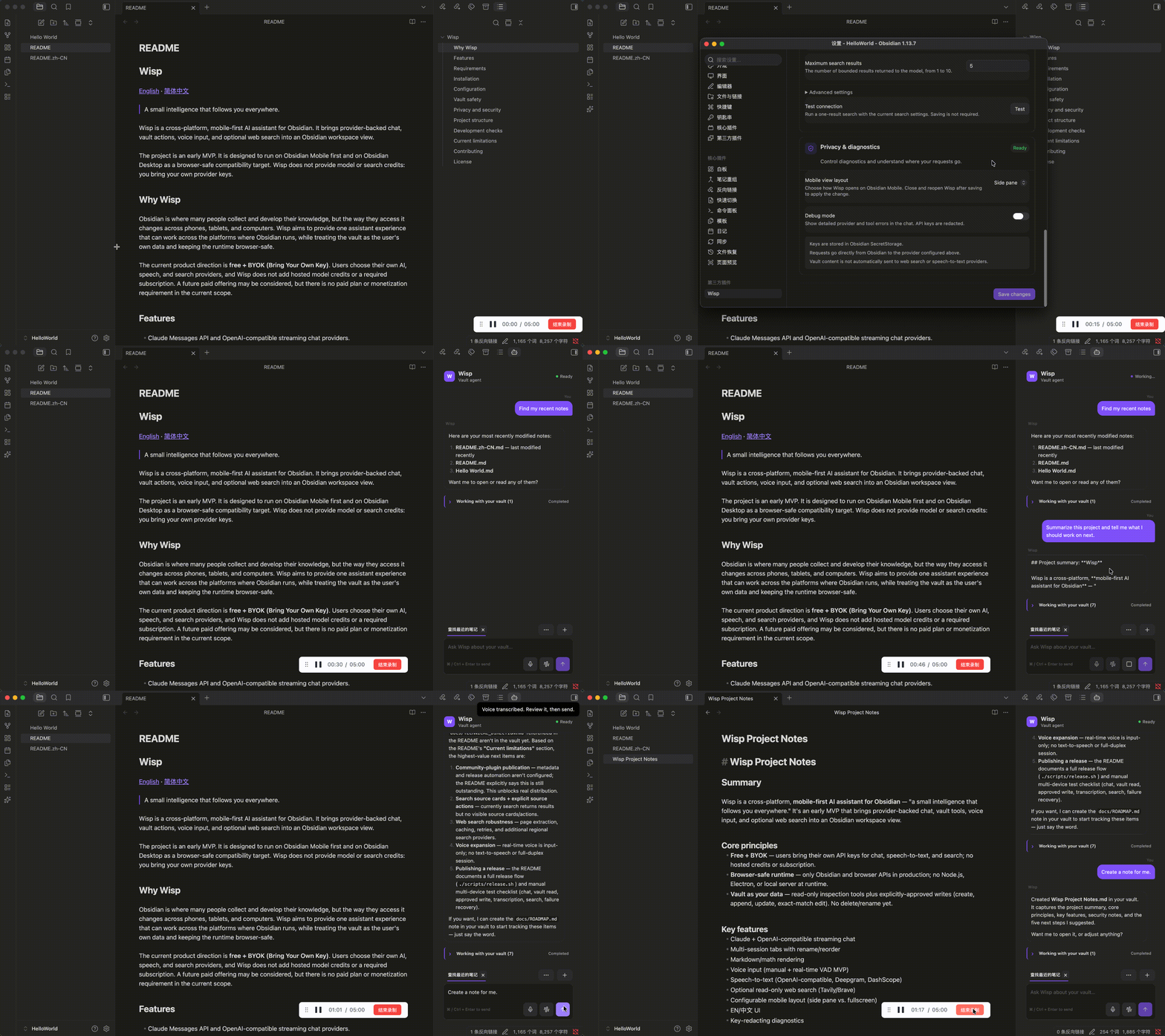
Usage demo
Why Wisp
Obsidian is where many people collect and develop their knowledge, but the way they access it changes across phones, tablets, and computers. Wisp aims to provide one assistant experience that can work across the platforms where Obsidian runs, while treating the vault as the user's own data and keeping the runtime browser-safe.
The current product direction is free + BYOK (Bring Your Own Key). Users choose their own AI, speech, and search providers, and Wisp does not add hosted model credits or a required subscription. A future paid offering may be considered, but there is no paid plan or monetization requirement in the current scope.
Requirements
- Obsidian 1.13.0 or newer.
- A provider account and API key for chat.
- Optional: a speech-to-text provider key for voice input.
- Optional: a Tavily or Brave Search key for web search.
- Node.js 18 or newer for development and building.
Wisp uses Obsidian APIs and browser APIs only in the production bundle. It does not require Node.js, Electron, a local server, or a desktop CLI at runtime.
Installation
Wisp is currently installed from source while the project is prepared for community-plugin distribution.
git clone https://github.com/RecurEngine/wisp.git
cd wisp
npm install
npm run build
Copy the generated main.js, manifest.json, and styles.css into:
<your-vault>/.obsidian/plugins/wisp/
Then enable Wisp in Settings → Community plugins. The generated main.js and styles.css are intentionally ignored by Git; they are release artifacts produced by npm run build.
For development, run:
npm run dev
This watches src/main.ts and creates a development bundle with an inline source map. Use a production build before installing the bundle on a device.
Configuration
Open Settings → Wisp and configure the chat provider first. Wisp supports:
| Capability | Providers | Stored data |
|---|---|---|
| Chat | Claude Messages API, OpenAI-compatible API | Key in Obsidian SecretStorage; endpoint, model, and prompt in plugin settings |
| Speech-to-text | OpenAI-compatible, Deepgram, Alibaba DashScope | Key in Obsidian SecretStorage; endpoint and model in plugin settings |
| Web search | Tavily, Brave Search | Key in Obsidian SecretStorage; endpoint and result limit in plugin settings |
Use the raw key value in the corresponding field and click Save changes. Do not paste shell syntax such as ANTHROPIC_AUTH_TOKEN=..., quotes, or an exported environment variable assignment.
On Obsidian Mobile, Mobile view layout controls whether Wisp opens as a side pane or a fullscreen view. After changing it, save the settings, close Wisp, and open it again.
Vault safety
Read-only vault tools can inspect notes, folders, metadata, links, the active note, and recent notes. Tools that change notes always request explicit approval. Delete and note rename are not exposed in this MVP.
Wisp only sends vault content to the configured chat provider when the agent needs a vault tool result to answer the request. Vault content is not automatically sent to web search or speech-to-text providers. Search results are treated as untrusted reference data by the agent.
Privacy and security
- API keys are stored with Obsidian
SecretStorage, not indata.json. - Network requests are made only for an explicit chat, transcription, or enabled web-search operation.
- There is no telemetry service or background sync in this project.
- Debug output redacts common API-key, bearer-token, and
api_keyvalues, but always review a diagnostic block before sharing. - Provider terms, retention, and data-processing policies still apply to the services you configure.
See SECURITY.md for reporting instructions and the full sensitive-data checklist.
Project structure
src/
├── main.ts                  # Plugin lifecycle and application composition
├── core/                    # Provider-neutral runtime, tools, errors, and contracts
├── providers/               # Claude and OpenAI-compatible chat adapters
├── tools/                   # Obsidian vault operations and path safety
├── sessions/                # Persisted conversation/session state
├── settings/                # SecretStorage, settings persistence, and settings UI
├── views/                   # Chat view, composer, session UI, and approval modals
├── voice/                   # Recorder, VAD, and speech-to-text adapters
├── websearch/               # Search adapters and the read-only search_web tool
└── i18n/                    # English and Simplified Chinese translations

tests/                       # Unit tests mirroring the runtime modules
docs/                        # Roadmap and technical direction
The dependency direction is intentionally simple: main.ts composes services; views depend on provider-neutral runtime contracts; provider adapters own protocol details; vault tools own Obsidian file operations. Production code must remain free of Node.js, Electron, process, and Buffer dependencies.
Development checks
Run the full local verification before opening a pull request:
npm run typecheck
npm run test
npm run build
Also manually test on Obsidian Mobile and Desktop when changing runtime behavior. At minimum, verify one chat request, one vault read, one approved write, one voice transcription, one web search, and one failure/recovery path.
To publish a release, commit and push the changes first, authenticate GitHub CLI with gh auth login, then run:
./scripts/release.sh
The script reads the version from manifest.json, runs validation and the production build, creates and pushes an annotated Git tag, and uploads the release assets to GitHub.
Current limitations
- Search source cards and explicit source actions are planned but not yet implemented.
- Web page extraction, caching, retries, and additional regional search providers are not included.
- Voice input depends on browser microphone permission and the selected provider's audio limits.
- The real-time voice feature is input-only; there is no text-to-speech or full-duplex audio session.
- Community-plugin publication metadata and release automation are not yet configured.
See docs/ROADMAP.md and docs/TECHNICAL_DIRECTION.md for the active plan.
Contributing
Issues and focused pull requests are welcome. Please read CONTRIBUTING.md before making a change, especially the browser-safe runtime boundary and provider ownership rules.
License
Wisp is released under the MIT License.