Visual Math
 Oliver24 downloads
Write math, chemistry and physics notes visually without learning LaTeX. Plot functions, polar curves and 3D surfaces. Explore calculus and convert units offline.
- Overview
- Scorecard
- Updates4
Write math, chemistry and physics notes directly inside Obsidian with Visual Math (formerly Visual Math Editor). Visual mode works like Word: choose fractions, roots, scripts, integrals and sums, then fill the placeholders. Zero LaTeX knowledge is required in Visual mode. LaTeX and synchronized Hybrid modes are available when you want source editing; formulas remain ordinary LaTeX/Markdown.
Built for quick science notes: optional chemical balance suggestions, physics templates, a periodic table, offline unit conversion, function graphs and a Re/Im complex plane. Everything runs locally without an account or runtime network connection.
0.8.2 — Display name and developer
The next metadata update uses Visual Math / Oliver in installed plugin details and public developer bylines. The plugin ID remains visual-math-editor. Community search follows a separately synchronized index; release and verification status are recorded in TEST-REPORT.md.
0.8.1 — Maintenance update
Removes the unnecessary type assertion and unused import reported by the 0.8.0 directory scan, and includes complete Spanish documentation in both packages. Polar/XYZ graph features and saved formats are unchanged. See the 0.8.1 release page for availability and TEST-REPORT.md for actual verification.
Local verification for 0.8.1: 194 automated tests and 368 browser component checks passed. On macOS with Obsidian 1.14.4, linked polar and XYZ formulas/graphs were inserted, navigated and explicitly saved; quitting/restarting the app and reopening both graph editors restored their numeric ranges, theta limits and camera angles. This focused manual-upgrade check does not establish native marketplace installation or coverage of other platforms.
0.8.0 — Desktop public beta
Visual Math 0.8.0 — Desktop public beta adds polar plots, numerical calculus and XYZ wireframes. 194 automated tests and 368 browser component checks passed. Native Obsidian 0.8.0 insertion/save/reopen has not been verified; test in a disposable vault first. GitHub publication, directory review and a successful native installation are separate states. See TEST-REPORT.md for actual checks and the live release page for download availability.
- Polar: choose Polar graph, enter
r=2*sin(3*theta)for a three-petal rose, and set θ from0to6.283185307179586(2π). X/Y units have equal scale. Negative radii reverse direction. - Calculus: enter
y=x^2, choose Derivative, Second derivative or Definite integral in the function graph's calculus selector. For the integral, use bounds0to1; the signed numerical estimate is approximately0.333333333, with shading over the selected interval. - XYZ: choose 3D surface and enter
z=(x^2-y^2)/10. Drag to rotate and scroll to zoom; X, Y and Z bounds and camera angles are saved with the graph. Defaults are X/Y −5 to 5, Z −2 to 2, azimuth 45° and elevation 30°. The wireframe uses at most a 28 × 28 base mesh of cells, with bounded refinement; costly expressions can receive a coarser mesh. Axes are scaled independently to the viewing box, so equal screen lengths do not imply equal numerical units across X/Y/Z. - Faster input: common-symbol buttons insert at the caret or wrap the selection. Example buttons replace the entire graph expression. Trigonometric input uses radians.
These are numerical drawing tools, not a computer algebra system. They do not solve general implicit equations, general parametric curves/surfaces or symbolic integrals. Definite integration accepts finite continuous intervals with increasing bounds; improper integrals and reversed bounds are not supported. Polar θ spans are limited to 100π radians. See the graph workflow and limits.
0.7.0 — Previous release verification
0.7.0 · Desktop public beta — previously published on GitHub. This update introduces the Visual Math name, Spanish alongside English and Simplified Chinese, a graph preview below the current equation, and custom formula shortcuts.
For the published 0.7.0 source/tag, the Node.js 22/24 checks and release workflow succeeded; all six public release assets passed strict provenance verification. The recorded official directory review shows 0.7.0 / Review Passed / Health Excellent, with no Error or Warning entries; recommendations for user-initiated clipboard access and optional download archives remain. Exact checks, native limits and review observations are recorded in TEST-REPORT.md and the submission guide. See scope and language support.
The display name changes; the plugin ID, repository URL and installation folder remain visual-math-editor, so existing preferences and saved graphs keep their identifiers.
New in-note workflow
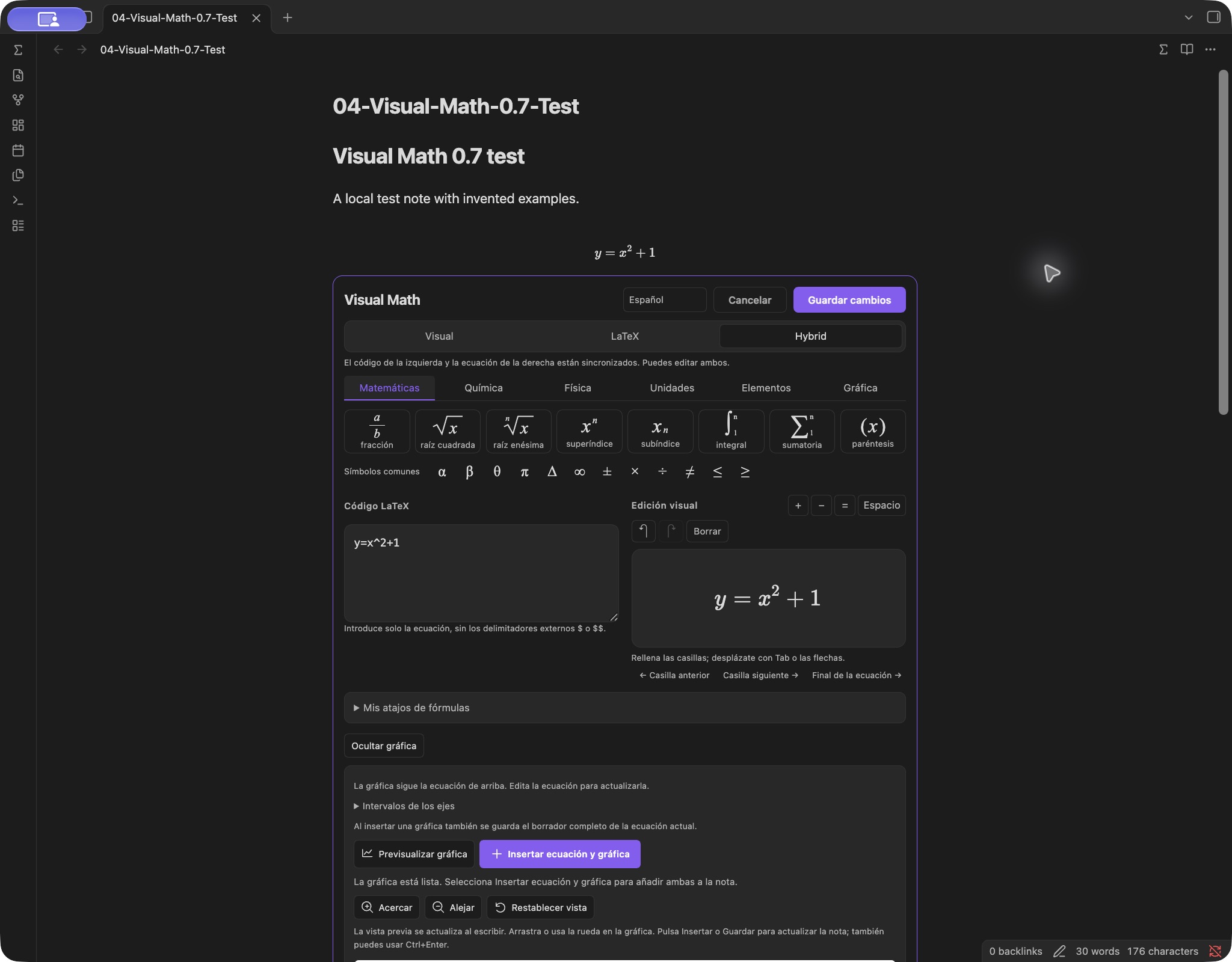
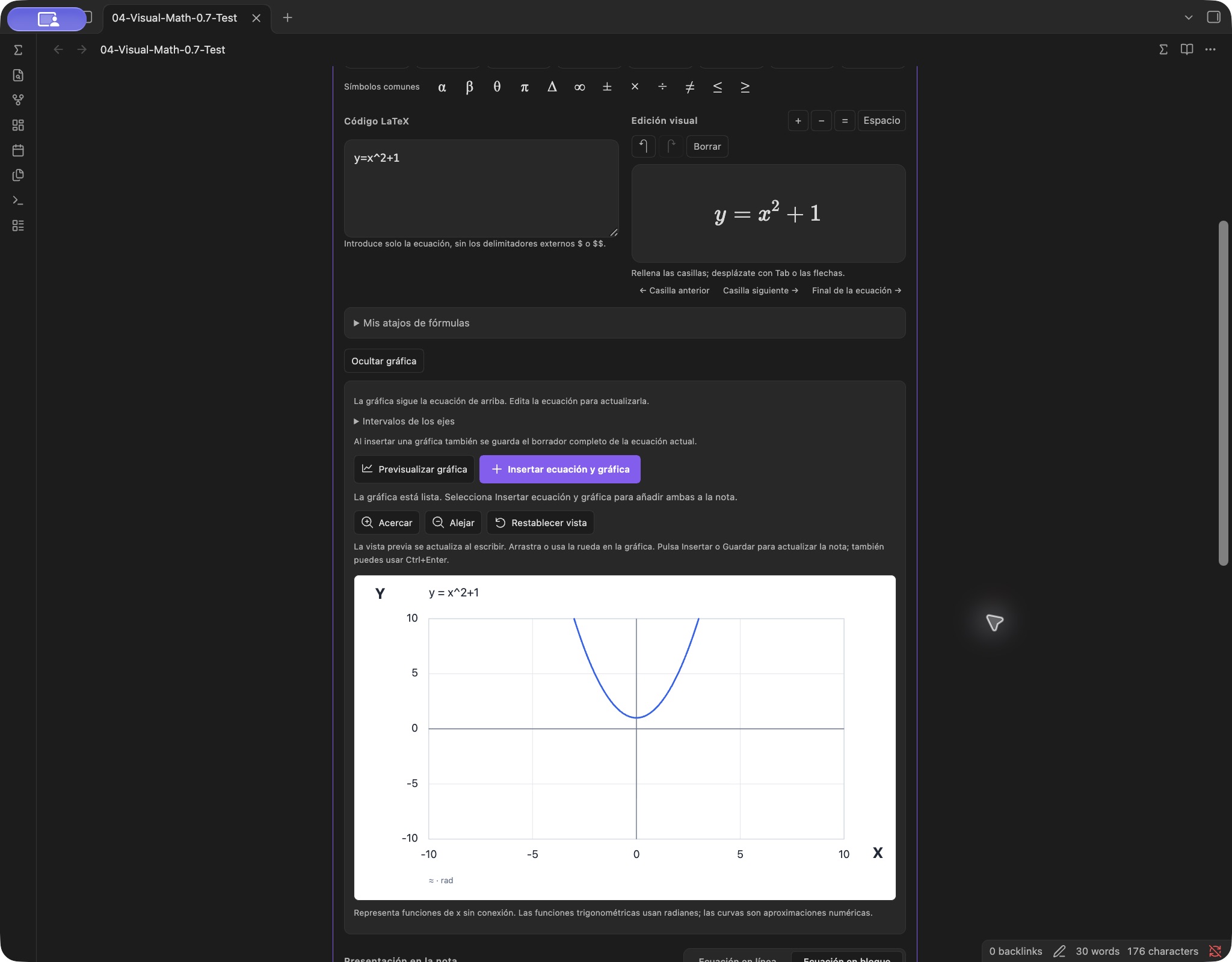
Real screenshots from Visual Math 0.7.0 running in Obsidian on macOS. The Spanish Hybrid interface and graph preview share the same equation draft. The detailed save/reopen and shortcut checks are recorded in the test report.
Download and install
Open the Obsidian community-directory page. When the plugin is available in the app's index, click Add to Obsidian, allow the link to open Obsidian, then choose Install → Enable in the plugin details. Open a Markdown note and click ∑ in its header or left ribbon. The directory's enabled installation link and a completed native installation test are separate observations; consult TEST-REPORT.md for what has actually been tested.
Directory and installation status (2026-10-18, America/Chicago): the 0.8.1 / 2a064dc review is Completed; the public listing shows Current version 0.8.1 / Health Excellent / Review Passed, with no Error or Warning entries. Clipboard use and optional archive/checksum recommendations remain. Public runtime attachments match the natively tested manual upgrade, which preserves existing settings and the old demonstration note. A fresh native app-catalog installation has not been completed. See TEST-REPORT.md for exact checks and limitations.
Manual installation
0.8.1 installation ZIP · Release notes and checksums · Detailed installation, updates and removal
For manual installation, download the published installation ZIP, rather than Code → Download ZIP or GitHub's automatic Source code archives, which require building.
The installation ZIP is already compiled. You do not need Node.js to use it.
- Extract the ZIP and copy the entire
visual-math-editorfolder into your vault's.obsidian/plugins/directory. - Confirm that
main.js,manifest.json,styles.cssand the license files are directly inside that folder, without another nested plugin folder. - Restart Obsidian. Open Settings → Community plugins, enable community plugins if necessary, then enable Visual Math.
- Open a Markdown note. Use ∑ in the note header or left ribbon to open the editor.
Earlier 0.6.2–0.6.5 releases are retained as recoverable drafts; their historical tags remain available. Historical tags/source and the original MIT rights remain available; the current GPL license does not revoke those earlier grants.
On macOS, ⌘⇧. shows hidden folders in Finder. If your vault uses a custom configuration directory, use that instead of .obsidian.
For directory updates, use Settings → Community plugins → Check for updates → Update; community plugins do not update automatically. For manual updates, save or cancel open drafts, disable the plugin and back up its existing folder. Copy the new installation files into that folder and retain your existing data.json settings. Save drafts before either update method, then restart Obsidian to refresh MathLive. You do not need to edit code or download your vault again. See how updates work.
Requires Obsidian 1.14.4 or later. Earlier native integration checks used macOS with Obsidian 1.14.4; they are not a native 0.8.0 retest. This release targets the desktop main window; Windows, Linux, mobile, detached pop-out windows and arbitrary third-party themes/plugins have not been verified. See TEST-REPORT.md for actual observations.
See it in action
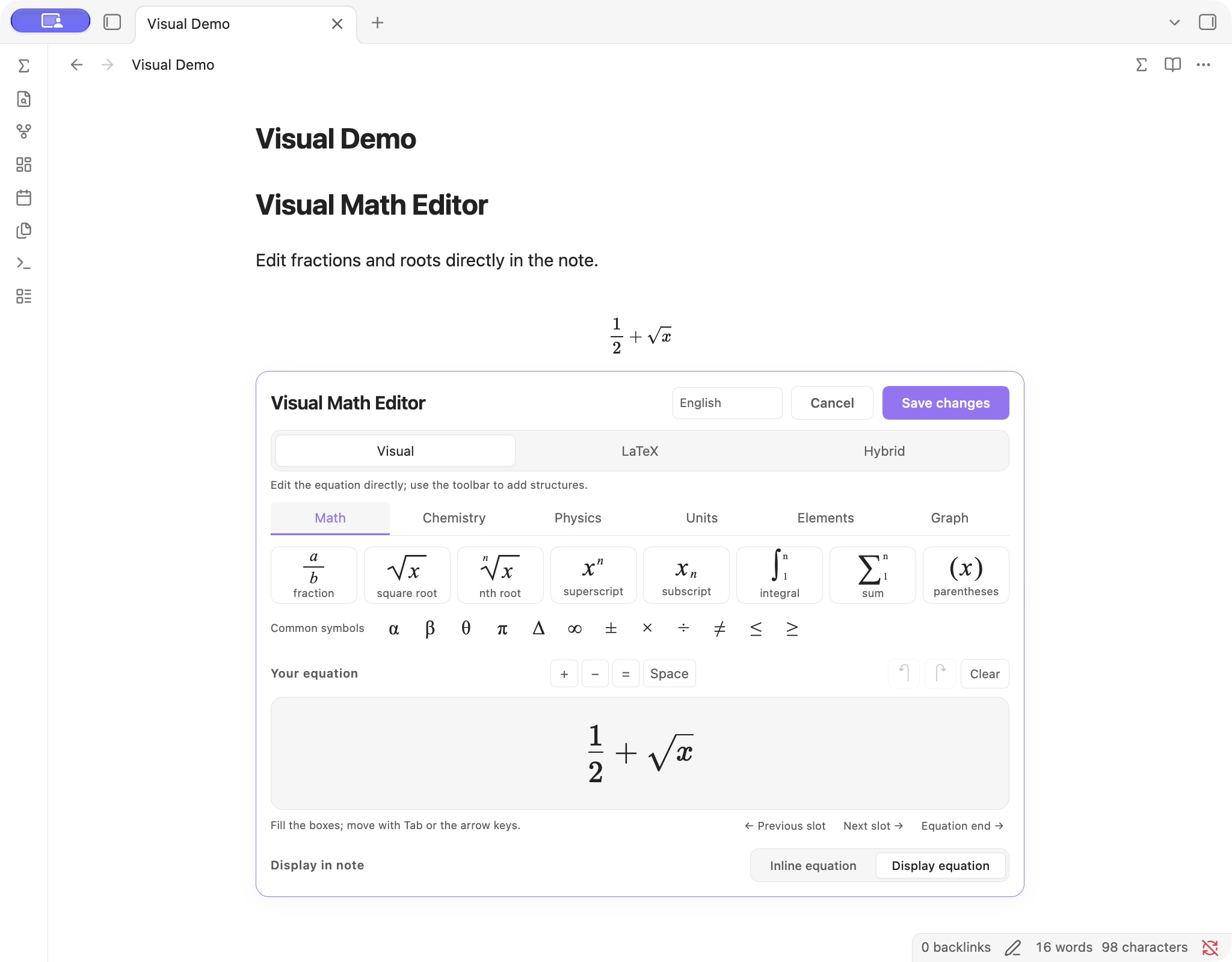
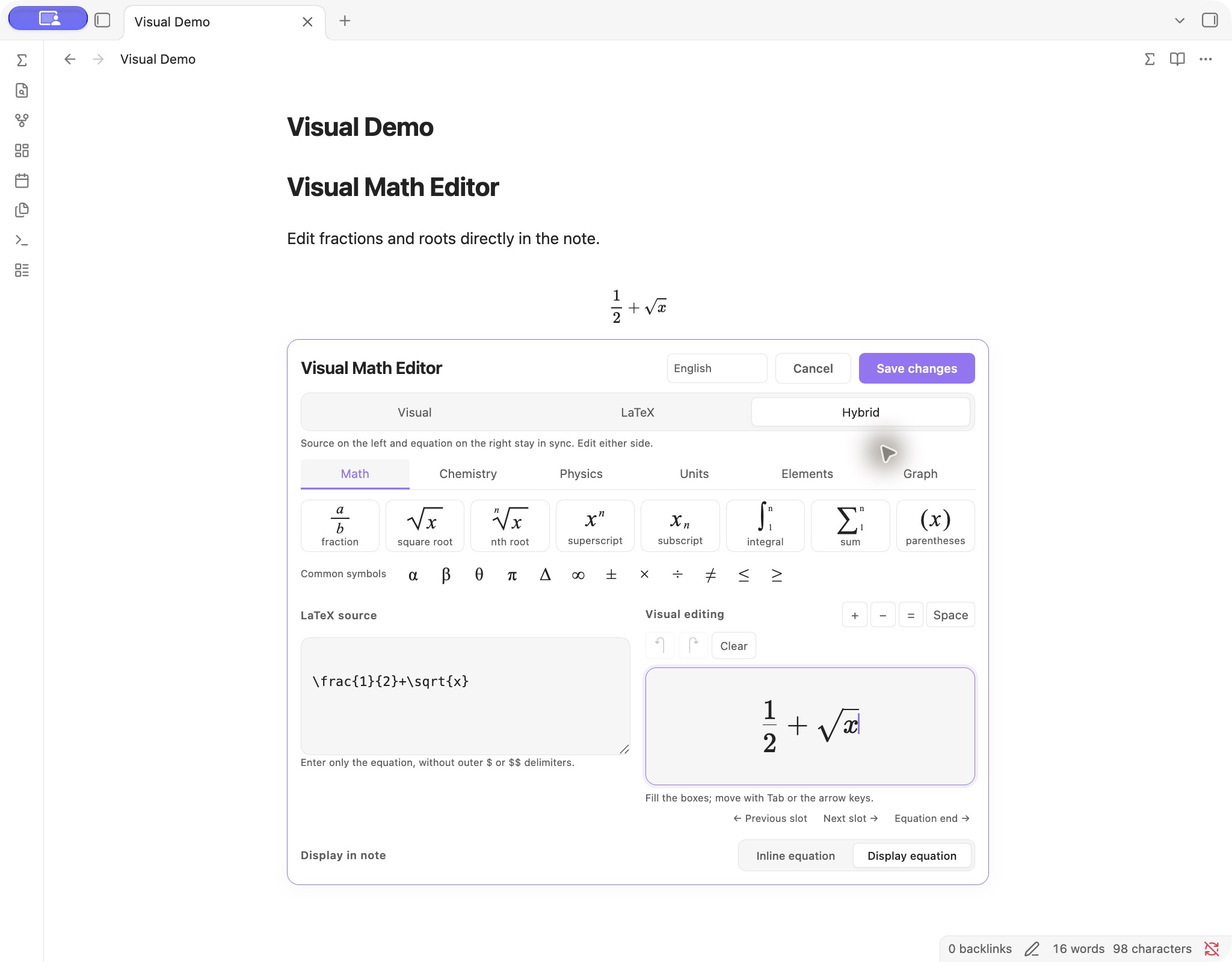
These screenshots show the earlier Visual Math Editor interface running in Obsidian's desktop main window, using a separate test vault and example notes. The editor opens directly below the note paragraph. Insertion, reopening, saving and native Undo observations are recorded in the test report.
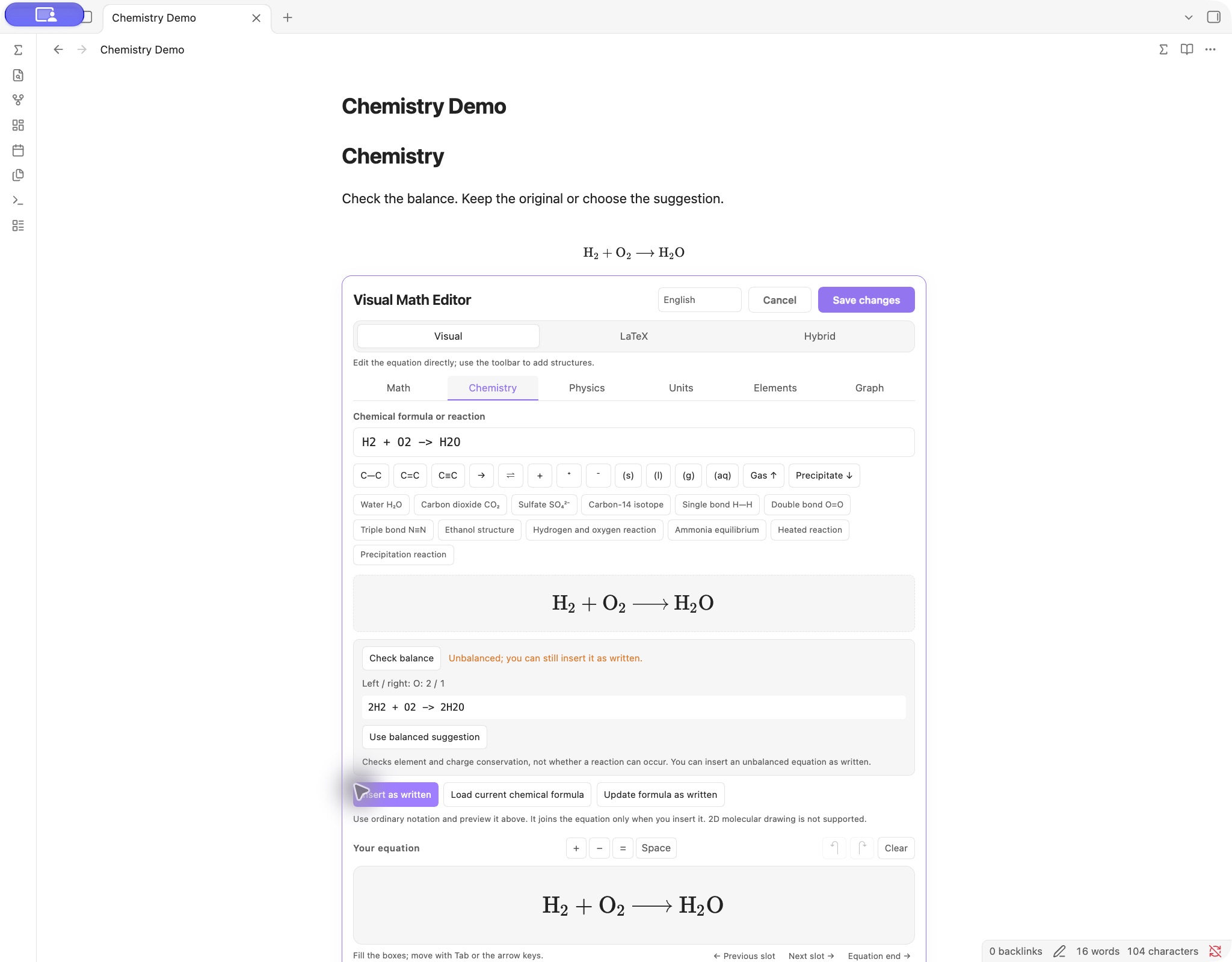
Visual and Hybrid editing
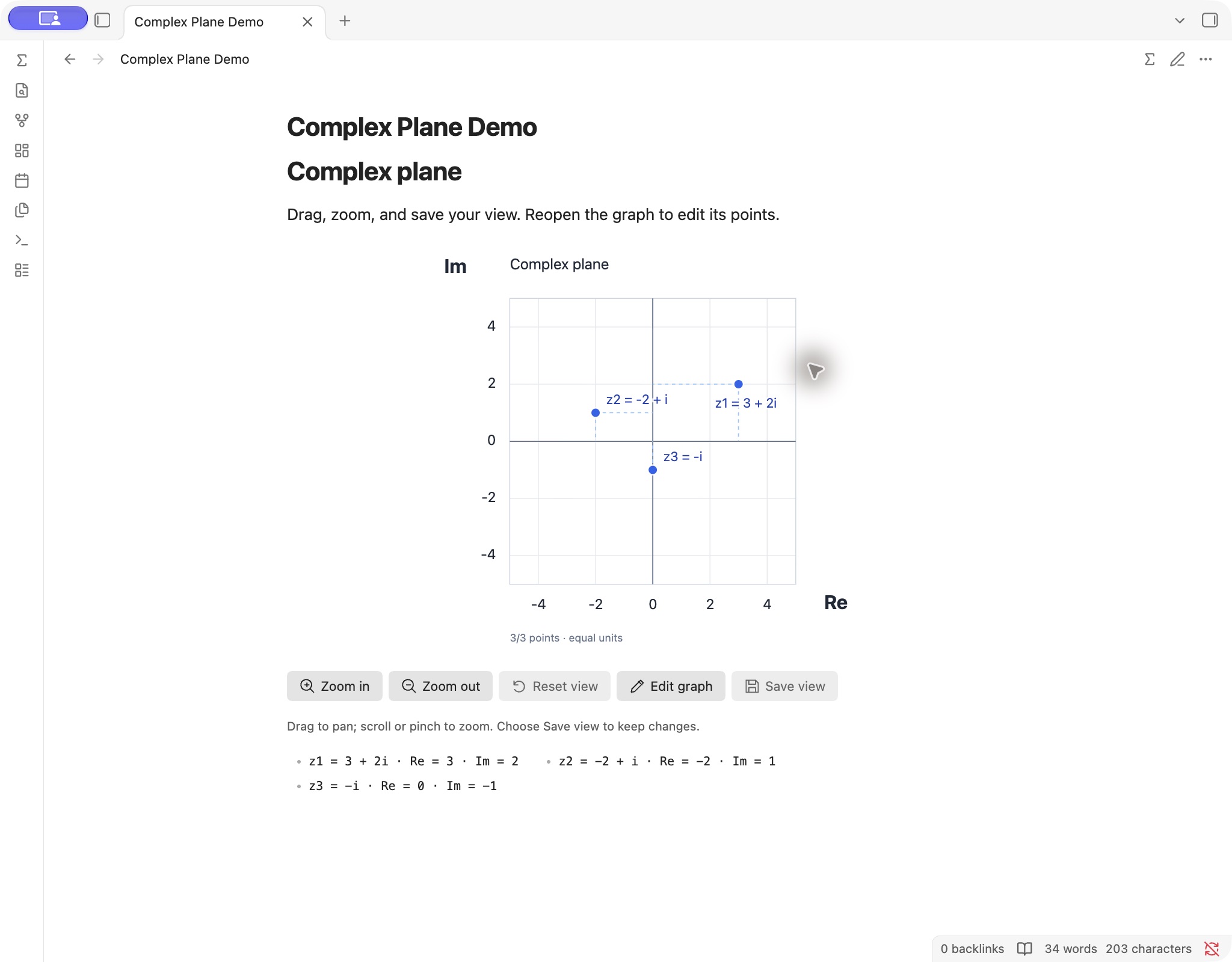
Complex plane and science tools
Insert a fraction
- Place the cursor in the note, then click ∑ in its header or the left ribbon. You can assign a shortcut to Insert or edit equation under Settings → Hotkeys; no global shortcut is assigned by default.
- In Visual → Math, click Fraction, enter
3, press Tab, then enter4. Previous/next placeholder buttons can also move between empty fields. - Choose inline or display math and click Insert equation. Ctrl+Enter also submits the active editor.
You can also run Visual Math: Insert or edit equation from the command palette. Input remains a draft until insertion or saving; Cancel leaves the note unchanged. Select existing content before choosing a structure to wrap the selection. Use operators or mathematical spacing when adjacent structures should be separated.
| Mode | Editing behavior |
|---|---|
| Visual | Edit the formatted equation using structure buttons and placeholders. |
| LaTeX | Edit the source directly. |
| Hybrid | See and edit both representations, with synchronization in either direction. |
All three modes share the same draft. Source input excludes the outer $ or $$ delimiters. Incomplete structures and recognized syntax errors prevent ordinary submission. Complete source containing unsupported commands can use the explicit Save source path in LaTeX/Hybrid; rendering still depends on the note environment.
To reopen an equation, put the cursor inside it and click ∑, or use Choose equation to edit. In Reading view, ∑ opens a picker with existing equations/graphs and an option to append a new equation. Double-clicking a rendered equation also attempts to locate it; use the picker if another plugin or Vim intercepts the gesture. The default editor opens below the relevant paragraph. Open equation dialog provides an optional separate window.
Graphs and the complex plane
The polar, calculus and XYZ controls below belong to 0.8.0. The native screenshots and earlier review observations above retain their stated versions; they are not native 0.8.0 verification.
In the equation editor, use Graph this equation below your formula to preview a supported function directly underneath it. There is no need to retype the formula in a separate field. Edits to the current formula update its connected preview; graph navigation retains the ranges until you explicitly reset or save them. Click Insert equation and graph to save the completed equation and graph together. Hide graph closes the connected preview. Previewing alone does not change the note.
Linking lasts only while this editor is open. After saving, the LaTeX equation and vme-plot graph are independent note blocks. Editing the saved equation does not automatically update its saved graph. Generate a new graph from the revised equation or use the existing graph's Edit graph action to update it explicitly.
Conversion supports bounded explicit formulas: y=x^2 for a function, r=2\sin(3\theta) in the equation editor for a polar radius, or z=(x^2-y^2)/10 for a surface. Fractions, roots and supported trigonometric commands convert without retyping. Arbitrary implicit equations, chemistry, sums, integral notation and unsupported macros receive an explanation instead of a guessed plot. Use the graph calculus selector to differentiate or integrate the supported function; an integral symbol in the equation is not a symbolic calculation request. The formula source is preserved.
For a manually entered function, polar radius, surface or complex points, open the advanced Graph tools and choose the graph type. Input changes update the preview after a short pause. You can click Insert graph or Save graph directly: the action validates the current input again before saving, so a manual preview click is optional. Preview graph remains available when you want to refresh it explicitly.
For a real graph, enter x^2, sin(x) or 1/x. The X/Y range can be adjusted manually or through navigation. Supported notation includes x, pi, e, decimal/scientific numbers, + - * / ^, parentheses, common implied multiplication and sin, cos, tan, sec, csc, cot, asin, acos, atan, sinh, cosh, tanh, asinh, acosh, atanh, sqrt, abs, ln, log, exp. arcsin, arccos, arctan and the symbols π/θ are accepted aliases in their supported modes. Function arguments need parentheses; trigonometric functions use radians. ln is natural logarithm and log is base 10. Explicit constant fractional powers such as x^(1/3) support negative real branches when the denominator is odd.
For the complex plane:
- Choose Complex plane and enter
3+2i. The point appears at Re = 3, Im = 2, using equal unit lengths on both axes. - Add one number per line if needed, such as
-i,4or-2+i. Full coordinates appear below the graph. - Drag inside the graph to pan, use the wheel or pinch to zoom, or use the labeled zoom buttons. Fit all points includes the points and origin; Reset view restores the range from when the editor was opened.
- Click Insert graph. On a saved graph, navigate temporarily and click Save view to keep that range. Reopen the note or click Edit graph to verify the saved bounds.
Navigation does not write on every gesture. In the editor, Insert graph / Save graph commits the current range. On a saved graph, Save view commits it explicitly. Scrolling outside the graph continues to scroll the note. A temporary unsaved view may reset when the graph is rendered again. Function, polar, surface and complex modes keep separate drafts while the editor is open. In XYZ mode, dragging rotates the camera; wheel/buttons zoom all three numeric ranges. Save view stores these changes only when explicitly selected.
Graphs are stored in versioned vme-plot Markdown blocks, including the mode, expression/points, axis bounds and applicable θ, calculus, integration and camera parameters. Saving and reopening restores those stored settings; this persistence does not create a continuing link to a separate saved equation. Earlier function blocks remain supported. The plugin renders them locally as SVG; disabling it leaves the definitions in the note rather than a rendered graph. Graph insertion is limited to standalone blocks in ordinary note text. A valid equation draft can be saved together with a new graph in one note operation; an unfinished equation must be completed or cleared first.
Plotting limits (0.8.0): one explicit real function y=f(x), polar radius r=f(theta), explicit surface z=f(x,y), or up to 20 rectangular complex literals. This is not a general equation solver. Complex input accepts a+bi, i, -i, real numbers, decimals and scientific notation; it does not evaluate arithmetic, sqrt(-1), polar coordinates or named points. Total complex input is limited to 1,000 characters; function input to 500. Axis bounds and complex components must stay within ±1,000,000. Ranges must be finite, ordered, at least 10⁻⁹ wide and sufficiently wide relative to their magnitude. Numerical sampling has work limits and can miss fine features; a plotted curve is not proof of continuity. General implicit or parametric plotting, multiple function overlays, sliders and symbolic solving are not included. Polar parameter spans must be positive and at most 100π radians. Numerical derivative curves omit detected cusps and unresolved discontinuities. Definite integration requires finite increasing bounds and a real continuous integrand on that interval; it does not compute improper integrals, reversed bounds or exact antiderivatives. Sampling and quadrature can miss fine features; error estimates are not convergence proofs. XYZ uses bounded wireframe sampling and independent axis scaling; use the numeric ticks when comparing axes.
For background on the numerical methods and their limits, see NIST DLMF §3.4 Differentiation and §3.5 Quadrature.
Science tools
- Chemistry: type ordinary notation such as
H2O,SO4^2-,CH3-CH2-OHorH2 + O2 -> H2O. Preview subscripts, charges, linear bonds and reaction arrows before inserting into the equation draft. - Balance check: compares supported element and charge counts offline. For
H2 + O2 -> H2O, it can suggest2H2 + O2 -> 2H2O. Choose Use balanced suggestion to apply it to the helper input, or Insert as written to keep the unbalanced original. Unsupported or unbalanced reactions remain insertable when their display syntax is valid. A balance check does not establish reaction feasibility, conditions or correct products. - Physics: insert vectors, gradients, divergence/curl, partial derivatives, ℏ, Greek letters and common formula templates, then edit their variables visually.
- Units: format entries such as
9.81 m/s2. Offline conversion provides 11 categories and 63 explicit choices. For example, select Length, enter1, choose Inch (in) → Centimetre (cm) and obtain1 in = 2.54 cm. Use converted result fills the units draft; Insert units adds it to the equation draft; the editor's final insert/save writes the note. - Elements: search 118 elements by atomic number, symbol, English name or Spanish name; Spanish-name search also accepts omitted accents. Hover or keyboard-focus an element for atomic-weight/isotope information, neutral ground-state electron configuration and shell populations. Clicking the element inserts its symbol into the chemistry input. Details are local factual lookups, not a molecular structure or electron-cloud simulation.
Chemistry and unit helpers generate \ce{…} and \pu{…} automatically. In the main visual field they are selected as whole fragments. A single complete fragment can be reopened in its helper; use LaTeX/Hybrid to edit fragments within mixed expressions. This is not a two-dimensional molecular structure editor.
Balance checking supports a bounded subset of chemistry notation and stops on unsupported or excessively complex input. Unit conversion is between preset choices within the same category, not arbitrary dimensional analysis. Temperature conversion uses absolute readings with offsets, not temperature differences. Results use fixed Convert 8.0.2 constants and display at most 12 significant digits. Element data retains uncertainty intervals and predicted/calculated qualifiers; bracketed isotope mass numbers are not standard atomic weights.
Custom equation keywords
Open My formula shortcuts, enter a keyword such as myfrac, and save the current completed equation. A keyword uses 3–24 ASCII letters/digits, beginning with a letter. Up to 50 shortcuts are stored per vault. Choose a saved item to insert it, or type its keyword in the Visual/Hybrid formatted math field to expand it. Shortcuts do not expand in the LaTeX source pane or ordinary note text.
Built-in shortcuts and conflicting prefixes are protected. To replace a definition, delete the saved item and save the new equation under that keyword. Expanding a shortcut changes the equation draft; the normal insert/save action still controls when the note changes. These local editing shortcuts are separate from public GitHub discovery topics.
Language, saving and privacy
The 0.8.0 interface retains English, Simplified Chinese and Spanish. Choose Follow Obsidian, 中文 (Simplified Chinese), English or Español; the preference is stored locally for the current vault. The Spanish Follow Obsidian label is Usar el idioma de Obsidian. Follow Obsidian uses Spanish for es, es-ES and other Spanish locales, Simplified Chinese for Chinese locales, and English for unsupported languages. Chinese regional variants share Simplified Chinese. Changing the interface language does not translate formula source, note text or saved ranges. This states the implemented translation scope, not a fluent-speaker or every-platform certification; see LANGUAGE-SUPPORT.md and TEST-REPORT.md.
Equations use $…$ or $$…$$. Standard mathematics remains native Obsidian math after the plugin is disabled; chemistry/units require mhchem support. Other export targets must support the relevant commands. Complex TeX, custom macros and other plugins' syntax may not be visually compatible. Tables/lists/quotes/callouts support inline equations only; code, YAML properties, comments and link destinations are protected insertion locations.
A save performs one guarded note operation and supports Obsidian's native Undo. An unchanged save preserves the original Markdown. If the note changes while the editor is open, saving stops and the draft is retained. Recover equation draft can restore a temporarily retained draft during the same application run; restarting Obsidian or disabling the plugin clears that memory.
The runtime needs no account or network connection. MathLive, fonts, Convert and element data are bundled; parsing, checking, conversion and SVG generation run locally. There is no telemetry, CDN, remote font, OCR or cloud recognition. Initial dependency installation during development needs network access. Offline operation is not an independent security audit; report defects using SECURITY.md.
Clipboard access supports user-initiated cutting, copying and pasting in the equation editor. The plugin does not monitor the clipboard in the background or send its contents to a server.
If another plugin has already registered an incompatible MathLive version, disable the conflicting plugin and restart Obsidian before retrying.
Build, preview and contribute
Use Node.js 22 or 24:
npm ci
npm run check
npm run package
check runs type checks, logic tests and the production build. Installable files are generated in dist/; package verifies release metadata and creates installation/source ZIPs plus SHA256SUMS.txt in release/. Source archives include project source, scripts, tests, locked metadata and the exact MathLive/Convert preferred-source and published-input archives in third-party-sources/. They exclude node_modules, generated plugin builds, vaults and application settings. See source provenance and rebuild instructions.
Developer-only local preview — ordinary plugin users can skip this. This is not an online demo. Each developer must download or clone the source, open a terminal in the project folder, and start the preview on their own computer:
npm ci
npm run preview
Then open http://127.0.0.1:8471 and use the component-test button. 127.0.0.1 always refers to the computer opening the address; it does not connect to this project's maintainer or another user. The address works only while the local preview service is running. It binds only to localhost, restricts external connections, and saves into test memory rather than a vault. Stop it with Ctrl+C. Browser checks and native Obsidian integration are separate; record what was actually tested in TEST-REPORT.md.
The repository includes Node.js 22/24 CI and packaging checks. A separate manual workflow prepares a draft release titled Public beta from an existing exact-version tag; it does not publish automatically. Hosted workflow results are available under Actions. See CONTRIBUTING.md and RELEASING.md for the development and release process. The local code precheck records the official lint-tool results and remaining warnings; it is separate from community-directory approval.
Feedback and contributions
Developer: Oliver / oranipost. For private contact, email [email protected]. GitHub profiles do not provide direct messages; use email for private enquiries and Issues for public feedback.
Report a problem through the bug report form. Include your plugin/Obsidian versions, operating system, view mode, a small invented input and reproduction steps. English, Simplified Chinese and Spanish are welcome. Do not attach a real vault, private notes or settings. Use the feature request form for suggestions.
Code, wording fixes and translation contributions are welcome; read CONTRIBUTING.md first. English, Simplified Chinese and Spanish are included in 0.7.0. A new locale should cover full workflows, errors and accessibility labels and receive fluent-speaker review.
A GitHub release is separate from approval for Obsidian's community directory. The community submission guide records the completed 0.6.3 review, its nonblocking warnings, the published 0.6.4 changes and completed review, the 0.6.5 localization hotfix, and the maintenance process. Review results do not replace the runtime observations in TEST-REPORT.md.
License and dependencies
Starting with 0.7.0, new project code and this release as a whole use GNU GPL version 3 only with the Obsidian linking exception. Copyright (c) 2026 Dongfang Wang. Code already released through 0.6.5 retains its original MIT grant; this change does not revoke those permissions. Third-party licenses remain unchanged. The dated transition and retained historical MIT notice are in THIRD-PARTY-NOTICES.md. The narrow exception permits working with the Obsidian host while preserving GPL requirements for covered plugin modifications. Distributed modifications of GPL-covered code must meet the GPL's source and licensing requirements; the license also permits commercial redistribution. Your own notes and formulas are not licensed under GPL merely because you create them using this plugin.
MathLive and Convert are pinned; the build applies two asserted MathLive compatibility fixes, including chemistry Undo/Redo serialization. Review those fixes before upgrading the dependency.
MathLive, Convert and the KaTeX-derived fonts use MIT licenses; the bundled mhchem component uses Apache 2.0. Retain LICENSE, LICENSING.md, MATHLIVE-LICENSE.txt, KATEX-FONTS-LICENSE.txt, MHCHEM-LICENSE.txt, CONVERT-LICENSE.txt and THIRD-PARTY-NOTICES.md in redistributed installation archives. That notice also records scientific-data sources and build modifications. Obsidian and CodeMirror are supplied by the host rather than redistributed in the plugin bundle.