Vault Spotlight
 saiken431 downloads
Spotlight-style vault launcher with fuzzy search, recent files, and property filters. Pro unlocks ripgrep search, starred pins, canvas/PDF, batch open, and custom commands.
- Overview
- Scorecard
- Updates45
A Raycast-style command center for Obsidian: find notes fast, reopen recurring work instantly, and act on results — all without leaving the keyboard.
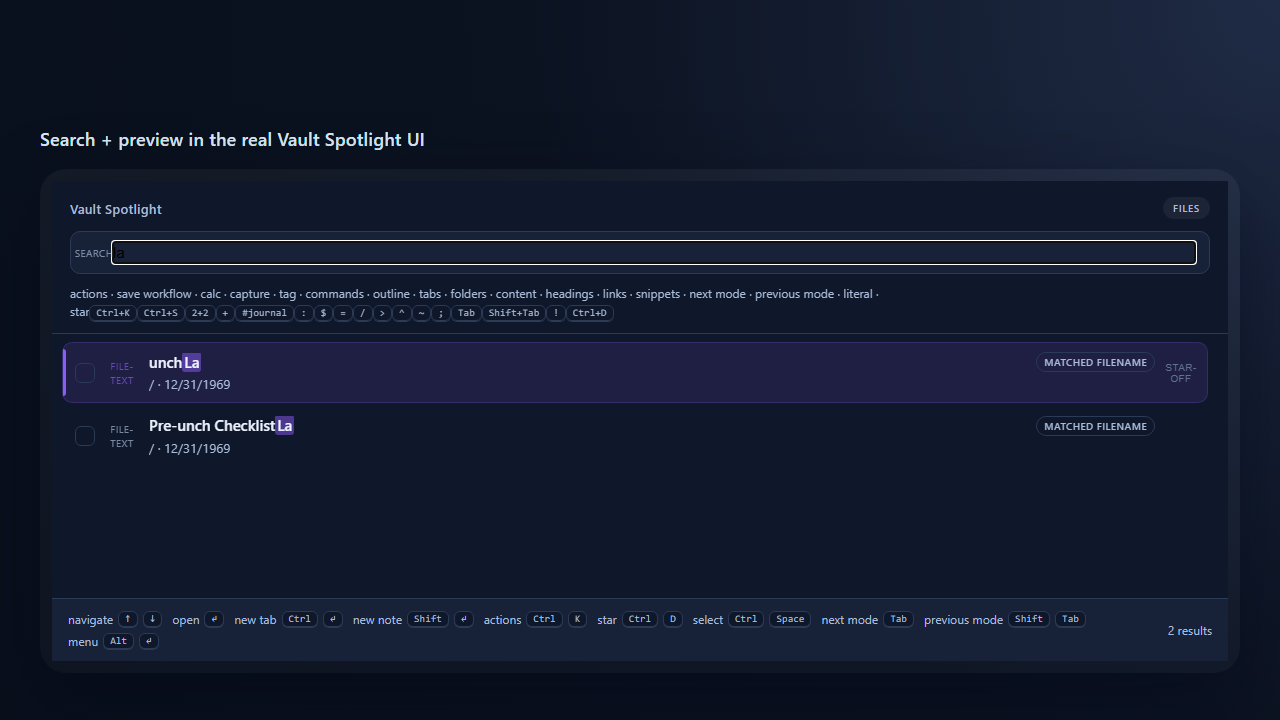
Vault Spotlight is a keyboard-first command center for three jobs:
- Search — fuzzy-find any note, command, heading, link, folder, or open editor in one launcher.
- Workflows — save a search and bring back the same project, meeting, or follow-up context in one keystroke.
- Actions — open, copy, rename, batch-edit, export, or preview results without breaking flow.
Free is genuinely useful on day one. Pro adds deeper search, unlimited workflows, and batch actions for people who live in the launcher.
Search
Find the right note, command, or vault object fast.
- Fuzzy launcher — partial names, initials, and light typos; recent files and open editors are boosted automatically.
- Modes without menus —
Tab/Shift+Tab(or a configurable prefix) cycles files, commands (:), symbols ($), open editors (=), and folders (/). - Tag & property filters — narrow with
#work,@status:done, or a name plus metadata filters. - Content & heading search (Pro) — search inside note bodies (
>) and jump to any heading (^); browse backlinks/outlinks with links mode (~).
Workflows
Reopen repeated work in one keystroke.
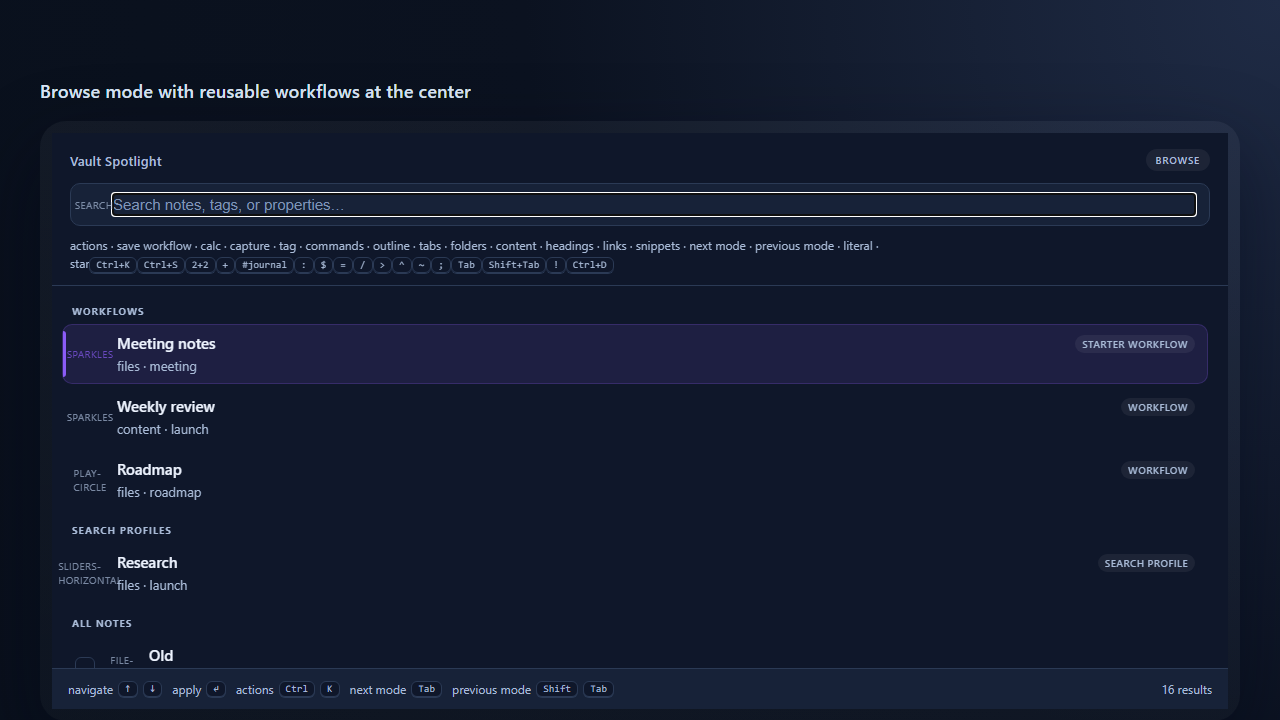
- Save the current search — mode + query (+ optional ranking and scope) — with
Cmd/Ctrl+S, then re-run it from the Browse screen. - One saved object — pin the ones you use daily. Free includes 2; Pro is unlimited and can seed curated starters.
Actions
Do useful work immediately after finding something.
- Action palette (Free) — press
Cmd/Ctrl+Kon any result to open it, copy a Markdown link or path, or rename it. - Batch actions (Pro) — select a working set with
Cmd/Ctrl+Space, then open, tag, set a property, move, or turn results into a map-of-content note. - Export (Pro) — copy selected results as Markdown links, or create a search-results note for handoff.
- Starred pins (Pro) —
Cmd/Ctrl+Dkeeps high-value files at the top of Browse.
Quick actions
Instant tools from the input bar — no mode-switching.
- Calculator & converter (Free) —
1234*0.19,20% of 250,10 km to mi,40 USD to EUR;Entercopies,Shift+Enterinserts. Offline rates you control. - Date jump (Free) —
today,next friday, or an ISO date opens (or creates) that day's daily note. - Quick capture (Free) — press
+, jot a thought, andEnterappends it to today's daily note without opening it.
Free vs Pro
Pro ($8 one-time) turns Spotlight into a reusable work cockpit — repeated leverage, richer actions, and deeper search. Basic file operations stay free.
| Area | Free | Pro |
|---|---|---|
| File launcher, commands, symbols, editors, folders | Yes | Yes |
| Tag / property filters in file search | Yes | Yes |
| Calculator, converters, date jump, quick capture | Yes | Yes |
| Ranking controls & match-reason badges | Yes | Yes |
Action palette (Cmd/Ctrl+K): open, copy, rename |
Yes | Yes |
| Saved workflows | 2 | Unlimited + starters |
Body content search (>) and heading search (^) |
No | Yes |
| Links mode, live preview pane | No | Yes |
| Batch actions, export, starred pins | No | Yes |
| Snippets, capture to inbox / under a heading | No | Yes |
| Workflow scope, aliases & advanced query (OR, filters) | No | Yes |
| Canvas / PDF / Bases discovery & search | No | Yes |
Purchase: Buy Me a Coffee — Vault Spotlight Pro. License keys are verified offline (Ed25519) — no account, server, or subscription.
Advanced & automation
Power-user depth — the advanced query language (Boolean OR, filters), aliases, workflow scope, ripgrep acceleration, Canvas/PDF/Bases, integrations, the URL scheme, and the global API — lives in docs/advanced.md.
Privacy & data
Vault Spotlight never phones home. All state lives in the plugin's local data.json (settings plus ranking data). Because that includes note paths and query text, add .obsidian/plugins/vault-spotlight/data.json to .gitignore if you commit your .obsidian folder.
Install
Manual: copy main.js, manifest.json, and styles.css into .obsidian/plugins/vault-spotlight/, then enable Vault Spotlight in Settings → Community plugins. Open from the ribbon icon or bind a hotkey to Open spotlight (no default hotkey, per Obsidian guidelines).
Community directory: search Vault Spotlight in Settings → Community plugins.
Activate Pro
- Purchase on Buy Me a Coffee.
- Your license key is emailed to you automatically, within seconds — delivery is fully automated, no waiting.
- Obsidian → Settings → Vault Spotlight → paste the key. Pro unlocks immediately (offline verification).
Development
npm install
npm run build
npm test        # typecheck + lint + full suite, incl. the fixture-vault & modal harnesses
Listed as Optional payments in the Obsidian Community directory (free core + paid Pro unlock). Issues and feature requests welcome on GitHub.