Vault Retrieval
 Johannes Kaindl781 downloads
Local, offline retrieval over your vault: related notes, semantic search, and grounded chat with a local LLM — nothing leaves your machine.
- Overview
- Scorecard
- Updates53
🇬🇧 English · 🇩🇪 Deutsch
Retrieval over your own vault — related notes and semantic search, always on-device — plus grounded chat with the LLM endpoint you configure.
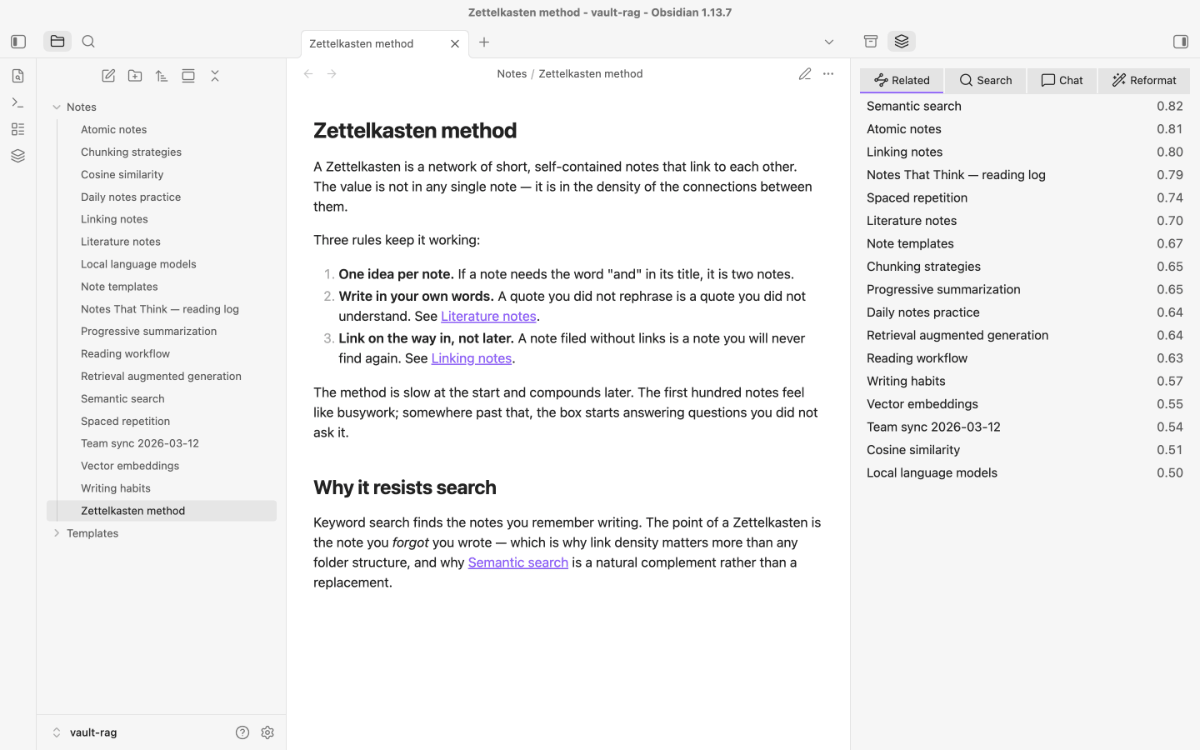
Vault Retrieval turns your notes into a searchable knowledge base. Retrieval — related notes, semantic search — always runs on your device. It keeps a small embedding index inside your vault, synced along with it and readable on every device, and answers three questions: What else have I written about this? Where did I say something like that? What does my vault know about X? Embedding and chat talk to whatever LLM endpoint you configure — one under your control, local or on your own network, by default. Add a provider's API key, and that traffic goes to them instead.
Interface language: the UI follows Obsidian's own language setting — English by default, German when Obsidian is set to German. A handful of diagnostic strings (endpoint tooltips, Smart Apply guard details) are still German; they are being cleaned up.
Features
Everything lives in one sidebar view with tabs: related notes, search, chat, reformat, plus Smart Apply once you enable it. Panels stay mounted, so a running chat stream or a pending Smart Apply survives switching tabs.
- Related notes — a side panel ranks the notes most similar to the one you're reading. Cosine similarity over a compact note-level index, computed on-device — works fully offline, including on mobile.
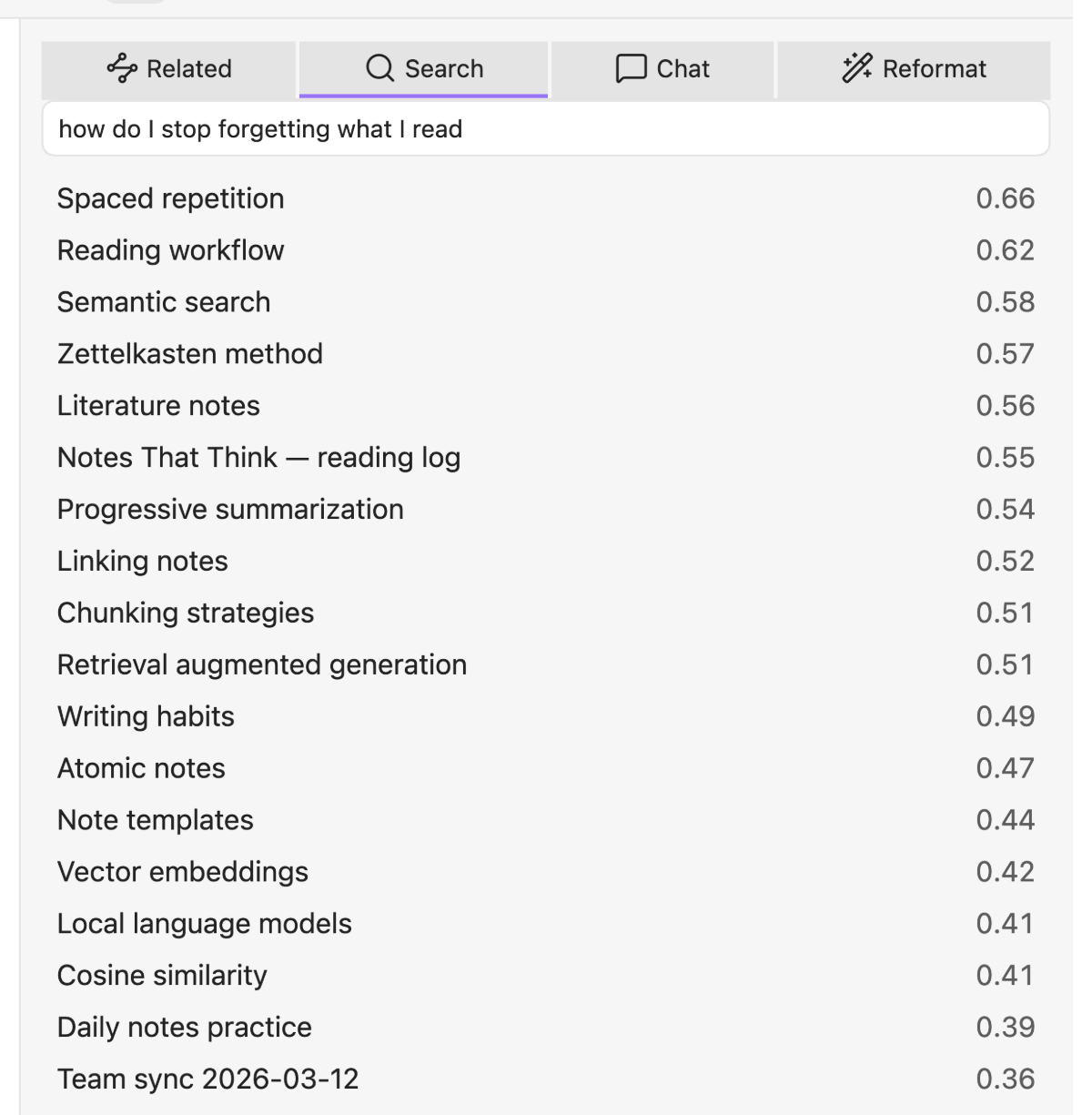
- Semantic search — find notes by meaning, not just keywords.
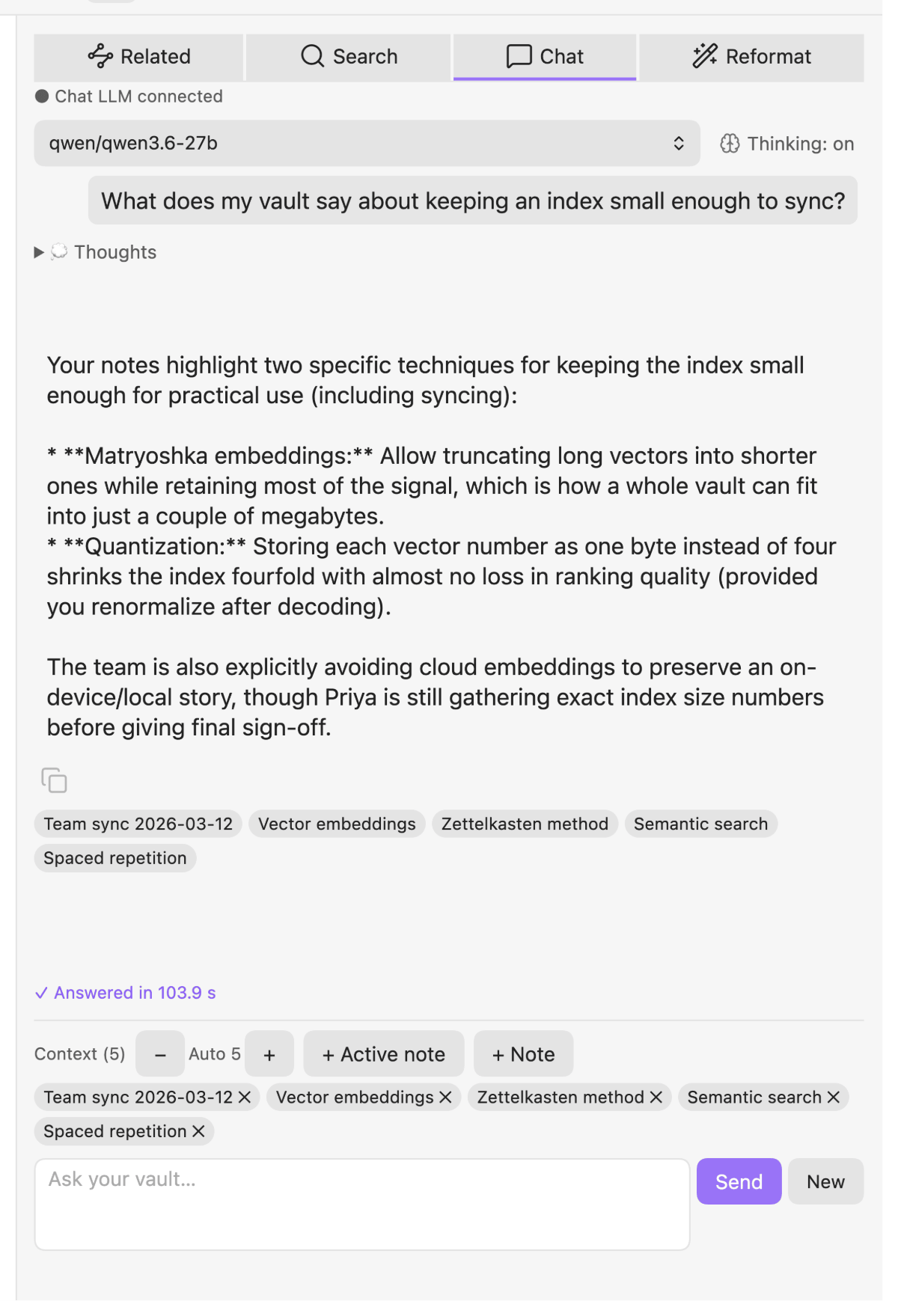
 - **Grounded RAG chat** — ask your vault a question and get an answer grounded in retrieved notes, streamed token-by-token from your chat LLM. An editable live-context panel shows exactly which notes feed the answer, with source chips that link back.
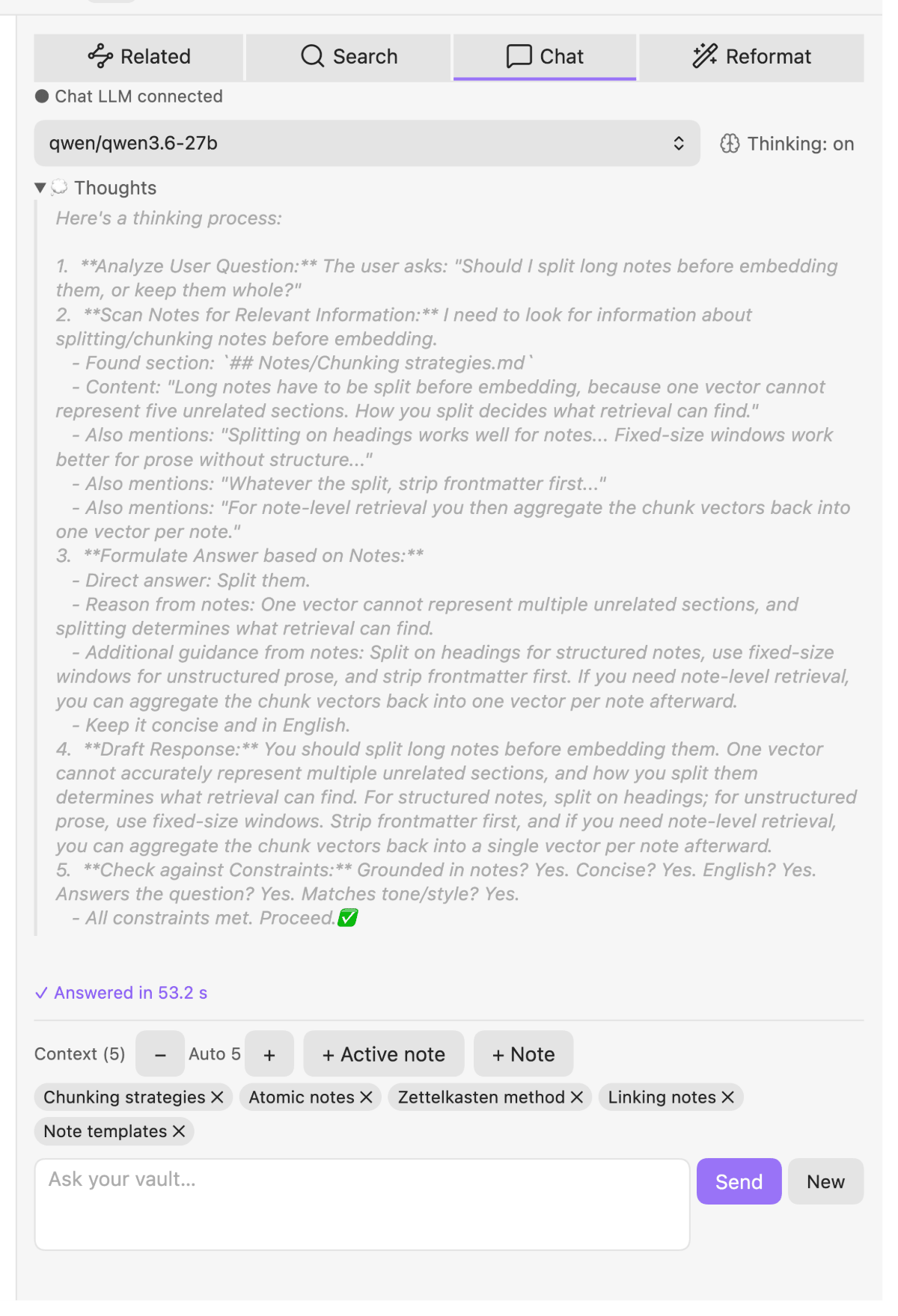
 - **Visible thinking, with an off switch** — for reasoning models, the live "💭 thinking" stream appears in a collapsible block above the answer and folds away once it arrives (and is never sent back into the conversation history). A toggle suppresses thinking when you want faster answers — via cross-server-portable hints — and a settings test tells you whether your model actually honours it.
 - **Model capability hints** — settings show, best-effort, whether the selected chat model supports vision and/or thinking, so you can pick the right one. Each endpoint has an inline connection test, and the model pickers populate from the server.
- **Secrets stay out of the prompt** — before a chat, Smart Apply or reformat request leaves your machine, tokens, bearer headers, private-key blocks and similar secrets in the text are replaced by placeholders such as `[redacted-token-1]`. The model works on the placeholders, and you get your original text back — in the answer, in the Smart Apply result and in the reformat preview. The LLM Lab log shows the text that was actually sent.
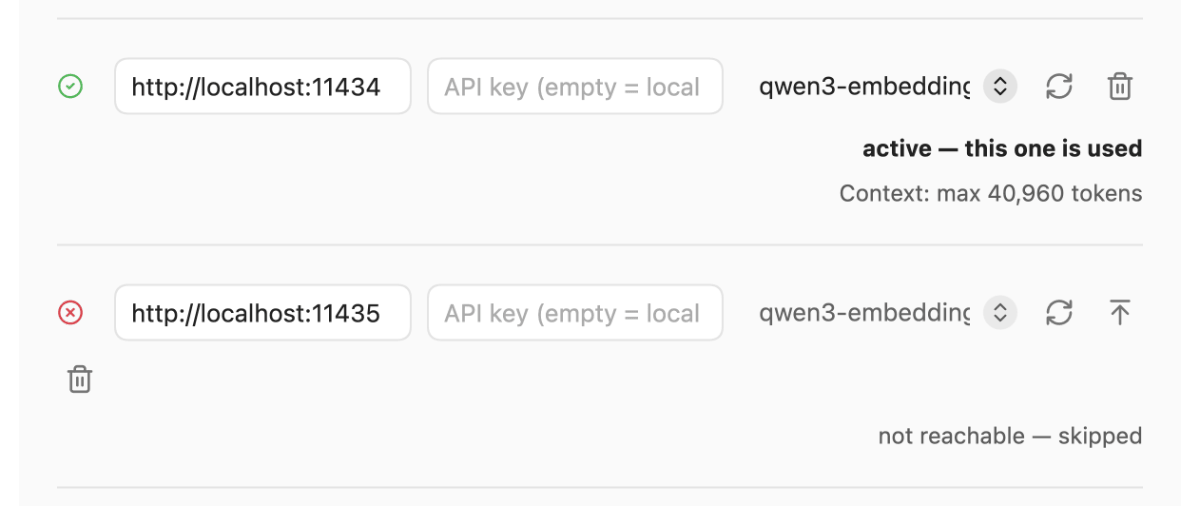
- **Endpoints are a priority list you can see and change** — the first reachable endpoint wins, so the order matters. Each row states its own role in plain words (*active — this one is used* / *reachable — fallback N* / *not reachable — skipped* / *skipped — model does not match the index*), and one click moves any endpoint to the front. Reachable is not the same as in use, and now you can tell them apart without guessing.
- **Model capability hints** — settings show, best-effort, whether the selected chat model supports vision and/or thinking, so you can pick the right one. Each endpoint has an inline connection test, and the model pickers populate from the server.
- **Secrets stay out of the prompt** — before a chat, Smart Apply or reformat request leaves your machine, tokens, bearer headers, private-key blocks and similar secrets in the text are replaced by placeholders such as `[redacted-token-1]`. The model works on the placeholders, and you get your original text back — in the answer, in the Smart Apply result and in the reformat preview. The LLM Lab log shows the text that was actually sent.
- **Endpoints are a priority list you can see and change** — the first reachable endpoint wins, so the order matters. Each row states its own role in plain words (*active — this one is used* / *reachable — fallback N* / *not reachable — skipped* / *skipped — model does not match the index*), and one click moves any endpoint to the front. Reachable is not the same as in use, and now you can tell them apart without guessing.
 - **Live indexing** — notes are re-embedded on save; edits made offline queue up and catch up automatically on reconnect. A full **reindex** command builds the whole index from your vault, so you can start from nothing with just an embedding endpoint.
- **An index that defends itself** — the index is your data, and losing it costs an hour of re-embedding. So: writes that would shrink it are refused rather than performed, a truncated index (half-finished sync download) is detected on load and switches the plugin to read-only instead of overwriting good data, device-local backups are rotated automatically and can be restored from the command palette, and a **self-heal** command re-embeds only the notes the index is actually missing. It also defends against a subtler risk: an embedding index is tied to the model that built it, so an embedding endpoint with a different model is skipped automatically, and any write that would mix vectors from two models is refused — a deliberate model change needs a full reindex. Empty notes are never counted as missing.
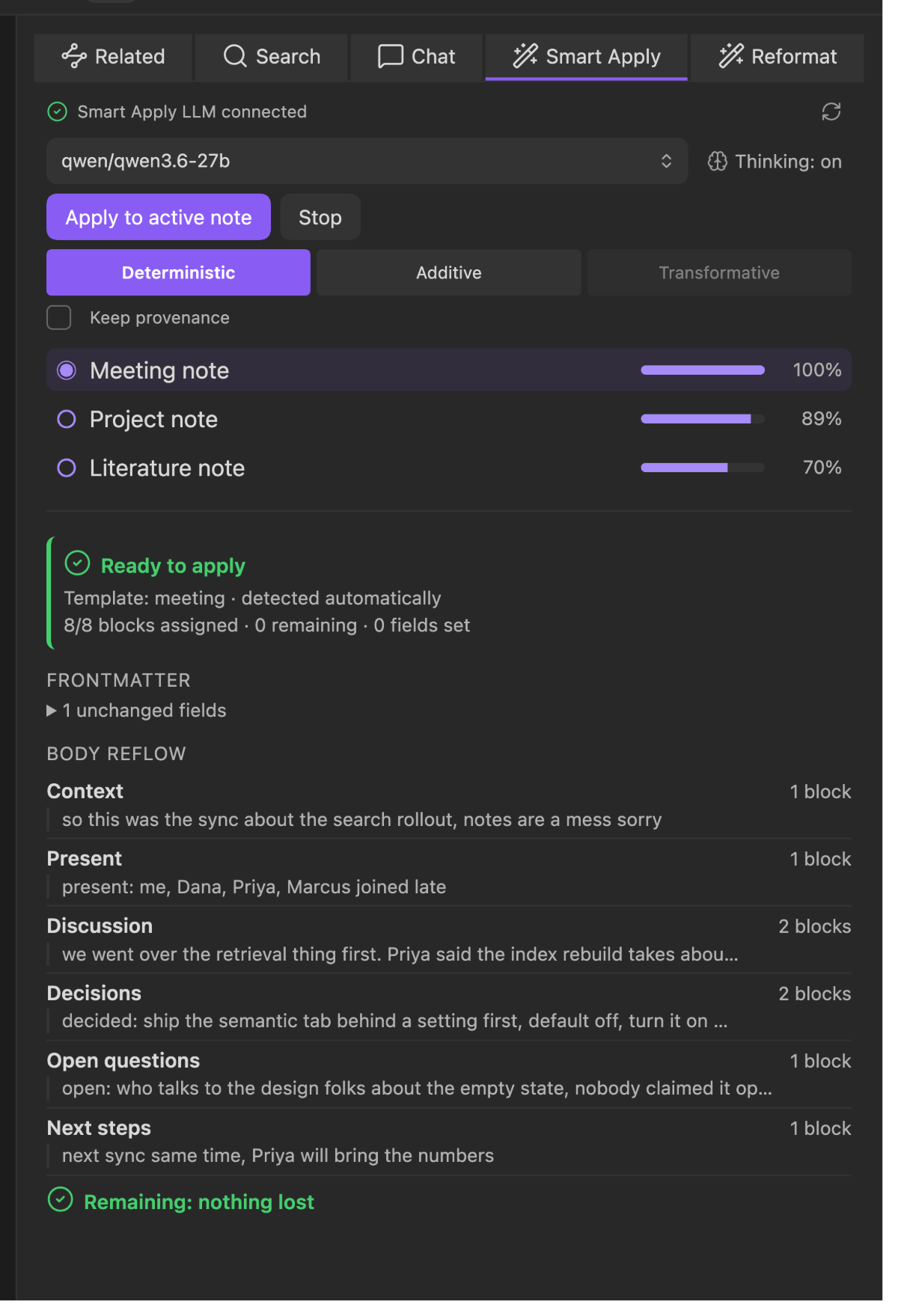
- **Smart Apply — restructure a note into a template** *(opt-in)* — pick a template and your chat LLM reorganises a messy note into its sections, routing your *original* blocks under the right headings. It never invents content — a diff gate shows exactly what moves where before you apply, and the body is rebuilt from your own bytes. Templates self-describe through `%%` guidance comments, and a relevance-ranked template list (cosine over the same index — reusing the stored vectors, no re-embedding) preselects the best fit and updates live as you switch notes. Enable it under **Settings → Smart Apply**.
- **Live indexing** — notes are re-embedded on save; edits made offline queue up and catch up automatically on reconnect. A full **reindex** command builds the whole index from your vault, so you can start from nothing with just an embedding endpoint.
- **An index that defends itself** — the index is your data, and losing it costs an hour of re-embedding. So: writes that would shrink it are refused rather than performed, a truncated index (half-finished sync download) is detected on load and switches the plugin to read-only instead of overwriting good data, device-local backups are rotated automatically and can be restored from the command palette, and a **self-heal** command re-embeds only the notes the index is actually missing. It also defends against a subtler risk: an embedding index is tied to the model that built it, so an embedding endpoint with a different model is skipped automatically, and any write that would mix vectors from two models is refused — a deliberate model change needs a full reindex. Empty notes are never counted as missing.
- **Smart Apply — restructure a note into a template** *(opt-in)* — pick a template and your chat LLM reorganises a messy note into its sections, routing your *original* blocks under the right headings. It never invents content — a diff gate shows exactly what moves where before you apply, and the body is rebuilt from your own bytes. Templates self-describe through `%%` guidance comments, and a relevance-ranked template list (cosine over the same index — reusing the stored vectors, no re-embedding) preselects the best fit and updates live as you switch notes. Enable it under **Settings → Smart Apply**.
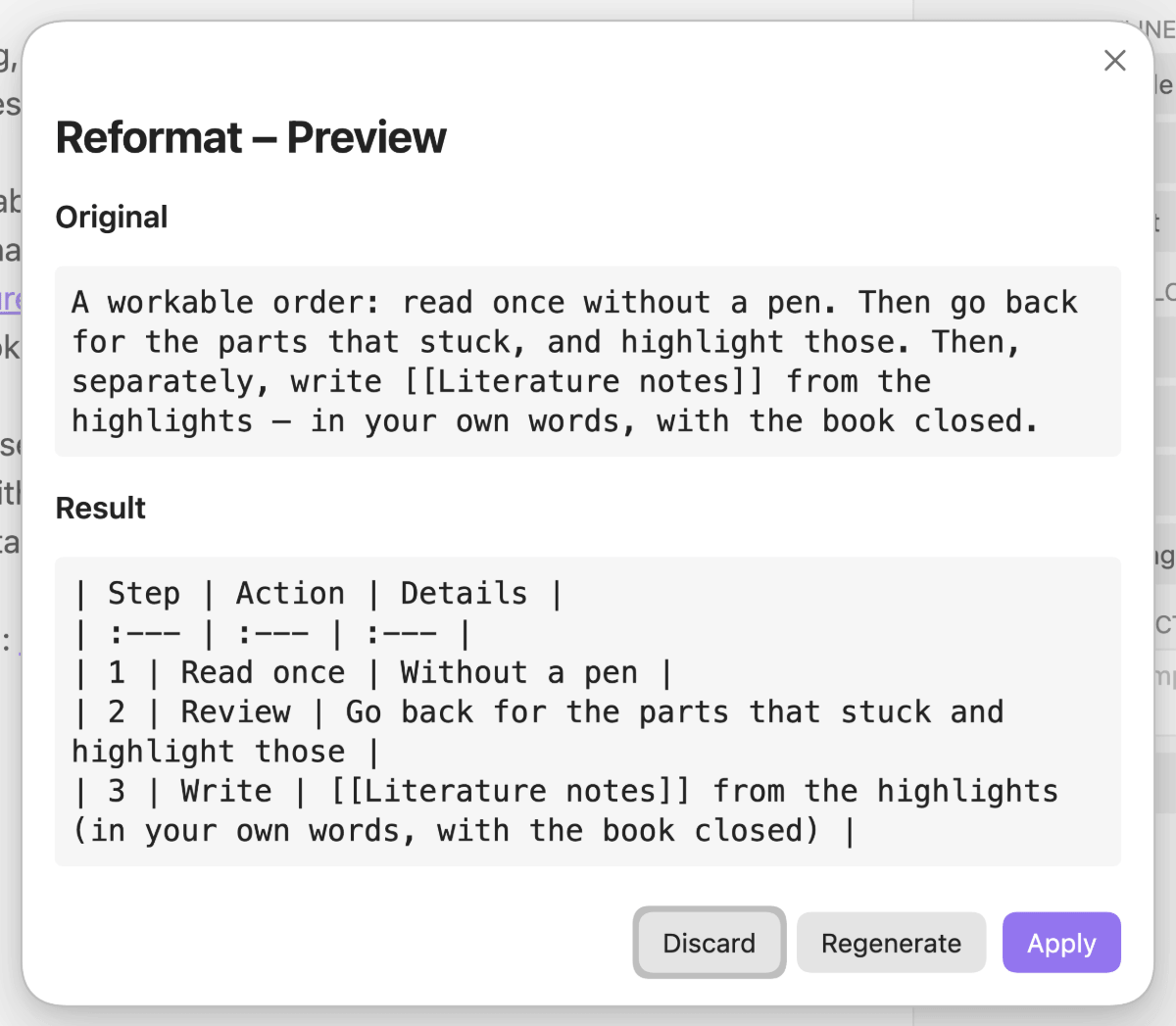
- Reformat a selection — select any block of text and run the reformat command (command palette or editor context menu) to reshape it. Mechanical transforms (transpose a table, table → list, wrap in a callout) apply instantly, no LLM involved. Shape-changing transforms (→ list, → prose, → table, → Mermaid diagram, or your own free-text instruction) stream a preview from your chat LLM that you review and can regenerate before applying. Every transform is also available from the reformat tab in the sidebar, which shows what is currently selected and greys the buttons out (with the reason) when it cannot run.
Requirements
- Obsidian 1.12.7+ (desktop or mobile). On 1.13+ the settings tab renders through Obsidian's native, searchable settings API; on older versions it draws the same structure imperatively.
- An embedding endpoint — an OpenAI-compatible server, local such as Ollama, or a hosted provider if you add an API key — to build and maintain the index. Run the full-reindex command once and the plugin embeds your vault into
<vault>/_vaultrag/itself; from then on notes are re-embedded on save. Alternatively, drop in an index produced by an external backend and synced with the vault — the format is the same. - Nothing else for retrieval. Once the index exists, related notes and semantic search run entirely on-device — no server, no daemon, offline, including on mobile.
- For chat, Smart Apply and LLM-backed reformatting: an OpenAI-compatible LLM endpoint — a local server such as LM Studio, or a hosted provider if you add an API key. New to local LLMs? The local LLM setup guide walks you through it. Configurable in settings — talks to whatever endpoint you configure, and only reaches a third party if you add that provider's API key.
Install
Plugin catalog (recommended)
This plugin is distributed through its own catalog rather than Obsidian's community directory.
Install AnySource Sideloader, add the
catalog https://git.jkaindl.de/jkaindl/obsidian-catalog/raw/branch/main/catalog.json, then
install Vault Retrieval from it and enable it under Settings → Community plugins.
Manual
Download main.js, manifest.json and styles.css from the latest release, drop them into <vault>/.obsidian/plugins/vault-retrieval/, then enable Settings → Community plugins → Vault Retrieval.
From source
git clone https://git.jkaindl.de/jkaindl/vault-rag
cd vault-rag
npm install
npm run build      # → main.js
# copy main.js, manifest.json, styles.css into <vault>/.obsidian/plugins/vault-retrieval/
Usage
- Point the embedding endpoint at your local server in settings, then run the full-reindex command from the command palette. (Skip this if you already have an index in
_vaultrag/.) - Click the layers ribbon icon to open the sidebar. Open a note — the related-notes tab populates automatically.
- Switch to the search tab to query the vault by meaning.
- Switch to the chat tab, point the chat endpoint at your local LLM in settings, and ask away. Edit the live-context list to control which notes ground the answer.
- (Optional) Enable Smart Apply in settings — it then appears as an extra tab. Pick a template from the relevance-ranked list and apply it to the active note; review the diff, then accept, re-generate, or pick another template.
- Select a block of text, then run the reformat command from the command palette or the editor right-click menu — or use the reformat tab and click a transform. Mechanical ones apply immediately; LLM ones open a streamed preview to review before applying. Reformatting needs editing mode; in reading mode the buttons stay disabled and say so. If you edit the note while a preview is open, the replacement is refused rather than applied at the wrong spot.
- (Optional) Enable the Integrator in settings — a sixth tab collects link suggestions for your notes. Run
Suggest links for active note, or list folders in settings so notes there get suggestions automatically after each change (andSuggest links for foldersruns over the backlog). Accept writes a wikilink into the note — into a section at the end (default headingVerwandte Notizen, editable) or into a frontmatter list property such asrelated, your choice; Reject remembers the target for that note. Nothing is written until you click, and nothing needs a language model: suggestions come straight from the index.
Commands
The middle column is what you type in the command palette. On a German Obsidian, the commands appear under their German names instead.
| Command | In the command palette | What it does |
|---|---|---|
| Open sidebar (per tab) | Open related notes · Open semantic search · Open vault chat · Open reformat panel |
Opens the sidebar on that tab |
| Reformat selection | Reformat section |
Reshapes the current selection (see step 6) |
| Smart Apply on active note | Smart Apply on active note |
Restructures the active note into a template |
| Integrator (opt-in) | Open integrator inbox · Suggest links for active note · Suggest links for folders |
Collects link suggestions; accept writes the link, reject remembers the target |
| Reindex vault | Reindex vault |
Rebuilds the whole index from the vault |
| Complete the index | Complete index (missing notes) |
Embeds only what the index is missing |
| Restore index backup | Restore index from backup |
Restores a device-local index backup |
Configuration

Click the preview for the full settings tab.
| Setting | What it does | Default |
|---|---|---|
| Embedding endpoint / model | Re-embeds notes on save; a fallback list, each row with its own model and optionally an API key | http://localhost:11434 · qwen3-embedding:8b |
| Chat endpoint / model | LLM for RAG chat, Smart Apply and reformatting; same fallback-list shape as embedding | http://localhost:1234 · qwen3 |
| Index folder | Where the synced index lives. Cross-device sync (including iPhone) requires the Obsidian Sync option "Sync all other file types" | _vaultrag |
| Hide index folder in file explorer | Hides the index folder from the file explorer for a cleaner workspace (cosmetic; data and sync are unaffected) | on |
| Similarity / top-k | Retrieval thresholds | 0.3 · 20 |
| Excluded paths | Paths skipped by indexing (dot-folders are always skipped) | Templates/, Archive/ |
| Progress in status bar | Shows embedding progress (● indexed | ⏳ pending); revealed automatically during a reindex |
off |
| Debounce | How long after a save the note is re-embedded | 3000 ms |
| Smart Apply | Off by default; enabling it adds the tab, the command and the template settings | off |
| Context budget | Max characters fed as context (ceiling follows the model window) | 12000 |
| Model requests | Collapsible section Request: what is sent per mode (chat, Smart Apply, reformat), overrides per model family, thinking level, last request and deviations; replaces the old temperature and thinking switches | by model family |
| Enter sends | On: Enter sends, Shift+Enter newlines · Off: reversed | on |
Endpoint tip: enter the base URL without a trailing
/v1— the plugin appends it. Both forms are accepted.
External providers: any endpoint row may carry an API key and a model name, turning it into a hosted OpenAI-compatible provider (OpenRouter, Groq, Together, Mistral, OpenAI, …) that sits in the same fallback list as local servers. Chat and embedding endpoint keys are stored in Obsidian's keychain (Settings → Keychain), not in
data.json, and do not travel with settings sync — enter them again on each device.
How it works
The index in <vault>/_vaultrag/ is a portable note-level Matryoshka-256 int8 mini-index — one 256-dimensional int8 vector per note, roughly 1.4 MB for a few thousand notes. Small enough to sync with the vault, which is the whole point: the plugin loads it and runs brute-force cosine locally, so retrieval works identically on every synced device — no daemon, no VPN, no on-device LLM. What does leave the device is text: each note you save goes to the embedding endpoint to be re-embedded, and chat, Smart Apply and LLM reformatting send their prompt and context to the chat endpoint. Both are endpoints you configure — by default ones under your control — and a third party only receives any of it once you add that provider's API key.
The plugin writes that index itself, as a single container file (_vaultrag/index.bin, CRC-checked on every load — one file instead of several means a sync service can never deliver a mixed generation), and reads any index in the same format (documented in the reference), whoever wrote it.
Architecture, module layout and contributor conventions live in AGENTS.md.
Documentation
Full guides live in docs/ — start with the documentation index. New here? → Getting started. Something not working? → Troubleshooting. The guides are organised along Diátaxis:
| Tutorial | From zero to your first related notes — start here |
| How-to guides | Chat setup, reformatting, Smart Apply, repairing an index, MCP, cross-device sync |
| Reference | Every command, setting, default, MCP tool and the index format |
| Troubleshooting | The exact message, its cause and the fix |
| Explanation | Why the index looks the way it does, and where its guarantees end |
MCP server (use your index from Claude Code & other agents, desktop only)
The plugin's embedding index doubles as a retrieval backend for MCP clients (Claude Code, OpenClaw, …). An in-plugin HTTP server (Streamable HTTP, loopback-only) exposes three read-only tools:
| Tool | What it does | Needs endpoint? |
|---|---|---|
search |
Semantic search over the vault (query → {path, score} hits) |
yes (embeds the query) |
related |
Notes related to a given note (straight from the index) | no — works offline |
read_note |
Full markdown text of a note (.md only, excludes respected) |
no — works offline |
Enable it in the plugin settings under "MCP-Server" (desktop only — the toggle and server
are disabled on mobile). The server binds to 127.0.0.1 on a configurable port (default
8123) and requires a Bearer token on every request. The settings section has a "copy
command" button that generates the registration command for you, e.g.:
claude mcp add --transport http vault-retrieval http://127.0.0.1:8123/mcp \
  --header "Authorization: Bearer <token>"
Configuration (endpoints, index folder, excludes) is read from the plugin's own settings — no separate config file. The server only runs while Obsidian is open and picks up index changes live (reloads whenever the plugin rewrites the index). One server instance per vault. The server never writes to your vault.
Note: read_note enforces exclude prefixes case-insensitively (safe on case-insensitive filesystems like APFS/NTFS), while search/related filter result paths case-sensitively — they expose only paths and scores, never content.
Plugin API (for other Obsidian plugins)
Retrieval is also available inside Obsidian, without the MCP server and without a network round trip. Any plugin can ask this one for semantic hits instead of building its own embedding index:
const api = app.plugins.plugins["vault-retrieval"]?.api;   // undefined if not installed/enabled
if (api?.apiVersion === 1 && api.status().indexed) {
  const r = await api.search("what did I decide about the index format?");
  if (r.ok) for (const hit of r.hits) console.log(hit.path, hit.score);
  else console.log("unavailable:", r.reason);              // "no-index" | "offline"
}
| Member | Signature | Notes |
|---|---|---|
apiVersion |
number |
1. Check it before relying on the shape of anything below. |
status() |
{ apiVersion, indexed, noteCount } |
Synchronous and network-free — meant for "can I offer retrieval at all?". Says nothing about endpoint reachability; that would need a request. |
search(query, opts?) |
Promise<Result> |
Text → semantically similar notes. Needs a reachable embedding endpoint. |
related(path, opts?) |
Promise<Result> |
Note → related notes. Straight from the index: no network, works offline and on mobile. |
proposeLinks(path) |
Promise<LinkResult> |
Link candidates for a note (Integrator, opt-in): index only, filtered for already-linked and rejected targets. Computes only — nothing lands in the inbox; the caller decides. |
applyLink(path, target) |
Promise<ApplyResult> |
Writes one wikilink into the note in the configured mode (section or frontmatter property), immediately and without the inbox's stale guard — the caller holds the state. Idempotent: changed: false if the link is already there. |
Result is either { ok: true, hits: [{ path, score }] } or { ok: false, reason } with
reason one of "no-index", "offline" or "not-indexed" (the latter carries the path).
These calls never throw — expected states are values, and reason is a machine-readable
code, never translated prose, so the caller phrases its own message.
LinkResult is { ok: true, links: [{ path, score }] } or { ok: false, reason } with reason
one of "no-index", "not-indexed", "nothing-new" or "disabled" (Integrator switched off).
ApplyResult is { ok: true, changed } or { ok: false, reason } with reason one of
"disabled", "excluded", "not-found", "unlinkable", "block-scalar", "not-a-list",
"frontmatter-unparseable" or "write-failed". These two exist so that something outside this
plugin — a scheduled workflow, say — can automate linking; the plugin itself never writes unasked.
opts accepts k (number of hits) and minSim (similarity floor); both default to your
settings. The exclude list is not overridable — it is a boundary you set, not a tuning knob
for a third-party plugin. Scores are returned raw and unrounded; presentation is the caller's
call.
This deliberately does not expose note reading or raw embedding vectors: a plugin can read the vault through Obsidian's own API, and vectors would tie callers to the index dimension, model and quantisation — internals this plugin needs to stay free to change.
Status: the contract is versioned but young. Treat version 1 as experimental until a second consumer has confirmed its shape.
Related
Image transcription (handwriting/screenshots → Markdown) lives in the sibling plugin image-to-markdown.
If the LLM Lab plugin is installed, Vault Retrieval reports its LLM calls to it — chat, reformatting and Smart Apply — so you can review what was sent and what came back. Nothing is reported when that plugin is absent, and the endpoint test button is excluded by design.
Contributing
Issues and pull requests are welcome on Forgejo (canonical; GitHub is a mirror). The project is test-driven — every change ships with tests (npm test), and larger features go through a brainstorm → spec → plan → TDD flow. See AGENTS.md for architecture and conventions.
License
- Code: GNU Affero General Public License v3.0 or later (
LICENSE). A commercial dual-license is available on request if the AGPL's copyleft doesn't fit your use case — seeLICENSING.md. - Documentation & text: Creative Commons Attribution-ShareAlike 4.0 (
LICENSE-DOCS).
Copyright © 2026 Johannes Kaindl.