Vault OKR Manager
 jingmengzhiyue616 downloads
Manage OKRs inside your vault with a streamlined dashboard and built-in check-ins.
- Overview
- Scorecard
- Updates16
Vault OKR Manager
A local-first Obsidian plugin for planning weighted OKRs, monitoring execution health, recording check-ins, and running structured period reviews in Markdown.
中文文档 · Release notes · Features · Quick start · Health model · Review workflows · Storage
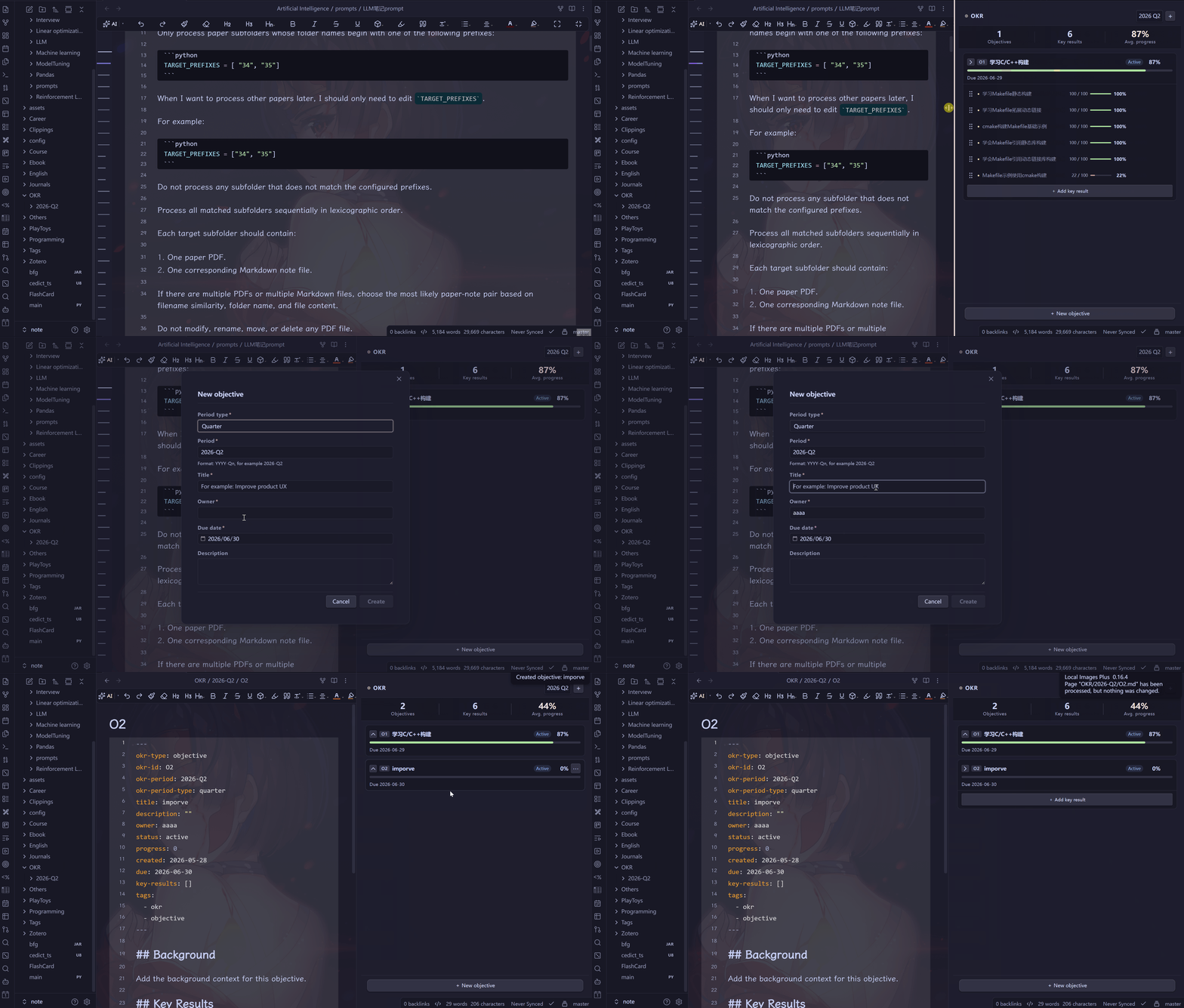
Overview
Vault OKR Manager keeps the complete OKR operating cycle inside an Obsidian vault: define objectives, weight key results, record progress, identify execution risk, conduct recurring reviews, close a period, and selectively roll unfinished work forward.
All durable data is stored as readable Markdown and YAML. The plugin uses no external database, cloud service, telemetry, or account, so the vault remains portable and suitable for Obsidian Sync, file backups, and Git-based workflows.
Version 1.4.0 replaces equal-only KR aggregation with relative weights, introduces a schedule-aware health assessment that is intentionally separate from completion progress, and adds weekly review, mid-cycle review, and cycle retrospective workflows.
Features
| Area | Capability |
|---|---|
| Planning | Weekly, monthly, quarterly, and yearly periods; one Markdown file per Objective |
| Measurement | Numeric, percentage, score, and Boolean KRs; positive relative KR weights |
| Progress | Automatic KR calculation and weighted Objective aggregation |
| Health | On track, at risk, and off track assessments based on schedule, confidence, blockers, hold state, and overdue state |
| Check-ins | Multiple dated progress records, notes, deltas, and active blocker tracking |
| Reviews | Repeatable weekly reviews, one mid-cycle review, and one retrospective per period |
| Evidence | Immutable progress and health snapshot captured when each review is created |
| Lifecycle | Close, reopen, archive, read-only enforcement, and selective rollover |
| Reuse | Markdown-backed period templates that retain KR weights |
| Interface | Dashboard, Objective detail tables, drag-and-drop KR ordering, overdue reminders, and due-date postponement |
| Language | English and Simplified Chinese interface |
| Privacy | Local-only Markdown storage with no network dependency or telemetry |
Requirements
| Item | Requirement |
|---|---|
| Obsidian | 1.7.2 or later |
| Platform | Windows, macOS, Linux, iOS, Android |
| Plugin ID | vault-okr-manager |
| Desktop-only | No |
Installation
Community plugins
If the plugin is available in Obsidian's community directory:
- Open Settings → Community plugins.
- Select Browse and search for
Vault OKR Manager. - Install and enable the plugin.
Manual installation
- Download
main.js,manifest.json, andstyles.cssfrom the latest release. - Create
.obsidian/plugins/vault-okr-manager/inside the vault. - Copy the three files into that directory.
- Reload Obsidian and enable Vault OKR Manager under Community plugins.
YourVault/
└── .obsidian/
    └── plugins/
        └── vault-okr-manager/
            ├── main.js
            ├── manifest.json
            └── styles.css
Quick start
1. Configure the plugin
Open Settings → Vault OKR Manager.
| Setting | Default | Purpose |
|---|---|---|
| Objective directory | OKR |
Root folder for periods, objectives, templates, and reviews |
| Default period type | quarter |
Initial period type in the new Objective form |
| Auto-calculate progress | Enabled | Derive KR progress from current and target values |
| Open dashboard on startup | Disabled | Open the dashboard after the workspace is ready |
2. Create an Objective and weighted KRs
- Run Vault OKR Manager: New objective from the command palette.
- Choose a period and provide the title, owner, dates, and optional description.
- Run New key result, or add a KR from the Objective card.
- Set a positive relative weight. A value of
1is the default.
Weights are relative, so 2, 1, 1 means 50%, 25%, and 25%. They do not need to total 100.
3. Record progress
Run Record progress or use a KR action. A check-in records the date, progress, current value when applicable, note, blocker, delta, and timestamp. The blocker entered on the latest check-in becomes the KR's active blocker signal; a later check-in with an empty blocker clears it.
4. Monitor progress and health
Open the dashboard from the ribbon or run Open dashboard. Objective cards and KR rows show completion, weights, normalized weight shares, confidence, and health. Hover a health badge to see the active risk reasons.
5. Run reviews and close the period
Run Period reviews or choose Period reviews from the period menu. Create weekly reviews during execution, a mid-cycle review when priorities need formal adjustment, and a retrospective before closing. Closing without a retrospective remains possible, but requires explicit confirmation.
Progress and health model
Progress and health answer different questions:
- Progress: How much of the measurable result is complete?
- Health: Given time, confidence, blockers, and status, how likely is execution to remain on track?
Weighted Objective progress
Cancelled KRs are excluded. For all other KRs:
Objective progress = Σ(KR progress × KR weight) / Σ(KR weight)
The result is rounded and clamped to 0–100. Existing files without weight are treated as weight 1, preserving the earlier equal-average behavior until weights are changed.
KR health score
Expected progress advances linearly from created to due and is clamped to 0–100. An active KR begins at 100 and receives these deductions:
| Signal | Effect |
|---|---|
| Behind schedule | expected progress − actual progress when positive |
| Medium confidence | −5 |
| Low confidence | −15 |
| Active blocker from latest check-in | −20 |
| On hold | −25 and maximum score 79 |
| Overdue and incomplete | Maximum score 59 |
Completed KRs score 100. Cancelled KRs are not applicable. Scores map to:
| Score | Status |
|---|---|
| 80–100 | On track |
| 60–79 | At risk |
| 0–59 | Off track |
Objective health is the weighted aggregation of eligible KR health scores, with Objective-level on-hold and overdue caps applied afterward. Health is a transparent operating signal, not a forecast or a substitute for review judgment.
Structured review workflows
Weekly review
Repeatable by date. The form includes summary, wins, blockers, and next steps. Summary and next steps are required.
Mid-cycle review
One per period. The form includes summary, achievements, risks, adjustments, and decisions. Summary and decisions are required.
Cycle retrospective
One per period. The form includes summary, outcomes, what worked, what did not work, lessons learned, and follow-up actions. Summary, lessons, and follow-up actions are required.
When a review is created, the plugin captures an immutable snapshot containing every Objective and KR's status, progress, weight, normalized share, health score, expected progress, and risk reasons. Editing the review changes only its narrative sections. It never changes Objectives, KRs, check-ins, or the captured snapshot.
Closed and archived periods are read-only: reviews can be opened but not created, edited, or deleted. Reopening a closed period restores write access.
Period lifecycle
Open → Closed → Archived
  ↑       ↓          ↓
  └── Reopen     Unarchive → Closed
- Open periods accept Objective, KR, check-in, review, template, and rollover-related writes.
- Closed periods are read-only and can be reopened or archived.
- Archived periods remain discoverable when Show archived is enabled and can be unarchived back to Closed.
- Closing can selectively roll unfinished Objectives and KRs into the next compatible period.
- Rollover retains KR weights and current progress, clears check-in history and active blocker state, and records the source Objective.
Markdown storage model
With the default root directory, the vault uses this structure:
OKR/
├── 2026-Q3/
│   ├── _period.md
│   ├── O1.md
│   └── Reviews/
│       ├── weekly-2026-08-07.md
│       ├── weekly-2026-08-14.md
│       ├── mid-cycle.md
│       └── retrospective.md
└── Templates/
    └── Product-quarter.md
Each Objective file contains Objective metadata and its KR array in YAML frontmatter. KR entries include weight and has-blocker. Human-readable check-ins remain in a managed Markdown section in the same file.
Review files contain:
- typed review metadata and timestamps in frontmatter;
- a serialized immutable snapshot in frontmatter;
- a readable snapshot table in a managed Markdown block;
- structured narrative sections between stable markers;
- any custom Markdown outside managed blocks, which is preserved when the plugin updates the review.
Do not remove managed markers unless you intend to repair the file manually. Ordinary text outside those markers remains yours.
Commands
| Command | Purpose |
|---|---|
| New objective | Create an Objective in a selected period |
| New key result | Add a weighted KR to an Objective |
| Record progress | Append a check-in and update current progress/blocker state |
| Open dashboard | Open or reveal the OKR dashboard |
| Period reviews | Browse, create, edit, open, or delete period reviews |
| Migrate legacy progress records | Move legacy frontmatter check-ins into readable Markdown sections for open periods |
Additional lifecycle, template, review, edit, delete, reorder, and postpone actions are available from the dashboard and Objective detail view.
Compatibility and upgrades
- Version 1.4.0 reads 1.3.x Objective files without migration. Missing KR weights default to
1; active blocker state is derived from the latest check-in when the field is absent. - Period templates created with schema version 1 remain readable and receive default KR weight
1. - The existing legacy check-in migration command remains available and skips closed or archived periods.
- Before downgrading below 1.4.0, back up or commit the vault. Older plugin versions ignore review files and may discard
weightorhas-blockerwhen rewriting an Objective.
FAQ
Do weights need to add up to 100?
No. They are relative positive values. The plugin normalizes them for display and calculation.
Why can progress be high while health is low?
Progress reports completion only. Health also considers how far through the schedule the KR should be, confidence, the latest blocker, hold state, and overdue state.
Can I edit review Markdown directly?
Yes. Keep the managed markers intact. Text inside structured section markers can be read back into the editor, and custom text outside managed blocks is preserved.
Does a review change my OKRs?
No. Review creation captures evidence; review editing only changes narrative content.
Can I close a period without a retrospective?
Yes, after a dedicated warning and explicit confirmation. This makes exceptions possible without making silent omission the default.
Development
npm install
npm run dev
npm test
npm run lint
npm run build
The production release bundle consists of main.js, manifest.json, and styles.css. Node.js 20 or later is required for development.
Privacy and license
Vault OKR Manager does not send vault content to external services and does not include telemetry. Review your own Obsidian Sync, backup, or Git configuration separately because those tools may copy vault files.
Released under the MIT License.