URL Name Extractor
 valenzine609 downloads
Converts raw URLs into markdown links by automatically fetching webpage titles.
- Overview
- Scorecard
- Updates6
Forked from: obsidian-url-namer by zfei
This is a plugin for Obsidian (https://obsidian.md) that retrieves HTML titles to name raw URL links.
What's New in This Fork
- Improved URL detection: Liberal regex pattern that correctly handles all valid URLs including domains with any valid TLD, DOI links, and academic article URLs
- Progressive complexity: Smart request strategy that tries simple approaches first, only adding complexity when needed to avoid triggering anti-bot systems
- Configurable URL regex: Customize the URL matching pattern in plugin settings
- Site-specific title extraction: Define custom title regex patterns for websites with non-standard HTML
- Multiple fallback methods: Archive.org and Microlink API support for bot-protected sites
- Better error handling: Clear error messages and graceful degradation
Usage
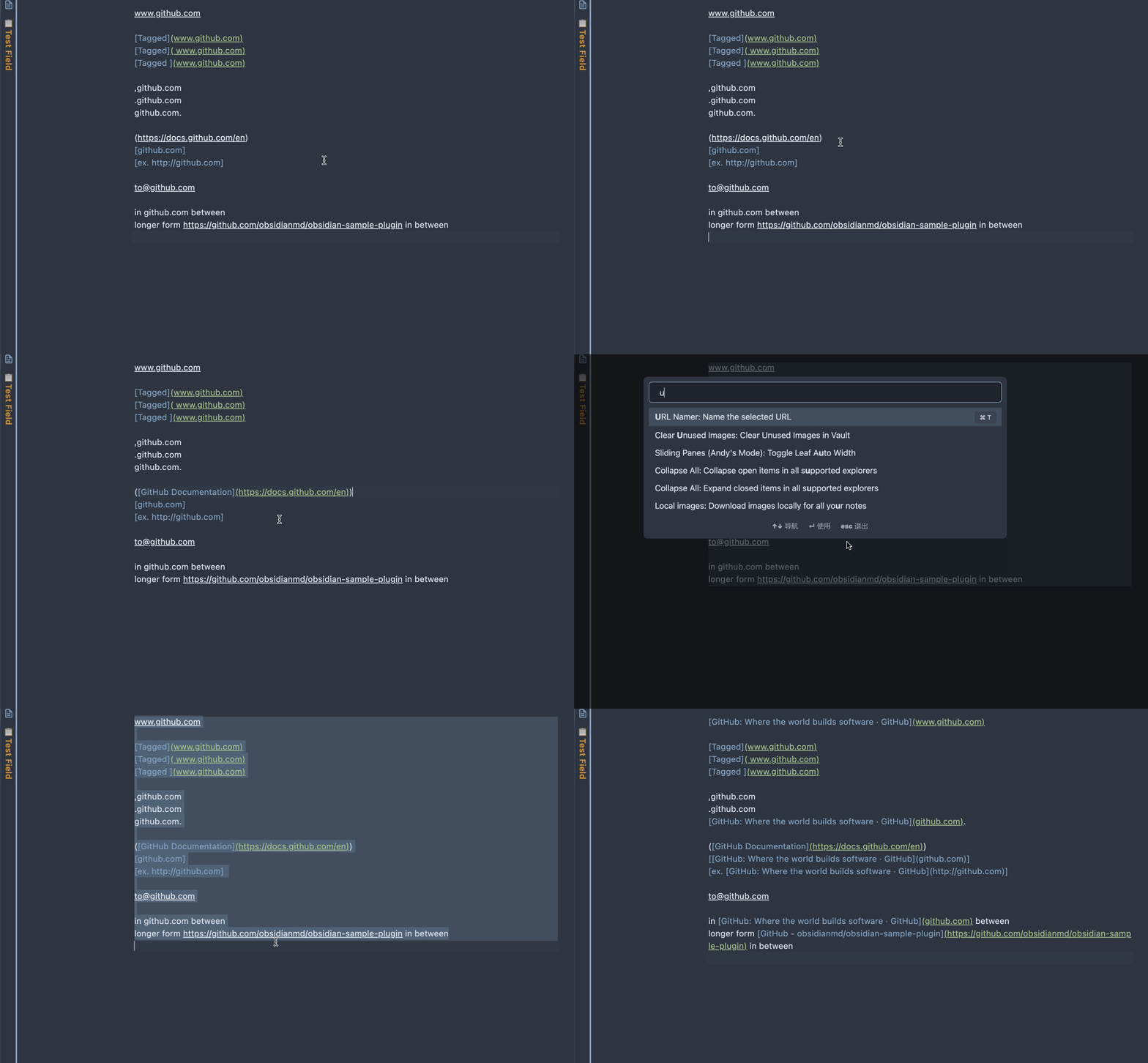
Select the text that contains the URLs to be named, execute the command Name the URL links in the selected text.
It's recommended to name few URLs at a time. In the case when the URL requests are taking some time, please DO NOT change the text selection or the content itself, before the command is done. Otherwise, the eventual result will be out of order.
Easier with the command binded to a keyboard shortcut.
Settings
URL Regex Pattern
Customize the regular expression used to detect URLs in your text. The default pattern is:
https?:\/\/[^\s\]\)]+
This pattern is compatible with all devices including iOS. It matches any http:// or https:// URL and automatically filters out URLs already in markdown links [text](url). The plugin validates URLs using the native URL constructor, so invalid URLs are safely ignored.
Site-Specific Title Patterns
For websites that don't use standard <title> tags or use lazy-loaded content, you can define custom patterns. Each pattern consists of:
- URL Match: A string to identify the website (e.g.,
example.com) - Title Regex: A regex pattern to extract the title (e.g.,
<meta property="og:title" content="([^"]*)")
Add one pattern per line in the format: urlMatch|titleRegex
Example:
arxiv.org|<meta name="citation_title" content="([^"]*)"
pubmed.ncbi.nlm.nih.gov|<meta name="citation_title" content="([^"]*)"
If no site-specific pattern matches, the plugin falls back to extracting from <title> tags.
Known Limitations
Bot Protection
Some websites use Cloudflare, AWS WAF, or other bot protection systems. The plugin handles these cases through its progressive approach:
- Attempts simple request (avoids triggering protection)
- Falls back to browser emulation if needed
- Uses external services if bot protection is detected
Common protection systems:
- Cloudflare challenge pages
- AWS WAF cookie challenges
- JavaScript-based bot detection
When you'll see errors: If bot protection is detected and no fallback methods are enabled:
Error: Bot protection detected. Enable a fallback method in settings.
Recommended approach: Enable Microlink fallback in settings for the most reliable experience with protected sites.
Archive.org Fallback
When enabled in settings, the plugin will automatically attempt to fetch titles from Archive.org's Wayback Machine if a site blocks direct access. This:
- Works for sites with Cloudflare or other bot protection
- May use slightly outdated content (shows date of archived snapshot)
- Adds a small delay while checking for archived versions
- Won't work for very recent URLs that haven't been archived yet
Microlink Fallback
When enabled in settings, the plugin uses Microlink API to fetch titles from protected sites. This is the recommended fallback for protected sites.
Features:
- More reliable than Archive.org for recent content
- Works with most protected sites
- No account required for free tier
Limitations:
- ⚠️ Free tier: 50 requests/day — when exhausted, falls back to Archive.org if enabled
- URLs are sent to a third-party service (Microlink)
- Optional API key field for users with paid plans
How Title Fetching Works
The plugin uses a progressive complexity approach to maximize compatibility:
Simple request — Clean HTTP request with minimal headers
- Works for the majority of websites
- Avoids triggering anti-bot systems
- Faster response times
- Obsidian's requestUrl automatically handles HTTP redirects (301, 302, etc.)
Complex browser emulation — Full browser-like headers if simple request fails
- User-Agent, Accept, Referer, and other browser headers
- Used automatically when simple approach doesn't work
External fallback services — When bot protection is detected:
- Microlink API — Headless browser service (requires sending URLs to third-party)
- Archive.org — Wayback Machine archived snapshots
Both fallback methods are disabled by default. Enable them in settings if you frequently encounter protected sites.
HTML Entity Decoding
Page titles are automatically decoded for common HTML entities:
- Basic entities:
&,<,>,",', - Typographic quotes:
’,‘,”,“ - Dashes:
–,— - Special characters:
…,• - Numeric entities:
{(decimal) and«(hexadecimal)
Fallback Priority
When both Archive.org and Microlink fallbacks are enabled, you can choose the priority order:
- Microlink → Archive.org (recommended): More reliable for recent content
- Archive.org → Microlink (privacy-focused): Tries non-profit Archive.org first
Troubleshooting
URLs aren't being detected
Check your URL regex pattern in settings. The default pattern requires http:// or https:// prefix:
https?:\/\/[^\s\]\)]+
The plugin automatically skips URLs already in markdown links [text](url).
Microlink rate limit errors
The free tier of Microlink allows 50 requests per day. When this limit is reached:
- Error message: "Microlink daily limit reached (50/day)"
- Plugin automatically tries Archive.org fallback if enabled
- Consider adding an API key in settings for higher limits
Site-specific issues
For websites with non-standard HTML or lazy-loaded titles, configure site-specific patterns in settings. See the Site-Specific Title Patterns section above.
Compilation
- Clone this repo.
npm ioryarnto install dependenciesnpm run buildto compile, ornpm run devto start compilation in watch mode.
Installation
- After compiled, rename the
distdirectory toobsidian-url-name-extractorand move it into the vault's plugin directoryVaultFolder/.obsidian/plugins/.
Credits
Original plugin created by zfei. This fork adds configurable settings, multiple fallback methods for bot-protected sites, and improved URL handling.