URL File Preview
 Gabriel89 downloads
Preview and edit Windows .url shortcut files — edit the URL inline, open in your default app or the web viewer, and convert to a Markdown note.
- Overview
- Scorecard
- Updates3
Preview and edit Windows .url shortcut files in Obsidian, with quick actions to open or convert them.
Windows "Internet Shortcut" (.url) files are plain INI-formatted text files
that store a link's URL and optional icon. This plugin registers a dedicated
view for .url files so they render as a small card with an inline-editable
URL field and one-click actions — handy for vaults that sync in shortcuts
created on Windows or dragged in from a browser.
Table of Contents
Background
.url files store their data under an [InternetShortcut] section, e.g.:
[InternetShortcut]
URL=https://obsidian.md/
IconFile=https://obsidian.md/favicon.ico
This plugin parses that format (preserving unknown keys/sections it doesn't
touch, including IconFile), renders the URL value as an editable field,
and writes changes back in the same format. It never makes any network
requests of its own — no favicon lookups, no telemetry — everything is local
to your vault except the actions you trigger explicitly (opening a link, or
opening it in the Web Viewer).
One action, Open in web viewer, depends on Obsidian's own optional Web viewer core plugin (desktop only, disabled by default). The button is only shown when that core plugin is enabled under Settings → Core plugins.
Install
From the Community Plugins browser
- In Obsidian, open Settings → Community plugins → Browse.
- Search for
URL File Preview. - Select Install, then Enable.
Manual installation
- Download
main.js,manifest.json, andstyles.cssfrom the latest release. - Copy them into
<your-vault>/.obsidian/plugins/url-file-preview/. - Reload Obsidian and enable URL File Preview under Settings → Community plugins.
From source
The Node.js version is pinned via mise; run
mise install first if you have it, otherwise use the Node version in
.mise.toml directly.
git clone https://github.com/turingexmachina/obsidian-url-file-preview.git
cd obsidian-url-file-preview
npm install
npm run build
Then copy main.js, manifest.json, and styles.css into
<your-vault>/.obsidian/plugins/url-file-preview/.
Usage
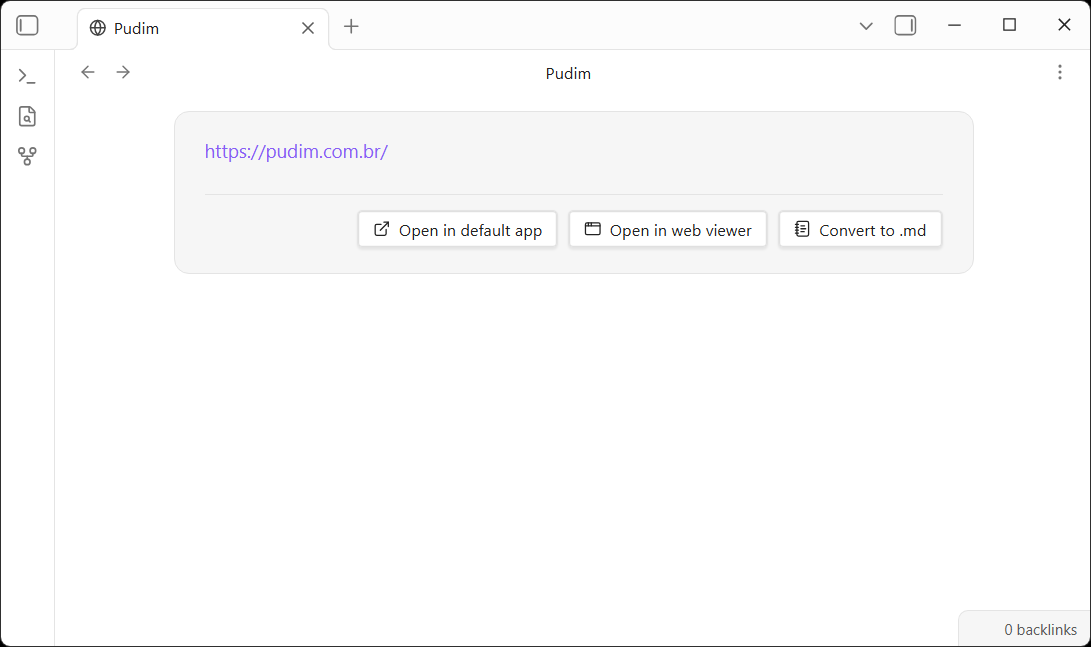
Open any .url file in your vault and it renders as a card with these elements:
- URL field — hover it to reveal a pencil icon; click to edit inline, then Save (or press Enter) or Cancel (Esc).
- Open in default app — opens the
.urlfile itself with your OS's default handler, the same as Open in default app from the file explorer's right-click menu. Desktop only. - Open in web viewer — opens the link in Obsidian's core Web Viewer. Only shown when that core plugin is enabled.
- Convert to .md — replaces the
.urlfile with a Markdown note containing the link in its frontmatter (source: <url>).
Double-clicking a .url file in the file explorer skips the preview card and
opens the link directly, for quick access.
Maintainers
Contributing
Issues and pull requests are welcome at the
GitHub repository.
Please open an issue first to discuss substantial changes, and make sure
npm run build (typecheck + production bundle) passes before submitting a PR.
License
MIT © turingexmachina