Unofficial Fabric Integration
 chasebank872k downloads
Integrates Fabric into your vault
- Overview
- Scorecard
- Updates24
Try out my new plugin, it accomplishes the same thing as this one without having to have fabric or fabric-connector installed. Install it from the community plugins repo in Obsidian. https://github.com/chasebank87/mesh-ai
Updated to work with Fabric 2.0 (Enable fabric 2.0 compatability in the plugin settings)
If you like this plugin, feel free to support the development by buying a coffee:

Overview
The Fabric Plugin is an advanced integration tool for Obsidian, designed to enhance content creation and management within the Obsidian ecosystem. It connects to external APIs to fetch and manipulate data based on user-defined patterns and models. The plugin also supports custom pattern management and YouTube link detection.
Features
- Custom Pattern Management: Watch for changes in a designated folder and sync patterns.
- Community Custom Patterns: Download and share custom patterns with other fabric users.
- YouTube Link Detection: Automatically detect YouTube links in notes.
- External API Integration: Connect to Fabric Connector API and Tavily API for enhanced content manipulation.
- Dynamic Content Rendering: Render content dynamically based on user interactions and API responses.
- Debugging Support: Toggle debug mode for additional logging.
Prerequisites
- Fabric: Install Fabric from danielmiessler/fabric.
- Fabric Connector: Install Fabric Connector from chasebank87/fabric-connector.
Installation
To install the Fabric Plugin, follow these steps:
- Download the plugin from the official repository.
- Place the plugin in your Obsidian's plugins folder.
- Enable the plugin from Obsidian's settings under "Community Plugins".
Configuration
Configure the plugin by setting up the necessary API URLs and keys through the plugin settings tab in Obsidian.
Settings
Fabric Connector API URL: URL to the Fabric Connector API.Fabric Connector API Key: Authentication key for the Fabric Connector API.Output Folder: Default folder path where output files will be saved.Custom Patterns Folder: Folder path for storing and managing custom patterns.YouTube Autodetect Enabled: Toggle to enable or disable automatic YouTube link detection.Default Model: Default model used for data processing.Debug: Enable or disable debug mode for logging.
Usage
- Pattern Management: Add or remove markdown files in the custom patterns folder to manage patterns.
- YouTube Transcription: Autodetect youtube links in current note or clipboard and transcribe them using whisper and then running a pattern against.
- Tavily Search: Use the Tavily API to search for relevant content, and process through results through the selected pattern.
- Input Sources:
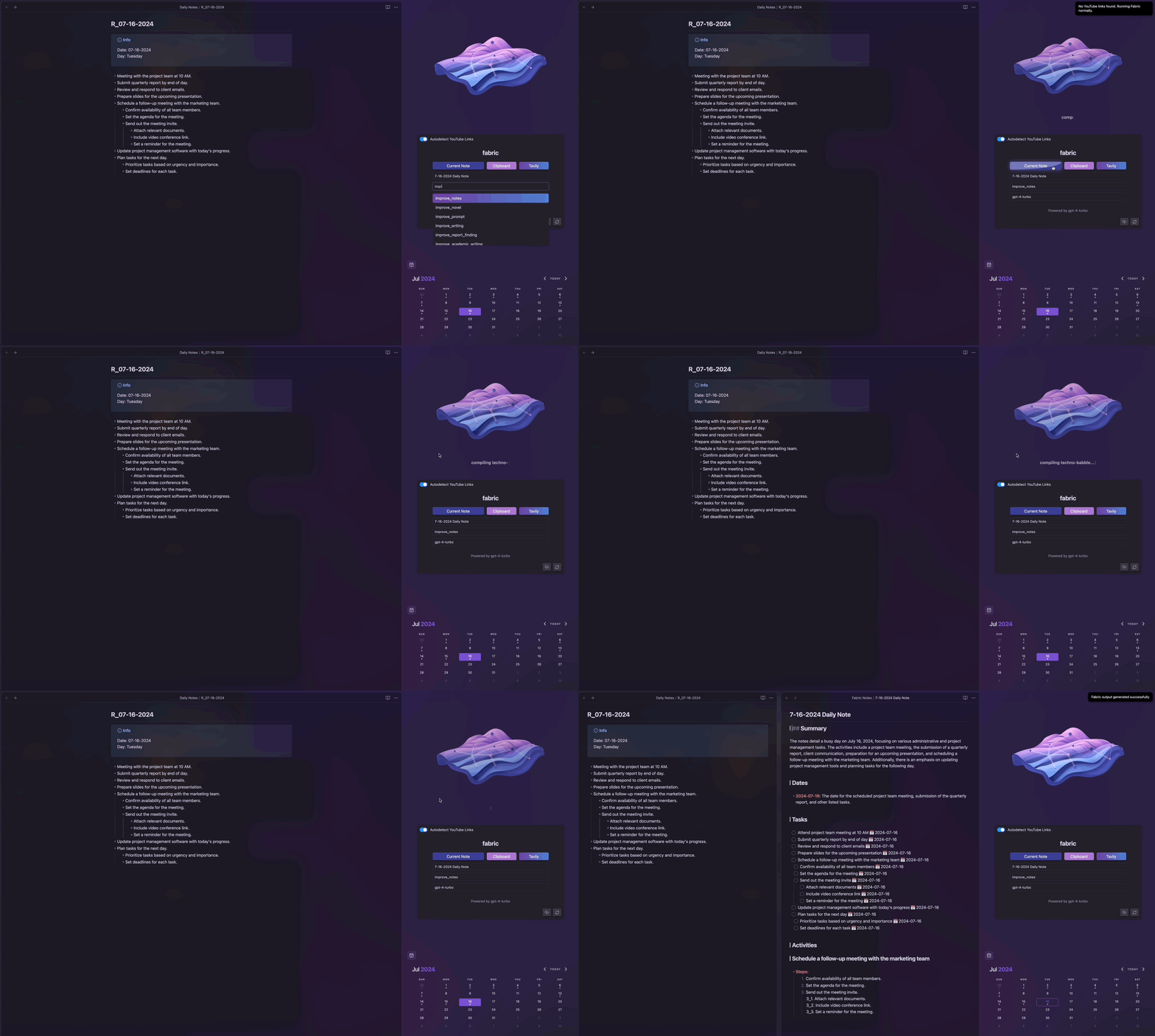
- Current Note: Uses the current active note as the source to be sent to fabric.
- Clipboard: Uses the clipboard as the source to be sent to fabric.
- Tavily: Uses Tavily Search results as the source to be sent to fabric.
- Pattern Selection: Choose a pattern from the available custom or built in patterns to process the input data.
- Models: Select a model from the available options to process the input data and pattern.
- Upload Patterns: One way sync to fabric, will create if the custom pattern does not exist, and update if it does
- Update Patterns and Models: Refreshes the models and patterns displayed in the dropdowns.
Demonstration
Debugging
Toggle the debug mode in settings to view detailed logs in the console. This can help in tracing issues and understanding the flow of data.
Contributions are welcome. Please fork the repository, make changes, and submit a pull request for review.
License
This project is licensed under the MIT License - see the LICENSE file for details.
For more information on usage and configuration, refer to the detailed comments within the codebase or visit the Fabric Plugin Documentation.