Tufte Map
 PleiadesM72 downloads
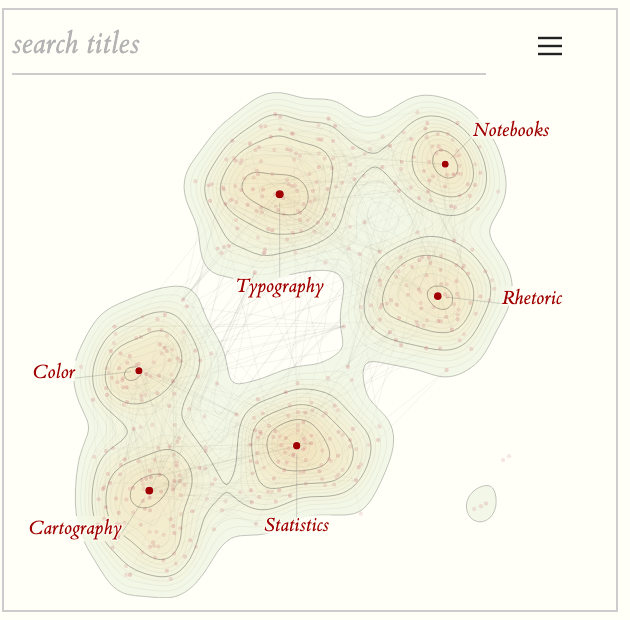
Draws the vault's link graph as a contour map: notes that link to one another lie close together, the land rises where notes are dense, and each summit is named after its most connected note. Styled by the Tufte theme.
- Overview
- Scorecard
- Updates4
Your vault's link graph, drawn as a contour map. Notes that link to one another lie close together, the land rises where notes are dense, and each summit is named after its most important note. It is a companion to the Tufte for Obsidian theme, in its paper, ink and single red, and it reads the colours of any other theme too.
What it shows
- Terrain from links. The layout comes from the link graph alone, so notes do not need any text for the map to work. Contour lines mark the density; every fourth line is an index contour. How many levels the land climbs through (sixteen by default, on every sheet), the lines' weight and strength, and how strongly the land is coloured are settings.
- Summits. Each hill is anchored on its most important note, drawn as a larger red dot on the summit and named in red italic beneath it. The details list ranks the hills by height.
- Dots. One dot per note, all of one size (the most important a tenth larger), in one pale tint of the red, stronger the better connected the note; the summit dots are the full red, sized by importance within a fifth. Importance is the note's links by default, weighted as you choose, with note length and recent edits as further weights.
- Bridges. Links that run from one summit's region to another's are drawn as faint hairlines. They are stronger over the water between the mountains and fainter over the land.
- Islets. Groups of notes that link only to each other sit near the centre, with open water around them. A clump the layout puts out at sea is brought in to a channel off the coast.
- Colours. The land climbs from a light sage at the coast to a pale ochre at the summits, laid over the paper at four tenths. The lowland and summit colours (for light and for dark paper), the summit dots' and the note dots' colour and opacity are yours to set; an arrow beside each returns it to the theme's.
Using it
- Open the map from the ribbon (map icon) or the command Open knowledge map. It opens in a tab or in the sidebar (Settings → Tufte Map → Open the map in). In a narrow sidebar it switches to a compact presentation.
- Hover a dot to see its name and its links. Click to open the note in a companion tab; ⌘/Ctrl-click opens a new one; ⌘/Ctrl-hover shows Obsidian's page preview. On touch, tap once to see a name and tap again to open the note.
- Zoom with a pinch or ⌘/Ctrl-scroll; zooming in names more notes. Double-click to zoom in; press 0 to reset.
- The corner toggle opens the details: find a note, list the summits and folders (hover to isolate, click to pin), switch bridges or all links on and off.
- The layout is remembered and warm-started when the vault changes, so the map stays recognisable as it grows; an unchanged vault opens to the same map at once. Redraw knowledge map from scratch forgets it. The first open after updating lays the map out afresh once.
Settings: excluded folders, where the map opens, how many notes to name, a text fade threshold (like the graph view's), dot size, contour levels, contour line width and opacity, terrain opacity, the colours (lowland, summit, summit dots, note dots, with their opacities), the importance weights (inbound links, outbound links, note length, recent edits), links between summits, all links.
Install
Until Tufte Map is listed in the community directory, install it by hand: download main.js, manifest.json and styles.css from the latest release, put all three in YourVault/.obsidian/plugins/tufte-map/, then Settings → Community plugins → enable Tufte Map.
Requirements
- Obsidian 1.4.0 or newer.
- No network access, no telemetry, nothing to build. The map is computed on your device from Obsidian's own link index.
- Desktop. It uses no desktop-only APIs and is not marked desktop-only, but it has not yet been tested on a phone or tablet.
How this plugin is built
One hand-written main.js in plain CommonJS, with no bundler and no dependencies. It computes everything itself, in small cooperative steps that keep the app responsive:
- A random-walk profile of each note's links, and k-nearest affinities.
- A UMAP-style layout (spectral start, then stochastic gradient descent).
- Terrain by binning and Gaussian blur, with marching-squares contours.
- Summits anchored on the most important note of each hill.
- Label placement that never prints over a dot.
data.json holds only the settings and each note's two map coordinates.
dev/ holds the tests and runs in place:
node dev/tests/run.js
The browser test page mounts the real plugin against a stubbed app. Serve the repository root (python3 -m http.server 8766) and open /dev/preview/app.html?selftest=1. One file is not distributed: dev/preview/obsidian-like.css, an excerpt of Obsidian's own app.css used to reproduce its form-field cascade. Without it the test page still runs; only that cascade check becomes a formality.
Credits
The idea of drawing a vault as contour terrain with named summits comes from obsidian-knowledge-map by fengyukongzhou, a Gemini CLI skill that uses text embeddings. Tufte Map is an independent implementation in JavaScript that works from the link graph, and it contains none of that project's code. The preview's type is ET Book.
License
MIT — see LICENSE.
Changelog
- 0.3.0 (2026-09-26)
- Draw the map to fill its sheet: satellites reeled in
- Name each summit in red italic beneath a larger red dot
- No numerals on the sheet; the details list keeps the ranks
- Name the most important summits first
- Draw ordinary notes as a faint tint of the red
- Size each summit's dot by importance, within a fifth
- Draw each summit's dot on the summit
- An unchanged vault opens to the same map at once
- Every sidebar summit name hangs on a leader
- Less margin: the map fills more of the panel
- Contour levels, line width and line opacity as settings
- Sixteen contour levels by default, the sidebar included
- A lighter terrain: sage lowlands climbing to a pale ochre
- A terrain opacity setting, four tenths by default
- Choose the lowland, summit, summit dot and note dot colours
- Choose the summit dots' and note dots' opacity
- 0.2.0 (2026-09-23)
- Colour a dot from warm grey to red by importance
- Draw every dot at one size, the most important a tenth larger
- Add a dot size slider
- Add sliders for what importance means: inbound links, outbound links, note length, recent edits
- Name summits and notes by importance
- 0.1.1 (2026-09-23)
- Clear the review's CSS lint warnings
- 0.1.0 (2026-09-23)
- First release