
- Overview
- Scorecard
- Updates2
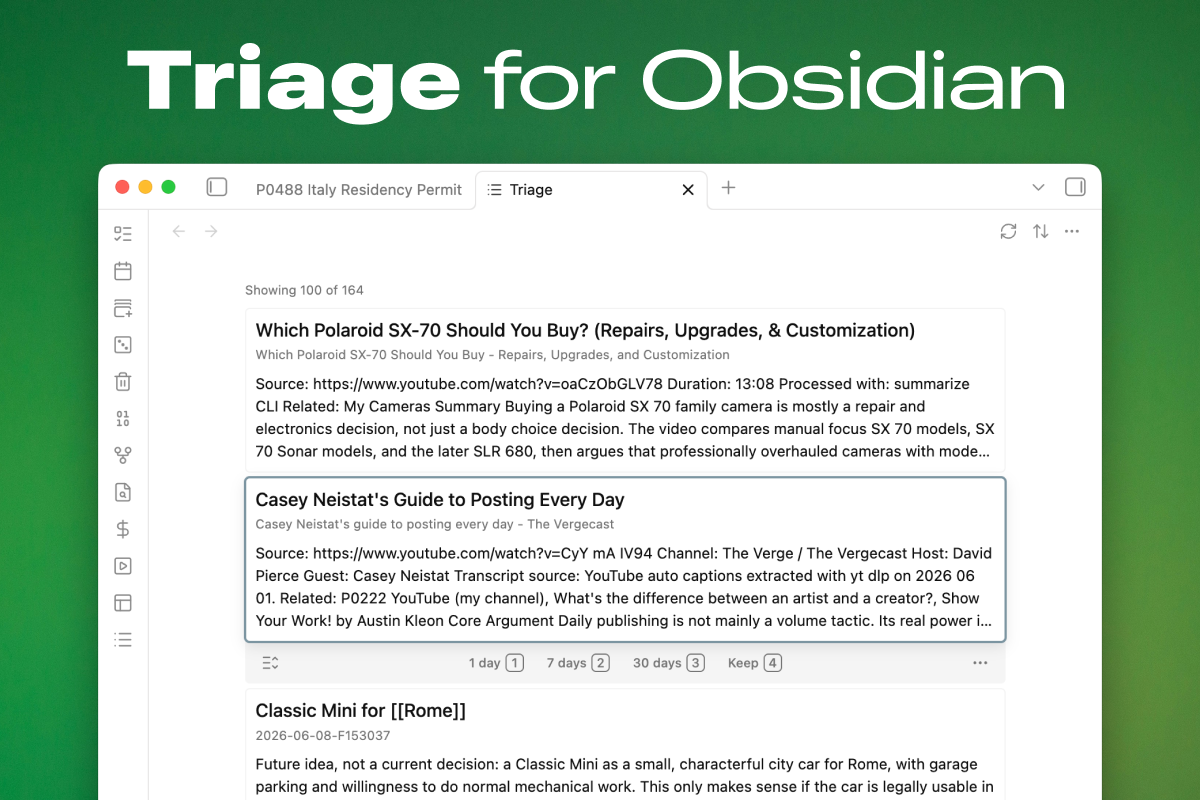
Triage
Triage for Obsidian: a triage queue that resurfaces unprocessed notes so they get reviewed instead of forgotten.
Every vault accumulates loose material — fleeting notes, literature notes, clippings, notes that never got a tag or a category. They aren't tasks, so they don't belong in a task manager, but left alone they quietly disappear into the graph. Triage gives them a way back: it collects eligible notes into a scrolling queue of cards, and you work through them with quick, low-stakes decisions — keep, snooze, delete, or open and actually do something with the note.
The resurfacing idea follows Andy Matuschak's "Peripheral vision": concrete cues beat abstract queues, so cards show the note's actual content rather than a bare title; and resurfacing should be dynamic, so snoozed notes return on real due dates instead of sitting in a static list you learn to ignore.
The review flow borrows Anki's ergonomics — a focused card, numbered answers, intervals you can feel — but Triage is not a spaced-repetition or flashcard tool. There is no scheduling algorithm, no ease factors, and nothing to memorize. Snoozing simply writes a plain due date into the note's frontmatter; when the date arrives, the note comes back.
How it works
- Open the Triage view from the ribbon or the command palette.
- The queue shows every note matching your filters, as cards with a title and a content preview. Cards expand in place to a fully rendered body.
- Move through the queue with the mouse or keyboard and decide, card by card:
- Keep — this note no longer needs triage. Marks it via frontmatter, a tag, or a frontmatter value of your choosing (see below). The file is never moved.
- Snooze — not now, ask me again later. Three configurable intervals (1, 7, and 30 days by default) write a concrete due date; the note resurfaces when it's due.
- Delete — hands off to Obsidian's built-in delete prompt. Triage never deletes silently.
- Open — the note deserves real attention; open it in the editor.
triage_status: snoozed
triage_snooze: shortcut-2
triage_due: 2026-06-19
Field names are configurable, so the plugin can adopt whatever conventions your vault already uses.
Keyboard-first review
| Key | Action |
|---|---|
↓ / j, ↑ / k |
Focus next / previous card |
Enter |
Open the focused note |
Space |
Expand or collapse the focused card |
1 2 3 |
Snooze for the first / second / third interval |
4 |
Keep |
0 |
Clear snooze |
Esc |
Clear focus |
Every action is also available as a command for custom hotkeys, and shortcut hints can be shown as keycaps on the card toolbar. Mouse review works too: hovering focuses a card, and stationary hover won't steal focus back after keyboard navigation.
Configuration
What counts as "unprocessed" is different in every vault, so eligibility is fully configurable and composable:
- Sources — include or exclude notes by folder, tag, or
field=valuefrontmatter matches; include untagged notes; include notes missing a category field. Include filters are OR-based; exclude filters always win. - Keep behavior — choose what Keep means in your vault: set a managed status field, add a tag such as
#evergreen, or set a frontmatter value such ascategory: evergreen. Whichever you pick also acts as the filter that hides kept notes from the queue. - Snooze intervals — the day counts behind the three snooze shortcuts.
- State fields — the frontmatter field names Triage reads and writes.
- Display — preview length (compact, normal, long) and keycap shortcut hints.
A typical setup: include notes tagged #fleeting or #literature, include notes missing your category field, and exclude your templates folder. Nothing is hardcoded.
Installation
Triage is published in the Obsidian community plugin directory.
In Obsidian, open Settings → Community plugins → Browse, search for Triage, then install and enable it.
For a manual install from a release or local build, copy the plugin assets into your vault:
.obsidian/plugins/triage/
├── manifest.json
├── main.js
└── styles.css
Then enable Triage in Obsidian's community plugins settings.
Development
npm install
npm run build     # type-check and bundle
npm run check     # type-check only
npm run lint
npm test
For live development, point the watch build at a test vault and it will rebuild on change (pairs well with the Hot Reload plugin):
OBSIDIAN_PLUGIN_DIR="/path/to/vault/.obsidian/plugins/triage" npm run dev
The product spec lives in docs/spec.md and is kept up to date as behavior changes.