
- Overview
- Scorecard
- Updates24
Manage *.todotxt files in Obsidian.
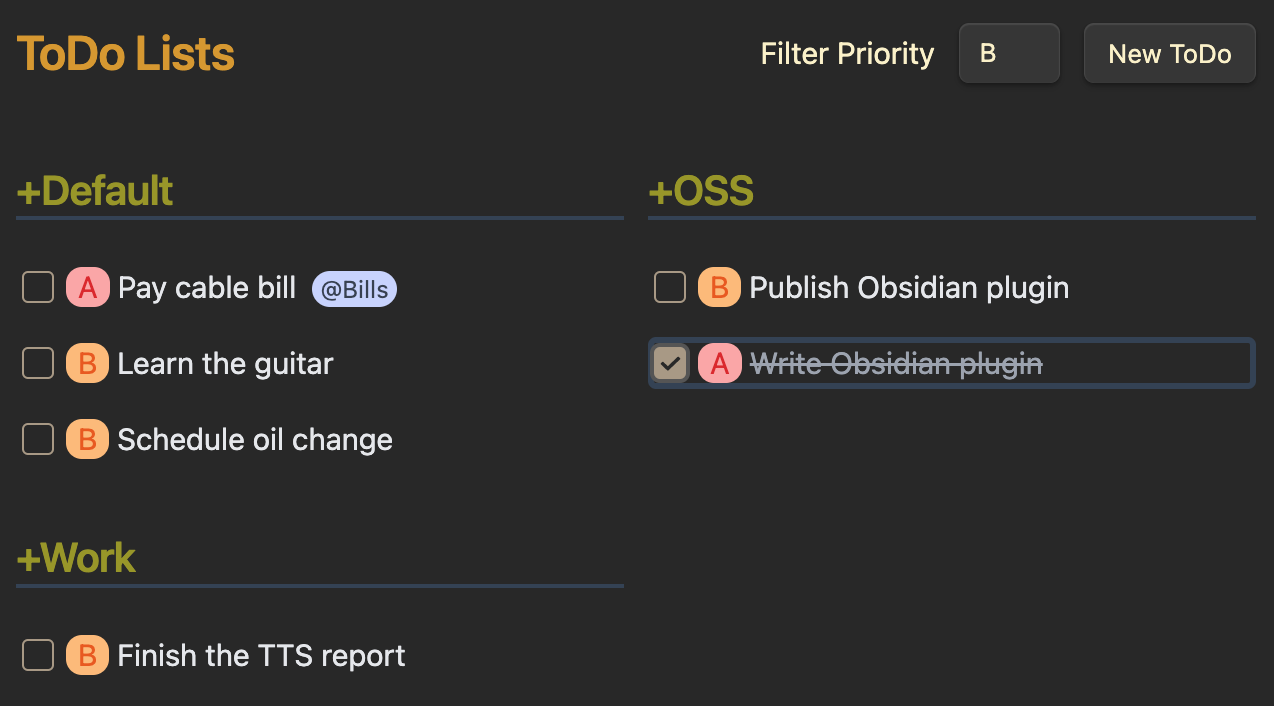
Install the plugin and put your todo file in your Obsidian vault with the
.todotxt extension (ie, TODO.todotxt).
Creating a .todotxt file from within Obsidian can be a bit tricky. When you
create a new note Obsidian will automatically append the .md extension, so
TODO.todotxt becomes TODO.todotxt.md. To fix this, you can right-click on
the file in Obsidian sidebar, select Reveal in Finder/File Explorer, and then
change the file extension to .todotxt. If you are successful, the file will
be listed in the Obsidian sidebar followed by a TODOTXT badge.
Additional Features
The TodoTxt Plugin supports some extensions to the basic todo.txt spec:
Due Dates
Due dates can be specified by including due:yyyy-mm-dd in the text of the
task item. The plugin will highlight the due date and shift to orange as the
date nears then red when the due date is missed. The date must be specified in
the yyyy-mm-dd format (including padding the month or day with a 0 if
needed) and no whitespace may be included.
Preserving Priorities on Complete
EXPERIMENATL: This feature is experimental and needs to be enabled in the settings.
As described in the todo.txt spec,
priorities are typically discarded when a task is marked as complete. This
extension to the spec will preserve the priority in a pri:X tag. It will also
restore the priority if the task is later marked as uncompleted.
Recurring Tasks
EXPERIMENATL: This feature is experimental and needs to be enabled in the settings. This is not part of the todo.txt spec.
Recurring tasks can be specified by including the rec: tag. When such a task
is marked as complete a new task will created with a due: tag based on the
value in the rec: tag.
See further documentation of recurring tasks.
Threshhold Dates
Threshold dates are indicated by the t:YYYY-MM-DD tag. Tasks with a specified
threshold are not considered ready to be undertaken until the threshold date.
The Todotxt Plugin will display tasks with threshold dates in the future with a
subtlely muted text.
How to Install by Hand
- Clone this repo.
pnpm installto install dependenciespnpm run devto start compilation in watch mode.
Manually Installing the Plugin
Copy main.js, styles.css, manifest.json to your vault
VaultFolder/.obsidian/plugins/todotxt-plugin/.
cp dist/* VaultFolder/.obsidian/plugins/todotxt-plugin/
Keyboard Shortcuts
Use tab and shift-tab to navigate through your todos.
ctrl-nto create a New todo taskctrl-/goto filter inputeorenterto Edit the current todo taskdto Delete the current todo taskspacetoggle done
Future Development
- Delete a Todo
- Edit a Todo
- Keyboard shortcut to create new Todo
- Keyboard navigation through TODOs
- Priority colors are a bit bright
- Better handling for Todo.parse() errors
- Global keyboard shortcut to create new Todo
- Command palette command to create new Todo
- Config menu set the default .todotxt file
- Command palette to create a new .todotxt file
Development
Helpful commands to run while developing:
pnpm run dev # compile typescript to ./dist via esbuild
pnpm run css # compile css to ./dist via postcss
pnpm run cp # copy files from ./dist to Obsidian plugins dir
pnpm run parser:watch # compile .peggy grammar to parser.js
pnpm run test:watch # run tests in watch mode
We are using the moment package because Obsidian already requires it. Otherwise would use something lighter weight (like date-fns) or built-in.
Thanks
- Thanks to the authors of todotxt.
- Thanks to the authors of SwiftoDo for documenting the due and recurring extensions to the spec.
Support
I've been asked if there are ways to support this plugin. I created it to scratch my own itch and am just happy that others find it useful. Giving it a star on github would be appreciated. If you are feeling extra generous, you can buy me a coffee ☕.