Search...Search plugins and themes...
⌘K
Sign in
  • Get started
  • Download
  • Pricing
  • Enterprise
  • Account
  • Obsidian
  • Overview
  • Sync
  • Publish
  • Canvas
  • Mobile
  • Web Clipper
  • CLI
  • Learn
  • Help
  • Developers
  • Changelog
  • About
  • Roadmap
  • Blog
  • Resources
  • System status
  • License overview
  • Terms of service
  • Privacy policy
  • Security
  • Community
  • Plugins
  • Themes
  • Discord
  • Forum / 中文论坛
  • Merch store
  • Brand guidelines
Follow us
DiscordTwitterBlueskyThreadsMastodonYouTubeGitHub
© 2026 Obsidian

Titler

jorammillenaarjorammillenaar27 downloads

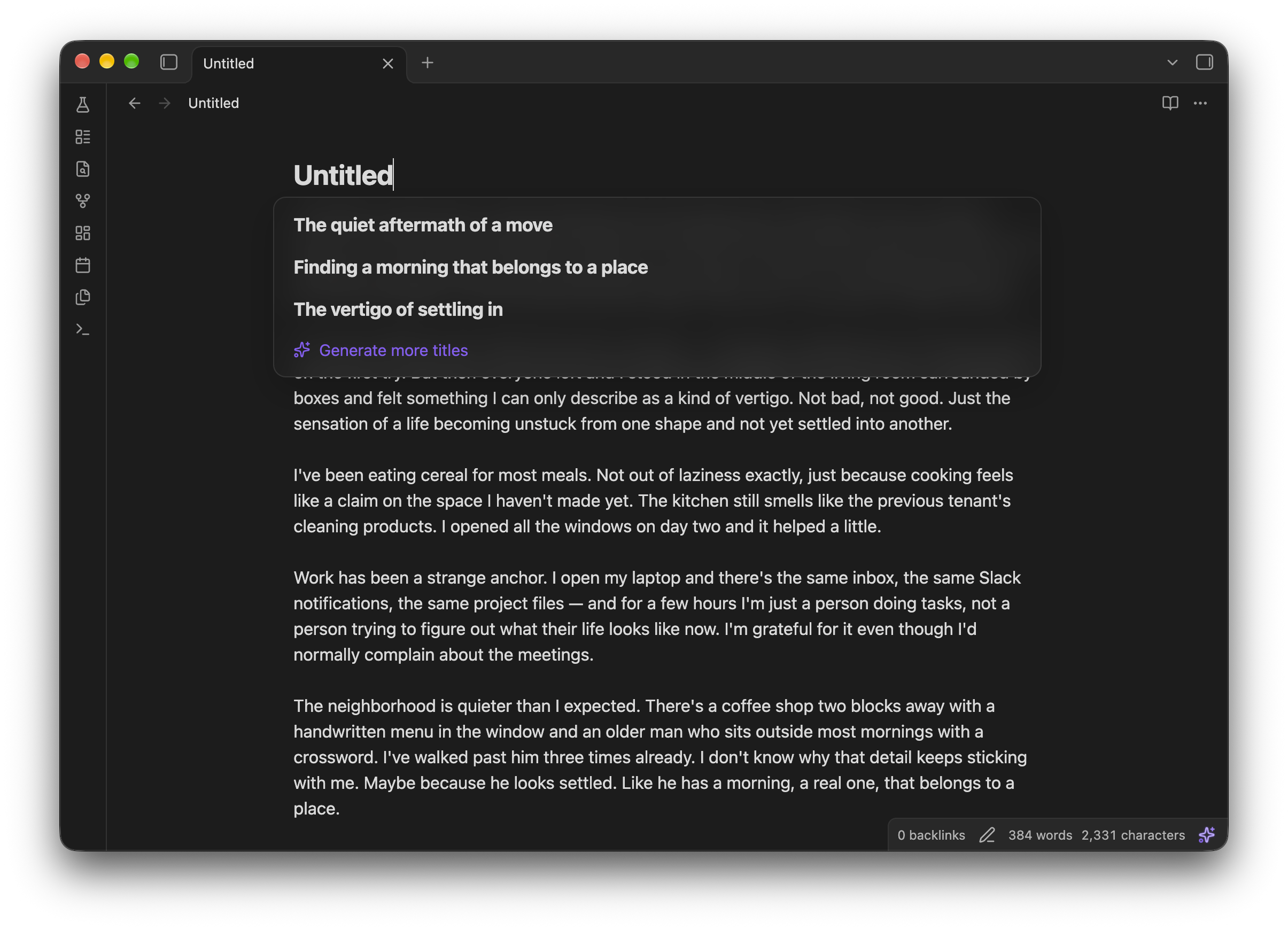
Suggests and writes titles for your notes with a small AI that runs fully on your device.

Add to Obsidian
Titler screenshot
  • Overview
  • Scorecard
  • Updates2

Suggest titles for you notes automatically, all on-device.
thumbnail

Privacy and network use

Your notes never leave your device: titles are generated locally, with no account, API key or external service.

The plugin uses the network once, to download what it runs:

  • the AI model (Qwen3.5 2B, about 1.4 GB) from huggingface.co, which starts when you enable the plugin (you can put it off from the notice and start it later from the settings);
  • the ONNX Runtime files that run it, from cdn.jsdelivr.net.

Both are stored in Obsidian's own storage on that device, shared by all your vaults, and work offline after that. There is no telemetry. Report a bug in the settings opens a GitHub issue in your browser, which you can read and edit before sending; it never includes your notes.

Settings

  • Name untitled notes automatically: on by default.
  • Capitalization: Sentence case, Title Case or lowercase.
  • Length: short (2–4 words), medium (4–8) or descriptive (up to 12).
  • Style: a topic ("Sourdough starter care"), a claim ("Starters need daily feeding at room temperature") or a question ("How often should I feed a starter").

Under Advanced you can turn the AI off on one device, choose how long the model stays in memory after use on that device, change how much you need to have written before a note is named, and delete the downloaded model.

Requirements

  • Obsidian 1.13 or later, on desktop. The model is too large for phones and tablets.
  • About 1.5 GB of disk space for the model, and as much memory while it's loaded. It unloads after 10 minutes without use (adjustable under Advanced) and reloads in a few seconds when needed.
  • A GPU with WebGPU support makes a title take about a second. Without one, the plugin runs on the CPU, which works but is noticeably slower.

License

The model, Qwen3.5 2B, is licensed under Apache 2.0.

HealthExcellent
ReviewPassed
About
Generate titles for your notes automatically, completely on-device. Keep your notes private: titles are created using a local AI model with no external services; the model downloads once (~1.4–1.5 GB) and runs offline on desktop.
AIWritingAutomation
Details
Current version
0.1.1
Last updated
2 weeks ago
Created
4 weeks ago
Updates
2 releases
Downloads
27
Compatible with
Obsidian 1.13.0+
Platforms
Desktop only
License
0BSD
Report bugRequest featureReport plugin
Author
jorammillenaarjorammillenaar
github.com/JoramMillenaar
GitHubjorammillenaar
  1. Community
  2. Plugins
  3. AI
  4. Titler

Related plugins

ChatGPT MD

A seamless integration of ChatGPT, OpenRouter.ai and local LLMs via Ollama into your notes.

Text Generator

Generate text content using GPT-3 (OpenAI).

Smart Templates

AI powered templates for generating structured content. Works with Local Models, Anthropic Claude, Gemini, OpenAI & more.

Homepage

Open a note, base, or workspace on startup, or set it for quick access later.

BRAT

Easily install a beta version of a plugin for testing.

Templater

Create and use dynamic templates.

LanguageTool Integration

Advanced grammar and spell checking, powered by LanguageTool.

Claudian

Embeds Claude Code/Codex and other local Agents as AI collaborators in your vault.

Linter

Format and style your notes. Linter can be used to format YAML tags, aliases, arrays, and metadata; footnotes; headings; spacing; math blocks; regular Markdown contents like list, italics, and bold styles; and more with the use of custom rule options.

Smart Connections

Find related notes and excerpts while writing. Your AI link building copilot displays relevant content in graph + list view. A local embedding model powers semantic search. Zero setup. No API key.