TaskLite
 SunnyYYLin477 downloads
A lightweight tree-aware task manager with Tasks-compatible emoji metadata.
- Overview
- Scorecard
- Updates21
TaskLite is a lightweight, tree-aware Obsidian task plugin compatible with the Tasks plugin's emoji metadata format. It focuses on editing and rendering standard Markdown task lines.
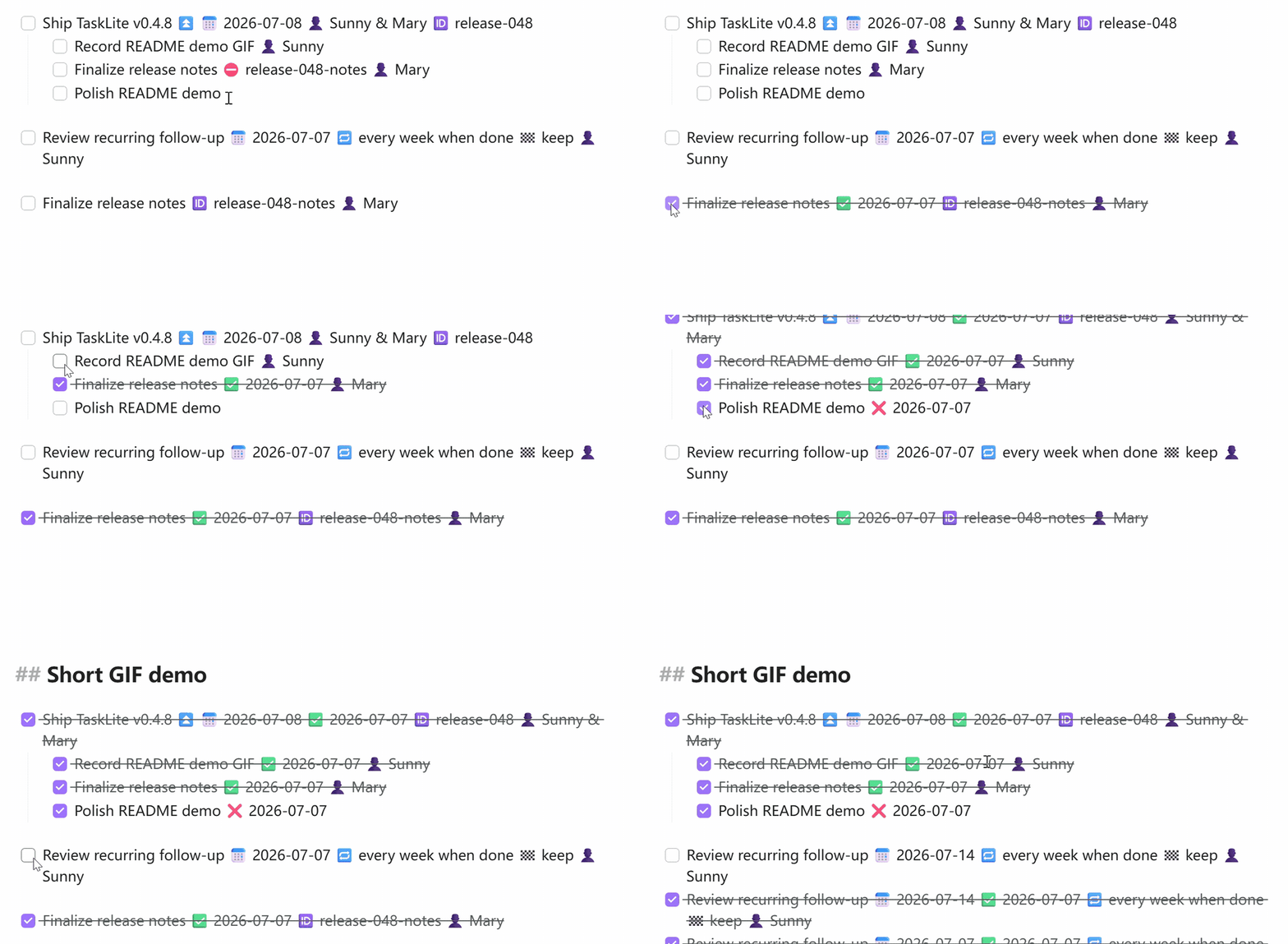
Features
- Tasks-compatible emoji metadata (dates, recurrence, priority, assignee, etc.)
- Tree-aware toggling: finish/unfinish cascades to children and bubbles to parent
- Recurring tasks with automatic next occurrence creation
- Automatic done/cancelled dates
- Live Preview checkbox interception
@emoji input suggestions on task lines- Best-effort import of custom status settings from the Tasks plugin
- External task reconciliation (detects checkbox changes from other plugins)
tasks: ignorefrontmatter to exclude files from scanning
Task Line Format
- [ ] Task description ⏳ 2026-01-01 📅 2026-01-15 🔁 every week 👤 Mary
Supported Emoji Fields
| Emoji | Field | Example |
|---|---|---|
| 🔺 | Priority: highest | 🔺 |
| ⏫ | Priority: high | ⏫ |
| 🔼 | Priority: medium | 🔼 |
| 🔽 | Priority: low | 🔽 |
| ⏬ | Priority: lowest | ⏬ |
| 🛫 | Start date | 🛫 2026-01-01 |
| ➕ | Created date | ➕ 2026-01-01 |
| ⏳ | Scheduled date | ⏳ 2026-01-01 |
| 📅 | Due date | 📅 2026-01-15 |
| ✅ | Done date | ✅ 2026-01-10 |
| ❌ | Cancelled date | ❌ 2026-01-10 |
| 🔁 | Recurrence | 🔁 every week |
| 🏁 | On completion | 🏁 delete |
| ⛔ | Depends on | ⛔ task-id |
| 🆔 | Task ID | 🆔 my-task |
| 👤 | Assignee | 👤 Mary |
Supported Recurrence Rules
every day,every week,every month,every yearevery N days,every N weeks,every N months,every N yearsevery weekdayevery week on Monday,every week on Fridayevery month on the 1stevery day when done(recurrence relative to completion date)
Ignoring Files
Add tasks: ignore to a file's YAML frontmatter to exclude it from TaskLite scanning:
---
tasks: ignore
---
File-level Tasks (Frontmatter Tasks)
You can turn an entire file (like a project note or a daily note) into a single task. This is particularly useful for tracking high-level projects or notes that themselves represent a task.
To enable this, add task: true (or a status symbol) to the file's YAML frontmatter:
---
task: true
description: "Review quarterly roadmap"
status: " "
priority: "⏫"
due: "2026-06-30"
assignee: "Alice & Bob"
---
Supported Frontmatter Fields
task: Set totrue(or any truthy value) to enable the file task.status: The status symbol (e.g." "for todo,"x"for done) or keywords (e.g.,todo,done,in-progress,cancelled). Keywords are case-insensitive and format-preserving. Status symbols with spaces (like" ") should be quoted.description: The task description. If omitted, the file's basename will be used.priority: Task priority. Supports emoji (🔺,⏫,🔼,🔽,⏬) or keyword (highest,high,medium,low,lowest).due/scheduled/start/created/done/cancelled: Dates inYYYY-MM-DDformat.recurrence: Recurrence rules (e.g.,every week).assignee/person: The person assigned (supports array or a single string with names separated by&).onCompletion: On-completion actions (deleteorkeep).id: Unique task ID.dependsOn: Depends on task IDs.
Body Tasks Connection
Any root-level task lines (indented at depth 0, i.e. not indented under another list item) within the body of a file-task note are automatically treated as subtasks of the file task.
- Toggling the status of a file task can cascade status changes to all list tasks in its body (depending on settings).
- Completing all list tasks in the body can bubble up to automatically complete the file-level task (depending on settings).
Creating Tasks & Task Syntax
A task in TaskLite is a standard Markdown checklist item (e.g., - [ ]) followed by a description and metadata emojis.
Task Emojis & Fields
Append these emojis to your task description to add metadata:
- 📅 Due Date:
📅 YYYY-MM-DD(e.g.,📅 2026-06-30) - ⏳ Scheduled Date:
⏳ YYYY-MM-DD(e.g.,⏳ 2026-06-25) - 🛫 Start Date:
🛫 YYYY-MM-DD(e.g.,🛫 2026-06-20) - ➕ Created Date:
➕ YYYY-MM-DD(automatically added upon creation) - 🔁 Recurrence:
🔁 <rule>(e.g.,🔁 every week,🔁 every weekday,🔁 every 2 days) - 👤 Assignee:
👤 <name>or👤 <name1> & <name2>(e.g.,👤 Mary,👤 Alice & Bob) - 🏁 On Completion:
🏁 deleteor🏁 keep(controls whether a recurring task is deleted/kept on completion) - 🆔 Task ID:
🆔 <id>(for task dependency identification) - ⛔ Depends On:
⛔ <id>(specifies parent/dependent tasks) - Priority: Add one of the following priority emojis at the end of the task line:
- Highest:
🔺 - High:
⏫ - Medium:
🔼 - Low:
🔽 - Lowest:
⏬
- Highest:
Indentation and Subtasks (Tree Structure)
TaskLite is tree-aware. Simply indent your list items using tabs or spaces to create subtasks:
- [ ] Parent task
    - [ ] Subtask 1 (completes automatically when Parent task is finished)
    - [ ] Subtask 2
Quick Input with Emoji Auto-Suggest
When typing a task line, type @ to open the emoji auto-suggest menu, allowing you to quickly insert date placeholders, priority symbols, assignees, or recurring rules.
Commands
| Command | ID | Description |
|---|---|---|
| Toggle task | toggle-task |
Cycle through task states (todo → done → todo) |
| Toggle task cancellation | toggle-task-cancellation |
Cycle through cancellation states |
| Cancel task | cancel-task |
Mark task as cancelled |
| Uncancel task | uncancel-task |
Restore cancelled task |
| Import status settings | import-tasks-status-settings |
Import from Tasks plugin |
Development
bun install          # Install dependencies
bun test             # Run tests
bun run build        # Production build (tsc + esbuild)
bun run dev          # Development mode (watch)
bun run lint         # ESLint check
Release
Push a tag matching x.y.z to trigger automatic GitHub release:
bun pm version patch # Bumps version in manifest.json and versions.json
git push && git push --tags
License
0BSD