Task Hub
 Carlos1k downloads
Bring Obsidian tasks together with Apple Reminders, Apple Calendar on macOS.
- Overview
- Scorecard
- Updates146
English | 简体中文 | 日本語 | 한국어 | Français | Español
Task Hub is a desktop-only Obsidian plugin that redesigns Obsidian task management around a focused workspace for Markdown tasks, external reminders, calendars, tags, filters, and daily planning.
It is built for people who keep commitments inside daily notes, meeting notes, project notes, and reference files, but still want one calm place to review, filter, reschedule, and safely update them.
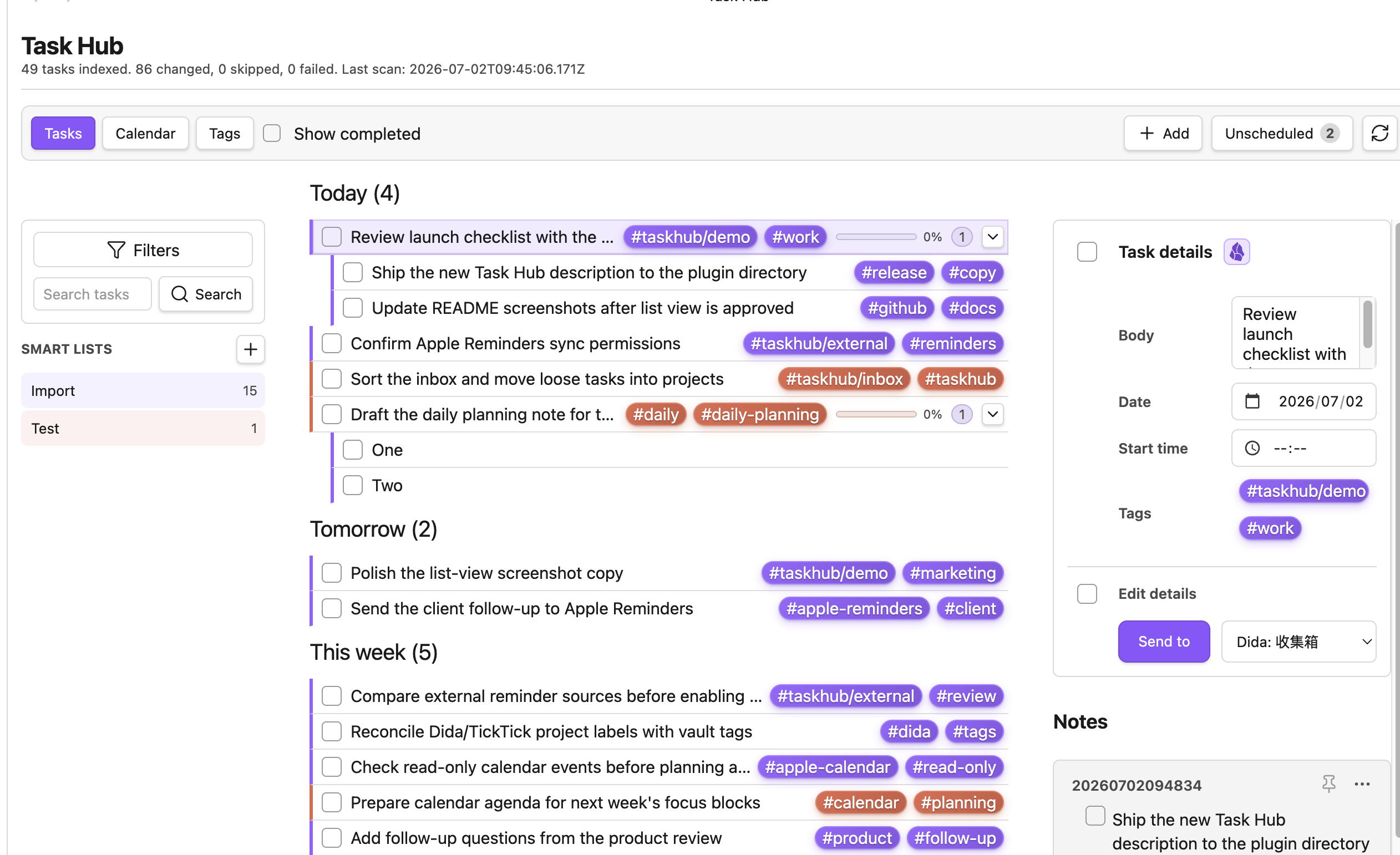
List view: Review Markdown tasks and external reminders in one focused queue. The sidebar narrows by source, tag, and saved task conditions; the toolbar keeps completed tasks, search, custom filters, and vault rescans close to the list so daily triage stays fast.
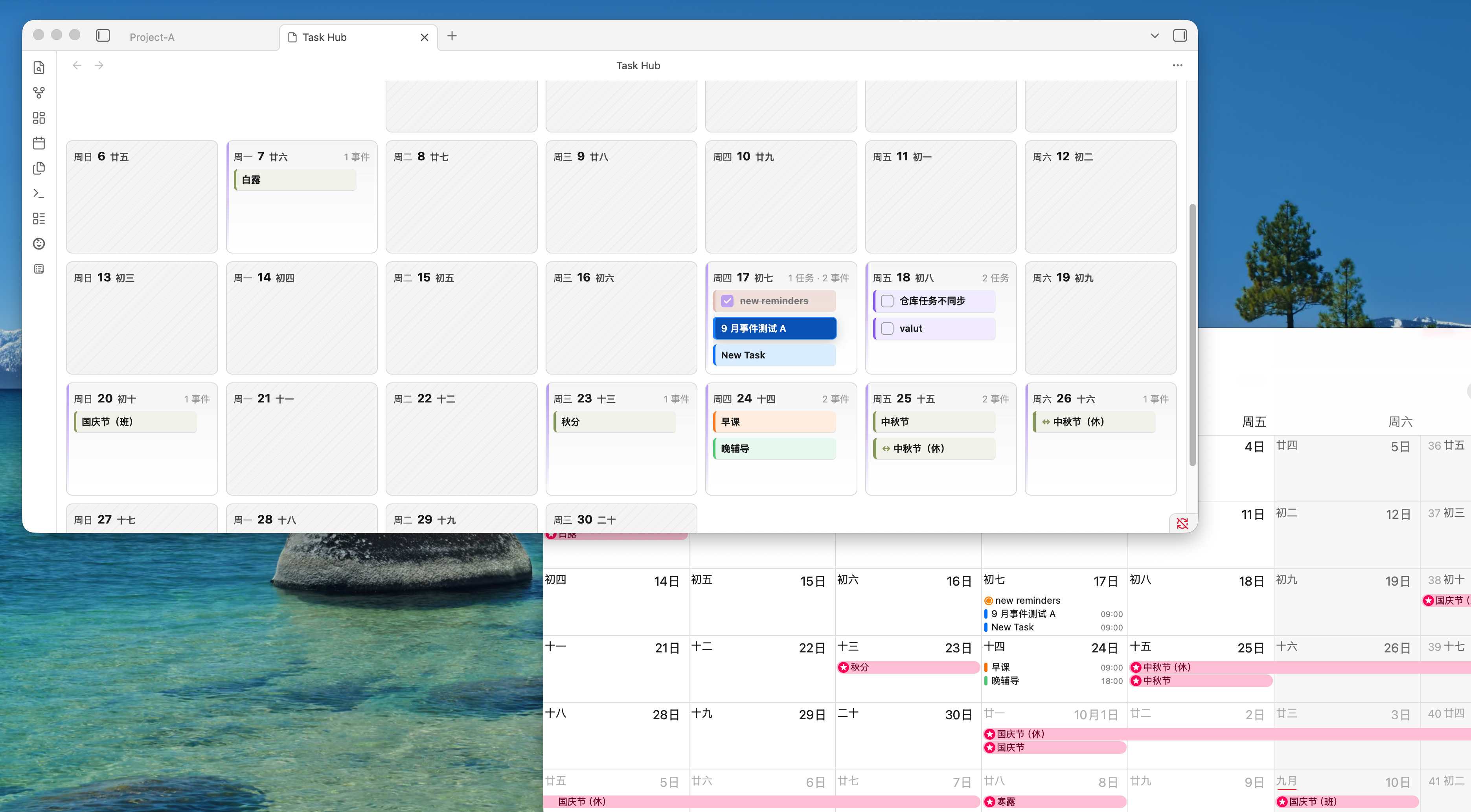
Calendar view: Plan dated Markdown tasks, Apple Calendar events, Apple Reminders, public ICS feeds, and Dida/TickTick tasks on month, week, and day timelines. Supported sources can be rescheduled by dragging, while read-only calendars remain visible without being modified.
Why Task Hub?
Task Hub keeps your Markdown tasks in your notes and gives them a dedicated command center. You do not need to move every task into a separate task manager before you can see what is due, where it came from, or which project tag it belongs to.
Use it when you want to:
- Collect
- [ ]and- [x]tasks from across your vault. - Open the source note from a task and jump near the original line.
- Review tasks by list, calendar, or tag.
- See dated tasks alongside supported calendar and reminder sources.
- Keep external writeback explicit and opt-in.
Highlights
- Index Markdown tasks written as
- [ ]and- [x]. - Parse planning dates written as
🛫 YYYY-MM-DD,⏳ YYYY-MM-DD,📅 YYYY-MM-DD,due:: YYYY-MM-DD, or a bareYYYY-MM-DD, with optional⏰ HH:mmstart times. - Filter by completion state, source, tag, date bucket, text, and custom AND/OR conditions.
- Safely complete vault tasks after checking that the source line still matches.
- Create and edit common recurring tasks: daily, weekly, monthly, and yearly.
- Browse dated tasks and events in month, week, and day calendar views.
- Drag dated Markdown tasks to reschedule them when the task already contains a supported date token.
- Add read-only public ICS calendars.
- Read Apple Reminders and Apple Calendar data on macOS through the local helper.
- Sync Dida/TickTick tasks through the Open API when configured.
- Create local Markdown notes linked to tasks and calendar events.
- Switch the plugin interface between English, Chinese, Japanese, Korean, and French.
Supported Sources
| Source | Read | Optional writeback | Notes |
|---|---|---|---|
| Vault Markdown tasks | Yes | Complete, edit, delete, recurrence, and drag-reschedule for supported task lines | Source-line checks are used before Markdown writeback. |
| Public ICS calendars | Yes | No | ICS events are read-only. |
| Apple Reminders | macOS 14 Sonoma or later | Complete, reopen, edit, create from Markdown, and reschedule when enabled | Uses the local Apple helper and macOS permissions. |
| Apple Calendar | macOS 14 Sonoma or later | Create and edit events, including drag-reschedule, when enabled | Writable calendars are respected; read-only calendars remain read-only. |
| Dida / TickTick | Yes, through Open API | Create, edit, complete, delete, tag sync, and drag-reschedule when enabled | Requires your configured API token and settings. |
Writeback features are intentionally separated into settings. Reading a source does not automatically mean Task Hub can modify it.
Compatibility
- Obsidian: Task Hub declares
minAppVersion1.7.2inmanifest.json. Use Obsidian desktop 1.7.2 or later. - Mobile: Obsidian mobile is not supported.
- macOS Apple integration: Apple Reminders and Apple Calendar integration is macOS-only. The tested and supported version range is macOS 14 Sonoma or later; macOS 13 or earlier is outside the current support matrix.
- Other desktop systems: Core vault task, tag, calendar, public ICS, and Dida/TickTick features are designed for Obsidian desktop. Apple Reminders and Apple Calendar features are unavailable outside macOS.
Installation
When Task Hub is available in the Obsidian community plugin directory, install it from Settings -> Community plugins -> Browse.
For manual installation from a GitHub release:
- Download
manifest.json,main.js, andstyles.cssfrom the release. - Create this folder in your vault:
.obsidian/plugins/task-hub/. - Copy the downloaded files into that folder.
- Restart Obsidian or reload community plugins, then enable Task Hub.
Published releases embed the local Apple helper in main.js and install it into the plugin folder on macOS when needed. Source builds can create the helper with npm run build:apple-helper. Standard community-plugin release assets remain the Obsidian-supported files: manifest.json, main.js, and styles.css; there is no separate helper asset to download.
Everyday Use
Open Task Hub from the ribbon icon or the command Open Task Hub.
The task view collects vault tasks and supported external task sources into one list. Use the sidebar to narrow by source or tag, and use the toolbar to show completed tasks, apply condition filters, search text, or rescan the vault.
The calendar view combines dated Markdown tasks, public ICS events, Apple Calendar events, Apple Reminders, and Dida/TickTick tasks where available. Month, week, and day layouts help you move between planning horizons. Drag-rescheduling is available only for sources and settings that support writeback.
The tag view groups indexed tasks by Obsidian-style tags so you can review project, context, or waiting lists without building a separate system first.
Task notes are optional local Markdown files linked to Task Hub tasks or calendar events. They use YAML frontmatter to keep the relationship visible and portable.
Privacy and Permissions
Task Hub indexes Markdown files inside your local vault and stores plugin settings in your vault's Obsidian plugin data.
Public ICS sources are fetched only from URLs you configure. Dida/TickTick integration sends authenticated HTTPS requests only to the configured API base when you enable it.
Local Apple integration runs only on macOS desktop and asks macOS for Reminders or Calendar access before reading local data. Task Hub does not ask for your Apple ID password and does not talk directly to iCloud servers; iCloud sync remains handled by macOS.
Obsidian may show capability warnings. Task Hub uses them for narrow purposes:
- Vault enumeration: scan Markdown files for task lines and date tokens.
- Vault read/write: read notes for indexing and write only when you complete, edit, delete, or reschedule a supported task.
- Filesystem access: install, check, and use the local Apple helper inside the plugin path.
- Shell execution: launch only the installed or locally built
taskhub-apple-helperfor Apple integration. - Network requests: fetch configured ICS URLs and the configured Dida/TickTick API when enabled.
Task Hub does not send vault tasks to a remote service unless you explicitly create or sync an external task through a configured integration.
Current Limits
Task Hub keeps its scope conservative:
- Obsidian mobile is not supported.
- Full Obsidian Tasks plugin grammar is not implemented.
- Timed Markdown tasks are limited to
⏰ HH:mmstart points anchored to supported date tokens; duration and end-time syntax is not implemented. - Google Calendar OAuth and Microsoft Calendar OAuth are not included.
- Public ICS events are read-only.
- Apple Reminders, Apple Calendar, and Dida/TickTick writeback features must be enabled explicitly.
- Local Apple integration uses the helper embedded in
main.jsfor release builds or a locally built helper for source builds; standard community-plugin releases do not ship a separate helper asset.
Development
npm install
npm test
npm run typecheck
npm run build
Useful commands:
npm run dev
npm run dev:hot
npm run smoke
npm run check:apple-helper
npm run diagnose:apple
Build the optional Apple helper on macOS:
npm run build:apple-helper
Release Assets
For an Obsidian community plugin release, the GitHub release tag must match manifest.json's version exactly and include these binary attachments:
main.jsmanifest.jsonstyles.css
The repository root also keeps the files expected by the Obsidian submission flow:
README.mdLICENSEmanifest.jsonversions.json
Do not attach extra files such as taskhub-apple-helper to community-plugin GitHub releases. Release builds embed the helper into main.js; Obsidian downloads only main.js, manifest.json, and styles.css from release assets.