Tab Link
 jon-vii3k downloads
Cursor-style ghost text autocomplete for linking to notes.
- Overview
- Scorecard
- Updates22
Ghost text autocomplete for wiki-links in Obsidian.
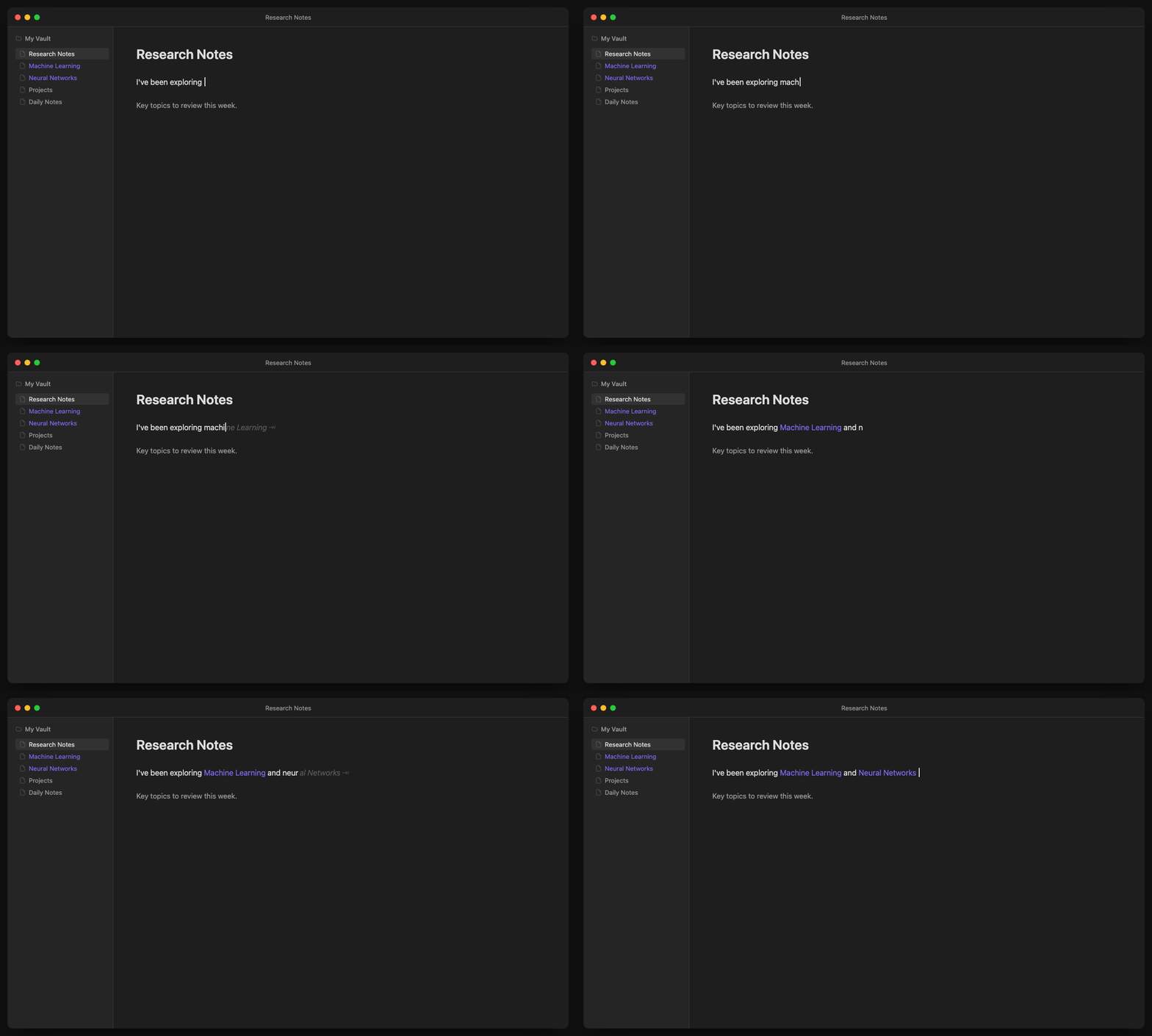
Type naturally. When you start typing a note name, ghost text appears inline. Press Tab to accept and create the link.
Features
- Ghost text, not popups — Non-intrusive inline suggestions that don't break your flow
- Tab to accept — Fast keyboard-driven workflow
- Smart context — Won't suggest inside existing links, code blocks, or frontmatter
- Frecency scoring — Ranks suggestions by frequency + recency of use
- Phrase matching — "mach learn" matches "Machine Learning"
- Alias support — Searches frontmatter aliases alongside note titles
- Auto-space — Optionally adds a space after accepting (configurable)
Installation
Using BRAT (recommended)
- Install BRAT from Community Plugins
- Open BRAT settings → Add Beta Plugin
- Enter:
Jon-Vii/obsidian-tab-link - Enable the plugin
Manual Installation
- Download the latest release from GitHub Releases
- Extract to
<vault>/.obsidian/plugins/obsidian-tab-link/ - Enable in Settings → Community Plugins
Usage
- Start typing text that matches a note name (5+ characters by default)
- Ghost text appears showing the suggested completion
- Press Tab to accept → creates the link
- Press Escape or keep typing to dismiss
| Key | Action |
|---|---|
Tab |
Accept suggestion |
Escape |
Dismiss suggestion |
Space |
Dismiss and continue typing |
| Arrow keys | Dismiss suggestion |
Settings
| Setting | Default | Description |
|---|---|---|
| Enable ghost text | On | Toggle suggestions on/off |
| Auto-space after link | On | Add space after accepting a link |
| Minimum characters | 5 | Characters needed before suggestions appear (3-8) |
| Debounce delay | 150ms | Wait time after typing before showing suggestions |
| Excluded folders | — | Comma-separated folders to ignore |
How It Works
- Trie-based matching — O(k) prefix lookups where k = query length
- Frecency scoring — Recently and frequently linked notes rank higher
- Performance-conscious — Debounced updates, chunked indexing on startup
License
MIT
HealthExcellent
ReviewSatisfactory
About
Insert wiki-links with inline ghost-text autocompletion that shows note-name suggestions as you type. Press Tab to accept completions and create links; use context-aware matching that skips code, frontmatter and existing links, with frecency ranking, phrase matching and alias support.Details
Current version
1.2.5
Last updated
8 months ago
Created
8 months ago
Updates
22 releases
Downloads
3k
Compatible with
Obsidian 1.0.0+
Platforms
Desktop, Mobile
License
MIT