Survey Log
 jannik-el41 downloads
Create timestamped survey log entries with location tags via a fast, keyboard-only modal with autocomplete.
- Overview
- Scorecard
- Updates8

An Obsidian plugin for fast event logging while out on survey tasks — timestamped, location-tagged entries you can capture in seconds, whether via a keyboard shortcut on desktop or by tapping on mobile.
Trigger the command (assign a hotkey, or tap it on mobile), nudge the pre-filled timestamp if needed, pick a location from an autocompleting list, optionally add a note (with suggestions from your own past entries) — and a clean, tagged log line lands in your active note:
- 13:47Z #JettyNorth Started transect
- 13:52Z #JettyNorth Water sample taken
- 14:31Z #Pier4
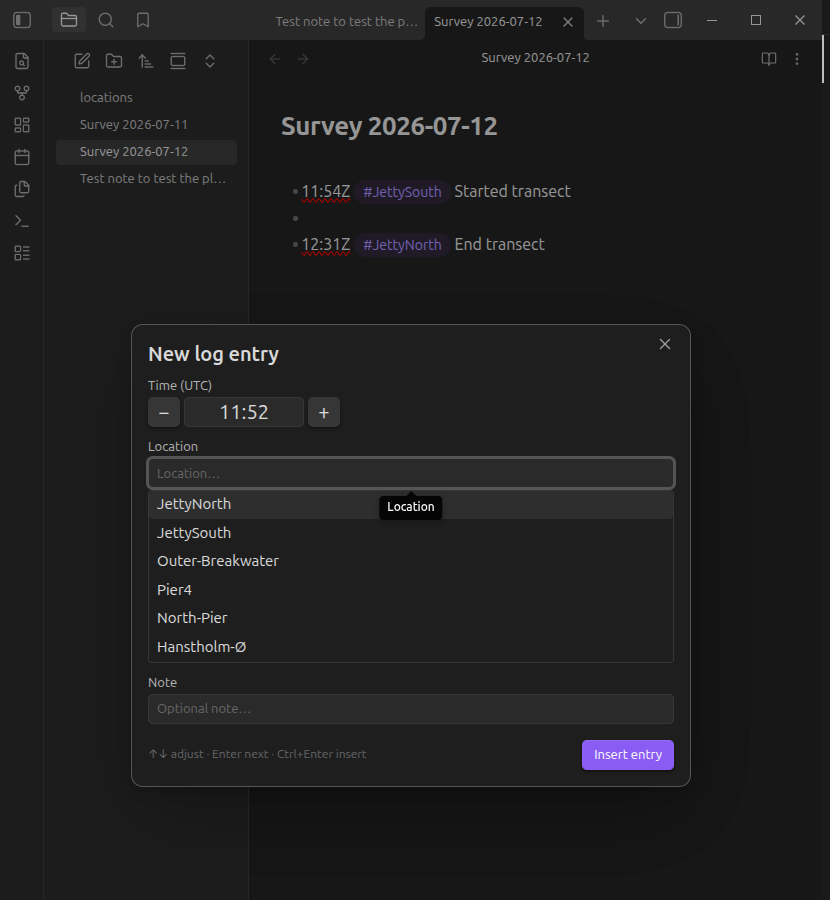
Locations are inserted as normal Obsidian tags (default), so every entry for a location is findable through the tag pane, search, or Dataview — or as wikilinks ([[Outer Breakwater]]) if you prefer each location to be a note with a backlinks list of all its entries.
Locations you type that aren't in your list yet are appended to the locations file automatically (toggleable).
Usage
Create a locations note in your vault (default path:
locations.md), one location per line:# Survey locations <- "#" lines are ignored JettyNorth JettySouth Outer Breakwater <- becomes #Outer-Breakwater Pier4Assign a hotkey to Survey Log: Create log entry (Settings → Hotkeys).
Open the note you want to log into, hit the hotkey, and:
- Time — pre-filled with the current time (
HH:mm).↑/↓= ±1 minute,Shift+↑/↓= ±10 minutes, or type over it. On mobile use the+/−buttons. - Location — pre-filled with your last-used location (fully selected: plain
Enterreuses it, typing replaces it). Suggestions filter as you type;↑/↓+Enter/Tabto pick. Unknown locations are allowed and sanitized into valid tags. - Note — optional free text. Suggestions come from note texts of your previous entries, most frequent first;
↑/↓to highlight,TaborEnterto accept the suggestion (a secondEnterthen inserts), orEscto dismiss the suggestions and keep what you typed. Ctrl/Cmd+Enterinserts from anywhere in the modal;Esccancels.
- Time — pre-filled with the current time (
Settings
| Setting | Description | Default |
|---|---|---|
| Timezone | UTC timestamps get a Z suffix (13:47Z) so entries are self-describing |
UTC |
| Locations file | Vault path of the note listing your locations | locations.md |
| Location style | Tag (#JettyNorth) or wikilink ([[JettyNorth]]) |
Tag |
| Tag prefix | Optional prefix, e.g. loc/ → #loc/Pier4 (tag style only) |
(empty) |
| Auto-add new locations | Append unknown locations to the locations file on insert | On |
| Insert position | End of note, or at the cursor | End of note |
| Note suggestions from | Whole vault or current note only | Whole vault |
| Pre-fill last-used location | Reuse the previous location with a single Enter | On |
Installation
Manual
Download main.js, manifest.json, and styles.css from the latest release into <vault>/.obsidian/plugins/survey-log/, then enable the plugin in Settings → Community plugins.
From source
git clone <this repo>
cd survey-log-obsidian-plugin
npm install
npm run build
Copy (or symlink) the repo folder to <vault>/.obsidian/plugins/survey-log/ — the folder name must be exactly survey-log.
Development
npm install
npm run dev     # esbuild watch mode
npm test        # vitest unit tests (pure logic: time math, parsing, ranking)
npm run lint    # eslint
npm run build   # type check + production bundle
Use a dedicated dev vault with the Hot-Reload plugin for a fast feedback loop. Note that changes to manifest.json require an app restart; source changes only need a plugin reload.
Releases are fully automated: every push to main runs tests + build, bumps the patch version (manifest.json, versions.json, and package.json via npm version / version-bump.mjs), tags it, and publishes a GitHub release with main.js, manifest.json, and styles.css attached. For a minor or major bump instead, include #minor or #major in the commit message. Tags carry no v prefix (Obsidian convention, enforced via .npmrc).