
- Overview
- Scorecard
- Updates53
Create and manage multiple daily note streams
Replaces the Daily Note core plugin.
Inspired by the Periodic Notes and Calendar plugins.

Support
If you find this plugin helpful, please consider supporting its development:
Donation Options:
- GitHub Sponsors - Monthly sponsorship ❤️
- Buy Me a Coffee - Support with a coffee ☕
- Venmo - Quick mobile payment
- PayPal - Direct PayPal donation
Your support helps maintain and improve this plugin! 🙏
Other Plugins
Check out my other Obsidian plugins:
Follow me on GitHub for updates.
Features
- Multiple daily note streams.
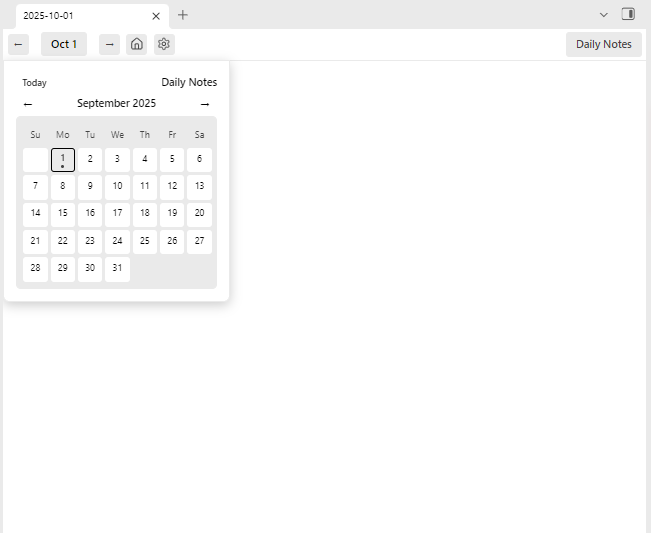
- Full calendar for each stream.
- New view for missing notes.
- Public API for other plugins to access stream data.
Benefits
- Divide up messy Daily Notes.
- Create a private stream for work.
- Encrypt a single stream for added data security.
- Quickly find and add notes.
Getting started
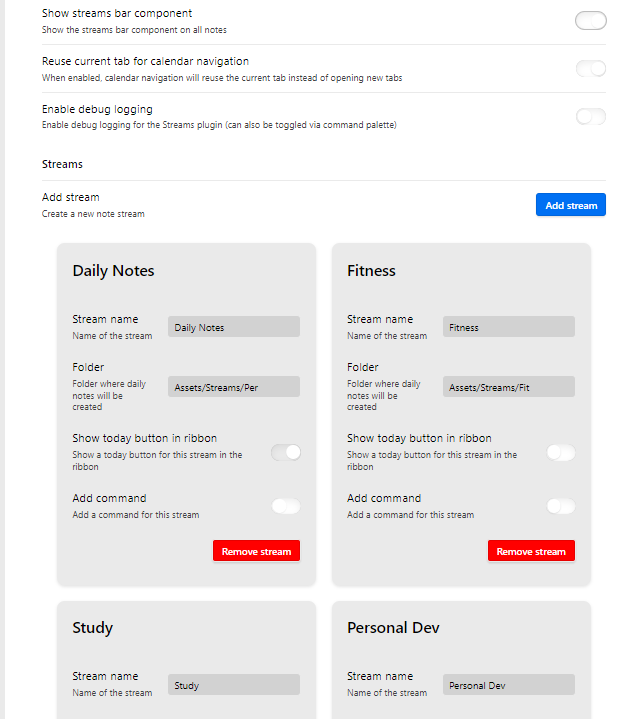
- Add new stream in settings, "Daily Notes", pointing to where you store your daily notes.
- Then create another stream for Work of School.
- Use the navigation bar to select any stream.
Streams Widget
Configure Streams
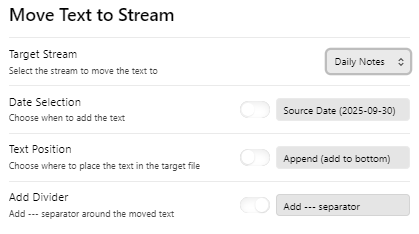
Move content between streams
Public API for Other Plugins
The Streams plugin provides a public API that other Obsidian plugins can use to access stream data and functionality.
Quick Start
// Get the Streams plugin instance
const streamsPlugin = this.app.plugins.getPlugin('streams') as StreamsPlugin;

if (streamsPlugin) {
    // Get all streams
    const streams = streamsPlugin.getStreams();

    // Get active stream
    const activeStream = streamsPlugin.getActiveStream();

    // Get stream for current file
    const activeFile = this.app.workspace.getActiveFile();
    if (activeFile) {
        const stream = streamsPlugin.getStreamForFile(activeFile.path);
    }
}
Available Methods
getStreams()- Get all configured streamsgetStream(streamId)- Get a specific stream by IDgetActiveStream()- Get the currently active streamgetStreamsByFolder(folderPath)- Get streams matching a folder pathgetStreamForFile(filePath)- Get the stream containing a filegetStreamInfo(streamId)- Get basic stream information for a specific streamhasStream(streamId)- Check if a stream existsgetStreamCount()- Get total number of streamsgetVersion()- Get plugin version infogetStreamsByIcon(icon)- Get streams with a specific icongetRibbonStreams()- Get streams enabled for ribbon displaygetCommandStreams()- Get streams with commands enabledhasStreams()- Check if any streams are configuredupdateStreamBarFromFile(filePath)- Update the stream bar to match an opened file
For detailed API documentation, see src/api/README.md.
HealthExcellent
ReviewCaution
About
Create and manage multiple daily note streams and replace the Daily Note core plugin. Display a full calendar per stream, surface missing notes in a dedicated view, move notes between streams, and expose a public API for other plugins.Details
Current version
1.3.4
Last updated
3 months ago
Created
2 years ago
Updates
53 releases
Downloads
2k
Compatible with
Obsidian 0.15.0+
Platforms
Desktop, Mobile
License
0BSD