Solo Oracle
 Walker Brown63 downloads
A yes or no oracle, scenes, threads and your own tables for solo tabletop play, in Obsidian. Every roll writes itself into your note.
- Overview
- Scorecard
- Updates5
A solo TTRPG oracle and GM emulator: play tabletop RPGs alone from a note, with no GM. Ask the oracle yes or no at the odds you pick, frame the next scene and see if it goes as you expect, keep your threads and the NPCs you meet, roll on your own random tables or draw playing cards, and get twists as the tension rises. Every answer writes itself into the note, so when you stop playing the note is the story.
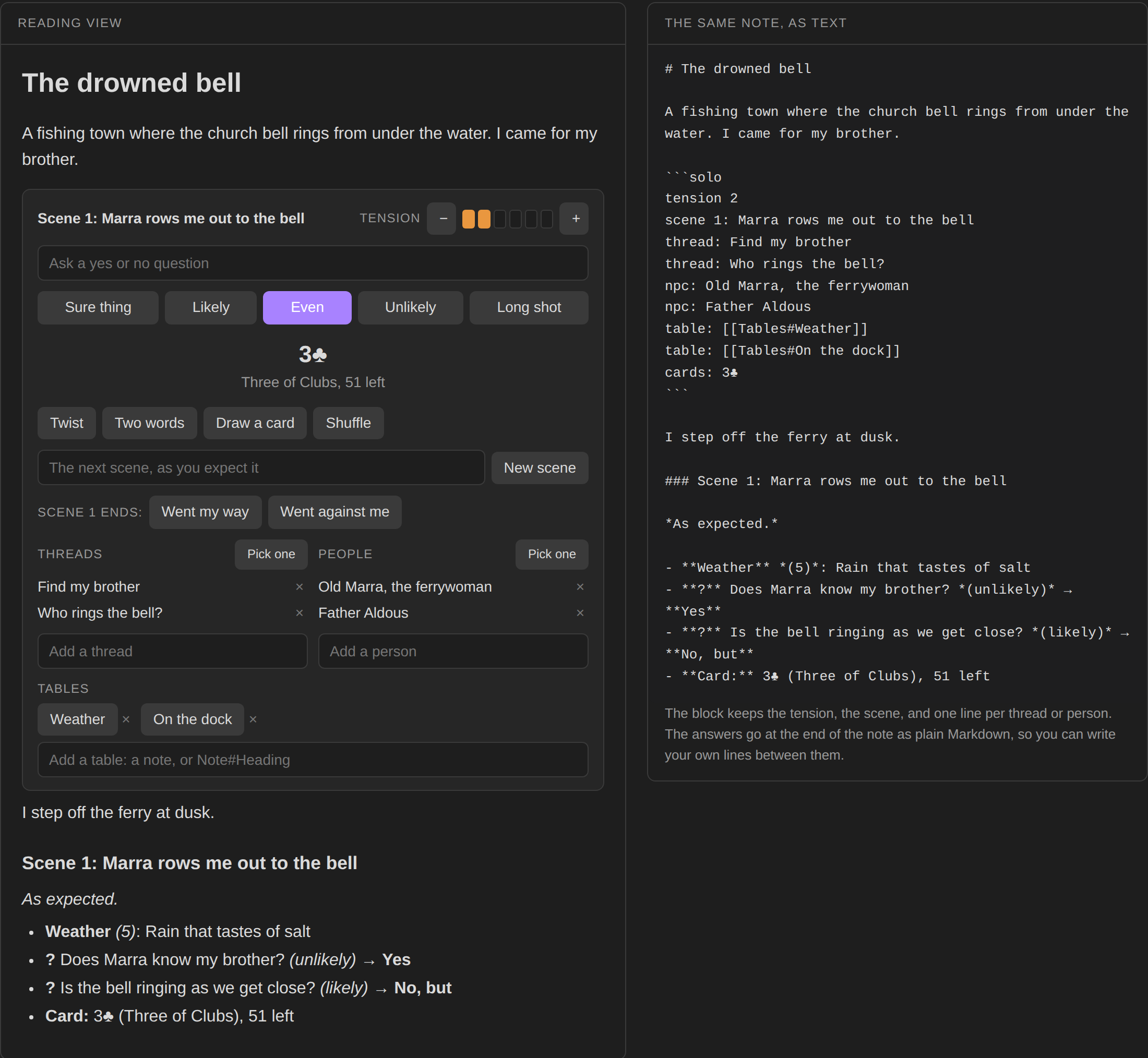
Try it in your browser before installing: https://bulkhead.bananafest-destiny.com/press/solo-oracle/ runs the real plugin code over a sample note and shows the note's text growing as you play.
Start a game
Run the command Insert solo block, or write one yourself:
```solo
tension 2
thread: Find my brother
npc: Old Marra, the ferrywoman
```
In reading view or live preview the block becomes a panel. The block keeps the state, one line each:
| Line | Meaning |
|---|---|
tension 2 |
how wild things are, 0 to 6 (2 if left out) |
scene 3: The far shore |
the scene you are in |
thread: Find my brother |
something you want to happen or find out |
npc: Old Marra |
someone you have met |
table: [[Tables#Weather]] |
one of your own tables, with a button to roll on it |
Any other line is left alone, so you can keep notes to yourself in the block.
Ask the oracle
Type a question and pick the odds: Sure thing (90% yes), Likely (70), Even (50), Unlikely (30) or Long shot (10). Enter asks at Even.
The answer is Yes or No. A roll far past the line makes it Yes, and or No, and; one close to the line makes it Yes, but or No, but. Every answer is possible at every odds.
Then a ten-sided tension die is rolled. At or under the tension, the answer comes with a twist: what happens (a thread moves closer, someone you know acts, something new steps in, and so on), who or what it is about, picked from your own threads and people, and two words to read into it.
Twist and Two words roll those on their own, for when you want a nudge without a question.
Playing cards
For games that run on a deck of cards, press Draw a card. It draws from a standard 52-card deck and writes the card into the note, like - **Card:** 7♥ (Seven of Hearts), 44 left. The block keeps what you've drawn on a cards: line, so no card comes up twice until you press Shuffle, and the deck is still where you left it next time you open the note. When the last card is gone, the next draw shuffles first.
Scenes
Type the scene you expect and press New scene. A ten-sided die against the tension decides how it goes:
- over the tension: as expected;
- at or under, odd: changed, with two words for how;
- at or under, even: interrupted by a twist.
When it ends, press Went my way (tension down one) or Went against me (up one). The more things go wrong, the stranger the story gets.
Threads and people
Add them in the boxes under the panel, remove them with ×, and press Pick one to roll a random one. Twists pick from these lists too.
Your own tables
Add a table: line with a link to a note, or to a heading in one, and the panel gets a button that rolls on it. Type Tables#Weather in the box under the panel, or write the line yourself. [[Tables#Weather|Sky]] names the button Sky.
No tables yet? Press Add starter tables on the panel, or run the command of that name. It writes one note, Tables/Starter tables, with six small tables to start from (Place, Complication, Stranger, Weather, Found and Mood), and puts Place, Complication and Stranger on the panel. The note is yours to change; adding the starter tables again never overwrites it.
What is under the link decides how it rolls:
| Under the link | A roll gives |
|---|---|
a table with a Weight column |
one row, picked by its weight: a row of 3 comes up three times as often as a row of 1, and a row of 0 never does. The weight isn't written |
a table whose first column is numbers or ranges (1-2, 3, 4-6) |
the dice in that column's header (d6, 2d6, d20) are rolled, or 1 to the highest number, and the matching row comes back with the roll |
| any other table | one row |
| a list | one item |
| anything else | one line |
## Weather

| d6 | Sky over the harbour |
| --- | --- |
| 1-2 | Still and grey |
| 3-4 | Fog off the water |
| 5-6 | A storm coming in |
Write dice inside a result in double braces and they roll with it: {{2d6}} rats gives 7 rats, and {{d4+1}} or {{3d6-2}} work too.
A heading's part of the note runs to the next heading as high as it. The links sit inside a code block, so Obsidian doesn't update them when you rename a note; fix the line by hand if you do.
The journal
Everything you roll goes at the end of the note as plain Markdown:
- **?** Is anyone at the dock? *(likely)* → **Yes, but**
    - **Twist:** Someone you know acts: Old Marra (betray · a promise)
- **Weather** *(3)*: Fog off the water

### Scene 2: Marra rows me to the church

*Interrupted. A thread moves closer: Find my brother (conceal · a key).*
Write your own lines between them. The panel only ever adds to the end of the note and edits its own block.
Original tables
The odds, twist focuses, word lists and starter tables were written for this plugin. None of them come from a published oracle, so the plugin works with any solo game and any setting.
Pro
Everything above is free. Solo Oracle Pro is a one-time payment of $6 on itch (https://bananafestdestiny.itch.io/solo-oracle-pro), and it adds:
- A table library. Run "Open table library" for a side pane with every table in a folder (Tables, or one you pick, or the whole vault). Search by name or by what's in them, roll with a click, and press + to add one to the game you're playing.
- Importing. Run "Import a table" and paste or open a text or CSV file. Numbered lines like
2-6 Rustbecome a dice table, columns become a table, and anything else becomes a list. It's saved as a note in the library folder. - Tables inside tables. A result can name another table, like
{{Names}}or{{Coast#Weather}}, and that one rolls too, up to five deep. Without Pro the name is left as written. - Export a game as a story. Run "Export this game as a story" on a game note. You get a copy beside it without the panel, with each roll as one short line or left out. The game note isn't changed.
After you buy, copy your download page's address. Paste it into Solo Oracle's settings under Pro key and press Check. Pro stays on in that vault from then on. Lost it? Type the email you bought with under Lost your key?.
Privacy
Solo Oracle has no accounts and collects nothing. It goes online only when you press Check or Mail my key in its settings. Check sends the Pro key you pasted to this plugin's server (bulkhead.bananafest-destiny.com), which asks itch whether the key is real; the server keeps a hash of a good key, never the key. Mail my key sends the email you typed to the same server, which asks itch for that address's key and mails it there; it keeps only a hash of the address, so it mails no more than once an hour. Nothing else ever leaves your vault. It only edits the solo block it is drawing and adds lines to the end of that note. It reads the notes your table: lines link to and never changes them. Importing and exporting write new notes and never change existing ones.
Install
From Obsidian: Settings → Community plugins → Browse → search "Solo Oracle".
By hand: copy main.js, manifest.json and styles.css from the latest release into <your vault>/.obsidian/plugins/solo-oracle/, then enable it under Community plugins.
Also from this maker
- Dice Tray: rolls dice, random tables and note sections inline, and reads Dice Roller's
dice:syntax. - Tabletop Clocks: segmented progress clocks, counters and stopwatches drawn from plain text.
- Session Log: a quick log for game night. Fights, rolls and clock ticks log themselves.
- Quick Initiative: a light initiative tracker that lives as plain text in your note.
Source
https://github.com/walkertbrown/solo-oracle
Build
npm install
npm test
npm run build
MIT licensed.