Search...Search plugins and themes...
⌘K
Sign in
  • Get started
  • Download
  • Pricing
  • Enterprise
  • Account
  • Obsidian
  • Overview
  • Sync
  • Publish
  • Canvas
  • Mobile
  • Web Clipper
  • CLI
  • Learn
  • Help
  • Developers
  • Changelog
  • About
  • Roadmap
  • Blog
  • Resources
  • System status
  • License overview
  • Terms of service
  • Privacy policy
  • Security
  • Community
  • Plugins
  • Themes
  • Discord
  • Forum / 中文论坛
  • Merch store
  • Brand guidelines
Follow us
DiscordTwitterBlueskyThreadsMastodonYouTubeGitHub
© 2026 Obsidian

Smart Link Alias

vpcanovpcano729 downloads

Enhance your internal links management with dynamic alias customization. Display short, full, or combined titles for your notes effortlessly.

Add to Obsidian
  • Overview
  • Scorecard
  • Updates1

SmartLinkAlias is an Obsidian plugin that enhances your internal link management by allowing you to dynamically control how note titles appear in links. Whether you're working with acronyms, abbreviations, or custom aliases, this plugin provides you with powerful options to display your links exactly how you want.
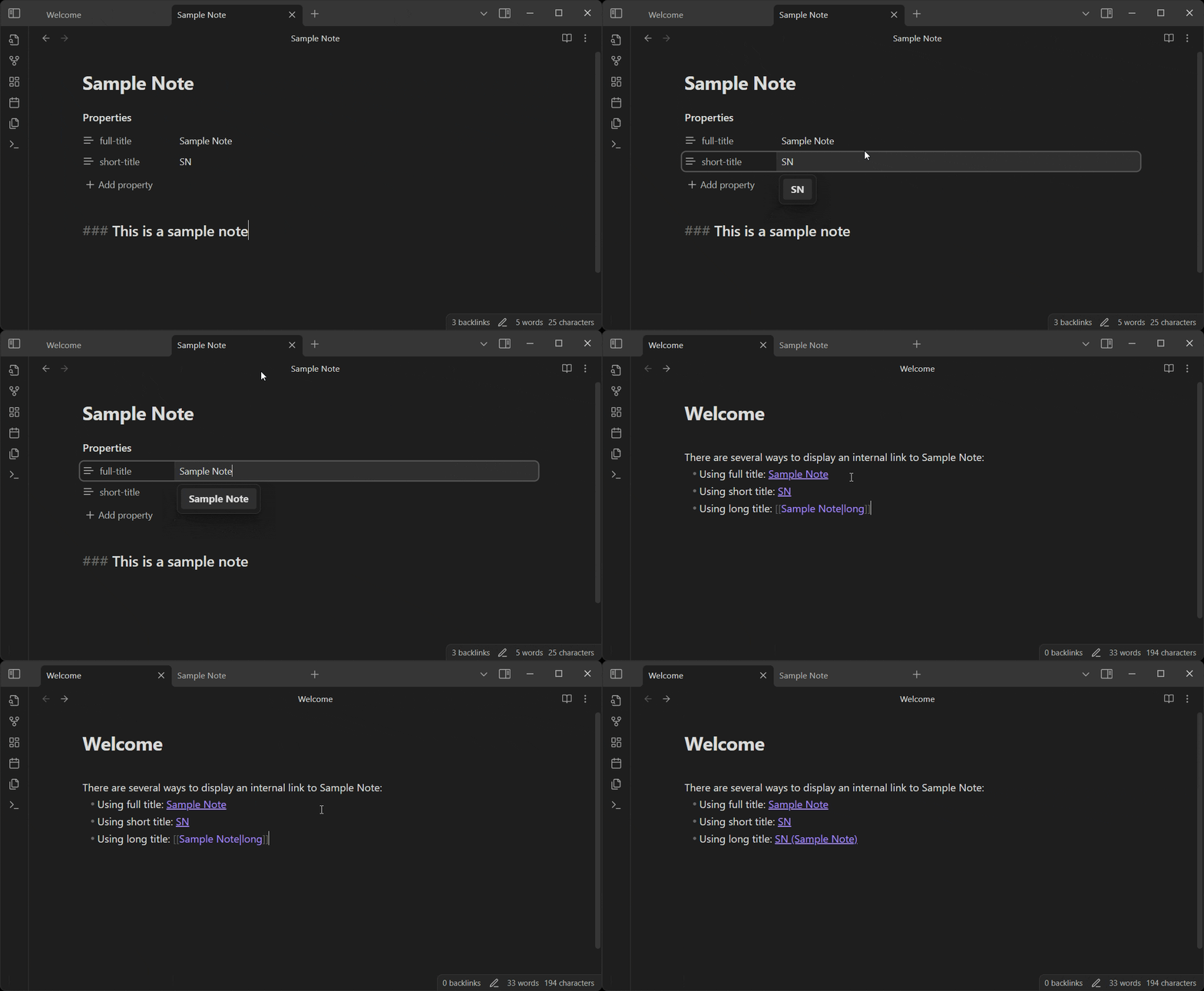
SmartLinkAlias in action

Usage

  1. Open a note where you'd like to define custom titles.

  2. Add the following YAML properties at the top of your note:

    ---
    full-title: Sample Note
    short-title: SN
    ---
    
  3. When creating a link to this note from another note, use the alias section to specify the display mode:

    • [[Sample Note|short]] → Displays: SN
    • [[Sample Note|full]] → Displays: Sample Note
    • [[Sample Note|long]] → Displays: SN (Sample Note)

Roadmap

  • Base functionality in read mode
  • Base functionality in edit mode
  • Customize display format via plugin settings
  • Add a tooltip when hovering a shortened link
  • Other ways to select the display mode ??

Contributing

If you encounter any issues or have feature requests, please visit the GitHub Repository and feel free to open an issue or submit a pull request.

License

This plugin is licensed under the MIT License.


Thank you for using SmartLinkAlias! If you find it helpful, don't forget to leave a review in the Obsidian Community Plugins list!

71%
HealthGood
ReviewSatisfactory
About
Define custom display titles in a note's YAML (full-title and short-title) to control how links render. Choose short, full, or long in link aliases to show an abbreviation, the full title, or both.
LinksPropertiesEditing
Details
Current version
1.0.0
Last updated
Last year
Created
Last year
Updates
1 release
Downloads
729
Compatible with
Obsidian 0.15.0+
Platforms
Desktop, Mobile
License
MIT
Report bugRequest featureReport plugin
Author
vpcanovpcano
GitHubvpcano
  1. Community
  2. Plugins
  3. Links
  4. Smart Link Alias

Related plugins

Meta Bind

Make your notes interactive with inline input fields, metadata displays, and buttons.

Paste URL into selection

Paste URL "into" selected text.

Note Refactor

Extract note content into new notes and split notes.

MetaEdit

Manage your metadata.

Advanced Tables

Improved table navigation, formatting, and manipulation.

Advanced Canvas

Supercharge your canvas experience. Create presentations, flowcharts and more.

Smart Connections

AI link discovery copilot. See related notes as you write. Lookup using semantic (vector) search across your vault. Zero-setup local model for embeddings, no API keys, private.

Excalidraw

Visual PKM powerhouse. Create and edit Excalidraw drawings.

Outliner

Work with your lists like in Workflowy or Roam Research.

Various Complements

Complete words similar to auto-completion in an IDE.