Search...Search plugins and themes...
⌘K
Sign in
  • Get started
  • Download
  • Pricing
  • Enterprise
  • Account
  • Obsidian
  • Overview
  • Sync
  • Publish
  • Canvas
  • Mobile
  • Web Clipper
  • CLI
  • Learn
  • Help
  • Developers
  • Changelog
  • About
  • Roadmap
  • Blog
  • Resources
  • System status
  • License overview
  • Terms of service
  • Privacy policy
  • Security
  • Community
  • Plugins
  • Themes
  • Discord
  • Forum / 中文论坛
  • Merch store
  • Brand guidelines
Follow us
DiscordTwitterBlueskyThreadsMastodonYouTubeGitHub
© 2026 Obsidian

Size History

pbrwpbrw4k downloads

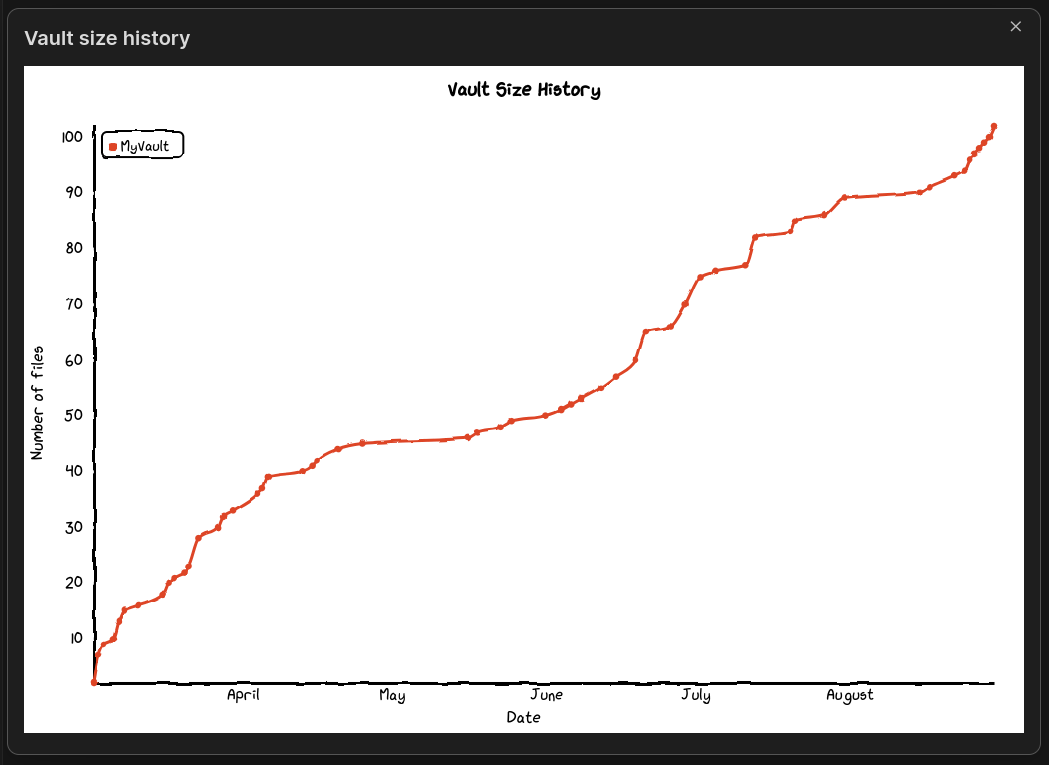
Admire the growth of your vault with a "hand-drawn" chart.

Add to Obsidian
  • Overview
  • Scorecard
  • Updates1

preview

Admire the growth of your Obsidian vault with a "hand-drawn" chart

How to use?

Install that plugin. A "line chart" icon :chart_with_upwards_trend: should appear in the panel on the left. Click it and modal with a chart will pop up.

Details

Currently the only metric available is number of files in the vault. The changes are tracked down to days. Everything before the plugin installation is recreated by looking at the files creation time. Unfortunately, if you deleted some files, there is no information about that and it won't be visible on the chart. But it will be tracked from now on.

Plugin uses chart.xkcd to draw a chart. Plugin does not send anything over the internet.

72%
HealthGood
ReviewSatisfactory
About
View a hand-drawn line chart of your vault’s file-count history with daily tracking. Recreate prior history from file creation dates and continue recording changes from installation onward; files deleted before installation won’t appear and all data stays local.
ChartsFilesDates
Details
Current version
1.0.0
Last updated
3 years ago
Created
3 years ago
Updates
1 release
Downloads
4k
Compatible with
Obsidian 0.15.0+
Platforms
Desktop, Mobile
License
MIT
Report bugRequest featureReport plugin
Author
pbrwpbrw
github.com/pbrw
GitHubpbrw
  1. Community
  2. Plugins
  3. Charts
  4. Size History

Related plugins

Thino

Quickly capture memos and display them in the sidebar with a heatmap. (Closed source)

Mood Tracker

Track your moods & emotions easily. Visualize tracked history and browse the past entries.

Vault Changelog

Maintain a changelog of recently edited notes.

Janitor

Perform cleanup tasks on your vault.

Notebook Navigator

A better file browser and calendar inspired by Apple Notes, Bear, Evernote and Day One.

Local REST API & MCP Server

Unlock your automation needs by interacting with your notes over a secure REST API.

QuickAdd

Quickly add new notes or content to your vault.

Recent Files

Display a list of recently opened files.

Omnisearch

Intelligent search for your notes, PDFs, and OCR for images.

Day Planner

Day planning from a task list in a Markdown note with enhanced time block functionality.