Simple Todo
 elliotxx4k downloads
A minimalist text-based todo manager (Text-Based GTD) for efficient task management.
- Overview
- Scorecard
- Updates14
A minimalist text-based todo manager (Text-Based GTD) plugin for efficient task management in Obsidian.
English | 简体中文
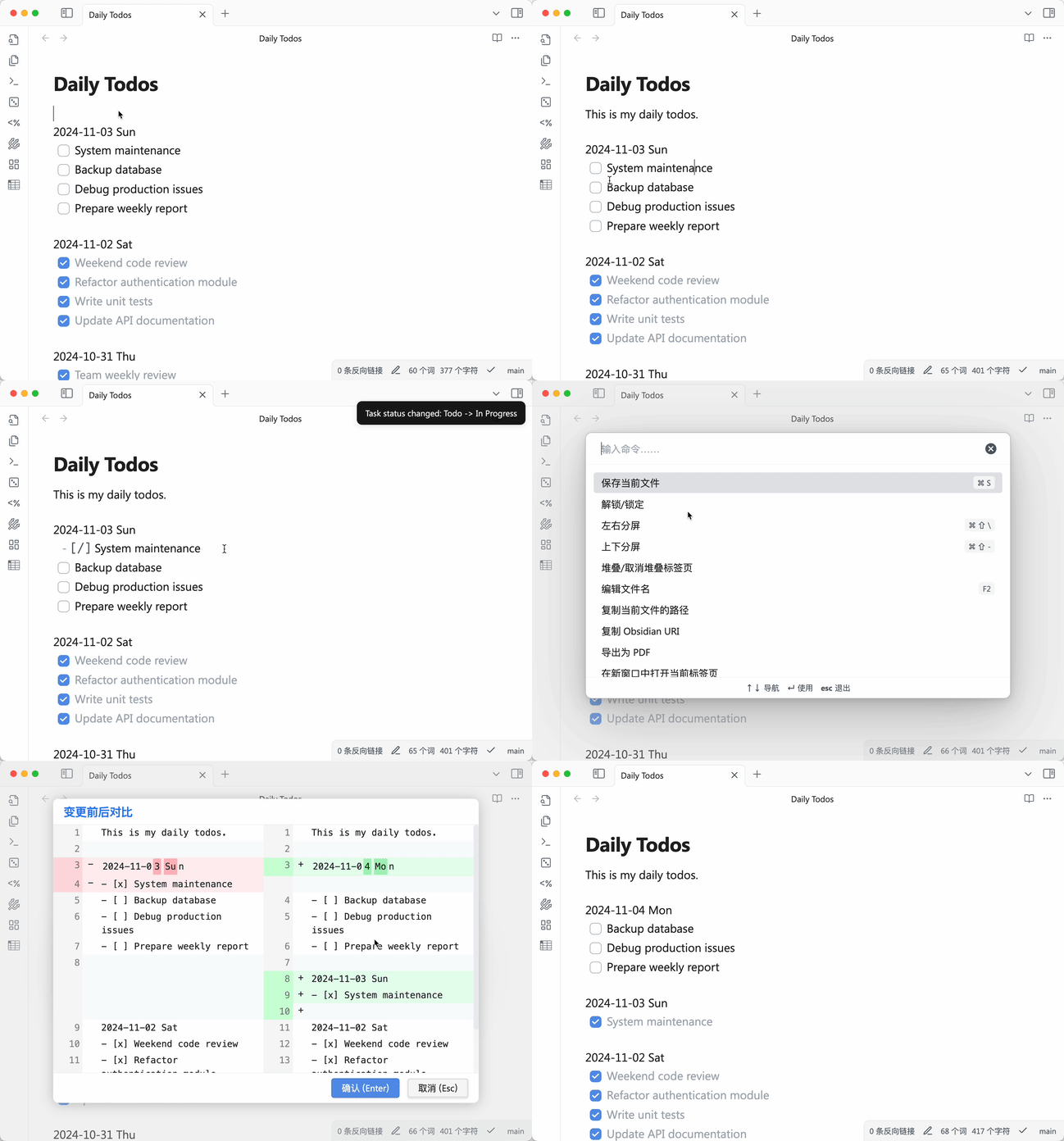
Features
- 📝 Pure text-based, fully compatible with Markdown syntax
- 🎯 Quick task creation, editing, and completion
- 🗂 Simple task categorization
- 📅 Date-based task organization
- 🔄 Task status toggle (Todo/In Progress/Done)
- 📦 Completed task archiving
- 🌐 Multi-language support (English, 简体中文)
Installation
- Open Settings in Obsidian
- Go to "Community Plugins"
- Disable "Safe Mode"
- Click "Browse" and search for "Simple Todo"
- Click Install
- Enable the plugin
Settings
Language
- Open plugin settings
- Select your preferred language from the dropdown menu
- Changes take effect immediately
Keyboard Shortcuts
Default shortcuts:
Ctrl/Cmd + Enter- Toggle todo status- Other commands can be configured in plugin settings
Usage
Basic Syntax
2024-10-30 Wed
- [ ] Create a todo task
- [x] Mark task as completed
- [/] Mark task as in progress
Note:
- Date format must be
2024-10-30 Wedto be recognized - Tasks must start with
- [ ]or- [x]or- [/]to be recognized as tasks
Supported Commands
Toggle Todo Status- Toggle task status (Todo -> In Progress -> Done -> Todo)Reschedule Previous Todos- Move unfinished tasks from the most recent day to todayArchive Completed Todos- Archive completed tasks (by month to simple-todo directory)
Task Status
- [ ]- Todo task- [/]- Task in progress- [x]- Completed task
Task Rescheduling
- Plugin searches for unfinished tasks from the most recent day, starting from cursor position
- If unfinished tasks are found, they will be moved under today's date
- If today's date doesn't exist, it will be created automatically
- After rescheduling, cursor will be positioned at the last task of today's block
Archiving
- Archive files are stored in the
simple-todo/directory - Files are named by month (e.g.,
simple-todo/archive-2024-03.md) - Archiving rules:
- Tasks are grouped by month
- A month can only be archived when all its tasks are completed
- Months with unfinished or in-progress tasks will be skipped with a notification
- Archive file format:
- Each file includes a month title
- Completed tasks are recorded chronologically
- Archived tasks are automatically removed from the original file
Date Format
- Format:
YYYY-MM-DD Weekday - Example:
2024-03-21 Thu - Date line must be on its own line
- Tasks must follow the date line
- Recommended to keep one empty line between date blocks, plugin will handle spacing automatically
Development Guide
Prerequisites
- Install Node.js (LTS version recommended)
- Install npm
- Clone the repository:
git clone https://github.com/elliotxx/obsidian-simple-todo.git
Development Workflow
- Install dependencies:
cd obsidian-simple-todo
npm install
- Create symlink to test vault:
# Windows (Administrator)
mklink /D "path/to/vault/.obsidian/plugins/obsidian-simple-todo" "path/to/your/project"

# macOS/Linux
ln -s "path/to/your/project" "path/to/vault/.obsidian/plugins/obsidian-simple-todo"
- Start development server:
npm run dev
In Obsidian:
- Open Settings > Community Plugins
- Turn off Safe Mode
- Refresh plugin list
- Enable "Simple Todo" plugin
After code changes:
- Files will auto-rebuild on save
- Press
Ctrl/Cmd + Rin Obsidian to reload
Building for Release
- Build production version:
npm run build
- Pre-release checklist:
- Update version in
manifest.json - Update version in
package.json - Update
versions.json - Commit all changes
- Create new release tag
- Update version in
Todo List
- Task Priority Management
- Support manual priority setting
- Support quick priority setting via hotkeys
- Auto-sort tasks based on priority
- Important but Not Urgent Task Management
- Support moving tasks to [Important but Not Urgent] list
- Daily random reminder of tasks from [Important but Not Urgent] list
- Hotkey Binding Enhancement
- Add default hotkeys for common operations
- Support custom hotkey configuration
Contributing
Issues and Pull Requests are welcome!
License
MIT License
HealthGood
ReviewCaution
About
Manage todos directly in Markdown using a minimalist, text-only workflow with date-based organization and simple task categorization. Toggle task status between Todo/In Progress/Done, reschedule unfinished tasks to today, and archive completed tasks monthly into a simple-todo directory.Details
Current version
0.2.7
Last updated
2 years ago
Created
2 years ago
Updates
14 releases
Downloads
4k
Compatible with
Obsidian 0.15.0+
Platforms
Desktop, Mobile
License
MIT