Semantic Backlinks
 Brightwav3516 downloads
Semantic note suggestions and related notes panel powered by local Ollama embeddings (bge-m3).
- Overview
- Scorecard
- Updates3
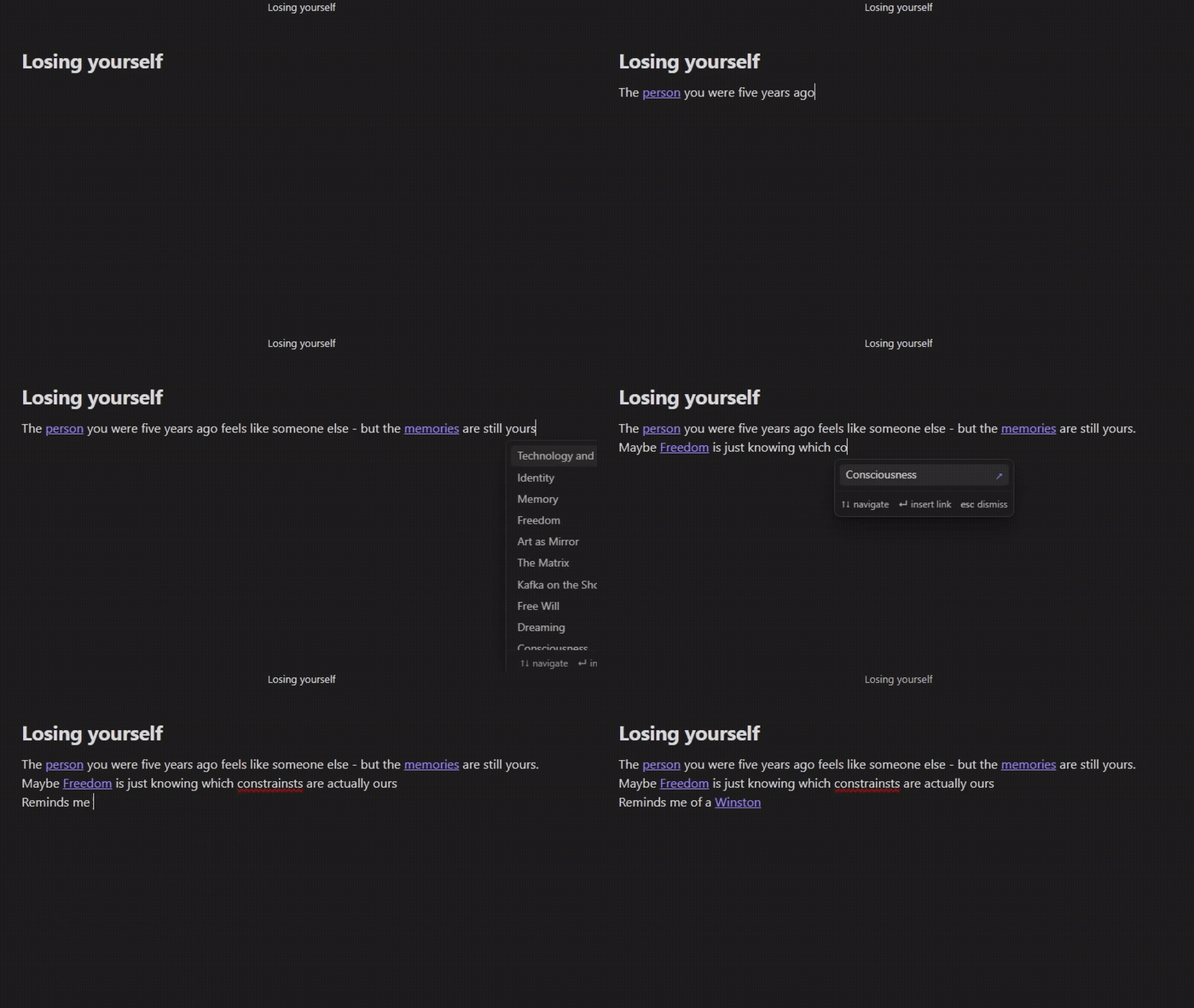
An Obsidian plugin that suggests note links while you type — combining fast lexical matching with semantic search powered by a local Ollama / LM Studio embedding model or the OpenAI API.
Features
- Inline suggest popup — appears as you type, just like Various Complements
- Lexical matches (exact, prefix, partial, word boundary) appear instantly
- Semantic matches from the embedding model appear below
- Optional snippet preview — see the best-matching sentence from each note directly in the popup
- Related Notes panel — sidebar panel showing the most semantically similar notes to the one you have open
- Optional snippet preview — shows which sentence from each note matched your current context
- Fully local by default — Ollama and LM Studio keep all embeddings on your machine
- OpenAI API support — use
text-embedding-3-smallor any compatible model if you prefer cloud inference - Auto-indexing — vault is indexed on startup with live progress; notes are re-indexed automatically after you stop editing
- Mobile support — works on iOS/Android via Tailscale or local network access to your Ollama instance
Requirements
Option A — local (recommended):
ollama pull bge-m3
Option B — OpenAI API:
- An OpenAI API key
- Set Provider →
OpenAI (API)and paste your key in settings
Installation
Manual
- Download
main.js,manifest.json, andstyles.cssfrom the latest release - Create folder
.obsidian/plugins/semantic-backlinks/in your vault - Copy the three files into that folder
- Enable Semantic Backlinks in Settings → Community plugins
- Make sure Ollama is running (
ollama serve) - The vault will be indexed automatically in the background — a progress notice appears during first run
BRAT (Beta Reviewers Auto-update Tester)
- Install BRAT
- In BRAT settings, click Add Beta Plugin and enter
Brightwav3/semantic-backlinks - Enable the plugin in Community plugins
Usage
Inline popup
Type any word — if a semantically or lexically related note exists, a popup appears:
↗badge = note name match (lexical)~65%= semantic similarity score- Italic sentence below the title = the best-matching sentence from that note (if snippet preview is enabled)
Press Enter to insert [[Note Title]] and replace the typed word.
Related Notes panel
Click the brain icon in the ribbon or run Show related notes panel from the command palette. Each result optionally shows the sentence from the note that best matched your current context.
Snippet preview
Enable Snippet preview in settings, then re-index your vault. The plugin builds a 1-bit quantized sentence index (~same storage size as the existing note index, 32× smaller than Float32) alongside the normal note-level index. Once indexed, you'll see the most relevant sentence from each result — making it immediately clear why a note was suggested without opening it.
Snippet display can be toggled independently for the popup and the panel at any time without re-indexing.
Storage
Embeddings are stored in .obsidian/plugins/semantic-backlinks/embeddings.json using a compact binary (base64 Float32Array) format — roughly 7× smaller than storing raw floats as JSON text.
When snippet preview is enabled, a second file embeddings-sentences.json is created alongside it. This stores sentence-level embeddings in 1-bit quantized form (sign-bit only, Hamming similarity) — 32× smaller than Float32, making it roughly the same total size as the existing note index.
Both files are device-local — they are not synced by Remotely Save or similar plugins. Each device builds its own index independently.
Settings (including your OpenAI API key if set) are stored in .obsidian/plugins/semantic-backlinks/data.json and are synced normally by Obsidian Sync / Remotely Save.
Mobile setup (Tailscale)
- Install Tailscale on both your desktop and mobile device
- On desktop, note your Tailscale IP (e.g.
100.x.x.x) - In plugin settings, set Server URL to
http://100.x.x.x:11434 - Make sure Ollama is running and accessible:
OLLAMA_HOST=0.0.0.0 ollama serve
Settings
| Setting | Default | Description |
|---|---|---|
| Provider | Ollama |
Ollama, LM Studio, or OpenAI (API) |
| Server URL | http://localhost:11434 |
Base URL of the embedding server. For OpenAI: https://api.openai.com. For mobile: use Tailscale IP. |
| API key | — | OpenAI API key (sk-…). Only shown when Provider is set to OpenAI. |
| Embedding model | bge-m3 |
Model name. For OpenAI: text-embedding-3-small or text-embedding-3-large. |
| Enable inline suggest | on | Show popup while typing |
| Show lexical badge (↗) | on | Mark name-match results with an arrow |
| Min word length to trigger | 2 | Minimum characters before popup appears |
| Min word length for semantic | 4 | Words shorter than this use lexical matching only |
| Similarity threshold | 0.35 | Minimum cosine similarity for semantic results |
| Max suggestions | 10 | Maximum popup items |
| Enable Related Notes panel | on | Show sidebar panel |
| Related notes count | 12 | Notes shown in the panel |
| Enable snippet preview | off | Build sentence-level 1-bit index and show matching sentence per result. Requires re-index after toggling. |
| Show snippet in inline suggest | on | Show matching sentence in the typing popup (only if snippet preview is enabled) |
| Show snippet in Related Notes panel | on | Show matching sentence in the sidebar panel (only if snippet preview is enabled) |
| Excluded folders | — | Comma-separated folder paths to skip (e.g. Templates, Archive) |
| Auto-reindex delay | 12s | Idle time after editing before re-indexing |
Privacy
Ollama / LM Studio (default): All text is processed entirely on your device. Nothing is sent to any external server. Embeddings are stored locally in embeddings.json and never leave your machine.
OpenAI (API): When this provider is selected, the text of your notes (in chunks up to ~1 500 characters) is sent to OpenAI's API to generate embeddings. This means your note content leaves your device and is subject to OpenAI's privacy policy. Your API key is stored locally in data.json. If you use Obsidian Sync or Remotely Save, data.json is synced — be aware that your API key travels with it.
If privacy is a concern, use Ollama or LM Studio.
Building from source
npm install
npm run build   # produces main.js
npm run dev     # watch mode
Requires Node.js 16+. The build uses esbuild to bundle src/main.ts into a single main.js.
Issues
Found a bug or have a feature request? Open a new issue.
License
MIT