Search...Search plugins and themes...
⌘K
Sign in
  • Get started
  • Download
  • Pricing
  • Enterprise
  • Account
  • Obsidian
  • Overview
  • Sync
  • Publish
  • Canvas
  • Mobile
  • Web Clipper
  • CLI
  • Learn
  • Help
  • Developers
  • Changelog
  • About
  • Roadmap
  • Blog
  • Resources
  • System status
  • License overview
  • Terms of service
  • Privacy policy
  • Security
  • Community
  • Plugins
  • Themes
  • Discord
  • Forum / 中文论坛
  • Merch store
  • Brand guidelines
Follow us
DiscordTwitterBlueskyThreadsMastodonYouTubeGitHub
© 2026 Obsidian

Sakura Tree Renderer

Cole DavisCole Davis33 downloads

Renders sakura fenced code blocks as colored directory trees.

Add to Obsidian
  • Overview
  • Scorecard
  • Updates5

Sakura is a tree visualization tool for simplifying the design of file systems or other tree-like structures. Sakura diagrams are color-coded and great for project documentation or presentations.

It runs as an Obsidian plugin: write an indented list inside a ```sakura code block and Sakura renders it as a colored directory tree.
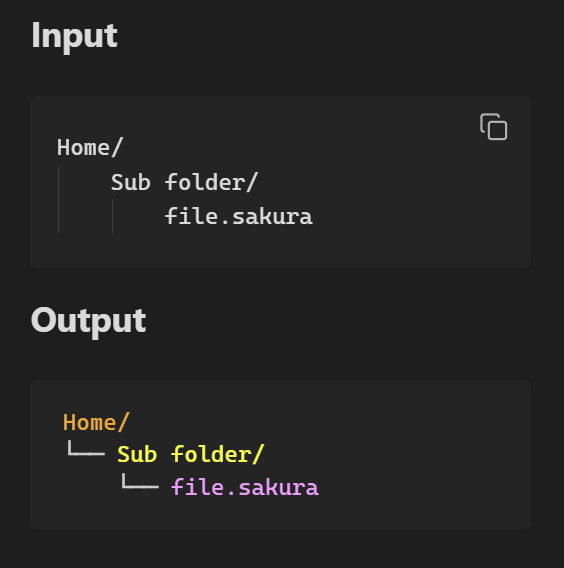
Simple example of valid input and expected output.

Install

Obsidian Community Plugins

  1. Settings > Community Plugins > Browse
  2. Search "Sakura"
  3. Install and Enable

Manual install

  1. Download main.js, manifest.json, styles.css from the latest release
  2. Put them in <vault>/.obsidian/plugins/sakura
  3. Enable in Settings > Community Plugins

Usage

```sakura
home
    documents
        notes.txt
    scripts
        deploy.py
```

Folders are detected from nesting, indentation widths don't have to be consistent, and you can mix tabs with spaces. You can also paste the output of the tree command, or a Markdown bulleted list, straight into the block and it renders as-is. See the full reference below.

Syntax Reference

SYNTAX.md

LICENSE

LICENSE

HealthExcellent
ReviewPassed
About
Render color-coded tree diagrams from indented lists inside a sakura code block. Detect folders by nesting, accept inconsistent indentation and mixed tabs/spaces, and paste output from tree or Markdown lists for quick, presentation-ready directory visuals.
VisualizationFiles
Details
Current version
1.2.2
Last updated
5 days ago
Created
8 months ago
Updates
5 releases
Downloads
33
Compatible with
Obsidian 1.0.0+
Platforms
Desktop, Mobile
License
ISC
Report bugRequest featureReport plugin
Author
Cole DavisCole Daviscolciferr
GitHubcolciferr
Colciferr
nicholas-cole-davis-787917121
  1. Community
  2. Plugins
  3. Visualization
  4. Sakura Tree Renderer

Related plugins

tldraw

Integration with tldraw, allowing users to draw and edit content on a virtual whiteboard.

Notebook Navigator

A better file browser and calendar inspired by Apple Notes, Bear, Evernote and Day One.

Excalidraw

Visual PKM powerhouse. Create and edit Excalidraw drawings.

Advanced Canvas

Supercharge your canvas experience. Create presentations, flowcharts and more.

ExcaliBrain

An interactive, structured mind-map of your Obsidian vault.

Claudian

Embeds Claude Code/Codex and other local Agents as AI collaborators in your vault.

Advanced URI

Control everything with URI.

Breadcrumbs

Visualise the hierarchy of your vault using a breadcrumb trail or matrix view.

Mermaid Tools

Improved Mermaid.js experience: visual toolbar with common elements and more.

Thino

Quickly capture memos and display them in the sidebar with a heatmap. (Closed source)