Search...Search plugins and themes...
⌘K
Sign in
  • Get started
  • Download
  • Pricing
  • Enterprise
  • Account
  • Obsidian
  • Overview
  • Sync
  • Publish
  • Canvas
  • Mobile
  • Web Clipper
  • CLI
  • Learn
  • Help
  • Developers
  • Changelog
  • About
  • Roadmap
  • Blog
  • Resources
  • System status
  • License overview
  • Terms of service
  • Privacy policy
  • Security
  • Community
  • Plugins
  • Themes
  • Discord
  • Forum / 中文论坛
  • Merch store
  • Brand guidelines
Follow us
DiscordTwitterBlueskyThreadsMastodonYouTubeGitHub
© 2026 Obsidian

root-vocabulary

wfz1990wfz199028 downloads

记录词根与单词,并在侧栏查阅、搜索和标记熟悉度。

Add to Obsidian
  • Overview
  • Scorecard
  • Updates3

An Obsidian desktop plugin for organizing English roots, affixes, and related vocabulary. It stores every entry as a Markdown note, supports multiple root associations, searches spelling and Chinese meanings, tracks familiarity and favorites, and looks up Chinese definitions from a local ECDICT CSV file.

Installation and usage

Install the plugin from the Obsidian Community Plugins directory. To install a release manually, copy main.js, manifest.json, and styles.css into .obsidian/plugins/root-vocabulary/, then enable root-vocabulary in Obsidian.

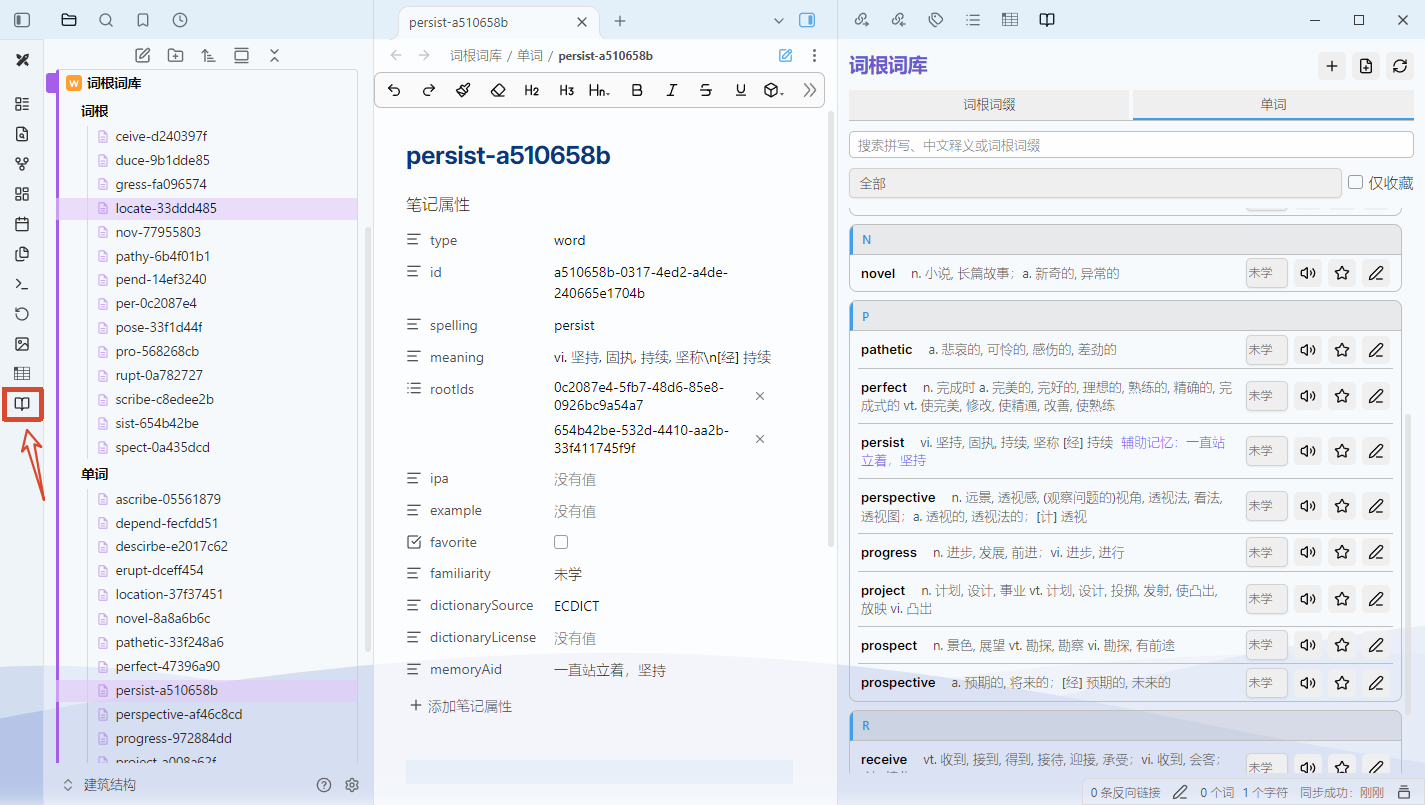
Open the plugin from the ribbon book icon or the 打开词根词库 command. Create a root or affix before creating related words. Plugin data is stored in 词根词库/词根 and 词根词库/单词; the Markdown files and their frontmatter remain directly editable.

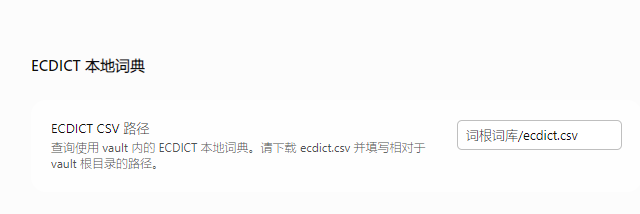
Chinese meaning lookup uses the local ECDICT dataset and does not send words to an online translation service. Download ecdict.csv, place it at 词根词库/ecdict.csv, or configure another vault-relative path in the plugin settings.

中文说明

个人英语词根和单词记录插件,适用于 Obsidian 桌面端。数据保存在库内 词根词库/词根 和 词根词库/单词 的 Markdown 笔记中,可直接修改 头部元数据 和正文。一个单词可以关联多个词根;收藏和熟悉度用于筛选,不安排复习日期。

构建与安装

开发与测试使用 Node.js 24 或更新版本。运行 npm install、npm test、npm run typecheck、npm run build。

请从 Obsidian 社区插件中搜索 root-vocabulary安装本插件。 如果手动安装发行版本:将 main.js、manifest.json、styles.css 复制到目录 .obsidian/plugins/root‑vocabulary/,之后在 Obsidian 内启用 root‑vocabulary 插件。

点击左侧书本图标打开“打开词根词库”命令。界面分为“词根”和“单词”两个页面,可用顶部标签切换;先新建词根,再新建单词,铅笔图标可重新编辑字段。词根和单词页可按拼写、中文释义、词根形式和变体搜索,并按熟悉度或收藏筛选。单击词根会自动跳转到关联的单词。
重点说明

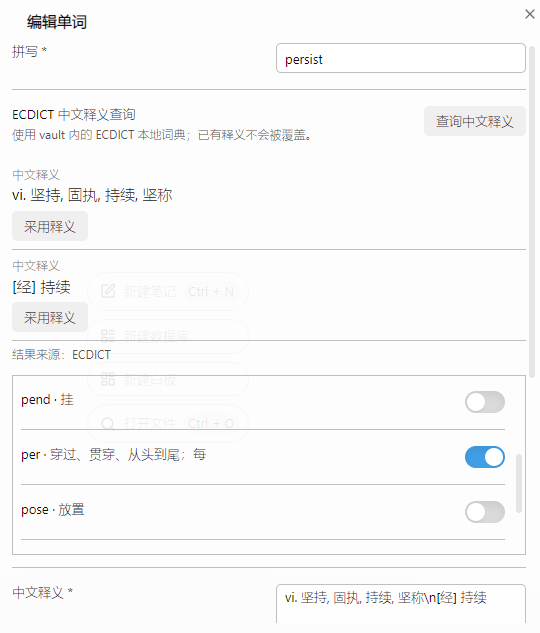
新建单词时,在单词表单点击“查询中文释义”时读取 vault 内的 ecdict.csv,不请求网络。请从 ECDICT 官方仓库 获取 ecdict.csv,或者本仓库获取 ecdict.csv,放入 词根词库/ecdict.csv。可在插件设置中填写其他相对路径。
HealthExcellent
ReviewSatisfactory
About
Manage a personal English roots-and-words database inside Obsidian using Markdown notes stored in your vault. Link words to multiple roots, search by spelling, Chinese meaning, root forms and variants, filter by familiarity or favorites (no review scheduling), edit fields inline, spot note issues, and fetch Chinese definitions locally from an ECDICT CSV without network access.
DataCSVSearch
Details
Current version
0.6.9
Last updated
5 days ago
Created
Last week
Updates
3 releases
Downloads
28
Compatible with
Obsidian 1.13.0+
Platforms
Desktop only
License
MIT
Report bugRequest featureReport plugin
Author
wfz1990wfz1990wfz1990
GitHubwfz1990
  1. Community
  2. Plugins
  3. Data
  4. root-vocabulary

Related plugins

DataLoom

Weave together data from diverse sources into different views. Inspired by Excel Spreadsheets and Notion.so.

Smart Connections

Find related notes and excerpts while writing. Your AI link building copilot displays relevant content in graph + list view. A local embedding model powers semantic search. Zero setup. No API key.

Tag Wrangler

Rename, merge, toggle, and search tags from the tag pane.

Quick Switcher++

Enhanced Quick Switcher, search open panels, and symbols.

Advanced Tables

Improved table navigation, formatting, and manipulation.

Omnisearch

Intelligent search for your notes, PDFs, and OCR for images.

Tracker

Track occurrences and numbers in your notes.

Quiet Outline

Make outline quiet and more powerful, including no-auto-expand, rendering heading as Markdown, and search support.

Semantic Notes Vault MCP

Give Claude Desktop and other AI assistants semantic access to your notes through a built-in Model Context Protocol (MCP) server.

Charted Roots

Family tree visualization with GEDCOM/Gramps import and Canvas/PDF/Markdown export. Charts, maps, timelines, citations, fictional calendars. For genealogists, worldbuilders, and TTRPG campaigns.