Reflect
 faradayfury23 downloads
Revisit your notes to see which ideas keep coming up and what you make of them now. Reflect is in pre-alpha.
- Overview
- Scorecard
- Updates5
Reflect is an Obsidian plugin for coming back to what you’ve written. It brings related passages together so you can see which ideas keep coming up. Each passage links back to the note it came from.
Pre-alpha. I’m still exploring how Reflect can help you come back to your notes. The workflow may change as I learn what people find useful.
See Reflect in use
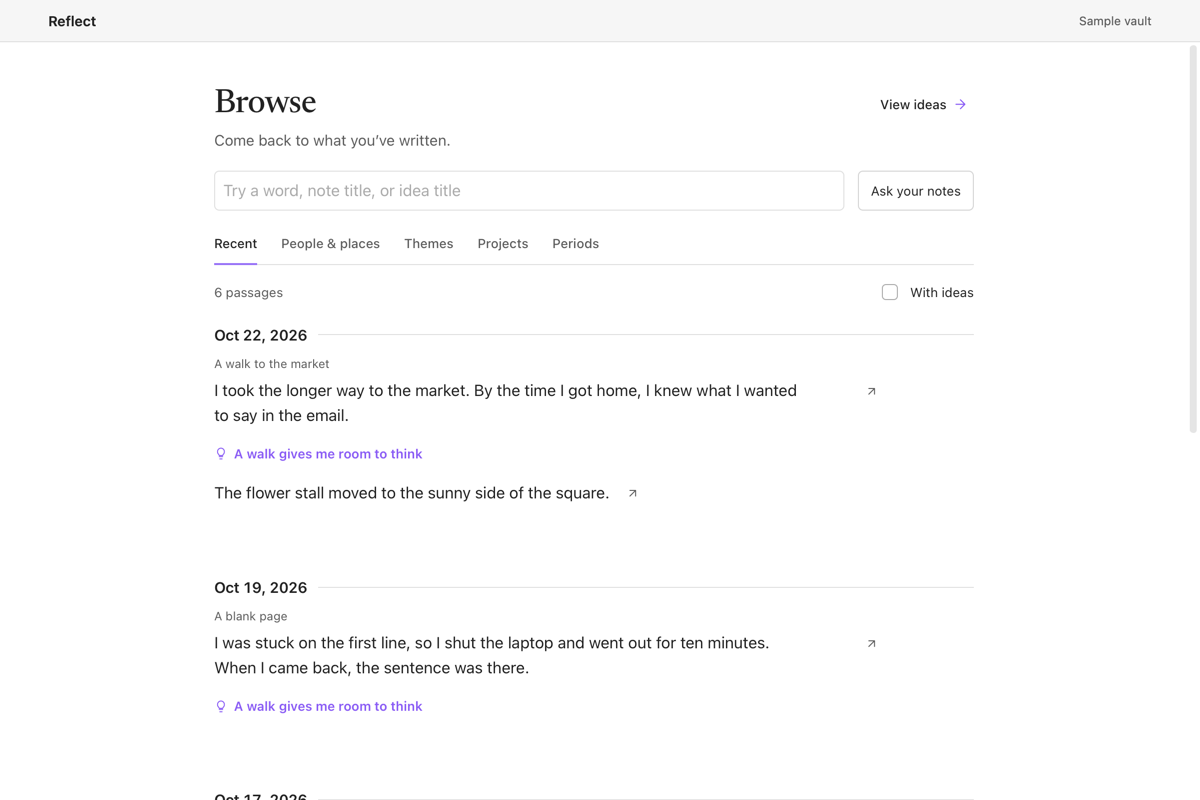
Browse passages. Revisit your notes by date and follow an idea that shows up in more than one passage.
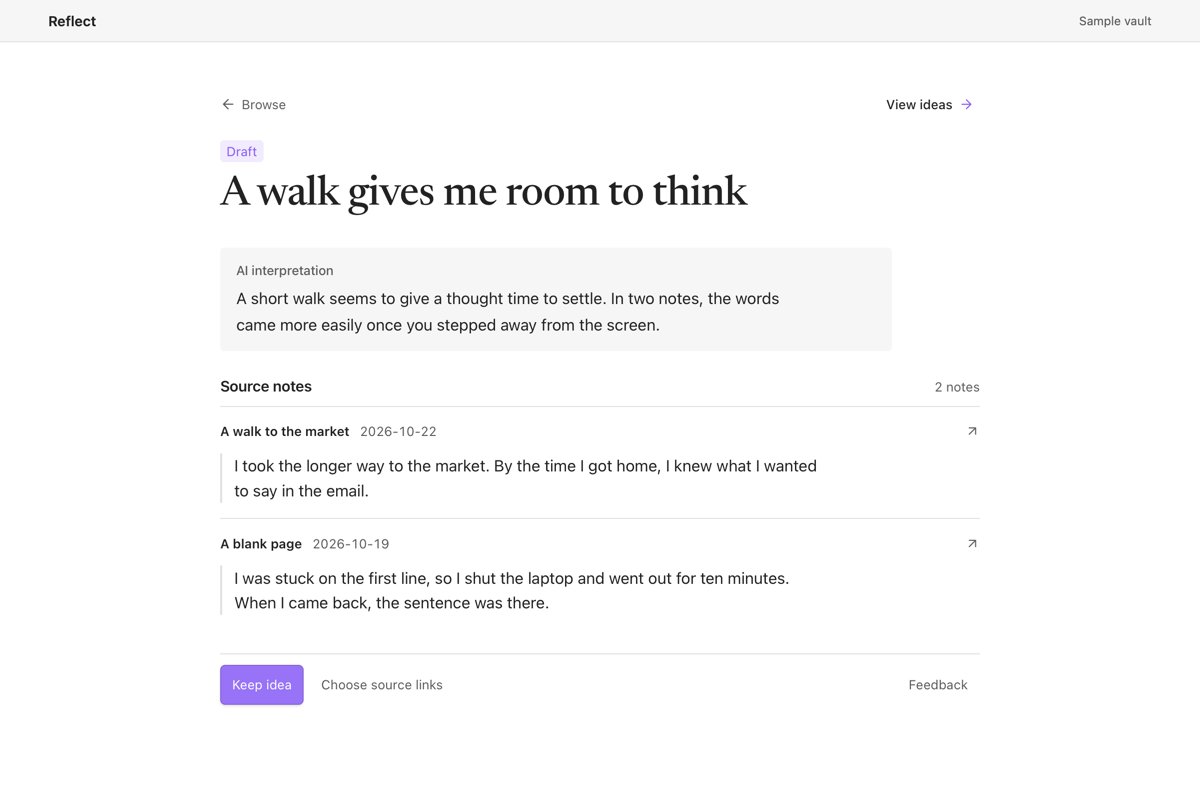
Read and keep an idea. Read the interpretation alongside the original passages. Keep the idea as a note if you want to come back to it.
Install
Reflect requires Obsidian Desktop 1.15.0 or later. In Settings → Community plugins, search for Reflect, then install and enable it. Browse, reading saved ideas, and keeping an idea work without a model.
For a manual install, download main.js, manifest.json, and styles.css from the latest release. Put them in your vault's .obsidian/plugins/reflect folder. Restart Obsidian, open Settings → Community plugins, and enable Reflect.
Use Reflect
- Open Reflect to see passages from current and recently opened notes in Browse. Use Browse notes or folders to include other writing. You can browse by date, people and places, themes, or projects without setting up a model.
- Select Find ideas in my notes or Choose notes to scan to look for recurring ideas. Choose a model. Enter one vault-relative Markdown file or folder path per line under Notes or folders to include, or choose Use recent notes. Include at least two notes. Select Preview note text, review the notes, and check the approval box before selecting Run scan. Reflect opens the first idea alongside the passages it found.
- Open Ideas to read drafts and kept ideas. Keep idea saves a Markdown note with links to its sources. To add links back from the source notes, select Choose source links before keeping the idea.
- Choose Reflect on this note in a note’s menu or the command palette. Select Find related ideas, read the quoted passages, and choose Add source if the note adds something to an idea.
- Select Look for more ideas from Ideas to find new drafts or more sources for ideas you already have.
- Use Ask your notes to explore a question. Choose and preview the notes to include, then save any findings you want to keep with their original passages.
Set up the models
Choose a model when you start a scan or use Ask your notes. Trust and test sends a built-in sample sentence and any selected API key to check the connection. Trust and use this model approves the connection on this device. If you used the built-in Codex CLI connection in an older release, choose and approve a new connection after upgrading.
| Connection | What you need |
|---|---|
| Ollama | Start Ollama and enter a downloaded model ID from ollama list. Use the server URL shown by your Ollama setup. Download Ollama |
| LM Studio | Start the LM Studio server and enter a model ID. The preset uses port 1234. LM Studio server setup |
| OpenRouter | Choose an OpenRouter API key and enter the full model ID. OpenRouter setup |
| Claude API | Choose a Claude Console API key and enter the model ID. Claude API setup |
| OpenAI-compatible endpoint | Enter a base URL for a server that accepts /chat/completions, a model ID, and a key if required. For the OpenAI API, use https://api.openai.com/v1. |
Reflect is free to install and use. Optional hosted models require a provider account or API key and may incur charges from that provider. Reflect stores API keys in Obsidian's secret storage and saves the approved connection on this device.
The optional Codex companion requires an installed, signed-in Codex CLI. Follow the companion setup instructions to download and start it. In Reflect, choose OpenAI-compatible endpoint. Enter the companion's server URL and model ID, use its token as the API key, and enter its SHA-256 Certificate fingerprint. The default server URL is https://127.0.0.1:41729/v1.
For Find related ideas and local feedback rechecks, start Ollama, run ollama pull qwen3:4b, and approve its exact loopback URL in Settings → Reflect. The default is http://127.0.0.1:11434. Use a server you control because plain HTTP cannot verify which local process answers. Local review runs when you choose one of these actions. The automatic suggestions setting from older releases has been removed.
Data and privacy
Reflect reads Markdown and keeps drafts, saved questions, and review feedback in your vault. It updates notes when you choose to keep an idea, add a source, or save a link. Browsing and reading saved ideas work offline. Reflect makes network requests for model features. The note preview uses Obsidian's Markdown renderer, which can load external media already embedded in the note. Reflect does not collect usage telemetry.
- Scans and questions. Reflect shows the destination, included notes, and note text for approval before sending note bodies, titles, dates, and selected source passages. A question also sends the question you enter. Daily notes and files Obsidian shows through links can appear in the preview. Saved review preferences and draft interpretations stay in the vault for these runs.
- Ollama and LM Studio. Reflect sends scan and question requests to the selected server on your computer. Find related ideas sends excerpts from the active note, relevant idea summaries, and review preferences to your approved Ollama server. For saved-feedback rechecks, select Preview Qwen recheck to review the excerpts and draft material before sending them with your saved feedback and preferences. Choose downloaded models to keep processing local. If you choose an Ollama cloud model, your server forwards the request to Ollama. Ollama cloud settings
- Hosted providers and custom endpoints. Reflect sends scan and question requests to OpenRouter at
openrouter.ai, the Claude API atapi.anthropic.com, or the server URL you approve under OpenAI-compatible endpoint. The optional OpenAI API endpoint isapi.openai.com. These services generate ideas and answers from the selected notes. OpenRouter routes requests to a provider for the selected model. A custom server can also forward requests. - Codex companion. If you connect to the companion, Reflect sends the approved request to its local server. The companion forwards the request to OpenAI under your Codex sign-in. The companion runs your configured Codex executable and uses a temporary directory outside the vault for the response. It removes that directory after the request.
Run the checks
From the Reflect repository, run these commands with Node.js 24. The tests use sample notes and run without Obsidian, model credentials, or an npm install.
node --check main.js
node --test
GitHub Actions runs the same checks on Linux, macOS, and Windows for pull requests and pushes to main. Open Checks on a pull request to see which platform, step, and test failed.
Prepare a release
From the reviewed commit, push a version tag that exactly matches manifest.json. Once the checks pass on all three platforms, GitHub Actions attests main.js, manifest.json, and styles.css and uploads them to a draft release. Review the draft and run the Obsidian directory preview scan before publishing.
License
Reflect is licensed under the MIT License. The bundled Newsreader typeface is licensed separately under the SIL Open Font License.