Readwise Reading Tracker
 Kostya Struga248 downloads
Track Readwise reading progress, highlights, heatmaps, and reading inbox notes.
- Overview
- Scorecard
- Updates7
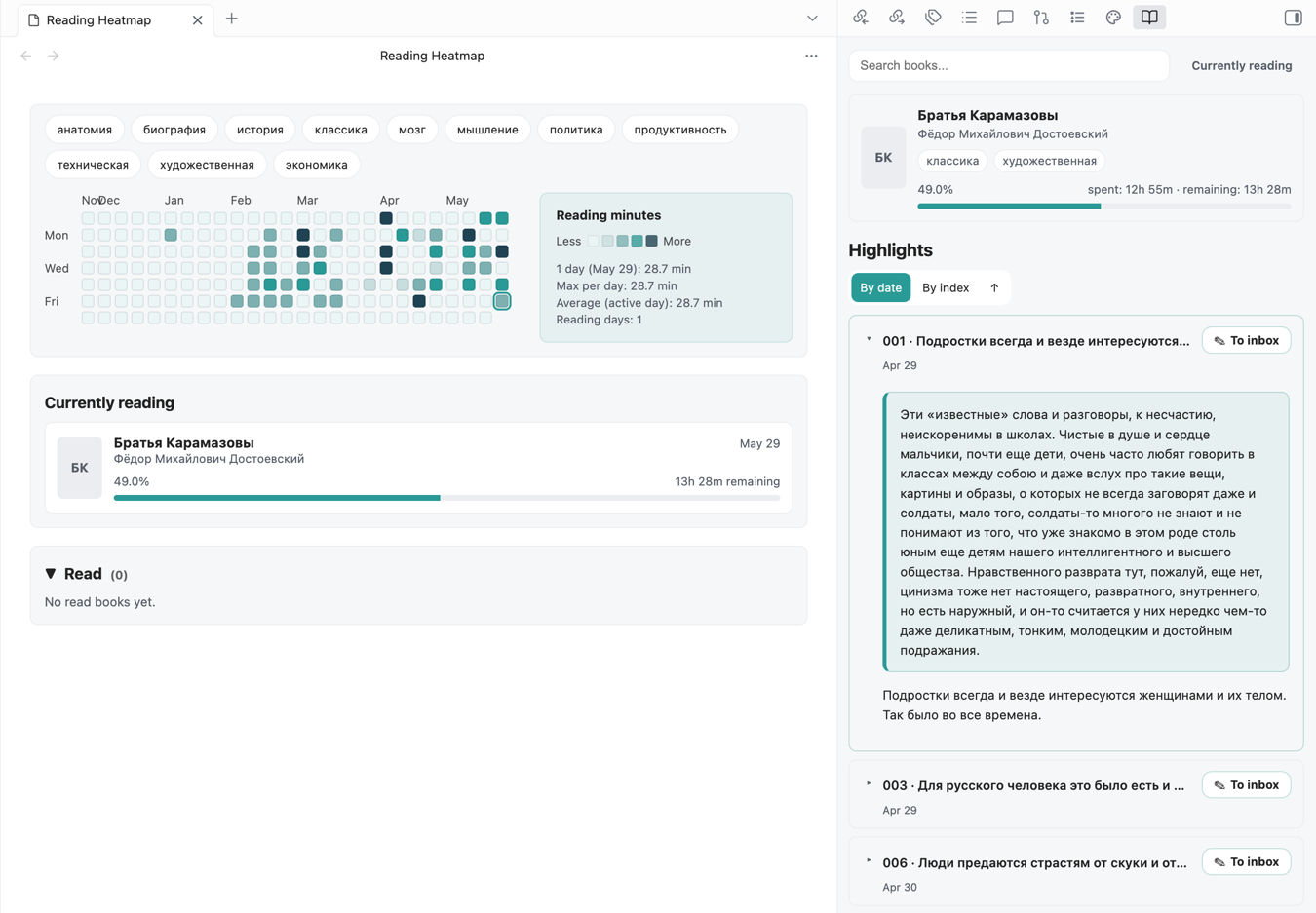
Readwise Reading Tracker is an Obsidian plugin for tracking reading progress, planning what to read next, and managing your Readwise Reader library. It turns reading activity into an Obsidian-native dashboard with a heatmap, a topic-based planning board, a Gantt reading plan, highlight navigation, Reader imports, tag management, and inbox notes created from highlights.
It also supports a Zettelkasten-style workflow: you can quickly review highlight notes, move promising fragments into your inbox, and keep the basic links back to the source book, highlight, and reading context.
Features
- Sync reading documents from the Readwise API.
- Track reading progress with a daily heatmap.
- Click a dashboard book to filter its heatmap activity and open its highlights in the right sidebar.
- Show current and completed books with progress and remaining-time estimates.
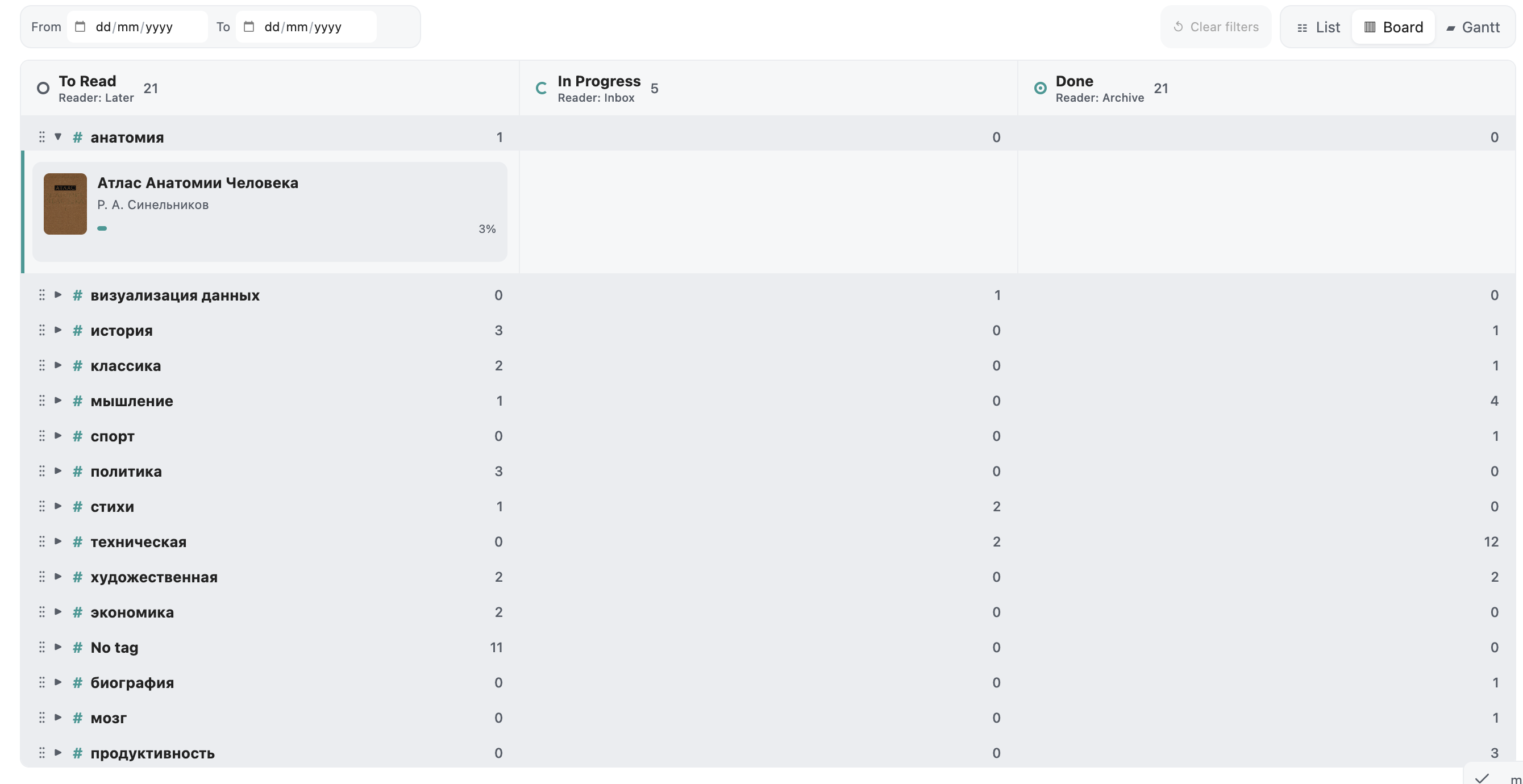
- Organize the library on a tag-based planning board with separate To Read, In Progress, and Done counts for every direction.
- Focus one or several reading directions by expanding their rows; non-focused directions stay collapsed.
- Reorder directions and books with drag and drop. Their visual order is also their planning priority.
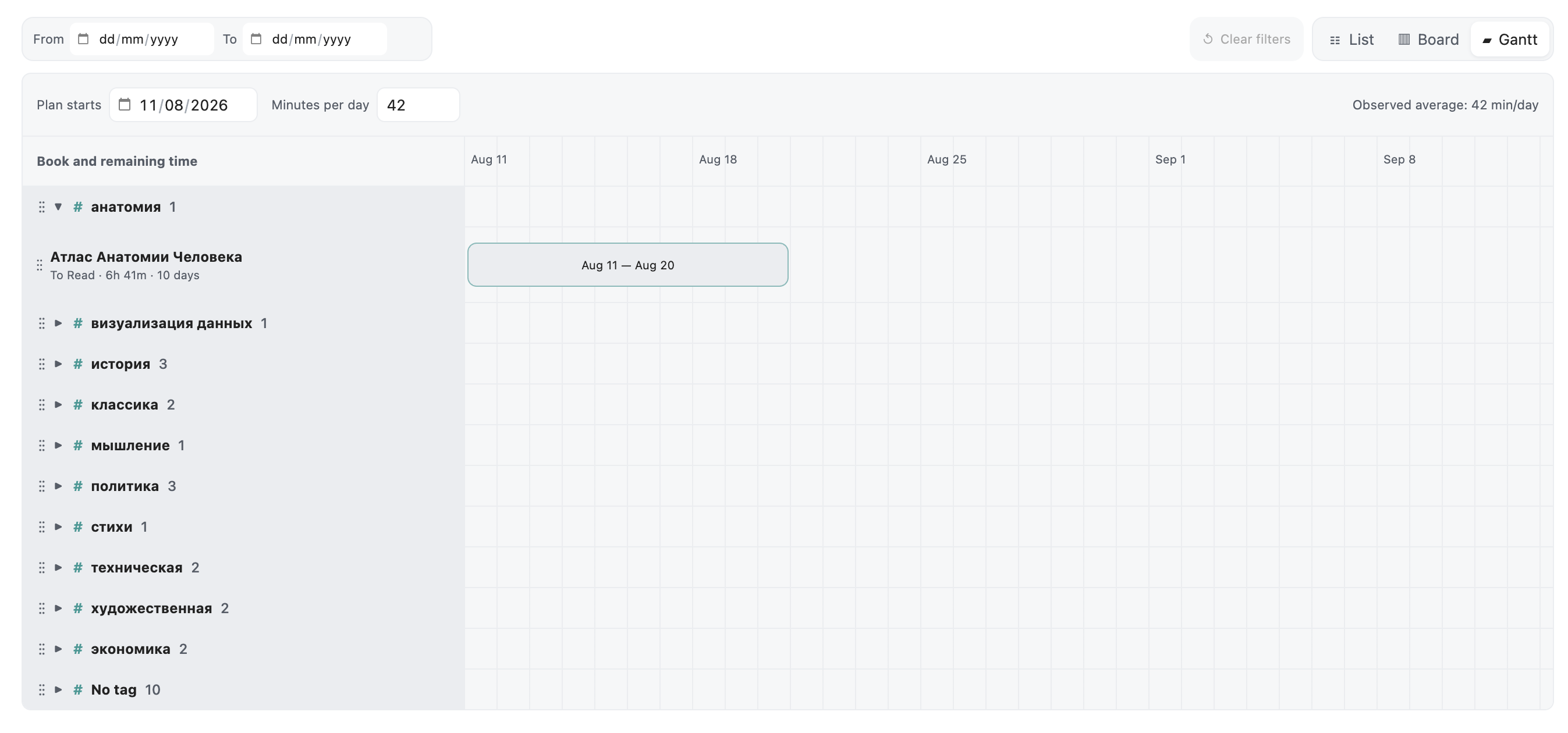
- Build a Gantt reading plan from focused directions, remaining reading time, and your observed or configured daily pace.
- Keep completed books out of the Gantt plan while retaining them on the planning board.
- Filter the dashboard by date and clear every active filter with one action.
- Flag in-progress books that have had no reading activity for more than two weeks.
- Move books between Reader Later, Inbox, and Archive directly from the board.
- Build reading timelines for regular books, EPUBs, and PDFs.
- Save URLs and upload EPUB, PDF, HTML, TXT, or Markdown files directly to Reader.
- Add existing or new Reader tags without leaving Obsidian.
- Permanently delete Reader books with an explicit confirmation step and synchronized local cleanup.
- Use linked highlight notes generated by the Readwise Official plugin or by this plugin's migration command.
- Create clean inbox notes from highlights with Obsidian Properties for
book,source,date, andcreated. - Keep data local in your vault plugin data.
Reading Focus And Planning
The Board groups books by Reader state and reading direction. Expand a direction to put it in focus and reveal its books. You can focus several directions at once, drag directions into priority order, drag books within a direction, and move books between Reader Later, Inbox, and Archive.
The Gantt view uses the same focus and priority order. It schedules unfinished books sequentially from their remaining reading time and your daily reading pace. Change the plan start date or minutes per day to immediately recalculate the timeline. Books already in Done are excluded.
Manual Installation
- Download these files from the latest GitHub release:
main.js
manifest.json
styles.css
- Create this folder in your vault:
.obsidian/plugins/readwise-reading-tracker/
- Place the downloaded files in that folder.
- Restart Obsidian.
- Enable
Readwise Reading Tracker.
Setup With The Official Readwise Plugin
Readwise Reading Tracker is designed to work together with the official Readwise Obsidian plugin.
The official plugin exports the source book notes from Readwise/Reader into your vault. This plugin then reads those files, extracts highlight timelines, builds linked highlight notes, shows the reading heatmap, and lets you create inbox notes from individual highlights.
1. Install both plugins
Install and enable:
Readwise OfficialReadwise Reading Tracker
2. Configure the official Readwise export
Open the official Readwise plugin settings or the Readwise Obsidian export page.
Use these export settings:
- Enable
Export All Reader Documents. - Enable
Group Files in Category Folders. - Map categories you want to track into the same books folder:
books -> Booksarticles -> Books- optional: keep
tweets -> Tweets,podcasts -> Podcasts
- Enable
Use Custom Formatting.
Use this Page metadata template:
---
type: book
source: readwise
title: "{{full_title}}"
{% if author %}author: "{{author}}"{% endif %}
{% if category %}category: "{{category}}"{% endif %}
created: {{date}}
{% if url %}url: "{{url}}"{% endif %}
{% if document_tags %}tags:{% for tag in document_tags %} - {{tag}}{% endfor %}{% endif %}
---
{% if image_url %}{% endif %}
Use this Highlights header template:
{% if is_new_page %}
## Highlights

{% elif has_new_highlights -%}## New highlights added {{date|date('F j, Y')}} at {{time}}{% endif -%}
---
Use this Highlight template:
> {{ highlight_text }}
{% if highlight_note %}
>> {{ highlight_note }}{% endif %}

📅 *{{ highlight_date | date('Y-m-d, H:i') }}*
{% if highlight_tags %}🏷 {% for tag in highlight_tags %}[[{{tag}}]] {% endfor %}{% endif %}
{% if highlight_location and highlight_location_url %}🔗 [{{highlight_location}}]({{highlight_location_url}})
{% elif highlight_location %}📍 {{highlight_location}}{% endif %}
---
Optional: keep Full Document Text Link enabled if you want links to full Reader content. It is not required for the tracker.
3. Configure Readwise Reading Tracker folders
In Obsidian, open Settings -> Readwise Reading Tracker.
Use the same folders as your official Readwise export:
Readwise books folder: Readwise/Books
Linked highlights folder: Readwise/Highlights
Inbox folder: Inbox/Readwise
The tracker reads official book notes from Readwise/Books. It writes linked per-highlight notes into Readwise/Highlights when you run the migration command.
4. Add the Readwise API token
Get your Readwise API token from:
https://readwise.io/access_token
Paste the token into Settings -> Readwise Reading Tracker, then run Test Readwise Token.
5. First sync
Run the command:
Readwise Reading Tracker: Sync All (Official + Tracker)
For large Reader libraries, regular sync uses an incremental update after the initial import.
Run Readwise Reading Tracker: Sync Full Readwise History when you want to import the complete
library. Full-history sync is rate-limited and preserves existing reading activity.
This command:
- Runs the official Readwise sync if the official plugin is installed.
- Syncs document metadata and reading progress from the Readwise API.
- Migrates official book-note highlights into linked highlight notes.
After sync, open:
Readwise Reading Tracker: Open Progress Dashboard
Readwise Reading Tracker: Open Readwise Book Highlights
If the official Readwise plugin is not installed, you can still run Sync Readwise Data, but linked highlight notes require official exported markdown files or a compatible Readwise export.
Privacy
Readwise Reading Tracker stores your Readwise token locally in Obsidian plugin data. The plugin calls the Readwise API directly from Obsidian and does not send your token, notes, highlights, or reading data to any server controlled by the plugin author.
The plugin may read markdown files from the configured Readwise folders in your vault to infer highlight dates and build reading timelines. It only writes notes when you run commands that explicitly create or migrate notes.
Troubleshooting
Readwise token is not set: add your token in plugin settings.- Token test fails: verify the token at
https://readwise.io/access_tokenand try again. - No books appear after sync: confirm your Readwise account has Reader/readwise documents and run sync again.
- PDF or EPUB activity looks approximate: Readwise does not always expose exact daily reading sessions. The plugin uses highlight dates when available and falls back to progress updates when exact dates are unavailable.
- Linked highlights are not found: check that the linked highlights folder matches the folder used by the Readwise Official plugin or run the migration command.
- Console logs are noisy: turn off
Debug Loggingin plugin settings.
Development
npm install
npm run check
npm run release
The local release bundle is written to:
release/readwise-reading-tracker/
For BRAT and Obsidian releases, publish a GitHub release whose tag exactly matches the version in manifest.json, for example 1.0.0.
License
MIT