
- Overview
- Scorecard
- Updates39
This is a plugin for Obsidian that allows you to render LaTeX-style pseudocode inside a code block. The plugin is based on pseudocode.js, a JavaScript library that typesets pseudocode beautifully to HTML.
Features
- Intuitive grammar: The plugin takes a LaTeX-style input that supports the algorithmic constructs from LaTeX's algorithm packages. With or without LaTeX experience, a user should find the grammar fairly intuitive.
- Print quality: The HTML output produced by the plugin is (almost) identical with the pretty algorithms printed on publications that are typeset by LaTeX.
- Math formula support: Inserting math formulas in the pseudocode is as easy as LaTeX. Just enclose math expression in
$...$or\(...\). - Auto-completion inside
pseudocode block. (Release 1.1.0) - Preamble style (macros) customization. (Release 1.2.0 & 1.5.0)
- Export a LaTeX file that can be compiled, including any required additional macros. (Release 1.3.0)
- Pseudocode block follows Obsidian theme and supports both light and dark ones. (Release 1.6.0)
Future Features
- Syntax highlighting.
Usage
Basic
To use the plugin, simply create a code block in your Obsidian note and add your pseudocode inside it. Then, add the language specifier pseudo (short for "pseudocode") to the code block. The plugin will automatically render the pseudocode as LaTeX.
Rocommend: use the command Pseudocode: Insert a new pseudocode block to start.
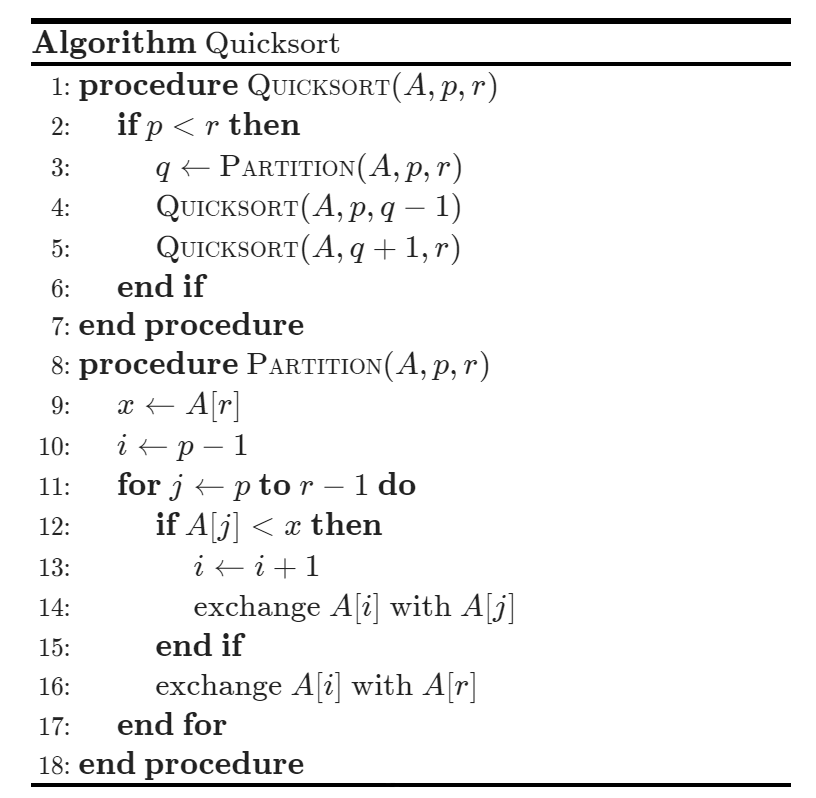
Here is an example:
    ```pseudo
    \begin{algorithm}
    \caption{Quicksort}
    \begin{algorithmic}
      \Procedure{Quicksort}{$A, p, r$}
        \If{$p < r$}
          \State $q \gets $ \Call{Partition}{$A, p, r$}
          \State \Call{Quicksort}{$A, p, q - 1$}
          \State \Call{Quicksort}{$A, q + 1, r$}
        \EndIf
      \EndProcedure
      \Procedure{Partition}{$A, p, r$}
        \State $x \gets A[r]$
        \State $i \gets p - 1$
        \For{$j \gets p$ \To $r - 1$}
          \If{$A[j] < x$}
            \State $i \gets i + 1$
            \State exchange
            $A[i]$ with $A[j]$
          \EndIf
        \State exchange $A[i]$ with $A[r]$
        \EndFor
      \EndProcedure
      \end{algorithmic}
    \end{algorithm}
    ```
This will be rendered as (to render line number, you need to toggle it in setting tab):
Preamble style customization
Use a .sty file
You can use a .sty file (actually the suffix does not matter) to customize with some macros. The plugin will locate the file according to the setting. The default path is preamble.sty.
Please reload the plugin after you change the preamble file.
Use in-block preamble
You can simply write your own macros in the pseudocode block before \begin{algorithm}. These macros will only be applicable within this specific block.
Supported macros
Currently supported macros can be found at this link and below(might not be fully supported):
\DeclarePairedDelimiter\DeclareMathOperator*\DeclareMathOperator
Export to a compilable LaTeX file
You can easily export a compilable LaTeX file by clicking the Export to clipboard button at the bottom right corner for each pseudocode block. The plugin will automatically generate a compilable LaTeX file, including any required additional macros, to your clipboard.
Installation
:tada: The Pseudocode plugin is now available in the Community Plugins section of Obsidian. To install it, simply search for Pseudocode and click on the installation button.
Credits
This plugin is based on pseudocode.js, a JavaScript library that typesets pseudocode beautifully to HTML. Many thanks to the pseudocode.js team for their great work!