Search...Search plugins and themes...
⌘K
Sign in
  • Get started
  • Download
  • Pricing
  • Enterprise
  • Account
  • Obsidian
  • Overview
  • Sync
  • Publish
  • Canvas
  • Mobile
  • Web Clipper
  • CLI
  • Learn
  • Help
  • Developers
  • Changelog
  • About
  • Roadmap
  • Blog
  • Resources
  • System status
  • License overview
  • Terms of service
  • Privacy policy
  • Security
  • Community
  • Plugins
  • Themes
  • Discord
  • Forum / 中文论坛
  • Merch store
  • Brand guidelines
Follow us
DiscordTwitterBlueskyThreadsMastodonYouTubeGitHub
© 2026 Obsidian

Pomodoro Planner

onesvatonesvat3k downloads

Generates a pomodoro schedule plan.

Add to Obsidian
  • Overview
  • Scorecard
  • Updates2

The Obsidian Pomodoro Planner is a simple plugin that generates a daily plan based on the pomodoro technique with compatible with the Obsidian Day Planner plugin.

How to use

  1. Install the plugin
  2. Open the command palette and run the Pomodoro Planner: Generate command
  3. The plugin will generate a daily plan based on the input
  4. You may insert the generated plan to the cursor, or copy it to the clipboard

Screenshots
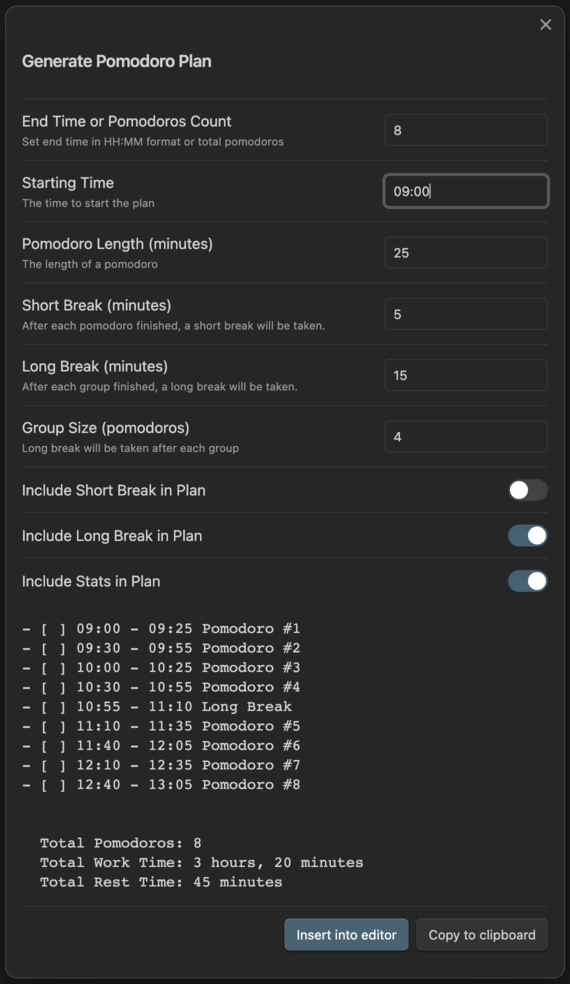
Screenshot


Pomodoro Technique is a registered trademark of Francesco Cirillo. This plugin is not affiliated with or endorsed by Francesco Cirillo.

HealthGood
ReviewSatisfactory
About
Generate a daily plan using the Pomodoro Technique based on your input and formatted for Obsidian Day Planner compatibility. Insert the generated plan at the cursor or copy it to the clipboard for quick use.
TasksDatesAutomation
Details
Current version
1.0.7
Last updated
2 years ago
Created
2 years ago
Updates
2 releases
Downloads
3k
Compatible with
Obsidian 0.15.0+
Platforms
Desktop, Mobile
License
MIT
Report bugRequest featureReport plugin
Author
onesvatonesvat
onurnesvat.com
GitHubonesvat
  1. Community
  2. Plugins
  3. Tasks
  4. Pomodoro Planner

Related plugins

Rollover Daily Todos

Rollover any unchecked checkboxes from your last daily note into today's note.

Tasks

Track tasks across your vault. Supports due dates, recurring tasks, done dates, sub-set of checklist items, and filtering. Maintained by Clare Macrae and Ilyas Landikov, created by Martin Schenck.

Day Planner

Turn tasks from daily notes, the Tasks plugin, and calendars into time blocks on an editable timeline, with built-in time tracker.

Update modified date

Automatically update a frontmatter modified date field when the file is modified.

Day Planner OG

Day planning from a simple task list in a Markdown note (bare bones, preserves the features and behavior of the original plugin).

Task Collector

Change task status and collect tasks within a document using hotkeys and context menus.

Todoist Sync

Materialize Todoist tasks within your notes.

Vault Changelog

Maintain a changelog of recently edited notes.

Day and Night

Automatically toggle themes between day theme and night theme on a set time schedule.

TaskNotes

Note-based task management with calendar, pomodoro and time-tracking integration.