Community Radar
 Ali Tekdemir154 downloads
Discover new and updated community plugins, find the ones that came back after a long pause, and track the ones you care about as notes.
- Overview
- Scorecard
- Updates18
Community Radar
Turn Obsidian's plugin directory into a live discovery engine and personal curation workspace.
Spot fast-rising newcomers, catch long-dormant plugins making a comeback, query the catalog like a database, discover alternatives by meaning—and keep the plugins you care about as living Markdown notes in your vault.
English · Türkçe
Why Community Radar?
Obsidian's built-in plugin browser is great for installing a plugin when you already know its name—but as the catalog grows into the thousands, genuine discovery hits a wall:
- All-time downloads hide today's momentum. A five-year-old giant always sits at the top, while a brilliant month-old plugin gaining a thousand users this week stays buried. Community Radar replays every daily release snapshot since October 2020 to surface real 7- and 30-day growth, fresh milestones, and release rhythms.
- Frequent patchers drown out real comebacks. Plugins shipping tiny tweaks every few days push everything else off the screen. By grouping rapid patches into update waves, Community Radar filters out release noise and spotlights quiet plugins waking up after months—or years—of silence.
- "I'll try this later" disappears. Bookmarked GitHub repos and mental notes get lost. Here, starring or grouping a plugin creates a structured vault note—complete with your rating, status, personal notes, an auto-updated README, and a one-click Obsidian Bases table.
Highlights
🏠 Start With What Changed Since You Last Looked
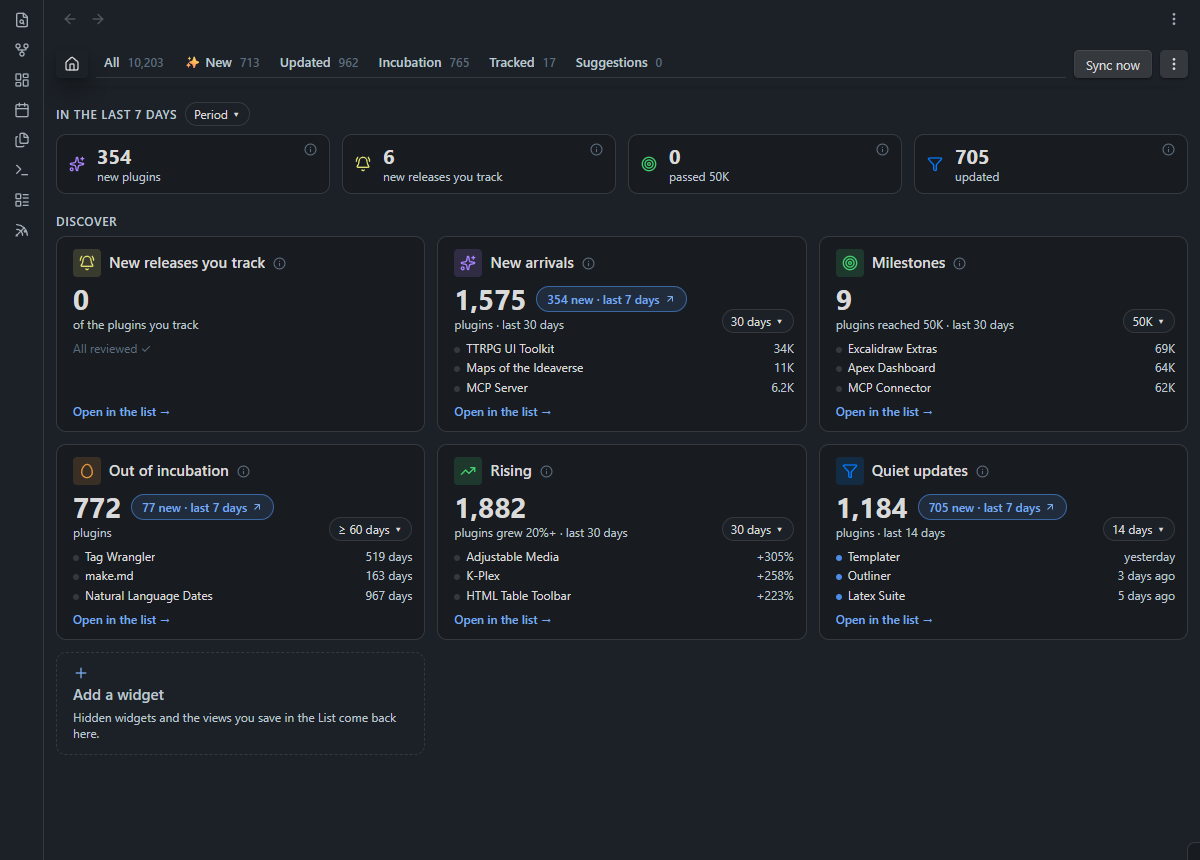
Instead of dropping you into an endless alphabetical wall, Community Radar opens on Home—a live dashboard tailored to your attention.
At the top, the Not seen yet strip tracks new arrivals, updates to plugins you follow, newly crossed download milestones, and quiet releases. Counts clear only when you actually open a list—restarting Obsidian never wipes your unread state. Below it, draggable cards answer the questions you actually care about: New arrivals, Milestones (1K to 100K), Out of incubation, Rising, Quiet updates, and New releases you track. Tweak time windows or thresholds right on any card, or click its N new pill to jump straight to what arrived since your last check.
🥚 Catch Comebacks. Mute Release Noise.
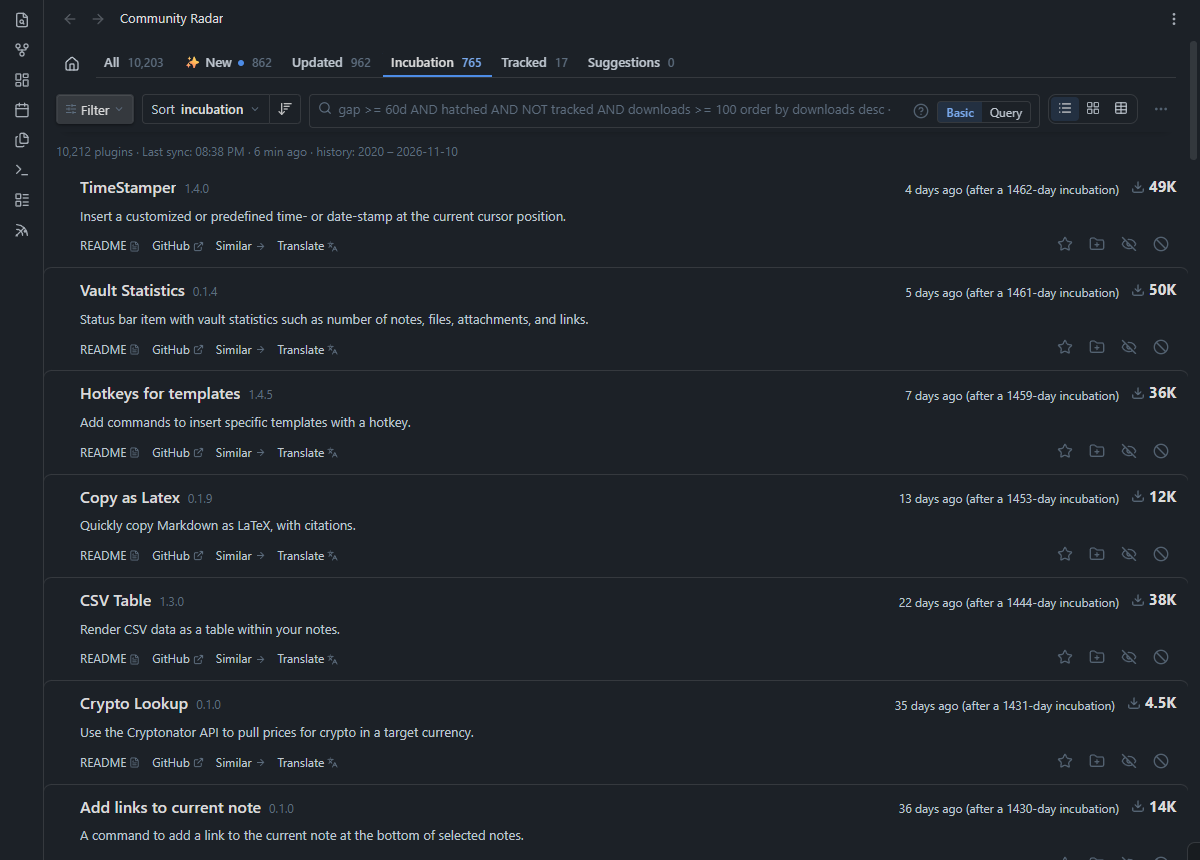
Some of the most exciting moments in the ecosystem happen when an abandoned favorite suddenly ships a major rewrite—yet in a standard "sort by updated" list, it vanishes within hours under daily hotfixes.
- Incubation surfaces plugins that shipped a new version after lying dormant for 60 to 360+ days—showing exact context like "4 days ago (after a 1,462-day incubation)". Better yet, a plugin stays visible here proportional to how long it slept, so a huge comeback never slips past you.
- Updated automatically sets aside hyper-active plugins (more than 9 update waves in 6 months), giving thoughtful, less frequent releases room to breathe.
🔍 Point-and-Click Filters—or a Full JQL-Style Query Engine
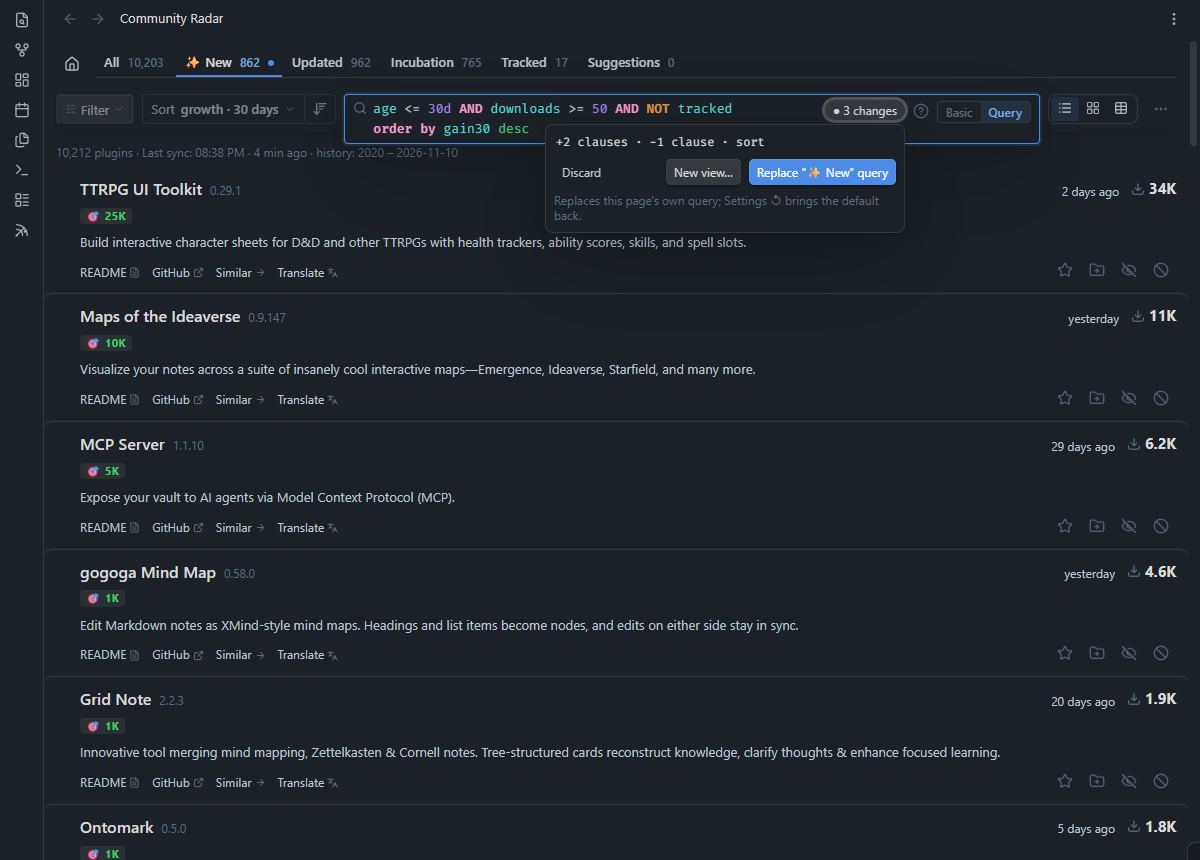
Prefer visual controls? Stay in Basic mode to combine search terms, /regex/, and quick filter chips behind the Filter menu. Want total precision? Flip to Query mode—because under the hood, every tab in Community Radar is just an editable query:
age <= 30d AND downloads >= 50 AND NOT tracked
order by gain30 desc
- 27 searchable fields & date functions: Filter by
gain7,rise30(% growth),gap,milestone,installed,group,rating, and dynamic dates likestartOfMonth(-1)orlastSync(). - Guided as you type: Press
Ctrl+Spacefor context-aware autocomplete (including your own groups, statuses, and plugin authors), hover over any token to see a plain-English explanation, or hit?for an interactive cheat sheet. If a query returns zero results, Community Radar even tells you which clause emptied the list. - Saved Views: Customize any query and save it as a View—giving it a permanent tab in your top bar (with a
+Nbadge for unseen matches) and its own widget card on Home. → Full Query Reference
≈ Discover Alternatives by Meaning—100% On-Device
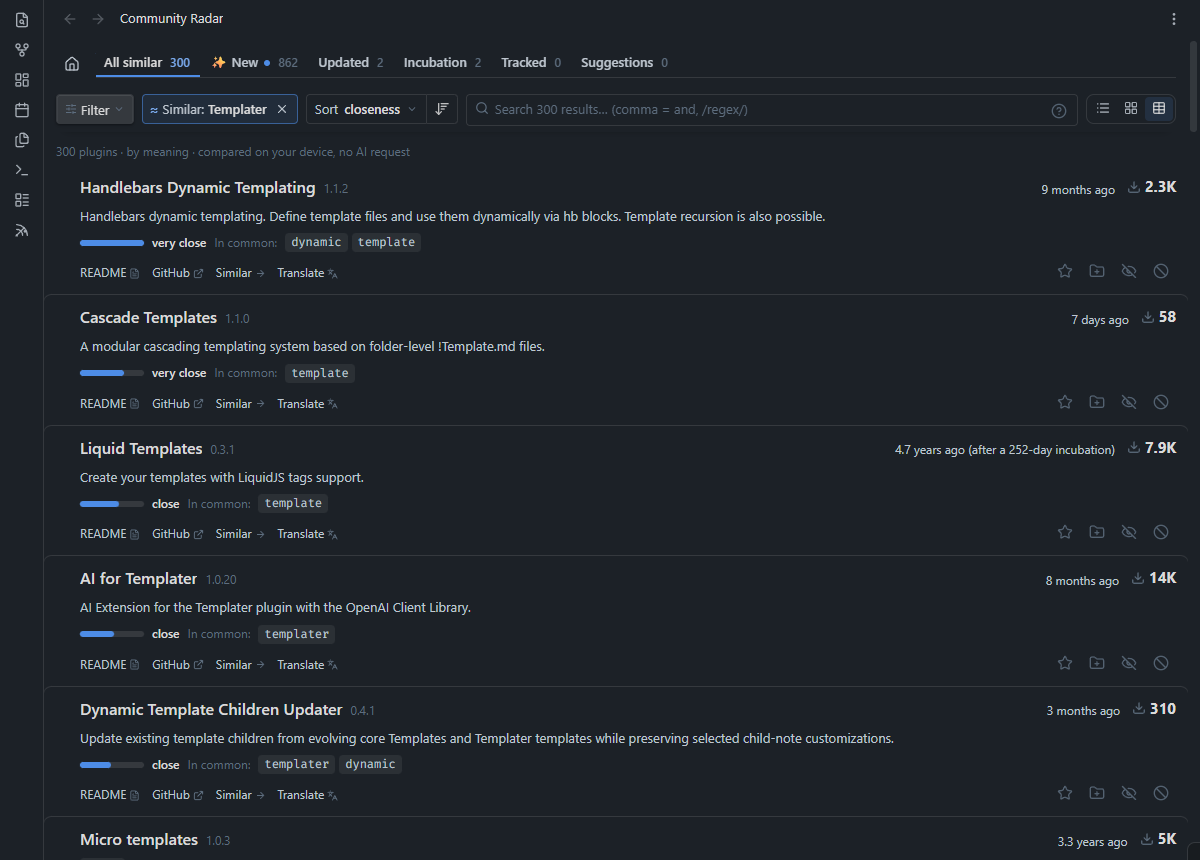
You shouldn't have to guess an author's exact wording to find plugins solving the same problem. Click Similar → on any plugin to uncover up to 300 conceptually related tools—ranked from very close to related alongside the key terms they share.
Zero API keys, zero cloud queries: Multilingual semantic embeddings are prebuilt daily via GitHub Actions. Your device downloads a compact ~2.5 MB index during sync and blends vector cosine similarity with BM25 lexical matching entirely offline. Hop from one plugin to another down a discovery chain, then hit
Escto snap right back to where you started.
📊 List, Cards, or Custom Tables—Built for Fast Triage
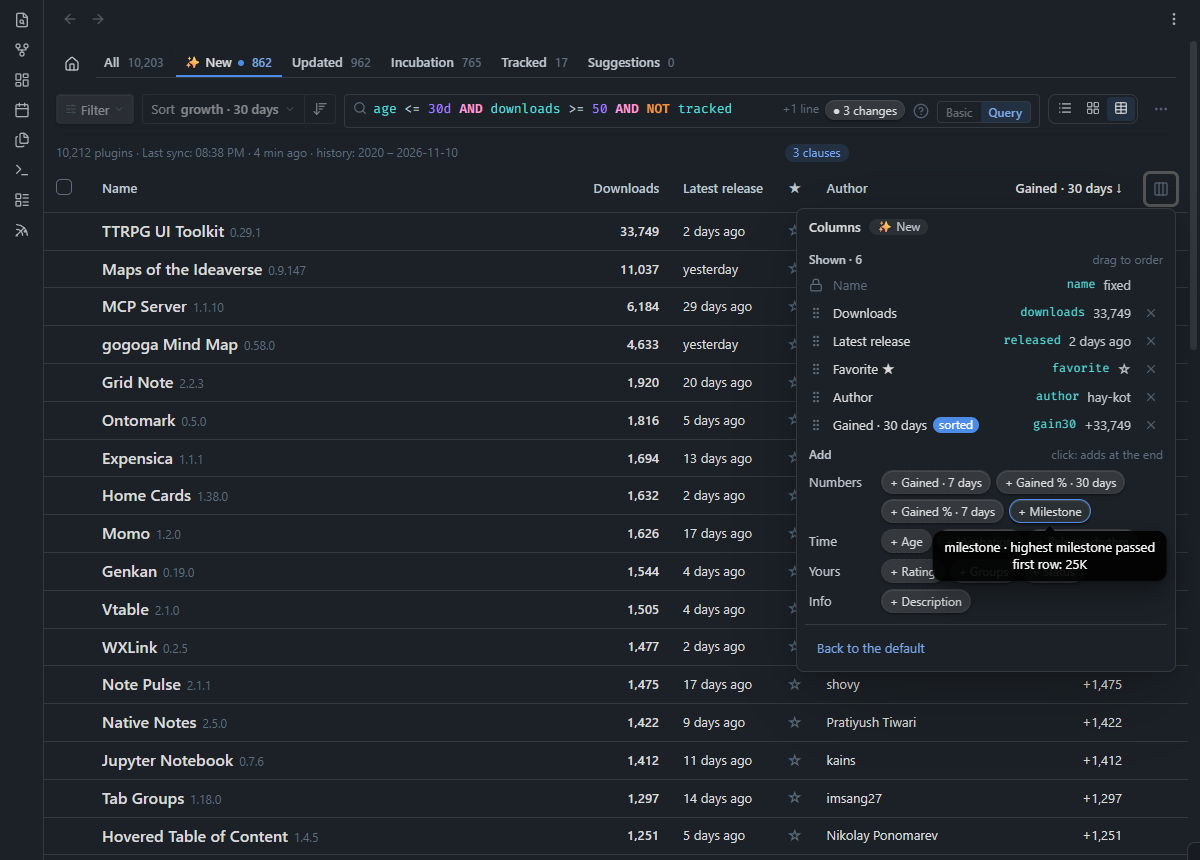
Work the way that fits the task at hand:
- Three layouts: Scan compact Lists, browse visual Cards, or switch to Table view with 16 draggable columns (including 7/30-day download gains, percentage growth, milestones, release cadence, and inline star/rating toggles)—remembered independently per tab and saved view.
- Batch actions with smart Undo: Select rows (with
Shift+Clickranges or Gmail-style Select all N in this list) to favorite, rate, group, mark reviewed, snooze until next release, or ignore in bulk. Recent actions remembers your last 20 batch operations across restarts—and Undo safely skips any plugin you manually edited afterward. - Deep plugin inspector & keyboard flow: Click any row (or press
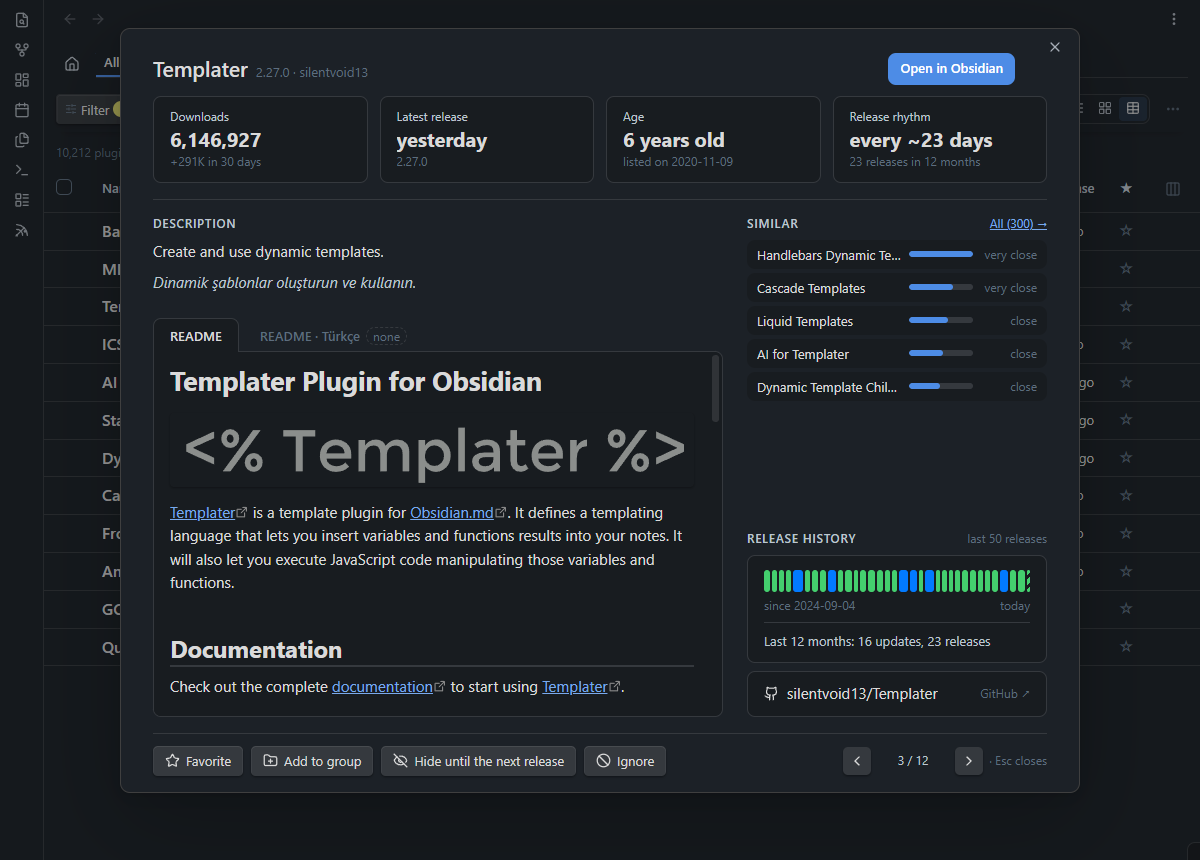
Enter) to inspect four key metrics, a color-coded visual timeline of release pauses, the 5 closest alternatives, and the full rendered README. Prefer keeping your hands on the keyboard? Enable Vim-style shortcuts (j/k,f,g,1–5,s,h,x) in Settings.
📝 Living Vault Notes, Obsidian Bases & Optional AI
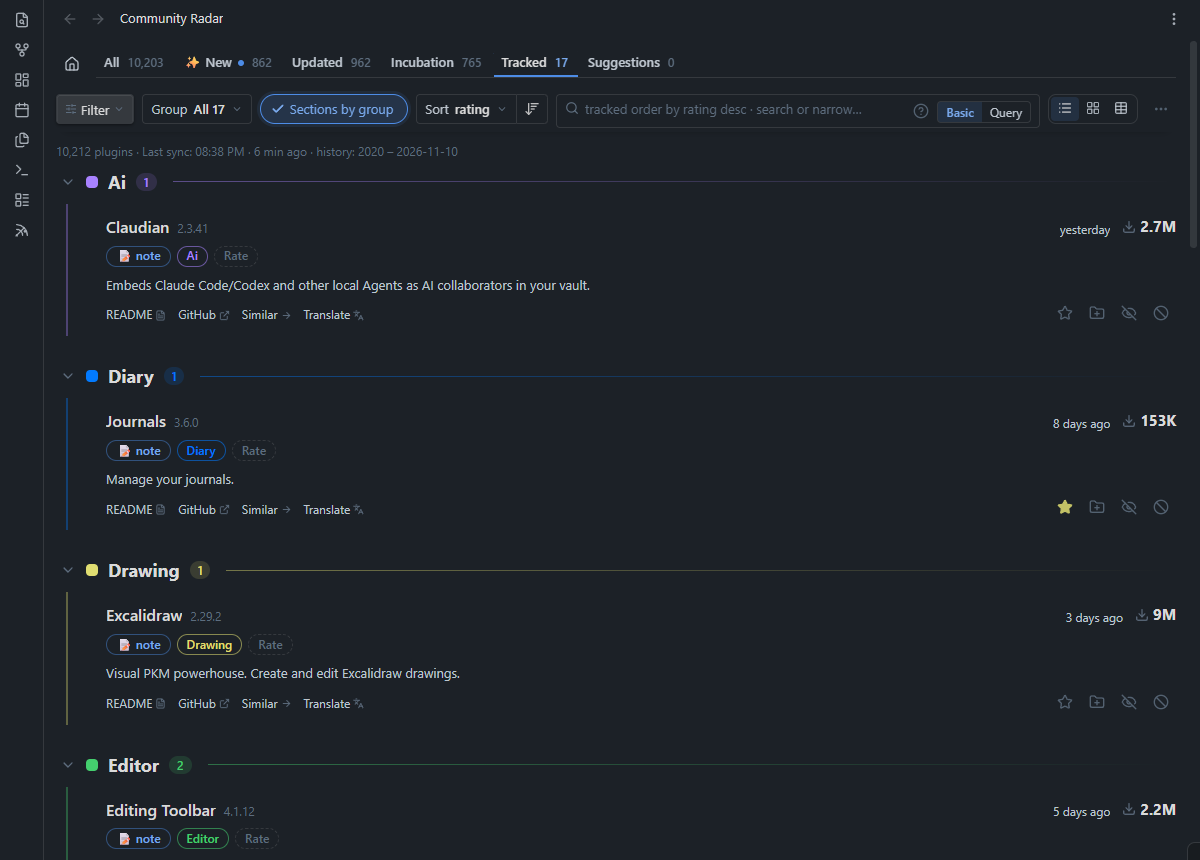
Community Radar doesn't lock your curation inside a private database. The moment you star (☆) or group (+) a plugin, it creates a clean Markdown note inside your vault:
- Structured frontmatter + untouched personal notes: Your
groups,favorite,rating(1–5), custom emojistatus, and personal thoughts stay yours, while catalog stats and the embedded README stay fresh automatically (with#tagsand[[wikilinks]]safely escaped so they never pollute your graph). - One-click Obsidian Bases: Generate a ready-made
.baseview from Settings to filter, sort, and edit your entire plugin library as a native Obsidian database table. → Tracking Notes Guide - Bring-your-own-key AI (strictly opt-in): Connect Anthropic, OpenAI, Gemini, or OpenRouter via Obsidian's native keychain to translate whole pages of descriptions, translate full plugin READMEs (with upfront token/cost estimates and stale-version detection), or get one-click group suggestions for selected plugins.
Install
- Open Settings → Community plugins → Browse in Obsidian.
- Search for Community Radar, then click Install and Enable.
- Click the radar icon in the left ribbon—or run
Community Radar: Open Community Radarfrom the Command Palette.
Up and Running in 60 Seconds
- Let the initial sync finish: Community Radar fetches the public plugin catalog, the 6-year release archive, and the semantic similarity index (~3 MB total).
- Check Home: Scan Not seen yet and click into a discovery card like Rising or Out of incubation.
- Curate your first plugin: Star (☆) or group (+) something interesting—its Markdown note is created instantly in your vault (and you can generate an Obsidian Bases view anytime from Settings).
- Make it yours: Switch any tab from Basic to Query to inspect its rule, tweak it, and save your own custom view.
Privacy by Design
- No accounts, no telemetry, no analytics. Nothing about you or your vault is ever collected.
- Strictly scoped vault access. Community Radar only reads and writes inside its designated plugin notes folder—it never scans the rest of your vault.
- Public data & keychain security. Syncs fetch static public files from GitHub. AI requests happen only when you explicitly trigger a translation or group suggestion, using API keys stored exclusively in Obsidian's device-local keychain (
SecretStorage). → Every network request, documented
Documentation
| Guide | What's Inside |
|---|---|
| Query Language | All 27 fields, operators, date functions, autocomplete, and ready-to-use examples |
| Tracking Notes & Bases | Frontmatter schema, README syncing modes, translations, and Obsidian Bases setup |
| Settings & Commands | Complete reference for settings, Command Palette actions, and keyboard shortcuts |
| How It Works & Privacy | Release archive pipeline, local vector matching, storage layout, and network table |
| Development & Translating | Architecture overview, running the offline test suite, and adding a UI language |
| Changelog | Release-by-release history |