PiperObs v2
 nicovenosa10 downloads
Local TTS with karaoke highlight, Pomodoro timer, 5 color themes, and offline voice synthesis.
- Overview
- Scorecard
- Updates10
Local TTS with karaoke highlight, Pomodoro timer, 5 color themes, and offline voice synthesis.
✨ Features
- 🎙️ Local TTS — Synthesize speech offline using Piper TTS. No internet required after setup.
- 🎨 Karaoke Highlight — Words are highlighted in real-time as they are spoken (editor mode only).
- 🍅 Adaptive Pomodoro — Auto-adjusts focus/break sessions based on document length.
- 🎭 5 Color Themes — Gold, Cyan, Magenta, Green, Orange. Switch anytime.
- 🎤 Voice Manager — Download, delete, and switch voices on the fly.
- 🎚️ Volume & Speed — Independent controls for playback volume (0-100%) and speed (0.75x - 1.5x).
- 🎯 Focus Mode — Dims everything except the active line while reading (editor mode only).
- 🌐 Multi-language — Supports Spanish (AR, ES, MX), Portuguese, English, and more.
- 📱 MiniPlayer — Floating playback bar with waveform animation and progress.
- ⚡ Gapless Playback — Web Audio API for smooth, uninterrupted reading.
📸 Screenshots
Sidebar — Controles principales
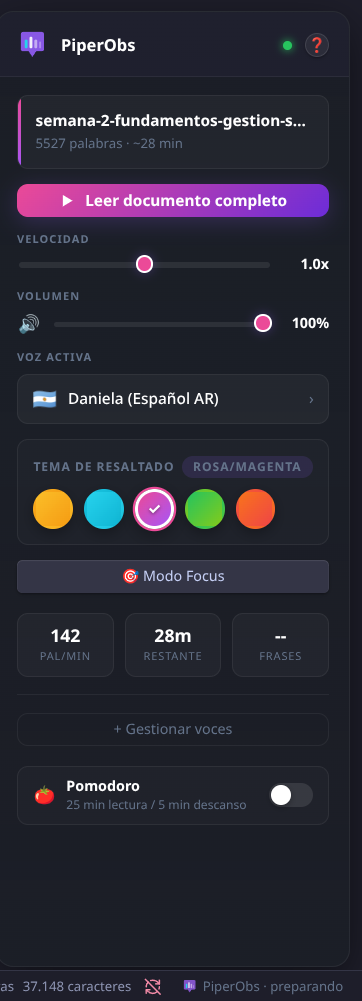 Panel lateral con velocidad, volumen, selector de voz, temas, focus mode y pomodoro
MiniPlayer — Reproducción flotante
 Barra flotante con waveform animado, controles de reproducción y progreso
Karaoke — Resaltado de palabras
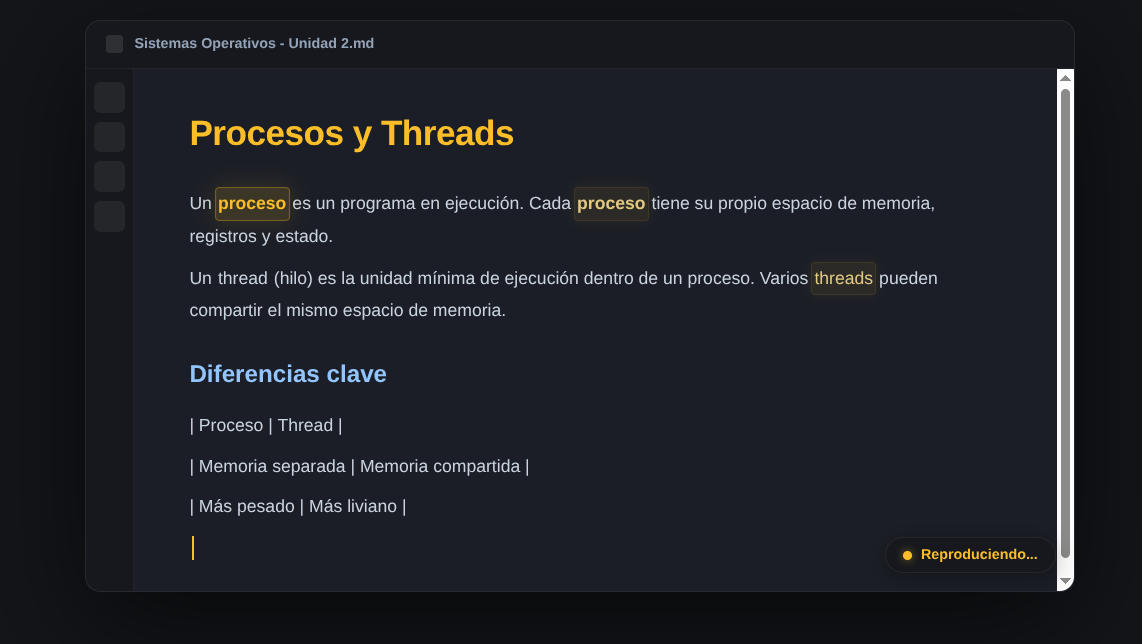 Modo edición: palabras resaltadas en tiempo real mientras se lee
📦 Installation
From Obsidian Community Plugins (Recommended)
- Open Settings → Community Plugins
- Turn on Safe Mode off
- Click Browse and search for "PiperObs"
- Click Install, then Enable
Manual Installation
- Download the latest release:
main.js,styles.css, andmanifest.json - Create a folder
.obsidian/plugins/piperobs-v2/in your vault - Copy the three files into that folder
- Enable the plugin in Settings → Community Plugins
🚀 First Use
- Open the PiperObs sidebar (right panel)
- Click "Leer documento completo" or use the command palette (
Ctrl+P→ "Read document") - The plugin will automatically download Piper binary and the default voice on first run
- Enjoy your local TTS!
🎛️ Controls
| Feature | Shortcut / Control |
|---|---|
| Read document | Ctrl+P → "Leer documento" |
| Pause / Resume | Ctrl+P → "Pausar/Reanudar" |
| Stop | Ctrl+P → "Detener" |
| Speed | Slider in sidebar (0.75x - 1.5x) |
| Volume | Slider in sidebar (0% - 100%) |
| Voice | Dropdown in sidebar |
| Theme | Color circles in sidebar |
| Focus Mode | Button in sidebar or Command Palette |
| Pomodoro | Toggle in sidebar |
🎤 Supported Voices
PiperObs includes a curated catalog of voices. You can download additional voices from the Voice Manager (+ Gestionar voces).
Included by default:
es_AR-daniela-high— Español Argentina (femenina)
Available to download:
es_ES-davefx-medium— Español España (masculina)es_ES-carlfm-x_low— Español España (masculina, ligera)es_MX-claude-high— Español México (femenina)pt_BR-faber-medium— Portugués Brasil (masculina)en_US-lessac-medium— English US (masculina)en_US-amy-medium— English US (femenina)
And 30+ more languages available via the Piper voice repository.
⚙️ Settings
| Setting | Description | Default |
|---|---|---|
| Data Directory | Where Piper binaries and voices are stored | .obsidian/piperobs-data |
| Default Voice | Voice used for reading | es_AR-daniela-high |
| Volume | Playback volume (0-100%) | 85% |
| Playback Rate | Speech speed | 1.0x |
| Karaoke Highlight | Highlight words while reading | On |
| Auto Magic | Suggest voices by language | On |
| Pomodoro | Enable timer during reading | Off |
| Karaoke Theme | Color theme for highlights | Gold |
🖥️ Requirements
- Obsidian v1.5.0 or later
- Desktop only (Linux, macOS, Windows)
- ~150MB free space for Piper binary + default voice
- Internet connection only for downloading Piper and voices (first time)
🛠️ Development
git clone https://github.com/Nicovenosa/piperobs-v2.git
cd piperobs-v2
npm install
npm run build
For development with hot-reload:
npm run dev
🗺️ Roadmap
- Streaming synthesis (no temp files)
- Mobile support (if Piper releases mobile binaries)
- Custom pronunciation dictionary
- Export audio to file
- Voice preview before download
🤝 Contributing
Contributions are welcome! Please open an issue or PR on GitHub.
📄 License
MIT License — see LICENSE for details.
🙏 Credits
- Piper TTS by Rhasspy / Michael Hansen
- Obsidian by Dynalist
- Built with ❤️ by Nicolas Venosa
⭐ Star this repo if you find it useful!