Persian RTL Smart Direction
 Fazel Majidfar73 downloads
Use RTL whenever text contains a Persian word; preserve LTR Latin tokens, symbols, and code, including Persian comments, properties, titles, and file names.
- Overview
- Scorecard
- Updates4
This plugin automatically detects Persian/Arabic content and adjusts the text direction (RTL) for paragraphs, headings, properties, and list items. It ensures your mixed-language documents look professional without adding hidden characters.
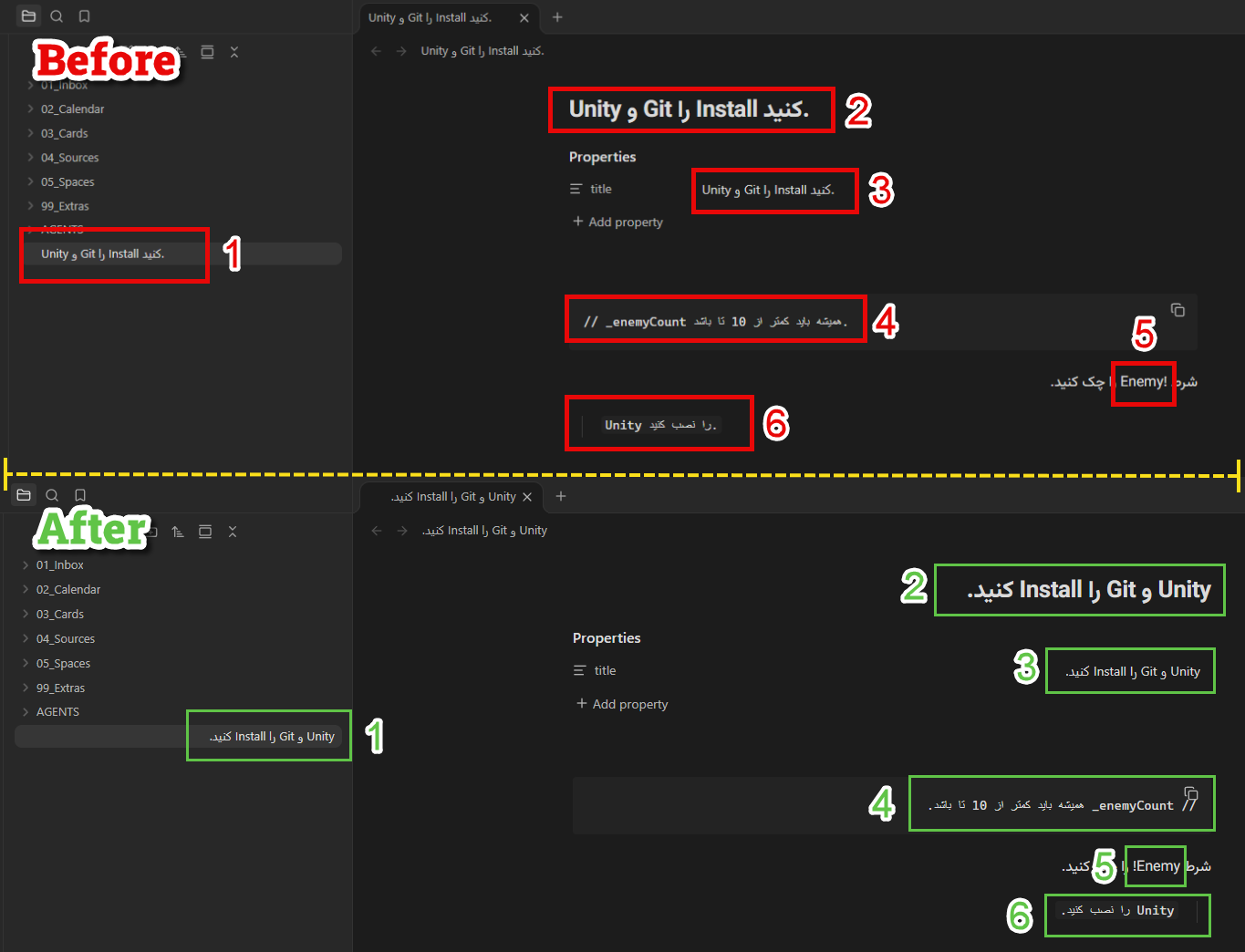
Features
- Smart Detection: Automatically applies RTL if any Persian/Arabic character is present.
- Context-Aware: Preserves LTR for code, URLs, and specific symbols (e.g.,
$,!,^). - Full Support: Works in Reading View, Live Preview, and Source Mode.
- Code Comments: Properly handles RTL in code comments while keeping syntax intact.
- English Phrases: Keeps consecutive English words in one LTR span within Persian sentences.
- Sentence Punctuation: Keeps sentence periods in RTL reading order and list numbers separate from English phrases.
- Plain Text Blocks: Applies RTL to Persian content in
text,txt,plain, andplaintextcode fences. - Tables: Detects each cell independently in Reading View and Live Preview, including English words at the end of Persian text.
- Non-destructive: Does not modify your underlying Markdown files or metadata.
- Lightweight: No external dependencies or network required.
Examples
The plugin handles mixed-language content seamlessly:
Unity و Git را Install کنید.
// _enemyCount همیشه باید کمتر از 10 تا باشد.
شرط !Enemy را چک کنید.
Unity را نصب کنید.
Installation
Install this plugin directly via the Obsidian Community Plugins browser:
- Open Settings > Community plugins.
- Click Browse and search for "Persian RTL Smart Direction".
- Install and Enable.
How it works
The plugin scans blocks for Persian/Arabic characters. If found, it forces an RTL layout. It treats list items individually and respects explicitly defined HTML directions.
Use the "Refresh Persian text direction" command from the Command Palette if you need to force an immediate update.
Development checks
This plugin ships directly as main.js, styles.css, and manifest.json; no build step is required.
Run the text direction regression checks with node --test tests/direction.test.cjs.
With the local plugin installed and enabled in an open vault, run node tests/run-obsidian.cjs "Vault name" to check DOM layout and CodeMirror letter order. These checks use disposable offscreen elements, preserve note contents and focus, and take no screenshots.