Pentimento
 Lucas66 downloads
Save drafts of a note and see what changed between them. Get back passages you cut, and restore any earlier draft.
- Overview
- Scorecard
- Updates6
Pentimento for Obsidian
Save drafts of a note without leaving Obsidian, and see what changed between them, what you cut, and any earlier draft you want back.
A pentimento is an earlier brushstroke showing through the paint on top of it. The plugin keeps your earlier drafts the same way: out of sight until you want them.
Using it
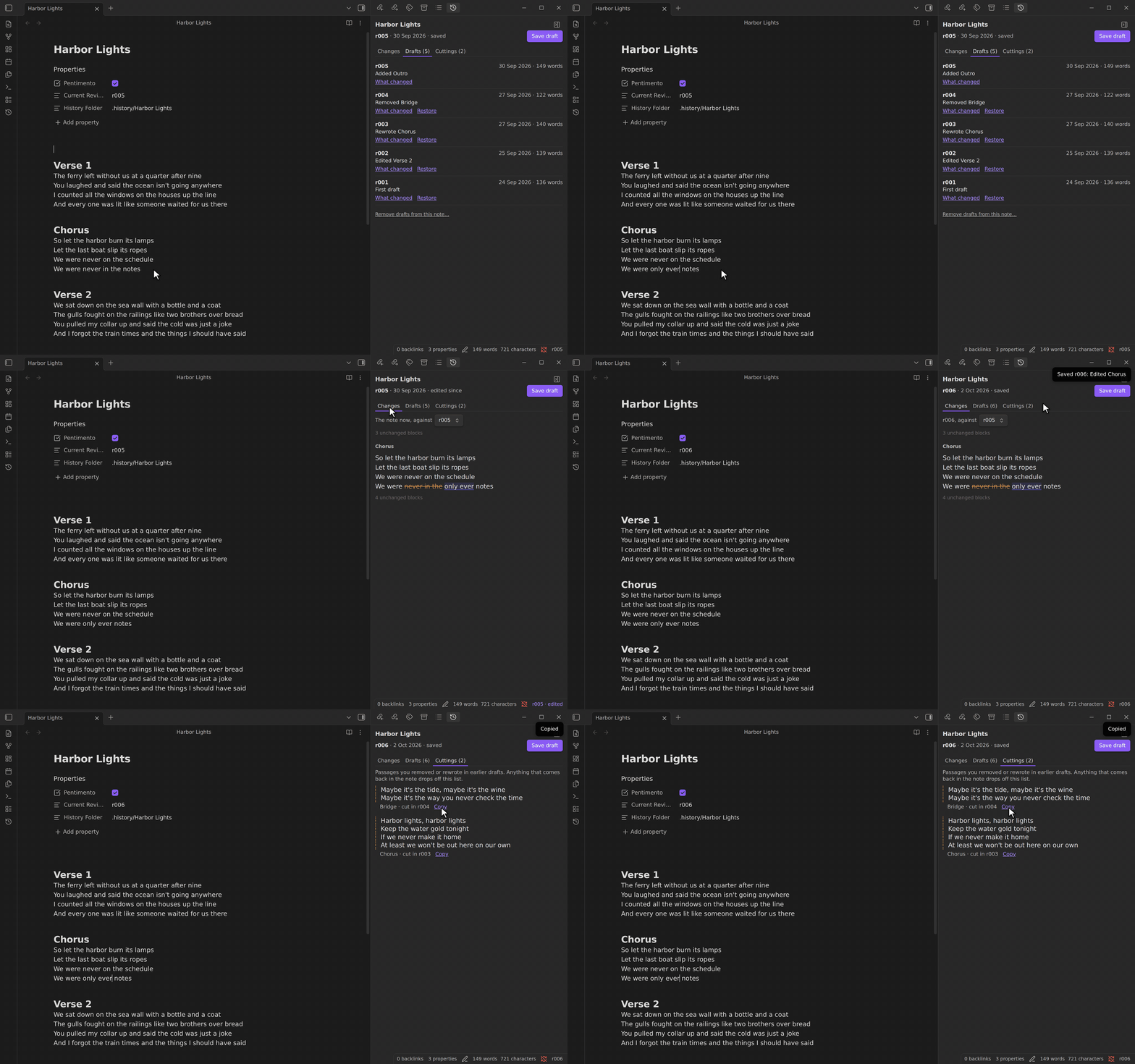
- Save draft (the ribbon button, or the command palette) keeps a copy of the note as it is now. The summary is written for you from what changed, using your headings: "Rewrote Chorus", "Removed Bridge".
- Save draft with a note… lets you write the summary yourself, and why.
- The status bar shows the latest draft, and "· edited" once the note has moved since. Click it to show or hide the panel.
- Show or hide drafts (command palette, or the button at the top of the panel) opens the panel or collapses the right sidebar. You can give it a hotkey in Settings → Hotkeys.
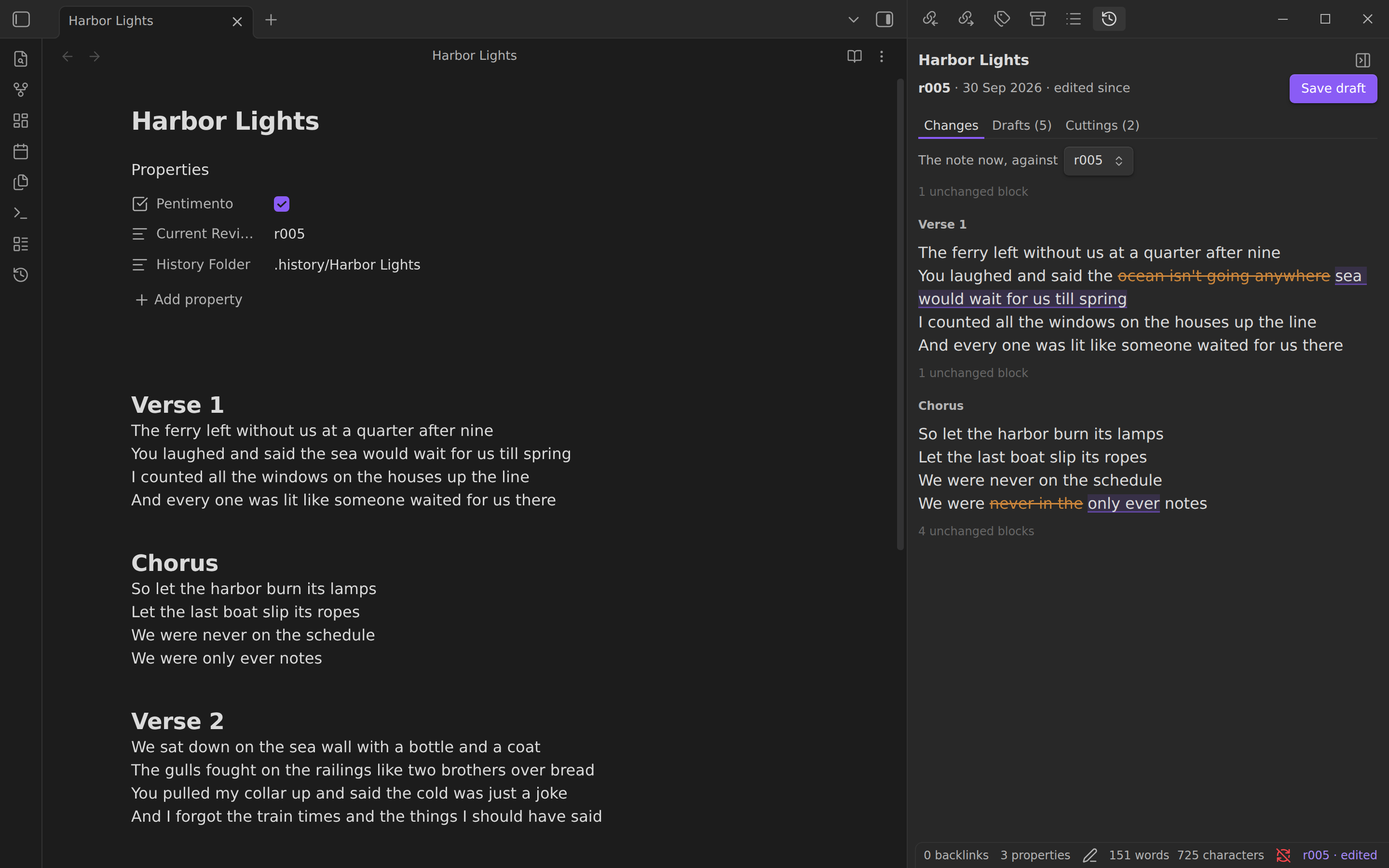
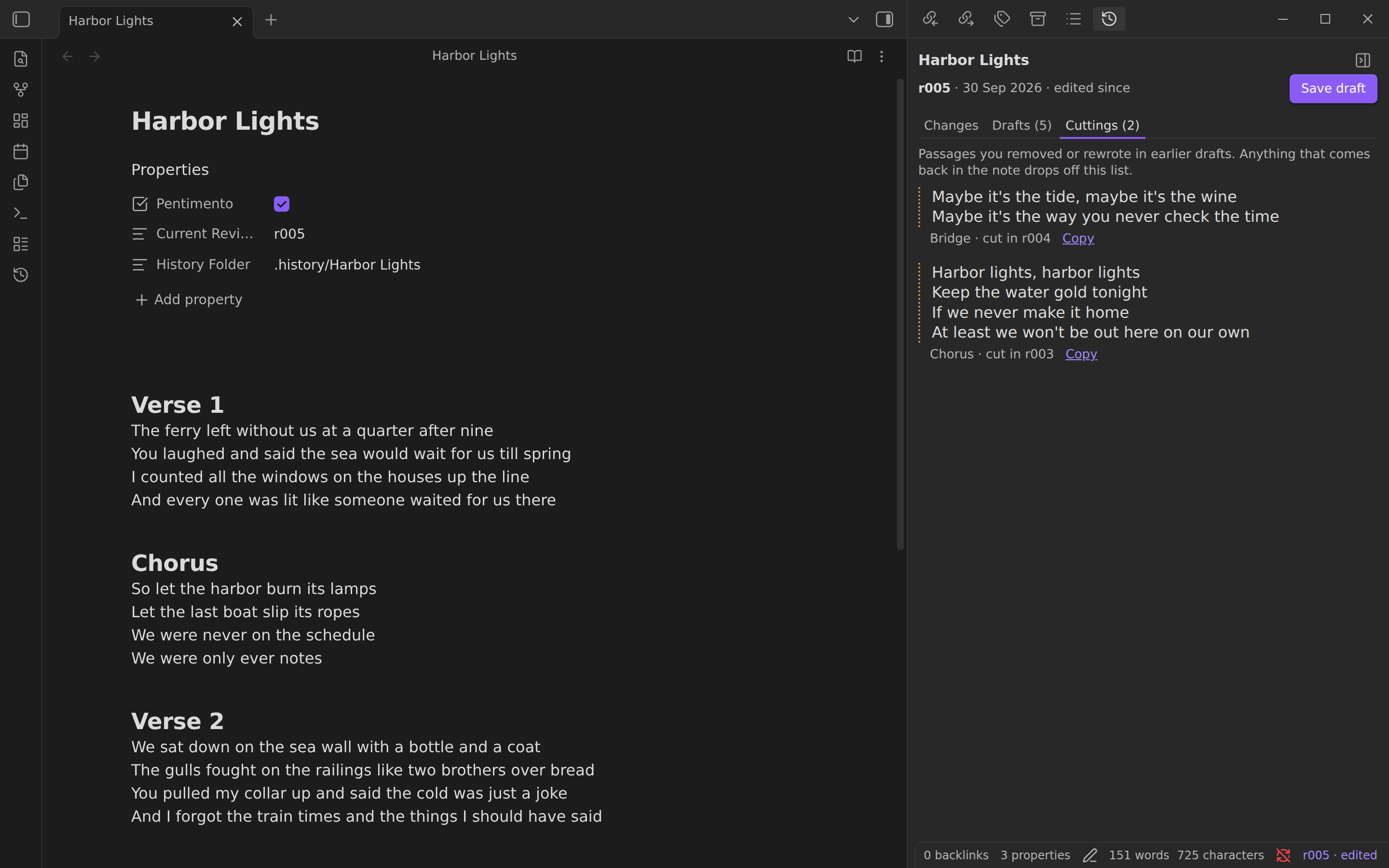
- The drafts panel has three tabs:
- Changes: the note now against any earlier draft. Removed words are struck through and new ones marked; verse and lists compare line by line.
- Drafts: every draft with its summary, date, and word count. "What changed" shows that draft's own changes. "Restore" brings it back as a new draft, after saving the note's current text, so nothing is lost.
- Cuttings: passages you removed or rewrote completely in earlier drafts, with a Copy button. A passage that comes back in the note drops off the list.
- Remove drafts from this note… deletes the note's drafts and its three Pentimento properties, after asking. The note's text stays as it is.
Where drafts live
Each draft is a copy of the note in a hidden .history/<note>/ folder beside it, with a summary of each draft in meta.yml. Move or rename the note and its drafts go with it. Everything is plain text and can be read without the plugin. Syncthing, iCloud, Dropbox, and git carry the drafts with the rest of your vault; Obsidian Sync doesn't (see below).
The first draft adds three properties to the note: Pentimento, Current Revision, and History Folder. Saving a draft edits only those three lines, so your own properties stay exactly as you wrote them. (It edits those lines directly instead of through Obsidian's processFrontMatter, which would rewrite the whole properties block in its own format.) When the note is open, the cursor stays where it was and a restore can be undone with Cmd/Ctrl+Z.
The plugin reads and writes the .history folders through Obsidian's file adapter, because Obsidian's vault index leaves out hidden folders. It never touches files outside a note's own history folder, the note itself, and its own settings.
With Obsidian Sync
Obsidian Sync skips hidden folders, so drafts in .history stay on the device that saved them. Turn on Sync drafts with Obsidian Sync and new notes keep their drafts in a visible _history/<note>/ folder instead, which Sync carries. When you turn it on, the plugin offers to move the drafts of notes that already have some, and "Move all drafts to the folder chosen in settings" does the same later (or moves them back when you turn it off).
Because _history isn't hidden, Obsidian treats the saved drafts as notes:
- They show up in search, the graph, and the quick switcher. Add
_historyto Settings → Files and links → Excluded files to keep them out of those. - Renaming a note also rewrites links to it inside saved drafts, even with
_historyexcluded, so an old draft's links point at the new name. The plugin itself never treats a saved draft as a note. - Save drafts of a note on one device at a time, and let Sync finish before saving on another. Two devices that save a draft of the same note before syncing both write the same
rNNN.mdandmeta.yml, and Sync can't keep both.
The command-line tool follows this setting for notes in the same vault.
Drafts use the same format as the Pentimento command-line tool, so you can use either, or both, on the same notes.
Settings
- Your name is recorded on each draft.
- Save a draft every day (off by default): once a day, notes that already have drafts and changed since their last one get a new draft. A note you've edited in the last 15 minutes waits until you stop.
- Sync drafts with Obsidian Sync (off by default): new notes keep their drafts in
_historyinstead of the hidden.history. See With Obsidian Sync.
Installing
Until the plugin is in Obsidian's community list, download main.js, manifest.json, and styles.css from the latest release into <your vault>/.obsidian/plugins/pentimento/, then turn Pentimento on in Settings → Community plugins.
From source:
pnpm install --frozen-lockfile
pnpm run build
pnpm run install-vault "/path/to/your vault"
Development
pnpm run devrebuilds on change.pnpm testbuilds the plugin and runstest/harness.mjs, which loads the builtmain.jsagainst a small fake of Obsidian's API and walks a note through saving, editing, restoring, daily drafts, and removal.pnpm run lintapplies Obsidian's own review rules (eslint-plugin-obsidianmd).- The build fails if anything in the bundle needs Node, which Obsidian on phones doesn't have.
The draft format (saving, reading, restoring, the diff, cuttings) comes from the pentimento npm package, where it is tested against the command-line tool's own output.
To release, bump the version in manifest.json, package.json, and versions.json, add a CHANGELOG.md entry, and push a tag with the bare version (0.3.1). CI builds the plugin and publishes the GitHub release Obsidian installs from.