PDF Export Enhancer
 kirliffilan199 downloads
Enhance PDF export with customizable text size, an A4 page preview, page navigation, and support for themes, Style Settings, and CSS snippets.
- Overview
- Scorecard
- Updates5
Enhance Obsidian's PDF export with a customizable text size, A4 page preview, pagination, and additional PDF formatting controls before exporting the note.
Version: 2.0.2
Preview
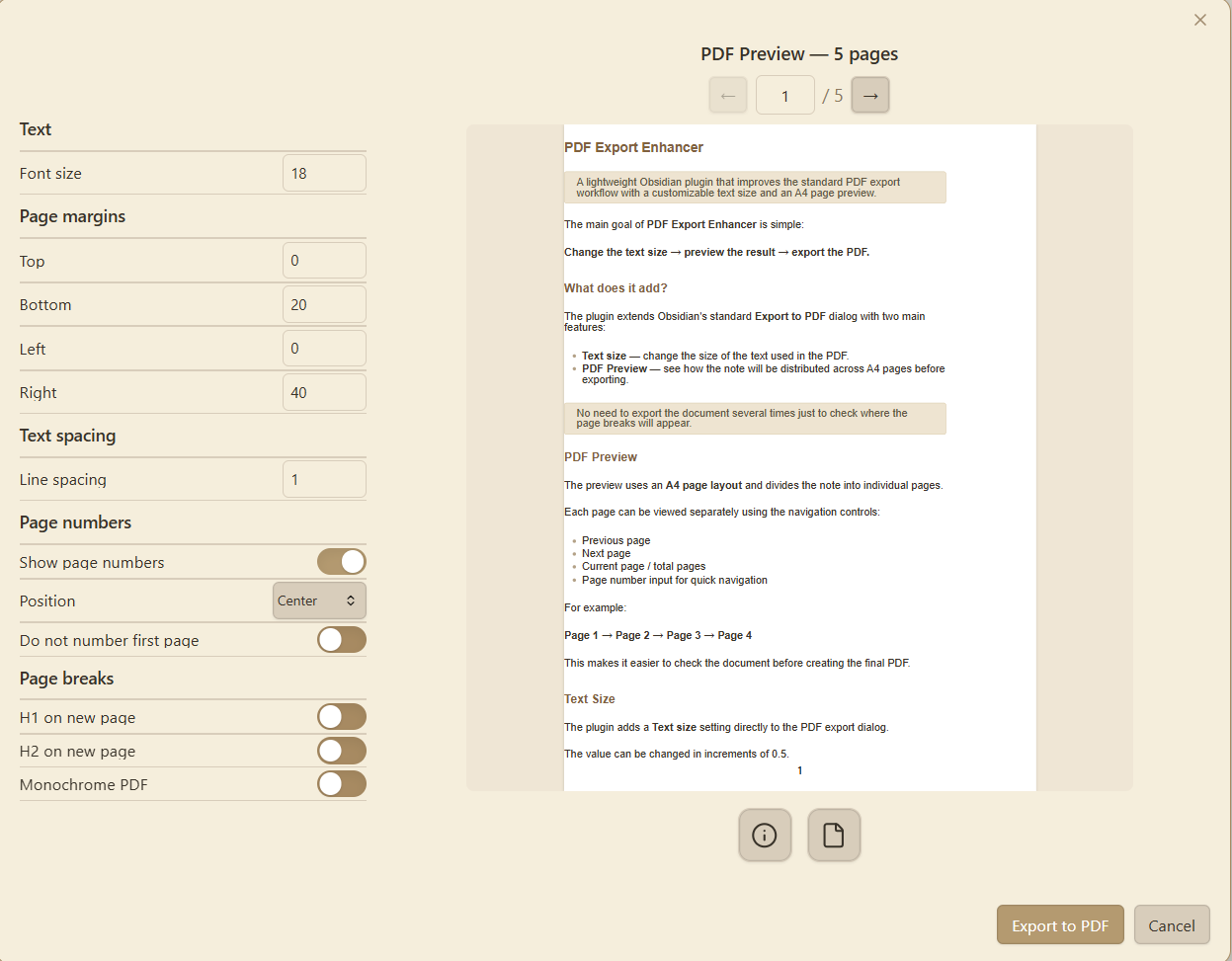
The preview shows how the note will be laid out on A4 pages before exporting it to PDF.
The preview preserves your existing Obsidian styles, including theme settings, Style Settings, and CSS snippets.
The preview reflects the selected PDF export options, including:
- File name as title
- Portrait or landscape orientation
- Page margins
- Text size
- Line spacing
- Page numbers
- Page breaks
- Monochrome output
Features
- Custom text size for PDF export
- A4 PDF preview
- Page-by-page navigation
- Page number display and positioning
- Option to skip the first page number
- H1 and H2 page breaks
- Custom page margins
- Custom line spacing
- Monochrome PDF option
- File name as title control
- Landscape orientation control
- Support for Obsidian themes
- Support for Style Settings
- Support for CSS snippets
- Support for native Obsidian PDF export settings
- Automatic preview updates when PDF settings change
Usage
Open Obsidian's standard Export to PDF dialog.
PDF Export Enhancer extends the existing export dialog with a customizable settings panel and an A4 PDF preview.
The preview updates automatically when the PDF export settings are changed.
PDF export settings
The plugin uses the existing Obsidian PDF export workflow while adding its own preview and formatting controls.
- Text — controls the text size used in the PDF.
- Page margins — controls the top, bottom, left, and right page margins.
- Text spacing — controls the line spacing.
- Page numbers — enables page numbers, their position, and whether the first page should be skipped.
- Page breaks — starts H1 and H2 sections on new pages when enabled.
- Monochrome PDF — converts the exported document to a black-and-white presentation.
- File name as title — controls whether the note file name is included as a title.
- Landscape — switches the PDF preview and export to landscape orientation.
- Page size — the preview uses A4 page size.
PDF preview
The preview displays the document as individual A4 pages.
Use the navigation controls to move between pages and check how the document will be distributed before exporting it.
Settings
Most PDF formatting controls are available directly in the PDF export dialog.
The plugin keeps the existing Obsidian PDF export workflow and adds a visual preview and additional formatting options around it.
Compatibility
The plugin is designed for the desktop version of Obsidian.
Requirements
- Obsidian 1.8.0 or later
- Desktop version of Obsidian
License
This project is provided as-is for use with Obsidian.