Path Picker
 U-ways E.146 downloads
Fuzzy-find any file or directory under a root, then insert its path at the cursor or open it.
- Overview
- Scorecard
- Updates9
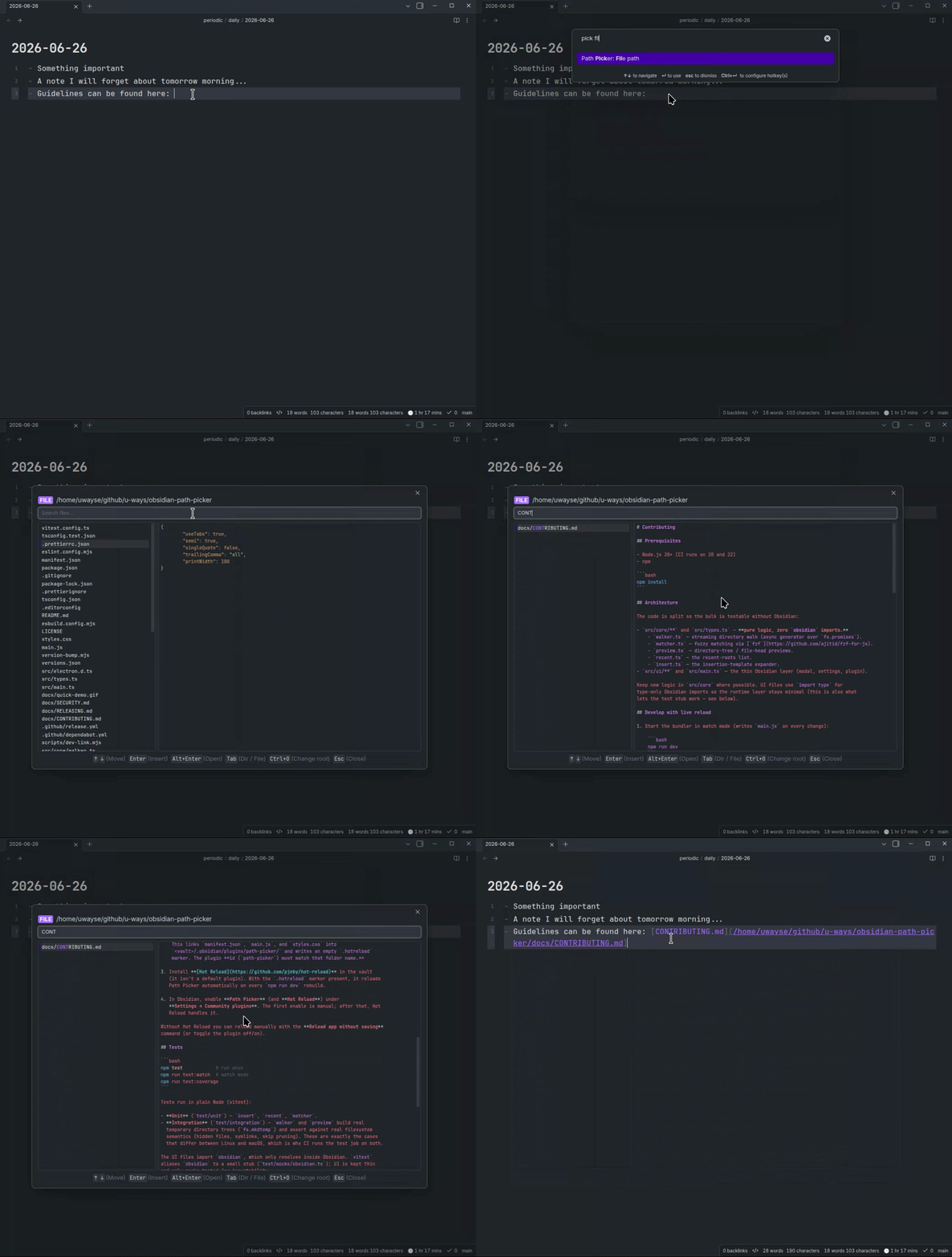
Fuzzy-find any file or directory anywhere under a root (default: your vault folder) from inside Obsidian, preview it, and then insert its path at the cursor or open the entry — as a note in Obsidian, or in your OS's default app.
Why
For me, dropping a real filesystem path into a note normally means:
- Open a terminal,
- Fuzzy-find the directory,
- Copy the path,
- Switch back,
- Paste.
Path Picker does the fuzzy-find in a modal and drops the result where your cursor already is — or opens the entry on the spot, no insertion needed — a seamless user experience. It brings the muscle memory of shell fuzzy finders into the editor, without leaving Obsidian.
Features
- Two commands: Directory path and File path. (+ a
Tabtoggle to switch mode inside the picker) - Live fuzzy match with highlighted match positions and a moving selection.
- Preview pane: a directory tree (depth configurable, default 2), or the head of a file with syntax highlighting (using Obsidian's own renderer, so it matches your theme). The tree is rainbow-coloured by nesting depth from your theme's palette (toggleable in settings).
- Resizable split: drag the divider between the results list and the preview to find your sweet spot; the position is remembered across sessions (double-click the divider to reset it to 50/50).
- Root switching (
Ctrl/Cmd+O): jump to home, the vault root, a recent root (the last 5 are remembered), or type/paste a custom path. - Open in place (
Alt/Option+Enter/Alt/Option+click): open the selection instead of inserting it — in Obsidian when it's a tracked vault entry (note in a new tab, or folder revealed in the File Explorer), otherwise in your OS's default app. - Configurable insertion: a template decides what gets inserted.
On top of that, it has no external dependencies, no fzf, eza, bat, or fd binaries.
Walking and previews use Node's fs; fuzzy matching uses fzf-for-js, bundled into the plugin.
Usage
- Place your cursor in a note.
- Run Path Picker: Directory path (or File path) from the command palette, or bind a hotkey under Settings → Hotkeys. (If you use the Doubleshift plugin, you can map shift-shift to either command.)
- Type to filter; the preview updates as you move the selection.
- Press Enter to insert the path at the cursor.
| Key | Action |
|---|---|
↑ / ↓ |
Move selection |
Ctrl+N/P |
Move selection (readline-style) |
Enter |
Insert the selected path |
Alt/Option+Enter / Alt/Option+click |
Open the selected entry |
Tab |
Toggle directory / file mode |
Ctrl/Cmd+O |
Change the search root |
Esc |
Close |
Opening an entry — Alt/Option+Enter (or Alt/Option+click) opens the selection instead of
inserting it. A tracked vault entry opens in Obsidian: a file opens as a note in
a new tab, a folder is revealed in the File Explorer sidebar. Anything else — outside
the vault, or an untracked in-vault path such as one under a dot-folder (e.g.
.obsidian/) — opens in your operating system's default application for that file
type (a directory opens in your file manager).
Swapping insert / open — by default Enter and click insert the path, while
Alt/Option+Enter / Alt/Option+click open the entry. Set Primary action to Open entry in the
plugin settings to flip this, so Enter / click open the entry and Alt/Option inserts the
path instead. The picker's footer key hints update to match whichever action is primary.
Settings
| Setting | Default | Notes |
|---|---|---|
| Default root | your vault folder | Where the picker starts. On a fresh install this is your current vault's folder. |
| Insertion template | {path} |
Tokens: {path} (absolute), {name} (basename), {rel} (relative). |
| Primary action | Insert path | What Enter / click do on the selected entry; the modifier (Alt/Option+Enter / Alt/Option+click) runs the other. Set to Open entry to open on Enter/click and insert with Alt/Option. The footer key hints follow this. |
| Directory tree depth | 2 |
How many levels deep the directory preview tree descends. |
| Colorize directory tree | on | Rainbow-colour the tree preview by nesting depth using your theme's palette. |
| Follow symlinks | on | Symlink cycles are handled safely. |
| Include hidden | on | Include dot-files and dot-directories. |
| Max results | 10000 |
A notice appears if the walk is truncated. |
| Highlight size cap | 1024 KB |
Files larger than this preview as plain text. 0 disables the limit. |
| Highlight line cap | 5000 chars |
Skip highlighting when a line is longer than this (e.g. minified). 0 disables. |
| Skip directories | common noise dirs | Comma-separated names pruned while walking. The default covers common VCS, dependency, build-output, and cache folders across ecosystems (e.g. node_modules, .venv, __pycache__, dist, build, target, vendor, .cache). |
Insertion template examples
Below are some examples of how the insertion template works:
| Template | Inserts |
|---|---|
{path} |
/home/you/projects/docs |
`{path}` |
`/home/you/projects/docs` |
[{name}]({path}) |
[docs](/home/you/projects/docs) |
So if you want to insert a Markdown link to the selected file, you can use [{name}]({path}) as the template.
Limitations
- Desktop only (Obsidian ≥ 1.4.0).
- File previews are syntax-highlighted via Obsidian's own renderer (your active theme's colors). Files with no recognized extension, binaries, and files over the configurable size/line caps fall back to plain monospace text.
- The commands require an active editor — they insert at the cursor.
- Tested with Ubuntu & macOS only.
Development
See CONTRIBUTING.md for the dev environment, the vault live-reload workflow, and how to run the tests.
License
See MIT licence.